Ask Sencha AI
From then to now: Ext JS 4.x to 6.x, Royal Weddings, Space Shuttles and Oprah
Sep 13, 2018
1813 Views
Get a summary of this article:
What a difference 7 years makes!
The year was 2011. What a year it was! A royal wedding, the last flight of the space shuttle, Oprah’s final episode, and… Ext JS version 4.0.0 was launched (on April 25, 2011)! Back then I was a Sencha customer and built a dashboard-oriented Ext JS version 4 application for one of my customers.
Looking back on that application it had a lot of great features but it was a lot of work to maintain. There was a lot of code in Global Controllers, no data binding support, we used ext-all.js for the framework, and we didn’t use Sencha Cmd. We needed to build a lot of custom components to support the functionality we wanted, and it also wasn’t a single page application…but it worked!
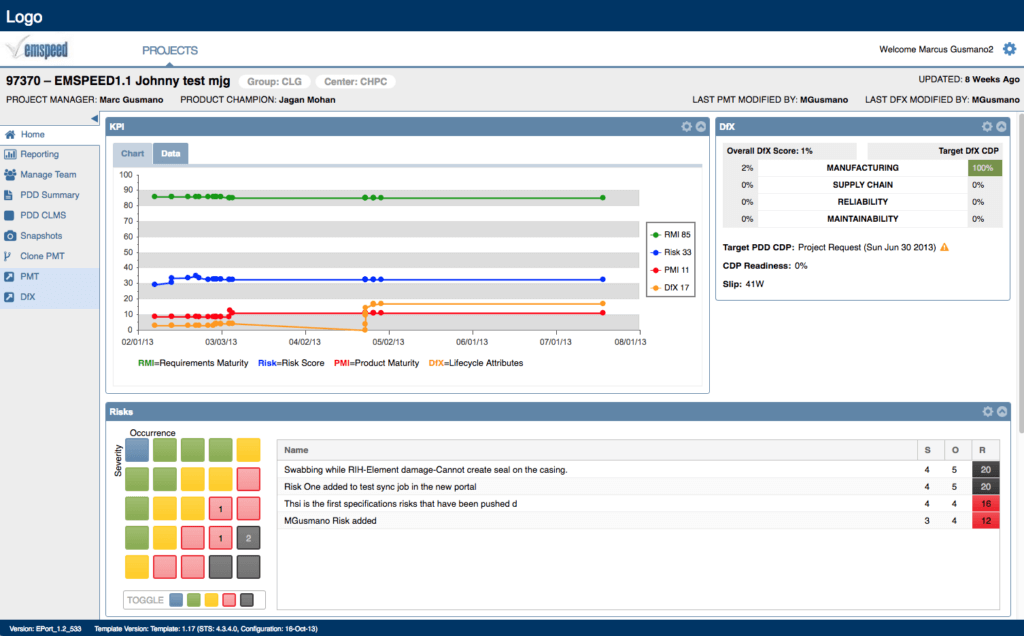
The initial view of the Ext JS 4 application I architected
Fast forwarding seven years to today, we now have the latest release of Ext JS version 6.6 available and coincidentally released it right after yet another royal wedding! A LOT of great new features have been added to the framework between the 2011 and 2018 royal weddings. I know that there are many of you who, like me, built applications with Ext JS v4, and I know there are still a good number of those that are still running.
The question now is one of upgrading – why should I upgrade? What is the best way to do it? What are the great new features I can take advantage of?
Well, you may not be familiar with all of the great new features that have been added to Ext JS since version 4 – and the last release of version 4.2.0 was on March 13, 2013 (the year ‘selfies’ made it into the dictionary) – there has been a lot of innovation in the framework since then.
So, I am sure there are many of you who have been busy and are probably not familiar with all of the new features since version 4. In this blog series, I will discuss all of these great new features and along the way I will show you how to bring your version 4 application up to version 6.6.
To kickoff this blog series, I want to start with a summary of how far we have come in the past 7 years. We have had 2 major versions since then; versions 5 and 6.
Ext JS Version 5
Version 5 has several key enhancements; the most significant being the merging of the Ext JS and Sencha Touch ‘core’, and the addition of a new MVVM architecture to greatly simplify the structure of an Ext JS application.
So why is that important? Well, following an MVVM construct which utilizes View-based Controllers instead of Global Controllers and allowing for two-way data binding significantly improves the organization and maintenance of your application code. For mission-critical business applications this can significantly reduce the cost of supporting an application.
Version 5 also introduced routing to the framework as another way to standardize and simplify interactions with the views of your application.
There were also several other innovations added to version 5:
Ext JS 5.0.0
- Tablet Support
- New Themes: Neptune Touch and Crisp
- MVVM: Data Binding
- View Controllers: References
- View Models
- Routing
- Responsive Configs
- Data Package Improvements: Models, Associations
- Sencha Charts Improvements
- Tab Panel Improvements
- Grids: Cell Components, Buffered Updates, Cell Updaters, Grid filters, Rendering Optimizations, multi-select Widgets
- Breadcrumb Bars
- Form Package improvements: Tagfield, Segmented Buttons
- New SASS mixins
Ext JS 5.0.1
- Accessibility enhancements
- Responsive Configs
- Chart Themes
- Cordova and PhoneGap packager
Ext JS 5.1.0
- Grid Spreadsheet model, Clipboard plugin
- 3D Bar and Column charts
- Advanced Color Picker
- Rating Widget
Ext JS Version 6
With Ext JS version 6.0.0, the most important innovation was the merging of Ext JS and Sencha Touch as two toolkits – Modern and Classic. Among other things, this gave us the ability to create a Universal application from a single code base along with the ability to support multiple devices (desktop, tablet, phone, etc.). And Universal applications are just one of many new innovations in version 6 – here are many more we will explore in the course of this blog series:
Ext JS 6.0.0
- Merging Ext JS and Sencha Touch
- Universal Applications
- Triton theme
- Fashion
- Promises Support
- Grid Spreadsheet mode enhancements, locking grid
- Treelist (for menus)
- Responsive Column
- Pie 3D Chart
- Pivot Grid
- Exporter
- Direct Accessibility Support
- Microloader: Caching
Ext JS 6.2.0
- Calendar
- D3
- D3 pivoting
- Grid row body widgets: rowexpander plugin, check columns
- Material design theme, IOS theme
- SparkLines
Ext JS 6.6.0
- npm Packages
- ext-gen, ext-build
- Modern timefield, timepanel
- Modern localization
- Graphite theme
- Dynamic styling for material theme
- Enhanced routing
- Gauges
I look forward to taking you on this journey of how Ext JS has evolved and improved over the past 7 years. Along the way, I will demonstrate many of these great new features, and we will also discuss how to bring your version 4 application up to version 6.6 – so you can start taking advantage of all of these great new features in your applications!


Latest Content

Mastering the Sencha Layout System with AI
In an enterprise Ext JS application, the layout system decides how fast screens render, how…
October 30, 2026

Testing Ext JS Applications: What Is Actually Worth Automating
Ask a team with a ten-year-old Ext JS application how much of it is covered…
October 29, 2026

Building a Reusable React UI Component Around the Ext JS Data Grid
The Ext JS data grid can do almost anything an enterprise screen needs: grouping, summaries,…
October 29, 2026