



 Ask Sencha AI
Using D3.js components in Ext JS apps
May 18, 2020
3512 Views
Get a summary of this article:
Data visualization capabilities play a key role in modern apps. D3.js is a powerful visualization component library and can be easily integrated in Ext JS apps.
D3.js provides different component types:
- Hierarchical Components
- Heatmap Component
- Custom Components
In this post, we’ll look at integrating the “d3-sunburst” and “d3-pack” component in your Ext JS app. View additional documentation on using D3 in Ext JS
Sunburst
The ‘d3-sunburst‘ component visualizes tree nodes as donut sectors with the root circle in the center.
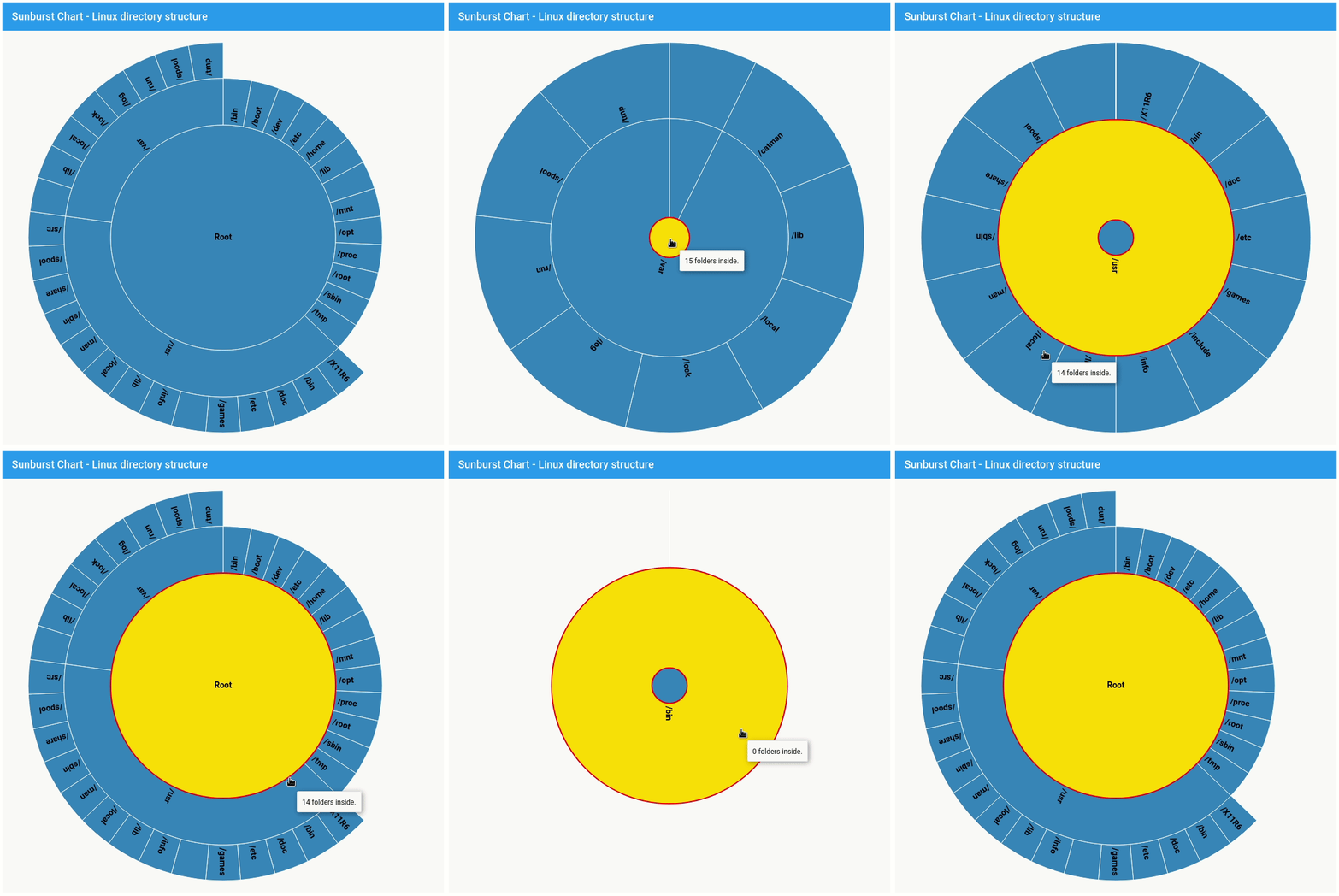
1. Get hierarchical data
     	text: '/usr',
            children:[{
                text: '/X11R6'
            },{
                text: '/bin'
            },{
                text: '/doc'
            },{
                text: '/etc'
            },{
                text: '/games'
            },{
                text: '/include'
            },{
                text: '/info'
            },{
                text: '/lib'
            },{
                text: '/local'
            },{
                text: '/man'
            },{
                text: '/sbin'
            },{
                text: '/share'
            },{
                text: '/spool'
            },{
                text: '/src'
       	 }]
2. Define sunburst configuration:
{
xtype: 'd3-sunburst',
padding: 20,
store: store
}
>/pre>
3. Add sunburst customization like tooltip or transition:
tooltip: {
renderer: function (component, tooltip, node) {
var record = node.data,
n = record.childNodes.length;
tooltip.setHtml(n + ' folder' + (n === 1 ? '' : 's') + ' inside.');
}
},
transitions: {
select: false
},
listeners: {
selectionchange: function(sunburst, node) {
sunburst.zoomInNode(node);
}
},
expandEventName: false
Fiddle:
Pack
The 'd3-pack' component uses D3's Pack Layout to visualize hierarchical data as an enclosure diagram.
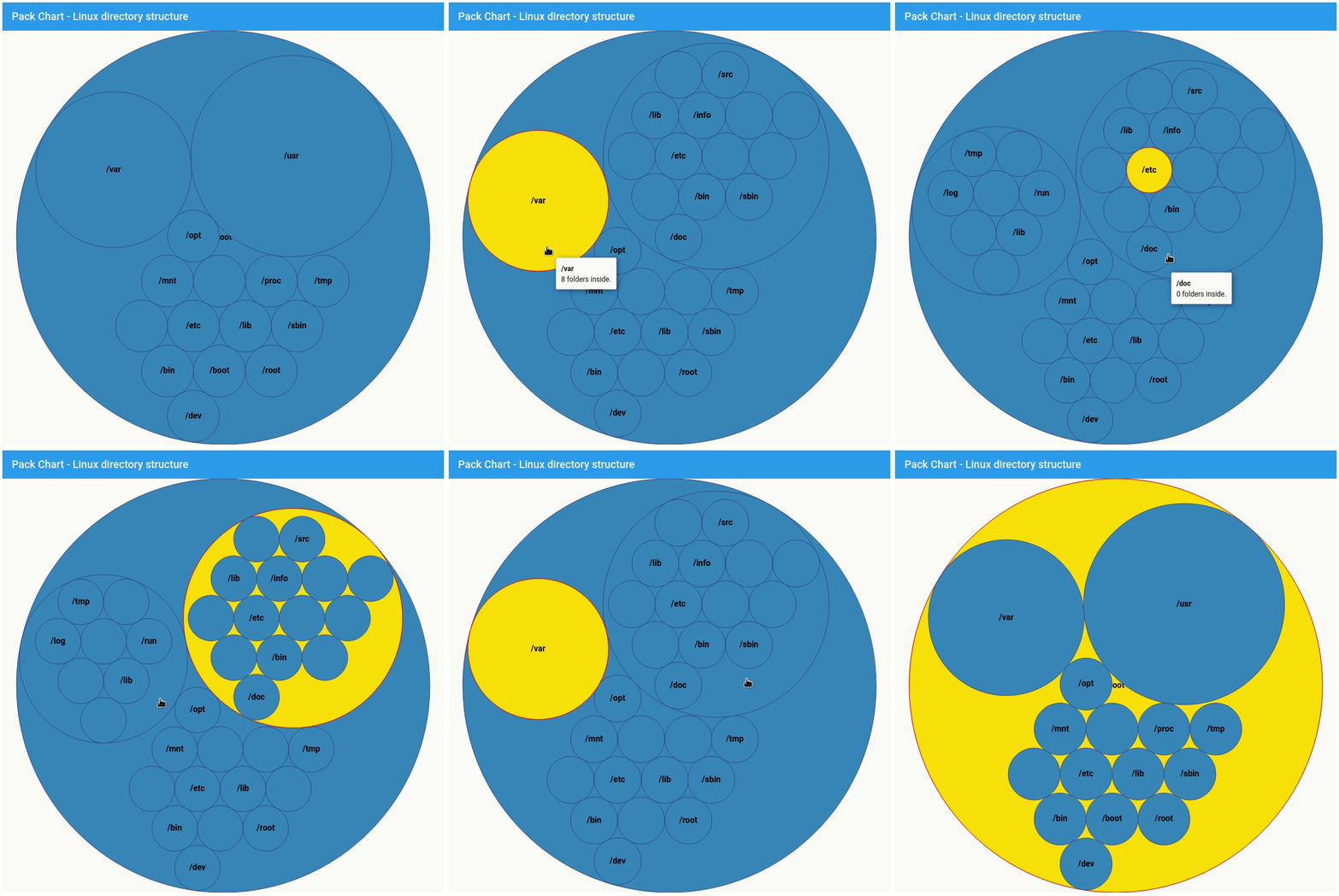
1. Get hierarchical data:
text: '/usr',
children:[{
text: '/X11R6'
},{
text: '/bin'
},{
text: '/doc'
},{
text: '/etc'
},{
text: '/games'
},{
text: '/include'
},{
text: '/info'
},{
text: '/lib'
},{
text: '/local'
},{
text: '/man'
},{
text: '/sbin'
},{
text: '/share'
},{
text: '/spool'
},{
text: '/src'
}]
2. Define pack configuration:
{
xtype: 'd3-pack',
store: store
}
3. Add pack customization like tooltip:
tooltip: {
renderer: function (component, tooltip, node) {
var record = node.data,
n = record.childNodes.length,
html = '' + record.get('text') + '
';
html += n + ' folder' + (n === 1 ? '' : 's') + ' inside.';
tooltip.setHtml(html);
}
}
Fiddle:
Try Ext JS 7.2
The Ext JS free trial provides access to the Enterprise Edition (containing the framework, 140+ components and the premium tools and components - D3 Adapter, Pivot Grid, Calendar and much more!). Download 30-day free trial (npm or zip options).
Did You Know?
FusionCharts, a powerful charting library is now an integral part of the Idera family and offers 100+ interactive charts, data-driven maps, as well as visually appealing dashboard for web and mobile projects. Download a free trial today!


Latest Content
React Component Library for Data-Heavy Apps: Why 1 Vendor Beats 5
Data-heavy React apps rarely start with five UI vendors. They get there one reasonable decision…
October 21, 2026
How to Standardize on One UI Component Library Across Your React Apps
In most large organizations, every React app has its own UI stack. One team uses…
October 21, 2026
UI Component Library vs Component Framework: What Enterprise React Teams Need
Ask a React team what they use for UI, and you’ll usually hear the name…
October 21, 2026


