



 Ask Sencha AI
Creating Native Windows 8 Apps with Ext JS 5
September 18, 2014
1524 Views
Get a summary of this article:
 Microsoft has a long and storied history in the field of web development. After Internet Explorer (IE) effectively won the first ”browser wars“ of the late 1990s and early 2000s, development on IE stagnated. IE6 was released in 2001 and quickly amassed 90% of the browser market share at that time — but IE soon received a poor reputation because it was not updated to support the newly emerging web standards in the years that followed. The subsequent ”browser wars“ of the late 2000s, coupled with the introduction of mobile devices, quickly eroded IE’s dominant market share.
But in recent years Microsoft has fought hard to improve its reputation as a leader in the tech community, specifically under the banner of HTML5. Microsoft first began touting the benefits of HTML5 back in 2010, and soon added their first HTML5 features in IE 9.
Microsoft’s support for HTML5 has continued to grow and expand since then (read the Sencha whitepaper). With the arrival of Windows 8 in 2012, Microsoft elevated web technologies as first-class development options to build native Windows applications. For the first time, developers could use JavaScript, HTML, and CSS to build and distribute as native Windows applications without the use of special wrappers or compilers.
As a developer excited by all things HTML5, I jumped at the chance to begin building Windows 8 applications. I even spoke about creating Windows 8 applications with Ext JS at SenchaCon 2013… but I quickly discovered how Windows 8 apps built with HTML5 were very different from those running in a browser.
Fast forward to 2014, and Sencha has released Ext JS 5. Among the many new features is a little known improvement that makes building Windows 8 applications completely seamless. Let’s take a quick look at how Windows 8 applications are different from basic web apps, and then dive into how Ext JS 5 makes it easier to develop Windows 8 apps.
Windows 8 Applications
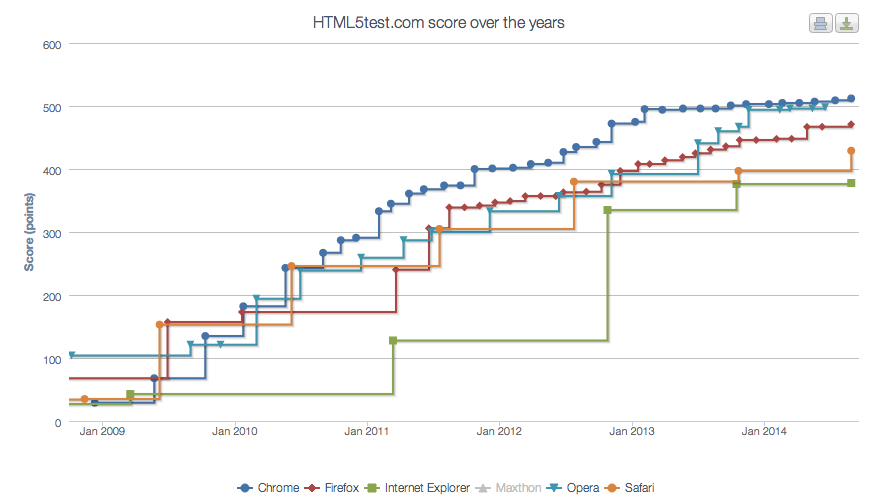
Windows 8 originally shipped with IE10 as its browser, and now Windows 8.1 comes with IE11. According to multiple sources (HTML5Test.com, HTML5Readiness.com, and even Sencha) both IE10 and IE11 have pretty awesome support for HTML5 — which is important because native Windows 8 applications built with web technology effectively use the same rendering and JavaScript engines as IE10/11.
However, because native Windows 8 applications can access the native Windows APIs, Windows 8 applications built with HTML5 are subject to the security model of the Windows shell. This security policy restricts many practices JavaScript developers take for granted — things like using the window API and dynamically adding HTML. But because many JavaScript frameworks handle DOM operations under-the-hood (Ext JS included), building native Windows 8 applications with your favorite JavaScript framework has historically been a challenge.
Ext JS 5.0.1 and the ext-win8 Package
With the recent release of Ext JS 5.0.1, Sencha has committed to making Ext JS comply with the Windows 8 security policy. This process involves two important parts:
- Ext JS 5.0.1 was carefully crafted to include a special hook that, when configured, elevates restricted JavaScript and DOM operations into the proper execution context.
- We created a special Sencha Cmd package containing the configured hook (ext-win8) that is incredibly easy to install.
As a result, you can build native Windows 8 applications using Ext JS, just as you would any other web application.
To install the ext-win8 package, simply add ”ext-win8“ to your application’s app.json file under ”requires“.
“requires” : [ “ext-win8” ],
//…
Then use Sencha Cmd to refresh your application:
//or
sencha app build development
Sencha Cmd will then download the ext-win8 package from our CDN and install it into your machine’s local repository (e.g. /Users/arthurakay/bin/Sencha/Cmd/repo/pkgs/).
As part of the refresh/build process, Sencha Cmd will copy ext-win8 to your application (or workspace) and rebuild your application’s dependency chain, ultimately including the necessary Windows 8 hooks.
Watch the following short video to see how it all works:
The sample application from the video is also available on GitHub.
Conclusion
By embracing HTML5, Microsoft has opened new doors for developers and provided access to new markets for HTML5 developers. Equally important, Microsoft has shifted from laggard to leader in HTML5 support—and in so doing has signaled strong support for the idea of multi-device, multi-platform, universal apps.
With Ext JS 5 fully primed, now is the time for developers to take a fresh look at the Windows 8 platform to evaluate how HTML5 creates new options for their businesses and their customers.
 1
1

Latest Content

How to Build a Reusable React Grid Component
In most enterprise React apps, the grid shows up on dozens of screens: orders, customers,…
October 9, 2026

React Grid Component: Layout and Data Grids in One Framework
Search for “React grid component,” and you will find two very different things. Half the…
October 9, 2026
How to Use the Ext JS Grid in React: Setup, Columns, Editing and Grouping
Set up the Ext JS grid in React with ReExt, then add typed columns, store-backed…
October 6, 2026


