



 Ask Sencha AI
From JavaScript Library to React: Bringing Ext JS into Modern Front Ends
Nov 4, 2026
105 Views
Get a summary of this article:
Many of today’s most important business applications started life in the era of the JavaScript library: when teams picked jQuery for the DOM, YUI or Dojo for widgets, and Ext JS for rich, desktop-like interfaces in the browser. Those applications still run trading desks, hospitals, logistics networks and finance departments. Their front ends, though, now sit next to a modern React world of npm, Vite, TypeScript and component-based architecture.
This guide is for teams with Ext JS applications who want to join that world without throwing away what works. It traces how Ext JS grew from a library into a full framework, compares the three paths to modernization, and shows step by step how ReExt brings existing Ext JS code into React front ends.
From JavaScript library to framework: how we got here
Front-end development has moved through three broad eras:
| Era | What developers used | How apps were built |
|---|---|---|
| The library era | jQuery, YUI, Dojo, Prototype, early Ext JS | Libraries enhanced server-rendered pages with widgets and DOM helpers |
| The framework era | Ext JS, AngularJS, Backbone, then Angular | Frameworks structured whole single-page applications with patterns such as MVC |
| The component era | React, Vue, modern Angular | Apps composed of components, built with npm, modern bundlers and TypeScript |
Ext JS has a distinctive place in that story. It began in the mid-2000s as an extension of the YUI library, became a standalone JavaScript library known for its grid and widgets, and grew into a complete application framework, with 140+ components, a data package, MVC and MVVM architecture, and its own tooling. That’s why so many data-heavy enterprise applications were built on it, and why many still are.
Ext JS hasn’t stood still. Version 8.0, released in April 2026, brought enhancements across both its Classic and Modern toolkits, and Sencha continues to develop its tooling. The question for most teams isn’t whether Ext JS still works. It’s how to connect it to the React-based front end the rest of the organization is moving to.
Why Ext JS teams feel pressure to modernize
The pressure usually comes from around the application, not from inside it:
- The organization has standardized on React. New apps, design systems and shared tooling are React-based, and the Ext JS app is the exception.
- Hiring and onboarding. New developers arrive knowing React, npm and TypeScript, and expect to use them.
- Integration. Teams want to combine Ext JS screens with new React screens, shared authentication and a common app shell.
- Modern tooling. Vite builds, TypeScript, modern testing tools and AI coding assistants are part of how teams now work.
It’s just as important to be clear about what isn’t broken. The grids, forms, stores and business rules inside a mature Ext JS app often encode years of domain knowledge, and users depend on how they behave. A modernization plan that throws them away takes on a lot of risk to fix a problem that’s mostly about the surroundings.
Three paths to a modern front end
| Rewrite in React | Upgrade Ext JS in place | Bring Ext JS into React with ReExt | |
|---|---|---|---|
| What happens | Rebuild every screen with React and new libraries | Move to Ext JS 8 and modern Ext JS tooling | Run Ext JS components inside a React app, migrating screen by screen |
| Time to first result | Months before anything ships | Weeks | Weeks |
| Risk | High: business rules must be rediscovered and re-implemented | Low | Low to moderate |
| Reuse of existing code | Little | Nearly all | Most: components, stores, models and overrides |
| Joins the React platform | Yes, eventually | No | Yes, from the first screen |
| Best for | Small apps, or apps whose UI needs a complete redesign | Apps that will stay standalone | Large apps that need to join a React-based platform |
Upgrading in place is a sound choice when the app will stay on its own. When it needs to become part of a React platform, the third path gives you that without a rewrite, and the rest of this guide shows how it works.
Also Read: How to Choose a JavaScript Library: 5 Steps (2026 Checklist)
How ReExt brings Ext JS into React
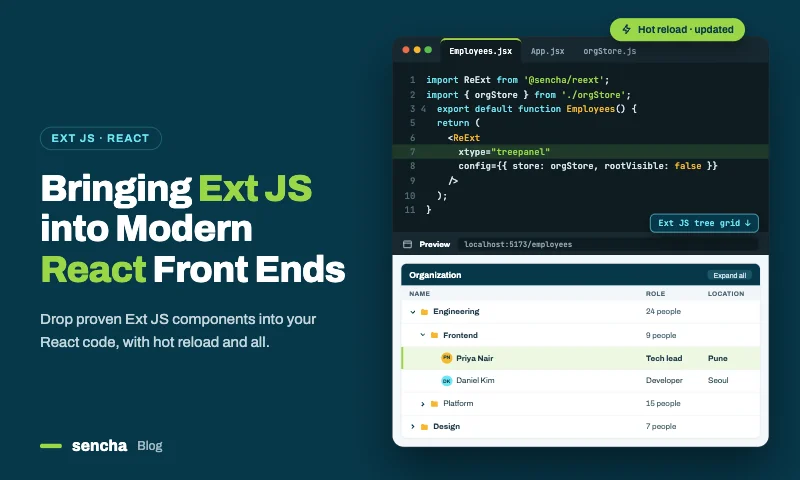
ReExt is a React package that renders Ext JS components inside a React application. A ReExtProvider loads the Ext JS framework once for the whole app; after that, any Ext JS component, including your own custom classes, can be rendered as a <ReExt> element. React handles routing, the app shell and application state; Ext JS handles the screens it’s already good at.
The steps below use Vite, the simplest path. ReExt also has quick starts for Next.js with JavaScript or TypeScript.
Step 1: Create the React app and install ReExt
    npm create vite@latest modern-shell -- --template react-swc
    cd modern-shell
    npm install @sencha/reext@latest
    cp node_modules/@sencha/reext/dist/example/vite.config.js vite.config.js
Step 2: Load your licensed Ext JS with ReExtProvider
Copy your licensed Ext JS 8.0 build into the React app’s public folder (for example, public/ext-8.0.0), then wrap the app in ReExtProvider, pointing it at that local copy:
    // src/main.jsx
    import ReactDOM from 'react-dom/client';
    import { BrowserRouter } from 'react-router';
    import { ReExtProvider } from '@sencha/reext';
    import App from './App';

    const ReExtData = {
      sdkversion: '8.0.0',
      toolkit: 'classic',      // match the toolkit your existing app uses
      theme: 'classic',
      urlbase: './',
      location: 'local',       // load the licensed copy from /public
      locale: 'en',
      rtl: false,
      debug: false,
    };

    ReactDOM.createRoot(document.getElementById('root')).render(
      <ReExtProvider splash={true} ReExtData={ReExtData} reextkey={import.meta.env.VITE_REEXT_KEY}>
        <BrowserRouter>
          <App />
        </BrowserRouter>
      </ReExtProvider>
    );
If your app uses optional Ext JS packages, such as charts, pivot or calendar, enable them in ReExtData as described in the ReExt documentation.
Step 3: Bring your existing Ext JS classes across
Copy the classes a screen needs, such as models, stores, ViewModels, ViewControllers and views, into the React project, for example under src/ext/. In an Ext JS app, Sencha Cmd’s class loader resolves dependencies for you; in the React app, import the files explicitly, in dependency order:
    // src/ext/index.js: existing Ext JS classes, imported in dependency order
    import './model/Order';
    import './store/Orders';
    import './view/orders/OrdersModel';
    import './view/orders/OrdersController';
    import './view/orders/Orders';
The classes themselves don’t change. A view defined with xtype: ‘orders’ in the old app is still xtype: ‘orders’ in React.
Load them once Ext JS is available, with a small hook:
    // src/ext/useExtClasses.js
    import { useEffect, useState } from 'react';

    export function useExtClasses() {
      const [ready, setReady] = useState(false);
      useEffect(() => {
        import('./index').then(() => setReady(true));
      }, []);
      return ready;
    }
Step 4: Render the screen in React and connect its events
To let the existing screen talk to React, have its ViewController fire a custom event, here when a user double-clicks an order:
    // src/ext/view/orders/OrdersController.js
    Ext.define('App.view.orders.OrdersController', {
      extend: 'Ext.app.ViewController',
      alias: 'controller.orders',

      onRowDblClick: function (grid, record) {
        this.getView().fireEvent('orderopen', record.getData());
      },
    });
The view wires the grid’s rowdblclick to that method with controller: ‘orders’ and listeners: { rowdblclick: ‘onRowDblClick’ }, as Ext JS views already do.
In React, render the view by its xtype and listen for the event. ReExt turns any Ext JS event into a prop by adding on and capitalizing the first letter, so orderopen becomes onOrderopen:
    // src/routes/OrdersRoute.jsx
    import { useNavigate } from 'react-router';
    import ReExt from '@sencha/reext';
    import { useExtClasses } from '../ext/useExtClasses';

    export default function OrdersRoute() {
      const ready = useExtClasses();
      const navigate = useNavigate();

      if (!ready) return <p>Loading orders…</p>;

      return (
        <ReExt
          xtype="orders"
          style={{ height: 'calc(100vh - 64px)' }}
          onOrderopen={(order) => navigate(`/orders/${order.id}`)}
        />
      );
    }
The existing Ext JS screen now runs inside a React route. React owns navigation, and the screen’s grid, ViewModel, bindings and business rules work exactly as they did before.
A screen-by-screen migration plan
With the bridge in place, migration becomes a series of small, low-risk moves instead of one big rewrite.
- Upgrade to Ext JS 8 first, if the app is on an older version. Sencha’s Upgrade Adviser scans the codebase and shows what needs to change, so the React move starts from a current version.
- Build the React shell. Routing, sign-in, navigation and the layout around screens move to React.
- Bring the first screens across unchanged. Pick a few high-traffic screens, copy their Ext JS classes into src/ext/, and render them by xtype in React routes.
- Connect screens to React where it helps. Fire custom events from ViewControllers for navigation and cross-screen actions, and pass React state in through props.
- Modernize screen by screen. As each screen is touched for new features, decide whether to keep it as-is, refactor it into smaller ReExt components configured from React, or rebuild it.
- Retire the old app once its last screen runs in the React shell.
At every stage, the application keeps working. Users see the same grids and forms they know, while the platform underneath moves to React.
What the modern front end gains
Bringing Ext JS into React connects proven screens to the tools and practices modern teams use:
| Area | Before | After |
|---|---|---|
| Packages and builds | Sencha Cmd for the whole app | npm and Vite (or Next.js) for the app; Ext JS loaded through ReExt |
| Language | JavaScript | TypeScript for React code, with ReExt’s TypeScript declarations |
| Routing and shell | Ext JS application and router | React Router, TanStack Router or Next.js |
| New screens | Ext JS only | Ext JS components through ReExt, or any React component |
| Ecosystem | Ext JS packages | The full React ecosystem, plus Ext JS components |
| Developer onboarding | Ext JS expertise required for everything | React skills for the app, Ext JS knowledge for data screens |
| AI assistance | General tools | React tooling plus Sencha’s AI assistant for Ext JS APIs and configs |
Nothing about this requires giving up what made the Ext JS app valuable. The grid, the data package, the MVVM patterns and the business rules come along.
Frequently asked questions
Is Ext JS a JavaScript library or a framework?
Both, historically. Ext JS began in the mid-2000s as an extension of the YUI JavaScript library, became a standalone widget library, and grew into a complete application framework with 140+ components, a data package, MVC and MVVM architecture, and its own tooling.
Can I use my existing Ext JS code in React?
Yes. With ReExt, existing Ext JS classes, including views, ViewModels, ViewControllers, stores and models, can be imported into a React app and rendered by their xtype. Their behavior stays the same, and their events can be handled in React.
Do I need to rewrite my Ext JS app to move to React?
No. You can move the app shell to React first, bring existing screens across unchanged, and modernize them one at a time. Rewriting is only one of several options, and usually the riskiest.
Which Ext JS version works with ReExt?
ReExt works with commercial Ext JS versions from 7.x onward, and ReExt 1.2.0 supports Ext JS 8.0. Sencha’s roadmap includes ReExt support for Ext JS 8.1 and the latest React version.
Should I upgrade to Ext JS 8 before moving to React?
Usually, yes. Starting from a current version reduces surprises, and Sencha’s Upgrade Adviser helps identify the code changes the upgrade needs.
Keep what works, modernize what surrounds it
Ext JS has come a long way from its JavaScript library roots, and the applications built on it still do critical work. Moving those applications into a modern front end doesn’t require starting over. With ReExt, the React platform your organization is standardizing on can host your existing Ext JS screens from day one, and you modernize at the pace the business can absorb.
Next steps: start a 30-day ReExt trial, book a migration assessment, or Best React Component Library 2026: ReExt Guide for Enterprise Responsive UIs


Latest Content
Best JavaScript Framework for Data-Intensive Applications
“What’s the best JavaScript framework?” has no single answer, because frameworks are built for different…
November 4, 2026
React JS Framework for Enterprise Application Development: An Architecture Guide
Choosing a React JS framework is the first decision in enterprise application development, not the…
November 4, 2026

Turning React into an Enterprise Framework with ReExt
Ask ten developers whether React is a React JS framework or a library and you’ll…
November 4, 2026