



 Ask Sencha AI
JavaScript Libraries for Enterprise UI: Grid, Chart and Form Options Compared
Nov 12, 2026
103 Views
Get a summary of this article:
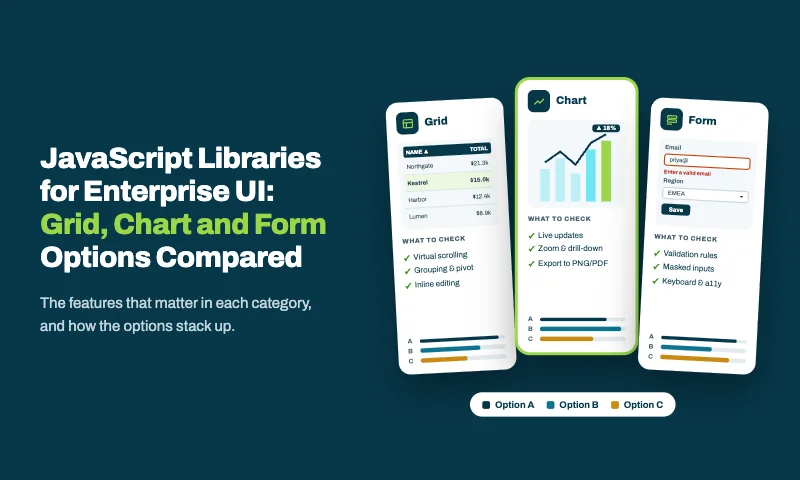
Most comparisons of JavaScript libraries look at one category at a time: the best grid, the best chart library, the best form library. Enterprise UIs don’t work one category at a time. The same screen shows a grid of orders, a chart of the same orders, and a form for editing the selected one, and all three have to agree on the data, the validation rules, and the look.
This guide compares grid, chart and form options against the criteria that matter for enterprise UI, then does what single-category lists can’t: it compares the four ways to put them together, and what each means for integration, consistency and long-term cost.
What enterprise UI demands
These criteria are used throughout the comparison:
| Criterion | What it means in practice |
|---|---|
| Depth | Grids that group, edit, and export; charts with interactions; forms with complex validation |
| Scale | Large datasets in grids and charts; forms with dozens of fields |
| Accessibility | Keyboard navigation, screen reader support, high-contrast options |
| Localization | Locale-aware dates and numbers, translated text, right-to-left layouts |
| Consistency | One theme and one interaction style across grid, chart and form |
| Shared data | Grid, chart and form reading and updating the same records |
| Shared rules | One set of validation rules for grid editing and forms |
| Licensing and support | Clear terms, and someone accountable for fixes and upgrades |
The first four criteria can be judged library by library. The last four only show up when libraries are combined, which is why the stack comparison later in this guide matters most.
Grid options compared
The grid is usually the most demanding component in an enterprise UI. Here’s how the main options compare on the criteria above:
| Grid | Depth | Scale | Shares data with charts and forms | License | Support |
|---|---|---|---|---|---|
| Ext JS Grid | Grouping, summaries, editing, locked columns, clipboard, tree and pivot grids | Buffered rendering, buffered and remote stores | Yes: same stores as Ext JS charts and forms | Commercial (part of Ext JS) | Sencha |
| AG Grid | Broad; advanced features in Enterprise edition | Strong | Through your own state code | MIT Community; commercial Enterprise | AG Grid (Enterprise) |
| Handsontable | Spreadsheet-style editing and formulas | Good | Through your own state code | Commercial for commercial use | Handsontable |
| Tabulator | Grouping, editing, virtual rendering | Good | Through your own state code | MIT | Community |
| TanStack Table | Logic only; you build the UI | Depends on your implementation | Through your own state code | MIT | Community |
What stands out: several grids match each other on depth and scale. The difference is the “shares data” column. Only a grid that’s part of a framework with a shared data layer can stay in sync with charts and forms without integration code.
For detailed profiles of each grid, see Best JavaScript Libraries for Data Grids, Charts and Dashboards in 2027.
Chart options compared
| Chart library | Depth | Accessibility | Shares data with grids and forms | License | Support |
|---|---|---|---|---|---|
| Ext JS Charts | Cartesian, polar, gauge and financial charts with built-in interactions | Part of Ext JS’s accessibility support | Yes: same stores as Ext JS grids | Commercial (part of Ext JS) | Sencha |
| Highcharts | Very broad, with stock, map and Gantt variants | Strong accessibility module | Through your own state code | Commercial for commercial use | Highsoft |
| Apache ECharts | Very broad, including maps; strong with large data | Built-in accessibility options | Through your own state code | Apache 2.0 | Community |
| Chart.js | Common chart types | Basic; extra work for full support | Through your own state code | MIT | Community |
| D3 | Unlimited, built by hand | Up to your implementation | Through your own state code | ISC | Community |
What stands out: for chart-only needs, Highcharts and ECharts are hard to beat on range. For dashboards where a chart must reflect exactly what the grid next to it shows, filters, edits and all, sharing one data store matters more than chart variety.
Form options compared
Forms are where enterprise UIs differ most from consumer apps: dozens of fields, type-ahead dropdowns, date ranges, dense multi-column layouts, and validation that must match the server’s rules. It helps to separate what a “form library” actually covers:
- Form state and validation: values, touched and dirty tracking, rules and error messages.
- Field components: text, number, date, time, type-ahead dropdowns, tag fields and more.
- Form layouts: columns, field sets, tabs and collapsible sections.
- Binding to records: loading a record into the form and writing changes back.
Most JavaScript form libraries cover the first item only. The rest comes from your component library, or your own code.
| Option | State and validation | Field components | Form layouts | Binding to records | License |
|---|---|---|---|---|---|
| Ext JS forms | Field validators plus model validators | Full set, including combobox, tag, date, time and HTML editor fields | Field sets, column, anchor and table layouts | Built in: loadRecord, updateRecord and ViewModel binding | Commercial (part of Ext JS) |
| React Hook Form with Zod or Yup | Strong, with schema validation | Bring your own | Bring your own | Your own code | MIT |
| TanStack Form | Strong, type-safe, with adapters for several frameworks | Bring your own | Bring your own | Your own code | MIT |
| Formik | Good, often with Yup | Bring your own | Bring your own | Your own code | MIT |
| Angular Reactive Forms | Built in, with validators | Basic set via Angular Material | Bring your own | Your own code | MIT (part of Angular) |
| Native HTML forms | Browser constraint validation | Native inputs only | CSS | Your own code | Built into browsers |
What stands out: the open-source form libraries are excellent at form state, and leave fields, layouts and record binding to you. Ext JS is the only option here that covers all four, and the only one where the same fields work as grid cell editors.
The real comparison: four ways to build an enterprise UI stack
Once grid, chart and form choices are combined, four kinds of stack emerge:
- Stack A, all open source: a free grid (such as TanStack Table or Tabulator), a free chart library (such as ECharts or Chart.js), a form library with a schema validator, and a general component kit for fields.
- Stack B, commercial grid plus open source: a commercial grid (such as AG Grid Enterprise) with open-source charts, forms and component kit.
- Stack C, a commercial suite: grid, charts and input components from one vendor’s suite, often with your own form state library.
- Stack D, one framework: Ext JS, used directly or in React through ReExt, with grid, charts, forms, layouts and the data layer together.
| Stack A: open source | Stack B: commercial grid | Stack C: suite | Stack D: Ext JS | |
|---|---|---|---|---|
| License cost | None | Grid license | Suite license | Ext JS license |
| Vendors and maintainers | Many | Several | One to two | One |
| Themes to align | Several | Several | One | One |
| Grid, chart and form share data | Your own state code | Your own state code | Partly, through suite helpers | Yes, through shared stores |
| One set of validation rules for grid and form | Your own code | Your own code | Partly | Yes, through model validators |
| Grid editors match form fields | Only if you build them to | Only if you build them to | Usually | Yes: the same field components |
| Integration code you maintain | Most | A lot | Some | Least |
| Upgrade schedules to track | Several | Several | One to two | One |
| Best for | Simple UIs, strong in-house front-end teams | Grid-centric apps with simple surroundings | Teams wanting a broad catalog from one vendor | Data-intensive enterprise apps |
The table makes a simple trade-off visible. Moving from Stack A to Stack D, license cost rises and integration work falls. For apps with a few simple screens, Stack A or B is often right. For enterprise application development with hundreds of data screens maintained for years, the integration work in Stacks A and B usually costs far more than a license, which is where Stack D pays off.
Stack D in practice: one model, one set of rules, grid and form together
Here’s what “shared data” and “shared rules” look like in Ext JS. The validation rules live once, on the model. The grid and the form both work on the same records, and the form shows errors straight from the model’s rules.
The model: fields and validation, defined once
    Ext.define('App.model.Customer', {
      extend: 'Ext.data.Model',
      fields: [
        { name: 'name', type: 'string' },
        { name: 'email', type: 'string' },
        { name: 'region', type: 'string' },
        { name: 'creditLimit', type: 'float' },
        { name: 'since', type: 'date', dateFormat: 'Y-m-d' },
      ],
      validators: {
        name: 'presence',
        email: 'email',
        region: { type: 'inclusion', list: ['EMEA', 'APAC', 'AMER'] },
        creditLimit: { type: 'range', min: 0, max: 1000000 },
      },
    });
The view: a grid and a form on the same records
    Ext.define('App.view.customers.Customers', {
      extend: 'Ext.panel.Panel',
      xtype: 'customers',
      title: 'Customers',
      layout: 'border',

      viewModel: {
        stores: {
          customers: {
            model: 'App.model.Customer',
            autoLoad: true,
            proxy: { type: 'ajax', url: '/api/customers', reader: { type: 'json', rootProperty: 'data' } },
          },
        },
      },

      items: [{
        region: 'center',
        xtype: 'grid',
        bind: { store: '{customers}', selection: '{customer}' },
        plugins: [{ ptype: 'cellediting', clicksToEdit: 1 }],
        columns: [
          { text: 'Name', dataIndex: 'name', flex: 1, editor: 'textfield' },
          { text: 'Region', dataIndex: 'region', width: 110,
            editor: { xtype: 'combobox', store: ['EMEA', 'APAC', 'AMER'], forceSelection: true } },
          { text: 'Credit limit', dataIndex: 'creditLimit', width: 140,
            xtype: 'numbercolumn', format: '$0,000', editor: 'numberfield' },
        ],
      }, {
        region: 'east',
        xtype: 'form',
        width: 320,
        split: true,
        collapsible: true,
        title: 'Customer details',
        bodyPadding: 12,
        modelValidation: true,      // show errors from the model's validators
        defaults: { anchor: '100%' },
        items: [
          { xtype: 'textfield', fieldLabel: 'Name', bind: '{customer.name}' },
          { xtype: 'textfield', fieldLabel: 'Email', bind: '{customer.email}' },
          { xtype: 'combobox', fieldLabel: 'Region', store: ['EMEA', 'APAC', 'AMER'],
            bind: '{customer.region}' },
          { xtype: 'numberfield', fieldLabel: 'Credit limit', bind: '{customer.creditLimit}' },
          { xtype: 'datefield', fieldLabel: 'Customer since', bind: '{customer.since}' },
        ],
      }],
    });
What this gives you without integration code:
- One source of truth. The grid and form edit the same record; a change in either appears in the other immediately.
- One set of rules. The model’s validators drive the form’s error messages, and any save path, including grid edits, can check record.isValid() against the same rules.
- One set of fields. The combobox and number field in the grid editors are the same components as in the form, so they look and behave identically.
- One theme and one layout system, with a resizable, collapsible detail panel.
React teams get the same model, stores and ui components through ReExt, which renders Ext JS grids, forms and charts as React elements.
How to choose
Match the stack to how your screens combine grids, charts and forms:
| Your situation | Recommended stack |
|---|---|
| A few simple screens, strong in-house front-end team, free license required | Stack A: open-source grid, charts and form library |
| One complex grid, with simple charts and forms around it | Stack B: a commercial grid plus open-source charts and forms |
| A broad mix of components, with grids, charts and forms used separately | Stack C: a commercial suite |
| Many data screens where grids, charts and forms share records and rules | Stack D: Ext JS |
| Organization standardized on React, with data-heavy screens | Stack D through ReExt: Ext JS components in React |
| Existing Ext JS application | Stack D: upgrade to Ext JS 8, or bring it into React with ReExt |
Questions to settle before deciding
- How often do grids, charts and forms appear on the same screen? The more often, the more shared data and shared rules are worth.
- Where do your validation rules live today? If they’re duplicated across grid editors, forms and the server, a model-based approach removes a common source of bugs.
- How many screens will you build and maintain over five years? Integration work grows with every screen; a license doesn’t.
- Who supports each piece? Count the maintainers you’d depend on, and check how each handles security fixes and new React frameworks or browser releases.
Also Read: 25 Best JavaScript Libraries in 2026 – By Category
Frequently asked questions
Which JavaScript libraries are best for enterprise UI?
It depends on how your screens combine components. For single-purpose needs, specialist libraries such as AG Grid, Highcharts, ECharts or React Hook Form are strong choices. For enterprise apps where grids, charts and forms share data and rules on the same screens, a framework such as Ext JS covers all three together.
What is the best JavaScript form library for enterprise apps?
Open-source libraries such as React Hook Form and TanStack Form handle form state and validation well, but leave field components, layouts and record binding to you. Ext JS forms include all of those, and their fields double as grid cell editors.
Do I need a separate chart library if I use a data grid library?
Usually, yes, unless your grid is part of a framework or suite that includes charts. With separate libraries, you’ll also need code to keep the chart in sync with the grid’s filters and edits.
How do I keep grid editing and form validation consistent?
Define validation rules once, close to the data, and use the same field components in grid editors and forms. In Ext JS, model validators and shared field components provide both.
Can I use Ext JS grids, charts and forms in React?
Yes. ReExt brings Ext JS components into React applications, and ReExt 1.2.0 supports Ext JS 8.0.
Compare stacks, not just libraries
Grid, chart and form libraries are easy to compare one by one, and many excellent options exist in each category. Enterprise UIs, though, are judged on how those pieces work together: whether they share data, validation rules, field components and a theme, and how much code it takes to make them.
If your screens combine all three every day, Ext JS gives you one model, one set of rules and one set of components, and ReExt brings the same to React.
Next steps: start a free Ext JS trial, try ReExt in React, or read Too Many JavaScript Libraries? How to Consolidate Your Front-End Stack.

JavaScript
Enterprise UI Development
Data Visualization
Enterprise Application Development
JavaScript Libraries


Latest Content
Too Many JavaScript Libraries? How to Consolidate Your Front-End Stack
Every front end accumulates JavaScript libraries. A date library for one feature, a second one…
November 12, 2026
Best JavaScript Libraries for Data Grids, Charts and Dashboards
Data grids, charts and dashboards are where most business applications earn their keep, and where…
November 12, 2026

JavaScript Library vs Framework: Which Do Enterprise Apps Need?
“Should we use a JavaScript library or a framework?” sounds like a terminology question. For…
November 12, 2026