Ask Sencha AI
Enterprise Software Development: A 6-Step Process That Works in 2026
Jul 18, 2024
26975 Views
Get a summary of this article:
Enterprise software development is the process of building scalable, secure and high-performance applications tailored to the needs of large organisations. It differs from regular software development in scale, integration complexity and lifespan. This guide explains what enterprise software is, the challenges teams face, and a proven six-step development process covering requirements, planning, design, development, testing and maintenance. For framework selection specifically, see our guide to choosing an enterprise JavaScript framework.
Key Takeaways
- Enterprise software development builds large-scale applications that support the operations of entire organisations, often handling 1,000,000+ records and thousands of concurrent users.
- It differs from regular software development in scale, integration depth, security requirements and application lifespan, with enterprise systems commonly running for 10 years or more.
- Common challenges include legacy integration, business and IT misalignment, developer shortages, and limited organisational agility.
- A reliable process moves through requirements, planning, design, development, testing and maintenance.
- Framework and tooling choices made early shape development velocity and long-term cost, and are expensive to reverse once the application is in production.
Introduction
Enterprise applications are software systems designed to support and automate the operations, processes and data management of large organisations. They are essential for managing complex, large-scale business activities, but building them is a demanding process.
Enterprise software development means creating applications that are scalable, secure and efficient enough to serve an entire organisation. These applications must handle thousands of concurrent users and datasets running to 1,000,000+ records, so performance optimisation is critical to ensure smooth operation under load. They must also be tailored to specific business processes and flexible enough to adapt as requirements change.
With the right tools, the right JavaScript framework, and a disciplined process, teams can build high-performance, large-scale enterprise applications reliably. Frameworks such as Ext JS ship 140+ pre-built components for exactly these requirements. This guide walks through a proven six-step enterprise software development process.
What Is Enterprise Software?
Enterprise software is an application built to meet the specific needs of large organisations. It supports and enhances core business processes, including finance, human resources, customer relationship management, supply chain management and enterprise resource planning. Choosing the Best application development software can help organisations build and manage these applications effectively.
Enterprise applications have become essential to modern large organisations. They automate business processes and tasks such as reporting and data collection, which saves time and improves productivity. They provide a centralised management system that keeps information consistent across departments. And they deliver real-time data and analytics that enable leaders to make informed decisions quickly.
Applications from Morgan Stanley, Citigroup, BMW Group, Hitachi Energy and Motorola Solutions illustrate the range: trading platforms, digital transaction approval workflows, operational dashboards, industrial IoT monitoring supporting 1,000+ concurrent users, and public safety equipment tracking. Different sectors, same underlying requirements of scale, compliance and multi-year reliability.
The Difference Between Regular and Enterprise Software Development
Regular software development
Regular software development produces relatively generic solutions designed for small to medium-sized businesses or for individual departments within a larger organisation. Examples include basic accounting software, simple project management tools and standard office productivity suites.
These applications focus on specific, straightforward tasks, suit small-scale operations with limited users and data, and often have limited integration capabilities that require manual data entry between tools. Our guide to application development software covers the tooling categories in more detail.
Enterprise software development
Enterprise software development is built for large organisations and a fundamentally larger scope. Examples include enterprise resource planning systems, customer relationship management systems and supply chain management systems.
These applications provide a wide range of complex functionality across finance, supply chain, HR, sales and marketing within a single integrated system. They are engineered to scale efficiently, managing datasets running to 1,000,000+ records across thousands of concurrent users, and they integrate with other enterprise systems to support complex organisation-wide workflows.
Common Types of Enterprise Software
Enterprise resource planning (ERP)
ERP software manages core business processes in real time. It centralises data from many departments, ensuring a consistent flow of information across the organisation, and typically includes modules for finance, human resources, manufacturing, supply chain, services and procurement.
Front-end demands: high data density across many linked entities, complex multi-step forms with cross-field validation, and role-based views that change what each user sees. ERP interfaces are where component depth matters most, because a single screen may combine a grid, a chart, a tree and a form.
Customer relationship management (CRM)
CRM systems manage a company’s interactions with current and potential customers. By consolidating customer information into a single database, they help businesses build stronger customer relationships, streamline processes, increase sales and improve customer service.
Front-end demands: fast search and filtering across large contact datasets, inline editing so sales teams can update records without leaving the list, and real-time updates when multiple users work the same accounts.
Supply chain management (SCM)
SCM systems help organisations manage the flow of goods, information and finances throughout the supply chain. They help businesses improve efficiency, reduce costs and ensure the timely delivery of products.
Enterprise Software Development Challenges
Before walking through the process, it helps to understand the obstacles that most enterprise development efforts encounter.
Integration with legacy systems
Legacy systems are older software applications that an organisation has relied on for many years. They often have limited functionality, weaker performance and security vulnerabilities, and they frequently lack compatibility with modern technologies. Integrating them with modern enterprise applications is one of the most consistent challenges in enterprise development.
The practical approach is gradual rather than wholesale. Build abstraction layers that isolate the new application from legacy specifics, use data transformation layers so both systems can coexist during transition, and design integration points around the existing data formats rather than forcing the legacy system to change. Micro-frontend architectures allow sections to be replaced independently, which our guide to front-end framework migration covers in detail.
Poor collaboration between business and IT
Effective enterprise applications require business and IT teams to work closely together. When business and IT strategies do not align, it becomes difficult to satisfy the organisation’s requirements. Business teams may hold unrealistic expectations, while IT teams may struggle to deliver solutions that match business goals. This misalignment leads to delays, rework and inefficient use of resources.
The most common failure point is unquantified requirements. “The system must be fast” cannot be tested against; “the order grid must render 50,000 rows in under one second on standard-issue hardware” can. Agreeing numeric targets during requirements gathering removes most of the disagreement that surfaces later during acceptance.
Developer shortage
Demand for skilled software developers often exceeds the available supply. Many organisations find it difficult to recruit and retain developers with the right enterprise experience, which can slow projects and increase cost. The gap widens for specialised skills: accessibility implementation, performance optimisation at scale, and legacy system integration are all areas where experienced practitioners are scarce.
Three approaches reduce the exposure:
- Reduce what has to be built. A framework shipping 140+ pre-built components removes the work that would otherwise need specialist developers. A production data grid alone takes three to six months to build from scratch.
- Lower the skill floor. Visual and low-code tooling such as Rapid Ext JS lets developers build layouts without hand-writing every configuration, and Sencha Training shortens the ramp for teams new to the framework.
- Supplement rather than recruit. Sencha Professional Services and Advisory Services provide implementation support where in-house expertise is thin, which is usually faster than hiring for a skill needed on one project.
Lack of organisational agility
Organisational agility is the ability to respond quickly and effectively to changing customer needs. Organisations with rigid structures and processes often struggle to adapt their software to evolving requirements, which limits the value the software can deliver over time.
Framework choice compounds this. A stack assembled from ten to fifteen libraries, each on its own release cadence, is slower to change than one with a single upgrade path, because every modification risks compatibility across the whole dependency graph.
The 6-Step Enterprise Software Development Process
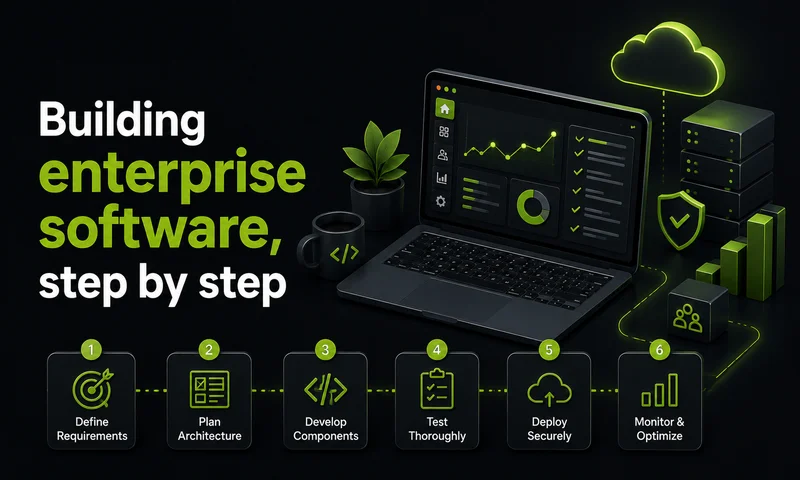
A reliable enterprise software development process moves through six stages, each of which is essential to delivering a scalable, high-performing application.
Step 1: Requirement gathering
The first phase gathers and documents detailed requirements for the enterprise software. This includes understanding the purpose of the application, the business goals it serves, the needs of its users and its functional requirements. The development team works closely with stakeholders, conducts interviews and performs analysis to define the software’s scope, key features and specifications.
Quantify the performance requirements while gathering them. “The system must be fast” cannot be tested against; “the order grid must render 50,000 rows in under one second” can. Document the maximum record counts, concurrent user targets and acceptable response times for each critical workflow, because these numbers determine the technology decision in Step 2. Typical duration: 3 to 6 weeks for a substantial application.
Step 2: Planning and alignment
The planning phase produces a detailed project plan covering features, development approach, timelines, resource allocation and milestones. The plan ensures alignment between the development team, stakeholders and project objectives. It establishes communication channels, defines roles and responsibilities, and identifies potential risks along with mitigation strategies.
Planning is also when teams decide which capabilities the application must include:
- Security is foundational: secure authentication, data encryption, role-based access control, and compliance with standards such as GDPR and HIPAA
- Accessibility is mandatory rather than optional for most enterprise deployments, with WCAG 2.2 AA and Section 508 the baseline for procurement
- Scalability so the application handles increasing user loads, data volumes and transaction demands as the business grows
- Integration capability so the application connects cleanly with existing systems such as CRM platforms
- Reporting and analytics so decision-makers gain insight from the data the application collects
- Cloud access, now a baseline expectation rather than a differentiator
Typical duration: 2 to 4 weeks.
Step 3: UI and UX design
The design phase focuses on creating an intuitive, user-friendly interface. Designers produce wireframes, prototypes and visual designs that align with the documented requirements and user expectations. Good enterprise design accounts for usability, accessibility and consistent branding, which together deliver a clear and effective user experience.
This stage is where the front-end framework choice has the most visible impact, because the framework determines how quickly the team can build interactive, functional and accessible interfaces. Design against the components the framework actually ships rather than designing freely and discovering the gap during development, which is a common source of rework. Typical duration: 4 to 8 weeks, running partly in parallel with Step 4.
Step 4: Enterprise software development
The development stage is where the application is actually built. Developers write the code, integrate the necessary components and modules, and implement the planned features and functionality.
Modern enterprise teams commonly use two approaches alongside traditional coding.
Low-code development uses a visual development environment with pre-built components and drag-and-drop interfaces. Developers build applications by visually configuring and connecting these components, which requires minimal hand-written code. Low-code platforms often include tools for database integration, user interface design and business logic, accelerating development and enabling faster iteration. Rapid Ext JS is one example, providing visual layout building inside Visual Studio Code.
No-code development extends this concept further, allowing users to create applications without writing code at all. These platforms provide intuitive interfaces, pre-built templates, form builders and workflow builders, which empower users with limited coding experience to build functional applications.
The right approach depends on the complexity of the application and the skills of the team building it. Typical duration: 4 to 9 months for a substantial enterprise application.
Step 5: Testing and deployment
Testing confirms that the software works as intended and meets its requirements. Enterprise applications typically go through several types:
- Unit testing for component logic
- Integration testing for cross-component behaviour
- End-to-end testing for complete user workflows
- System testing against the full environment
- Accessibility validation with real screen readers, since automated tools catch only a portion of WCAG failures
- Performance benchmarking against the numbers agreed in Step 1
- Long-session testing running for hours rather than minutes, because memory issues invisible in short tests surface in production
- User acceptance testing with the business stakeholders from Step 1
Once testing confirms the application is stable and correct, it is deployed to its production environment. Typical duration: 6 to 10 weeks.
Step 6: Maintenance and support
After deployment, enterprise software requires ongoing maintenance and support. This includes addressing reported issues and bugs, releasing updates and patches, and providing technical support to end users.
Because enterprise applications have long lifespans, often 10 years or more, this final stage continues for years and is essential to keeping the software secure, reliable and aligned with evolving business needs. Budget for it explicitly: allocating 15 to 20 per cent of each development cycle to maintenance and debt remediation keeps debt from compounding while still delivering new features.
Why Ext JS Is a Strong Choice for Enterprise Software Development
We built Ext JS specifically for data-intensive enterprise applications, and several of its capabilities map directly onto the requirements of this process.
- 140+ pre-built components, fully tested and high-performance, with support for both MVC and MVVM architectures
- Enterprise-scale data handling through models, stores and proxies, with a grid rendering 25,000 rows in under 200ms and sustaining 60fps across 1,000,000+ records
- Built-in accessibility — ARIA across every component, tested against JAWS, Narrator, TalkBack and VoiceOver, supporting WCAG 2.2 and Section 508
- Low-code development through Rapid Ext JS, plus cross-browser and cross-platform support without separate codebases
- Responsive design through layout managers and flexible grids
- Enterprise-grade features including drag-and-drop, advanced grid functionality and sophisticated form handling
- Backward compatibility — applications written for Ext JS 5.0 run on 8.0 with minimal changes, supported by the Sencha Upgrade Adviser
- Comprehensive documentation, extensive examples and professional support
Conclusion
This six-step process covers the full arc of enterprise software development, from gathering requirements through design, development, testing and long-term maintenance. Each phase is essential to delivering an application that is high-performing, scalable and reliable enough to support large-scale business operations.
Modern web application frameworks and methodologies, including agile practices, cloud solutions and low-code platforms, help enterprise applications keep pace with evolving business needs. Custom enterprise software such as ERP and CRM systems plays a critical role in streamlining operations and improving productivity.
Two decisions carry the most weight across the whole process. The first is quantifying requirements in Step 1, because unmeasurable targets cannot be tested and surface as disagreement during acceptance. The second is the framework choice in Steps 2 and 3, which shapes development velocity for the application’s full lifespan and is expensive to reverse once the system is in production.
By following a disciplined process and choosing the right tools, organisations can build secure, reliable and adaptable software that supports their long-term growth. Teams evaluating a framework for data-intensive enterprise development can start a free Ext JS trial
Frequently Asked Questions
How is enterprise software development changing?
Four shifts are reshaping it: cloud, AI tooling, low-code and compliance.
- Cloud-first deployment rather than on-premises infrastructure
- AI coding assistants such as GitHub Copilot and Cursor, now part of mainstream workflows
- Low-code platforms reducing the specialist skills each project requires
- Accessibility compliance moving from optional to procurement requirement, with WCAG 2.2 AA and Section 508 as the baseline
Performance at scale has also become a higher priority as data volumes have grown.
What is enterprise software development in the cloud?
Building applications hosted on cloud platforms rather than on-premises infrastructure.
- Common platforms — AWS, Microsoft Azure, Google Cloud
- Main benefit — resources scale up or down with demand rather than being provisioned for peak
- Trade-off — ongoing operational cost replaces capital expenditure, and data residency requirements may constrain region choice
What is a full-stack enterprise software developer?
A developer who works across both the front-end interface and back-end services.
- Contributes across the whole system rather than one layer
- Helps ensure front-end and back-end function together
- In enterprise contexts, usually paired with specialists for accessibility, security and performance at scale, which are deep disciplines in their own right
What is the best platform to develop enterprise software?
It depends on the layer. Cloud and front-end are separate decisions.
- Cloud and hosting — AWS, Microsoft Azure or Google Cloud, usually following existing organisational commitments
- Front end — for data-intensive applications, Ext JS ships 140+ components and handles 1,000,000+ records natively; React, Angular and Vue require third-party grid libraries to match
Our enterprise JavaScript framework guide covers the front-end comparison with benchmarks and cost figures.
How do I choose the right enterprise software development methodology?
Match the methodology to how stable the requirements are.
- Agile — requirements likely to evolve; delivers in sprints with regular feedback
- Waterfall — well-defined projects with stable requirements and fixed compliance gates
- Hybrid — structured planning with iterative delivery, which most enterprise teams end up using in practice
How do you ensure security in enterprise software development?
Build it in from the start; retrofitting costs significantly more.
- Secure authentication through SAML, OAuth 2.0 or OpenID Connect
- Data encryption at rest and in transit
- Role-based access control and audit logging
- Regular security audits and automated vulnerability scanning in the CI pipeline
- Compliance with GDPR, HIPAA, SOX or PCI DSS as the industry requires
- Minimise the dependency footprint — a stack assembled from ten to fifteen libraries carries proportionally more audit surface than one comprehensive framework
What is the role of DevOps in enterprise software development?
Automating the path from commit to production, so updates ship reliably over a long lifespan.
- Automated testing, build and deployment pipelines
- Faster, more reliable delivery of updates
- Continuous monitoring in production
- Particularly valuable for applications that must evolve steadily across 10+ years
How do you implement agile methodology in enterprise software development?
Break delivery into sprints, but keep the enterprise constraints fixed.
- Deliver incremental improvements in short iterations
- Maintain close collaboration between business and IT teams throughout
- Gather regular feedback so the application adapts as requirements clarify
- Keep non-negotiables outside the backlog — security, accessibility and performance targets are acceptance criteria on every sprint, not features to be prioritised against each other
Enterprise Software Developmen
Software Development Process
Software Engineering
Enterprise Application Development
Digital Transformation
Web Development
 1
1
 1
1
Latest Content

Mastering the Sencha Layout System with AI
In an enterprise Ext JS application, the layout system decides how fast screens render, how…
October 30, 2026

Testing Ext JS Applications: What Is Actually Worth Automating
Ask a team with a ten-year-old Ext JS application how much of it is covered…
October 29, 2026

Building a Reusable React UI Component Around the Ext JS Data Grid
The Ext JS data grid can do almost anything an enterprise screen needs: grouping, summaries,…
October 29, 2026