



 Ask Sencha AI
Taming a Large Ext JS Codebase: Structure, Naming, and Boundaries That Last
Nov 11, 2026
102 Views
Get a summary of this article:
Every Ext JS application starts tidy. Five years and forty screens later, you have a util folder nobody dares touch, three grids that are 90% identical, and a build that only one person understands. None of this is Ext JS’s fault. It comes from a few early decisions about structure that were never revisited.
This article covers practical conventions that keep a large Ext JS codebase maintainable: a predictable folder layout, a naming scheme, thin views, shared base classes, and a build that enforces the boundaries. The snippets target Ext JS 7, but the principles apply to any version.
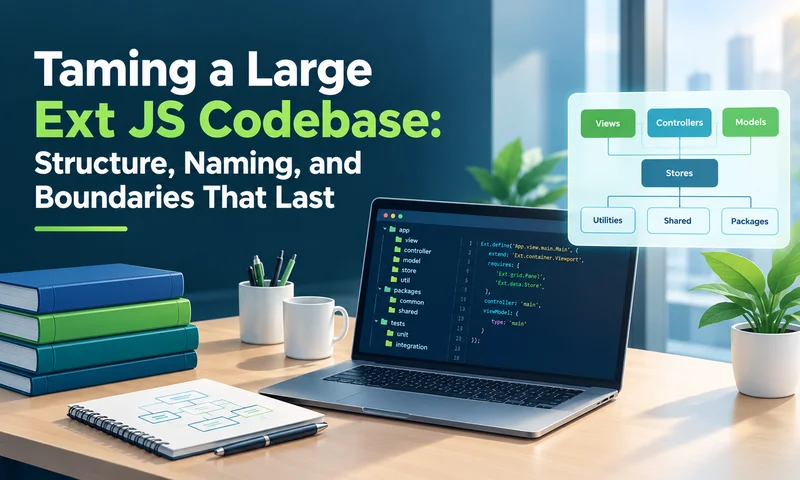
1. Let the namespace mirror the folder structure
Ext’s class loader maps class names to file paths, so use that to your advantage. If someone can guess where a class lives from its name, they can find it without searching.
    app/
    ├── Application.js
    ├── model/
    │   ├── Base.js
    │   └── Account.js
    ├── store/
    │   ├── Base.js
    │   └── Accounts.js
    ├── view/
    │   ├── main/
    │   │   ├── Main.js
    │   │   ├── MainController.js
    │   │   └── MainModel.js
    │   └── account/
    │       ├── AccountGrid.js
    │       ├── AccountGridController.js
    │       ├── AccountGridModel.js
    │       └── AccountForm.js
    ├── common/
    │   ├── grid/
    │   │   └── BaseGrid.js
    │   ├── form/
    │   │   └── Validators.js
    │   └── util/
    │       └── Format.js
    └── overrides/
Two rules keep this working:
- Group views by feature, not by type. view/account/ holding the grid, form, controller, and view model is far easier to reason about than controllers/, grids/, and forms/ folders spread across the tree.
- Anything used by more than one feature goes in common/. Anything used by one feature stays in that feature’s folder. Promote code to common/ only when a second consumer actually appears.
2. Use a consistent naming scheme
Consistency matters more than which scheme you choose. A workable one:
| Artifact | Class name | Alias / xtype |
|---|---|---|
| View | Acme.view.account.AccountGrid | xtype: ‘accountgrid’ |
| View controller | Acme.view.account.AccountGridController | alias: ‘controller.accountgrid’ |
| View model | Acme.view.account.AccountGridModel | alias: ‘viewmodel.accountgrid’ |
| Model | Acme.model.Account | n/a |
| Store | Acme.store.Accounts | alias: ‘store.accounts’ |
A view, its controller, and its view model should share a prefix, so they sort together in any file tree or search result.
3. Move from Ext.extend to Ext.define
If you are maintaining older code, you have probably seen this pattern:
    // Ext JS 3.x style
    Acme.AccountGrid = Ext.extend(Ext.grid.GridPanel, {
        initComponent: function () {
            Ext.apply(this, {
                store: new Acme.AccountStore(),
                columns: [ /* ... */ ]
            });
            Acme.AccountGrid.superclass.initComponent.call(this);
        }
    });
    Ext.reg('accountgrid', Acme.AccountGrid);
Its problems are architectural, not cosmetic. The class registers itself as a global, dependencies are implicit, and the store is instantiated inside the component, so you can’t swap it for testing. The Ext.define equivalent makes dependencies declarative and the data source injectable:
    Ext.define('Acme.view.account.AccountGrid', {
        extend: 'Ext.grid.Panel',
        xtype: 'accountgrid',

        requires: ['Acme.store.Accounts'],

        controller: 'accountgrid',
        viewModel: { type: 'accountgrid' },

        bind: { store: '{accounts}' },

        columns: [
            { text: 'Code', dataIndex: 'code', width: 120 },
            { text: 'Description', dataIndex: 'description', flex: 1 }
        ]
    });
You don’t need to migrate everything at once. Convert a class when you touch it, and leave the rest alone.
4. Keep views declarative and push logic into controllers
A view should describe what is on screen. Anything that happens in response to the user belongs in a controller:
    Ext.define('Acme.view.account.AccountGridController', {
        extend: 'Ext.app.ViewController',
        alias: 'controller.accountgrid',

        onAddClick: function () {
            this.getView().add({ xtype: 'accountform', record: Acme.model.Account.create() });
        },

        onRowDblClick: function (grid, record) {
            this.fireViewEvent('accountselected', record);
        }
    });
Notice fireViewEvent. The controller never reaches into a sibling view. It announces what happened, and whoever composes the screen decides what to do about it. This is what keeps features from becoming tangled with each other.
The view model owns the data bindings:
    Ext.define('Acme.view.account.AccountGridModel', {
        extend: 'Ext.app.ViewModel',
        alias: 'viewmodel.accountgrid',

        stores: {
            accounts: { type: 'accounts', autoLoad: true }
        }
    });
5. Centralize data configuration in base classes
Without a shared base, every model and store repeats the same proxy configuration, and one change to your API contract becomes a 40-file edit. Define it once with a schema:
    Ext.define('Acme.model.Base', {
        extend: 'Ext.data.Model',

        schema: {
            namespace: 'Acme.model',
            urlPrefix: '/api',
            proxy: {
                type: 'ajax',
                url: '{prefix}/{entityName:uncapitalize}',
                reader: { type: 'json', rootProperty: 'data' }
            }
        }
    });

    Ext.define('Acme.model.Account', {
        extend: 'Acme.model.Base',

        fields: [
            { name: 'id', type: 'int' },
            { name: 'code', type: 'string' },
            { name: 'description', type: 'string' }
        ],

        validators: {
            code: { type: 'length', min: 1, max: 20 },
            description: 'presence'
        }
    });
Every model that extends Acme.model.Base now inherits the endpoint convention, the reader settings, and any error handling you add later. Putting validators on the model also gives you one definition of “valid” that forms, grids, and tests can all share.
6. Build reusable components, not copies
When two grids differ only in columns and store, extract a base class and let each screen declare only what is different:
    Ext.define('Acme.common.grid.BaseGrid', {
        extend: 'Ext.grid.Panel',

        plugins: ['gridfilters'],
        loadMask: true,
        emptyText: 'No records found.',
        viewConfig: { stripeRows: true },

        dockedItems: [{
            xtype: 'pagingtoolbar',
            dock: 'bottom',
            displayInfo: true,
            bind: { store: '{accounts}' }
        }]
    });
One caveat: base classes are powerful but easy to over-engineer. Extract after the third repetition, not the first. A base class built on speculation tends to grow flags and options until nobody understands it.
7. Let the build enforce the boundaries
Conventions that rely on discipline erode. Sencha Cmd gives you the tooling to make them stick:
- Always declare requires. Cmd uses it to build the dependency graph, so a missing entry fails in the production build rather than silently working in dev.
- Split shared code into a package (sencha generate package) once multiple apps need it. This forces a clean public interface.
- Run the production build in CI, not just on release day. Dependency and minification problems surface within minutes instead of weeks.
sencha app build --production
A short checklist
- Does the class name tell you where the file lives?
- Is each view’s logic in a controller, and its data in a view model?
- Is proxy and reader configuration defined in exactly one place?
- Can you name the second consumer of everything in common/?
- Does CI build the app for production on every merge?
If you can answer yes to most of these, adding the fortieth screen costs about the same as adding the fourth, and that is the real measure of a healthy architecture.
MVP Developer Series
Web Application Testing
Test Automation
Software Testing
Enterprise Application Development
Ext JS


Latest Content

Performance Tuning Large Grids and Stores in Ext JS
Grids are where enterprise Ext JS applications live, and they are also where performance problems…
November 4, 2026
From JavaScript Library to React: Bringing Ext JS into Modern Front Ends
Many of today’s most important business applications started life in the era of the JavaScript…
November 4, 2026
Best JavaScript Framework for Data-Intensive Applications
“What’s the best JavaScript framework?” has no single answer, because frameworks are built for different…
November 4, 2026