Ask Sencha AI
React UI Component Library Comparison: ReExt vs Syncfusion vs KendoReact vs MUI
Oct 29, 2026
109 Views
Get a summary of this article:
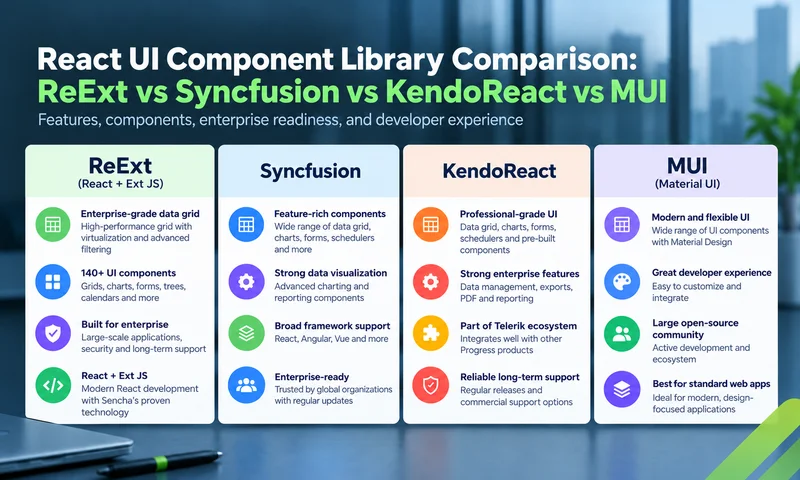
Choosing a React UI component library for an enterprise app usually comes down to a short list. Four names come up again and again: ReExt, which brings the Ext JS framework into React; Syncfusion, with its broad Essential Studio suite; KendoReact from Progress Telerik; and MUI, the most widely used Material Design library, with its MUI X extensions.
All four are capable, actively maintained and used in production by large organizations. They differ in philosophy, in where their strongest features live, and in how they’re licensed. This comparison looks at each library’s approach, its data grid and the components around it, developer experience, licensing and cost, and finishes with a scenario guide for choosing.
Details reflect each vendor’s public information as of October 2026. Vendors change features, tiers and prices regularly, so confirm on their sites before deciding.
At a glance
| ReExt | Syncfusion | KendoReact | MUI | |
|---|---|---|---|---|
| What it is | Ext JS components used in React | A suite of React components | A suite of React components | Material Design components (Material UI) plus advanced MUI X components |
| Components | 140+ Ext JS components | 145+ React components | 120+ (50+ in the free tier) | Core library plus MUI X data grid, date pickers, charts and tree view |
| Free production option | No (30-day trial) | Community License for eligible small organizations | KendoReact Free (50+ components) | Material UI and MUI X community components are open source |
| Paid model | Included in Ext JS Pro or Enterprise, per user per year | Per-developer annual subscription | Per-developer subscription or perpetual license | MUI X Pro and Premium, commercial licenses |
| Data grid strengths | Grouping, editing, locking, tree and server-side data in Pro; pivot and export in Enterprise | Full grid feature set under one license | Strong grid; grouping, Excel export and virtualization in premium | Free core grid; advanced features in Pro and Premium |
| Data layer | Shared Ext JS stores across components | Data manager utility for grids and other components | Data-processing helpers; state in React | State in React or your own library |
| Best fit | Data-heavy enterprise apps, Ext JS teams moving to React | Teams wanting the broadest component catalog | Teams standardizing on Telerik tools | Material Design apps and design-led products |
Read More: 15 Best Web Application Frameworks in 2026 – Compared
The four libraries
ReExt
Approach. ReExt brings Ext JS, a mature component framework for data-heavy web apps, into React. Each Ext JS component is used as a <ReExt> element, picked with an xtype and configured through a config prop, with events delivered to React as props such as onEdit.
Strengths. Depth in data components: the Ext JS grid, pivot grid, trees, charts, forms and application layouts, all sharing one theme and one data layer. Teams with existing Ext JS apps can reuse their components, stores and custom classes in React.
Watch-outs. There’s no free production tier. The current release supports the Ext JS classic toolkit and theme. Configuration follows Ext JS conventions rather than typical React component props, which Ext JS developers know well and React developers need to learn.
Best for. Data-heavy enterprise apps such as back-office systems, dashboards and trading screens, and Ext JS teams moving to React.
Syncfusion
Approach. A large suite of React components, published as individual npm packages, under one Essential Studio license that also covers other frameworks.
Strengths. The broadest catalog in this comparison, at more than 145 React components, including data grid, pivot table, tree grid, scheduler, charts and document-related components. One license unlocks all grid features.
Watch-outs. With so many components, consistency and depth vary by component, so test the ones you depend on. Pricing is per developer, sold with a minimum team size.
Best for. Teams that want one vendor for a very wide range of components, and small organizations that qualify for the free Community License.
KendoReact
Approach. React components from Progress Telerik, with a free tier and a commercial tier, plus design tools and themes shared with other Telerik products.
Strengths. More than 120 ui components in the commercial edition, a polished data grid, and mature themes. KendoReact Free gives access to more than 50 components at no cost.
Watch-outs. Many grid features that enterprise apps need, such as grouping, Excel export and virtualization, are in the premium tier.
Best for. Teams already standardizing on Telerik tools across frameworks, or those who want to start free and upgrade.
MUI
Approach. Material UI, the open-source core, implements Google’s Material Design. MUI X adds advanced components, including the data grid, date and time pickers, charts and tree view, with free community versions and commercial Pro and Premium tiers.
Strengths. The largest community of the four, excellent design-system tooling, and a free core that suits a wide range of apps.
Watch-outs. Row grouping, aggregation, Excel export and pivoting are in Premium, two tiers above the free grid. MUI X pricing and licensing changed in April 2026, including a move to application-based licensing.
Best for. Apps built on Material Design, and design-led products where the grid needs are moderate.
Head to head: the data grid
In enterprise apps, the data grid usually decides the choice. The table shows which tier includes each feature. Free means a free or community edition; Licensed means Syncfusion’s single license (commercial, or Community for eligible organizations); a tier name means you need that tier.
| Grid feature | ReExt | Syncfusion | KendoReact | MUI X |
|---|---|---|---|---|
| Grouping and aggregation | Pro | Licensed | Premium | Premium |
| Pivoting | Enterprise (pivot grid) | Licensed (Pivot Table component) | Separate PivotGrid; check tier | Premium |
| Excel export | Enterprise | Licensed | Premium | Premium |
| Range selection and clipboard | Pro | Licensed | Check tier | Premium |
| Tree data | Pro | Licensed (Tree Grid component) | Separate TreeList; check tier | Pro |
| Master-detail | Pro | Licensed | Check tier | Pro |
| Column locking or pinning | Pro | Licensed | Check tier | Pro |
| Multi-column sorting | Pro | Licensed | Premium | Pro |
| Virtualization | Pro | Licensed | Premium | Free |
| Inline editing | Pro | Licensed | Basic free; advanced premium | Free |
ReExt has no free tier, so “Pro” means its entry-level paid plan. For a deeper grid-only comparison, including AG Grid and TanStack Table, see Enterprise React Data Grid: The Features Enterprise Teams Need, and What Each Grid Includes.
Beyond the grid
Data-heavy screens also need charts, forms, dates, trees and layouts. How each library covers them:
| Component area | ReExt | Syncfusion | KendoReact | MUI |
|---|---|---|---|---|
| Charts | Cartesian, polar and gauge charts | Extensive chart library | Chart components | MUI X Charts |
| Forms and inputs | Full field set with validation and form layouts | Full set of inputs | Full set of inputs and form helpers | Material UI inputs; form state via your own library |
| Date and time pickers | Included | Included | Included | MUI X Date and Time Pickers |
| Scheduler or calendar | Calendar (Enterprise) | Scheduler | Scheduler | Check current MUI X offering |
| Trees | Tree panel and tree grid | Tree view and tree grid | Tree view and tree list | MUI X Tree View |
| Application layouts | Border, card, accordion and table layouts with splitters | Splitter and layout components | Splitter and layout components | Grid and stack layout primitives |
| Shared data across components | Ext JS stores shared by grids, charts, trees and forms | Data manager utility | Data-processing helpers | Your own state management |
The last row matters most for data-heavy apps. With ReExt, a grid and a chart can read the same store, so editing a value in one updates the other without extra state code.
Developer experience, theming and data handling
How you write components
Syncfusion, KendoReact and MUI follow typical React patterns: you import a component per feature and configure it with props, often with child components for columns. ReExt uses one component for everything, configured with an Ext JS config object:
    import ReExt from '@sencha/reext';

    <ReExt
      xtype="grid"
      style={{ height: 400 }}
      config={{
        store: { data: orders, groupField: 'region' },
        features: [{ ftype: 'groupingsummary' }],
        columns: [
          { text: 'Customer', dataIndex: 'customer', flex: 1 },
          { text: 'Amount', dataIndex: 'amount', xtype: 'numbercolumn', summaryType: 'sum' },
        ],
      }}
      onSelect={(grid, records) => openOrder(records[0])}
    />
The trade-off: the ReExt style is very compact for complex components and maps directly to years of Ext JS documentation and examples, while the JSX-per-component style feels more familiar to React developers new to Ext JS.
Comparison
| ReExt | Syncfusion | KendoReact | MUI | |
|---|---|---|---|---|
| API style | One <ReExt> element, xtype plus config object, on event props | JSX components with props and child directives | JSX components with props | JSX components with props |
| TypeScript | Declarations included | Supported | Supported | Supported |
| Next.js | Supported, client components | Supported | Supported | Supported |
| Theming | One Ext JS theme across all components (classic theme in current release) | Several built-in themes and a theme designer | Several built-in themes and a theme builder tool | Highly customizable theme system based on Material Design |
| Community | Ext JS community and Sencha forums | Vendor forums and docs | Vendor forums and docs | Largest open-source community of the four |
| Reuse of existing Ext JS code | Yes: custom components, stores and overrides | No | No | No |
| AI assistance | Ask Sencha AI for Ext JS and ReExt configs | Vendor AI tools | AI productivity tools offered with licenses | Community and docs |
Licensing and cost
All four are licensed per developer in some form, but what a license covers, and which tier you need, differs a lot.
| ReExt | Syncfusion | KendoReact | MUI | |
|---|---|---|---|---|
| Free option | 30-day trial; no free production tier | Community License for organizations under $1M revenue, with 5 or fewer developers and 10 or fewer employees | KendoReact Free: 50+ components | Material UI core and MUI X community components (MIT) |
| Paid model | Included in Ext JS Pro or Enterprise, per user, billed annually | Per-developer annual subscription; published pricing starts at a five-developer minimum | Per-developer annual subscription or perpetual license with 12 months of updates and support | MUI X Pro and Premium; application-based licensing introduced in April 2026 |
| What the paid tier covers | The full Ext JS component library; pivot, calendar, D3 and exporter in Enterprise | All components and grid features | 120+ components, including premium grid features | Pro or Premium features of MUI X components |
| Who must be licensed | Each developer using it | Each developer | Each developer | Developers contributing front-end code to projects that use Pro or Premium |
| Published price | Pro $125 and Enterprise $158 per user per month, billed annually | See vendor pricing | See vendor pricing | See vendor pricing (changed April 2026) |
How to compare cost fairly
Price the tier that covers every feature on your must-have list, for every developer who needs a license, over three years. Then add the engineering time to build or integrate anything that tier doesn’t include.
For example, with ReExt’s published prices, a team of 10 developers pays $15,000 a year on Pro, or $18,960 a year on Enterprise if it needs pivoting and Excel export. Both cover the full component library, so there’s nothing else to buy for grids, charts, forms or layouts. Run the same calculation with each vendor’s current quote, and watch for features your app needs that sit in a higher tier.
Which React UI component library should you choose?
There’s no single winner. Each library is the best choice for a different kind of team.
| Your situation | Strongest fit | Why |
|---|---|---|
| Data-heavy enterprise app: grids, charts and forms on the same screens | ReExt | Deep data components sharing one data layer, one theme and one API |
| Existing Ext JS app moving to React | ReExt | Reuse existing components, stores and custom classes instead of rewriting |
| Need the widest possible range of components, including document and file components | Syncfusion | The largest catalog under one license |
| Small organization that qualifies for a free commercial license | Syncfusion | Community License covers the full suite |
| Team already standardized on Telerik tools across frameworks | KendoReact | Shared themes, tools and vendor relationship |
| Want to start free and upgrade later | KendoReact or MUI | Free tiers with clear upgrade paths |
| App built on Material Design, or design-led product | MUI | Material UI’s design system and the largest community |
| Moderate grid needs inside a broader design system | MUI | Free core grid, with Pro features when needed |
Where ReExt is strongest, and where it isn’t
ReExt stands out when the hardest part of your app is its data: many grids with grouping, editing and locked columns, charts and forms working on the same records, complex layouts, and years of maintenance ahead. It’s the only option of the four that lets Ext JS teams bring their existing code into React.
It’s not the best fit if you need a free production license, if your brand demands a heavily customized visual design, or if your app is mostly content with only light data needs. In those cases, MUI or KendoReact’s free tiers are worth a closer look.
Frequently asked questions
What is the best React UI component library for enterprise apps?
It depends on the app. For data-heavy enterprise apps, ReExt offers the deepest integrated data components; Syncfusion offers the widest catalog; KendoReact fits teams on Telerik tools; and MUI suits Material Design and design-led apps.
Is ReExt a good Syncfusion alternative?
For data-heavy apps, yes. ReExt focuses on depth in grids, pivot grids, trees, charts, forms and layouts that share one data layer, and it’s the natural choice for teams with existing Ext JS code. Syncfusion offers a broader catalog, including components outside data apps.
Is there a free version of these libraries?
MUI’s core and MUI X community components are open source, KendoReact Free includes more than 50 components, and Syncfusion offers a free Community License to eligible small organizations. ReExt offers a 30-day trial but no free production tier.
Which library has the best React data grid?
All four have capable grids, but feature tiers differ. Syncfusion includes all grid features under one license. ReExt includes grouping, editing, locking, tree data and server-side data in its Pro plan, with pivoting and export in Enterprise. KendoReact and MUI keep features such as grouping and Excel export in their premium tiers.
Can I use ReExt alongside MUI or another library?
Yes. ReExt components are React components, so teams often use them for data-heavy screens while keeping another library for simpler screens in the same app.
The right library for your data
ReExt, Syncfusion, KendoReact and MUI are all strong React component libraries. The best choice depends on where your app’s complexity lives, which features you need in which tier, and what you already have.
If your app is built around data, with grids, charts and forms on the same screens and years of maintenance ahead, or if you’re bringing an Ext JS app into React, ReExt gives you Ext JS’s 140+ components and shared data stores inside React, under one license.
Next steps: start a 30-day ReExt trial or read React Component Library for Data-Heavy Apps: Why One Vendor Beats Five.
React
UI Component Comparison
React Component Libraries
React UI Components
Enterprise React
Enterprise Application Development


Latest Content

Testing Ext JS Applications: What Is Actually Worth Automating
Ask a team with a ten-year-old Ext JS application how much of it is covered…
October 29, 2026

Building a Reusable React UI Component Around the Ext JS Data Grid
The Ext JS data grid can do almost anything an enterprise screen needs: grouping, summaries,…
October 29, 2026

Beyond the Grid: Pivot, Tree and Calendar React UI Components with ReExt
The data grid gets most of the attention in enterprise React apps, and for good…
October 29, 2026