



 Ask Sencha AI
How to Quickly Customize Ext JS Data Grid (Part 4/6) – Using Flexible Methods
March 19, 2020
3899 Views
Get a summary of this article:
In this fourth article of the 6-part “Ext JS Grid Customization” blog series, we focus on using flexible methods to customize grid data. If you missed reading the previous posts, take a quick read here:
Customize using Built-in Grid and Column Properties
Customize using Grouping Methods
Customize using Row Editing Methods
Ext JS provides flexible methods to customize data. The example here shows a grid with a sample NBA 2020 player ratings data.
For example, if we want to display the height of the player in the correct format (ft and inches) or format the salary (with the correct thousands separator), we can do this within the Renderer method or use the formatter property.
This is how the initial data is setup:
data: [{
            player: 'Kemba Walker',
            team: 'Boston Celtics',
            rating: 88,
            dunkRating: 30,
            threePointRating: 83,
            position: 'PG',
            ht: 60,
            salary : 32742000
    	}, {
            player: 'Jayson Tatum',
            team: 'Boston Celtics',
            rating: 86,
            dunkRating: 83,
            threePointRating: 90,
            position: 'SF',
            ht: 68,
            salary:7830000
    	}, {
            player: 'Jaylen Brown',
            team: 'Boston Celtics',
            rating: 85,
            dunkRating: 82,
            threePointRating: 85,
            position: 'SG',
            ht: 66,
            salary:6534829
    	}, {
            player: 'Gordon Hayward ',
            team: 'Boston Celtics',
            rating: 82,
            dunkRating: 81,
            threePointRating: 75,
            position: 'PG',
            ht: 67,
            salary: 32700690
    	}, {
            player: 'Marcus Smart',
            team: 'Boston Celtics',
            rating: 82,
            dunkRating: 74,
            threePointRating: 50,
            position: 'SG',
            ht: 63,
            salary: 12553471
    	}]
We want to format the height and salary of the players. Here’s how we expect them after customization.
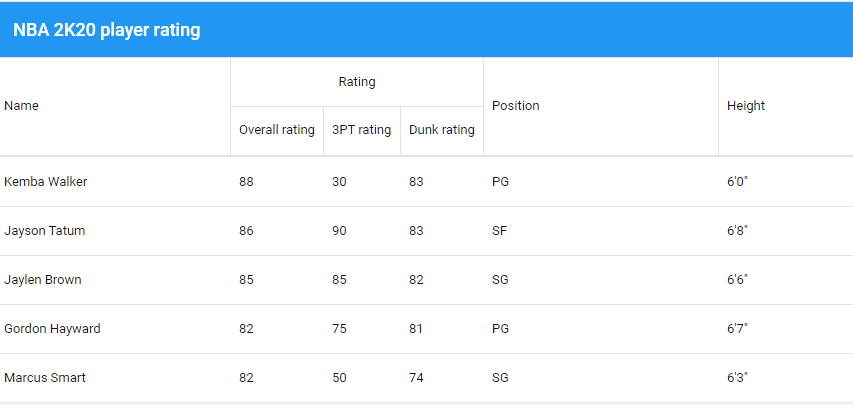
How to change the format of the player height view?
The “Renderer” method is used to transform data before it is rendered.
Override “renderer” method in column configuration:
    {
    	dataIndex: 'ht',
    	text: 'Height',
    	flex: 1,
    	renderer: function(value) {
            let height = value.toString();
            return height.substring(0, 1) + '\'' + height.substring(1, 2) + '"';
    	}
    }
How to change the formatting of the salary values?
Formatter can use Ext.util.Format methods directly in configuration.
Use “formatter” property in column configuration :
  {
        dataIndex: 'salary',
        formatter: 'usMoney',
        text: 'Salary',
        flex: 1
  }
Sencha Fiddle:
Processing Data and Customizing Rendered Values
Ext.Template or XTemplate can be used to process grid data and customize the rendered values.
Specific column type
It is possible to use specific column to display specific data types :
- Ext.grid.column.Boolean for true/false values.
- Ext.grid.column.Date for date/time values.
- Ext.grid.column.Number for numeric values.
{
        xtype: 'numbercolumn',
        dataIndex: 'salary',
        text: 'Salary',
        flex: 1
},  {
        xtype: 'booleancolumn',
        dataIndex: 'lastYearContract',
        text: 'Is last year contract',
        trueText: 'Yes',
        falseText: 'No',
        flex: 1
    }
Sencha Fiddle:
Stay tuned for our next article covering ‘How to use Widget Column Methods to Customize Your Grid’
Build Your Data Grid with Ext JS 7.1
The free 30-day trial of Ext JS 7.1 provides full access to the product features. Get started today and see how you can build a high-performing data grid for your application.


Latest Content

React Component Library for Data-Heavy Apps: Why 1 Vendor Beats 5
Data-heavy React apps rarely start with five UI vendors. They get there one reasonable decision…
October 21, 2026

How to Standardize on One UI Component Library Across Your React Apps
In most large organizations, every React app has its own UI stack. One team uses…
October 21, 2026

UI Component Library vs Component Framework: What Enterprise React Teams Need
Ask a React team what they use for UI, and you’ll usually hear the name…
October 21, 2026


