



 Ask Sencha AI
Dean Ranft is Third Place Winner in Sencha Theming Contest
April 7, 2017
1856 Views
Get a summary of this article:
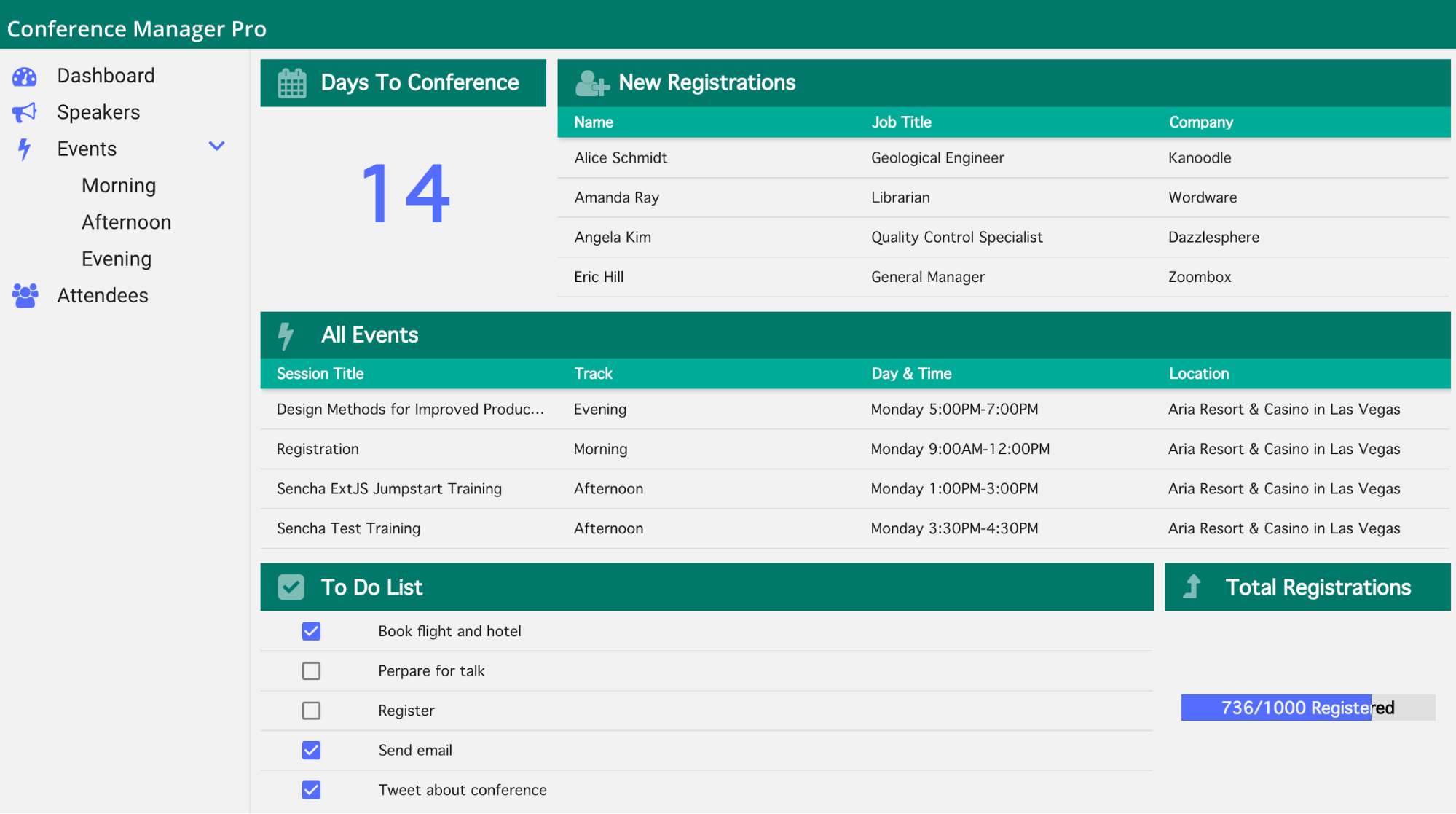
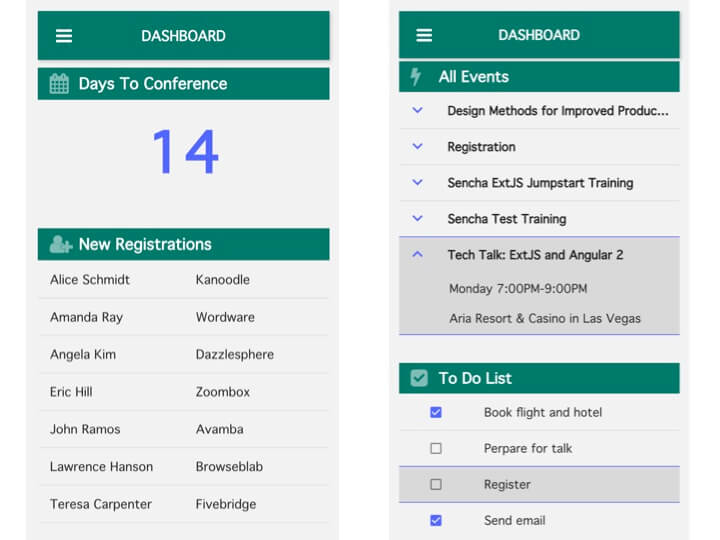
We’d like to congratulate Dean Ranft on winning third place in the Sencha Theming Contest! Our goal was to highlight how easy it is to use the latest advancements in Sencha Themer to modify the theme of an existing application. For the contest, we used this conference application.
Here are two screenshots of Dean’s design.
Desktop View
Mobile View
Judges’ Comments
Our contest judges included product managers, engineers, and key members of our UX team. What they liked most about this design was:
- The background color of this app is a great alternative to a bright white background which could have a harsh contrast with black text.
- The blue and green colors used in this app complement each other quite well and have a fun modern feel.
- The overall simplicity of this app, especially the grid styling, creates a clean interface.
If you’d like to leverage Dean’s theme, you can access the package on GitHub.
How Dean Created His Design
We asked Dean to answer a few questions about his experience with Ext JS and the process he went through to create his design.
How much experience do you have with Ext JS, Sencha tools, Sass, and theming?
I started developing apps with Ext JS 3, but didn’t use it continuously. I’ve used Sass for five years. This was my first Ext JS theme using Themer, but I’ve developed, adapted, and extended website front-ends for almost 10 years.
How did you create this design?
I had a little bit of time before Christmas, and I headed over to the material design palette to find a color palette for the theme as a starting point. I picked the dark primary color from the website and used it as the base color in Themer. After I chose the base color, I used the 10% lighter and darker color feature from Themer to derive the lighter teal tone. For the accent colors (icons etc), I chose a blue tone that provided a nice contrast to the teal. In the end, I picked a light gray as the background color. In my opinion, this color is a bit easier on the eyes compared to the default white.
Where did you get your inspiration for the design?
Mainly from the teal/blue color palette in the material design palette.
Describe the process you used to create this theme.
I chose the Material Design preset in Themer to start this theme. Next, I set my chosen color (dark teal) as the base color and tested different color variations until I was satisfied with the look. Then, I applied the color schema to all the necessary components. If I was not able to target a component through Themer, I manually wrote Sass to apply any styles to that component.
Describe your experience using Sencha Themer.
I used the first EA of Themer that was released after SenchaCon. Starting a theme was pretty straightforward and easy. Styling the base colors and base elements was also no problem. The color picker with the lighter and darker feature was really handy.
About Dean:

Dean works as a Front-end Developer at dkd Internet Service GmbH based in Frankfurt, Germany. He spends his day developing and architecturing websites and web applications. As an experienced Ext JS developer, he also provides on-site consulting to support his customers.


Latest Content
Async/await with Ext JS
Probably one of the most appreciated features of the latest versions of JavaScript is Promises,…
September 3, 2026

Sencha IDE Plugins - JetBrains 6.0.18 Is Here
JetBrains 2026.2 just shipped. So did we. Sencha’s JetBrains plugin is an Integrated Development Environment…
September 2, 2026
MVP Developer Series 1.1 - Responsive layout in Ext JS
Ext JS provides several tools for building a responsive layout. A video was recently published…
August 24, 2026


