Ext JS 7.6 Has Arrived!
August 31, 2022
8106 Views
Get a summary of this article:

We’re very excited to announce the official release of Ext JS version 7.6. This release includes new features for Grids, Modern sliderfield and more, along with quality improvements of 15+ customer requests for both Classic and Modern Toolkit.
Check out the highlights of Ext JS 7.6 below.
What’s New in Ext JS 7.6?
Expanded Grid support: Classic to Modern Parity Features
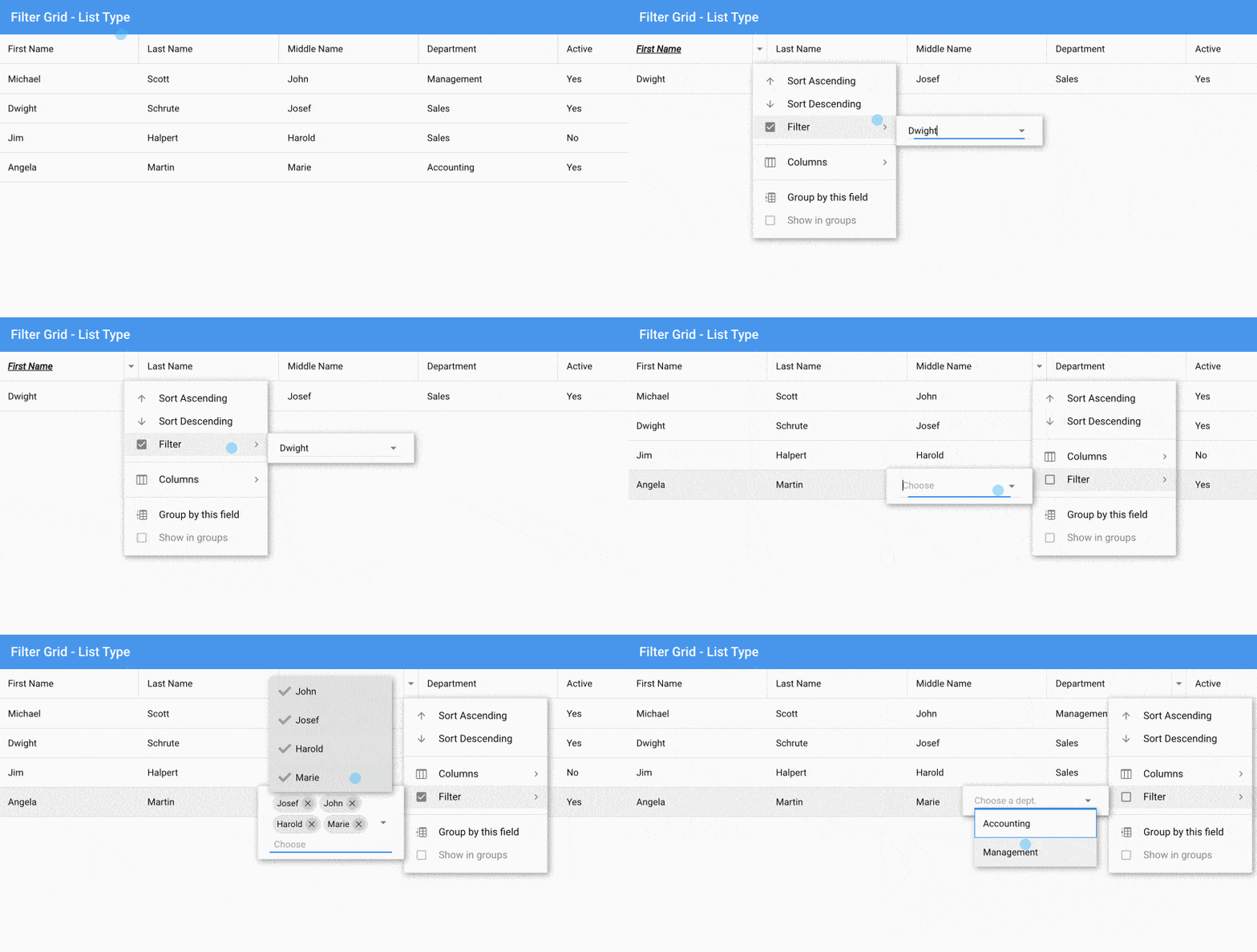
Added the new filter type list for the modern grid. The list grid filter allows you to create a filter selection for the range of unique values found in a store. If you don’t configure a store, the grid’s store is used to create filter selections. For example and usage, refer to the documentation of List filter for the modern grid.

    columns: [{
        text: 'First Name',
        flex: 1,
        dataIndex: 'first',
        filter: 'list' // These are shown in the order found in the grid's store
    }, {
        text: 'Last Name',
        flex: 1,
        dataIndex: 'last',
        filter: {
            type: 'list',
            sorted: true,
            sortDirection: 'ASC' // ASC (default) or DESC
        }
    }, {
        text: 'Middle Name',
        dataIndex: 'middle',
        flex: 1,
        filter: {
            type: 'list',
            menu: {
                items: {
                    list: {
                        multiSelect: true // Allows multiselect filter
                    }
                }
            }
        }
    }, {
        text: 'Department',
        dataIndex: 'department',
        flex: 1,
        filter: {
            type: 'list',
            // define what you want to view in the list to filter (add custom filter)
            menu: {
                items: {
                    list: {
                        valueField: 'dept',
                        displayField: 'dept',
                        placeholder: 'Choose a dept.',
                        store: {
                            storeId: 'mystore',
                            sorters: ['dept'],
                            data: [{
                                dept: 'Management'
                            }, {
                                dept: 'Accounting'
                            }]
                        }
                    }
                }
            }
        }
    }, {
        text: 'Active',
        dataIndex: 'active'
    }]
Shown: Example for Filter Grid – List Type
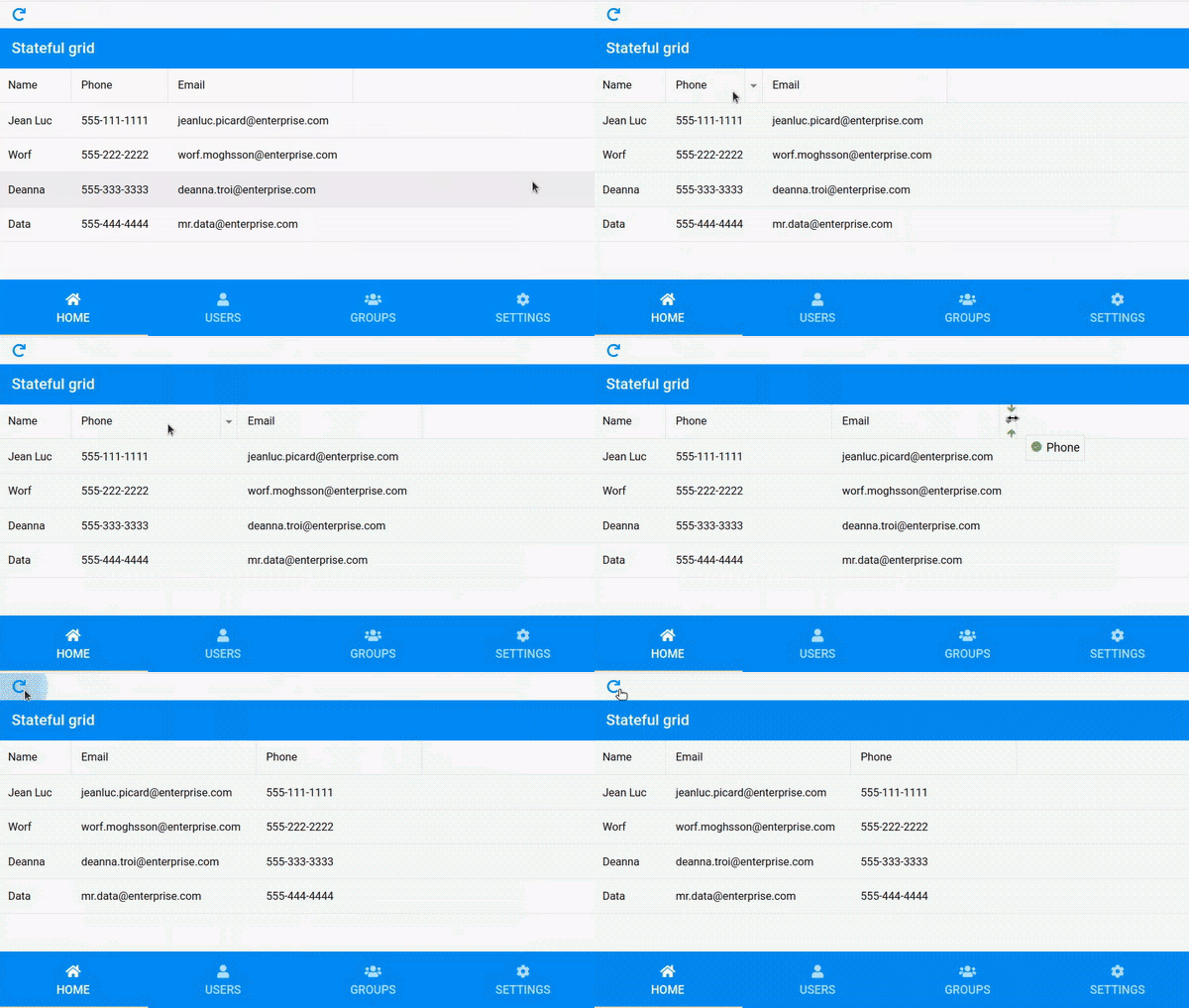
The column width and position for a modern grid are now stateful, just like we have for the classic grid. Users can rearrange the grid as they want, and even after page reload, that look and feel can be remembered, as shown below.

Enhancements
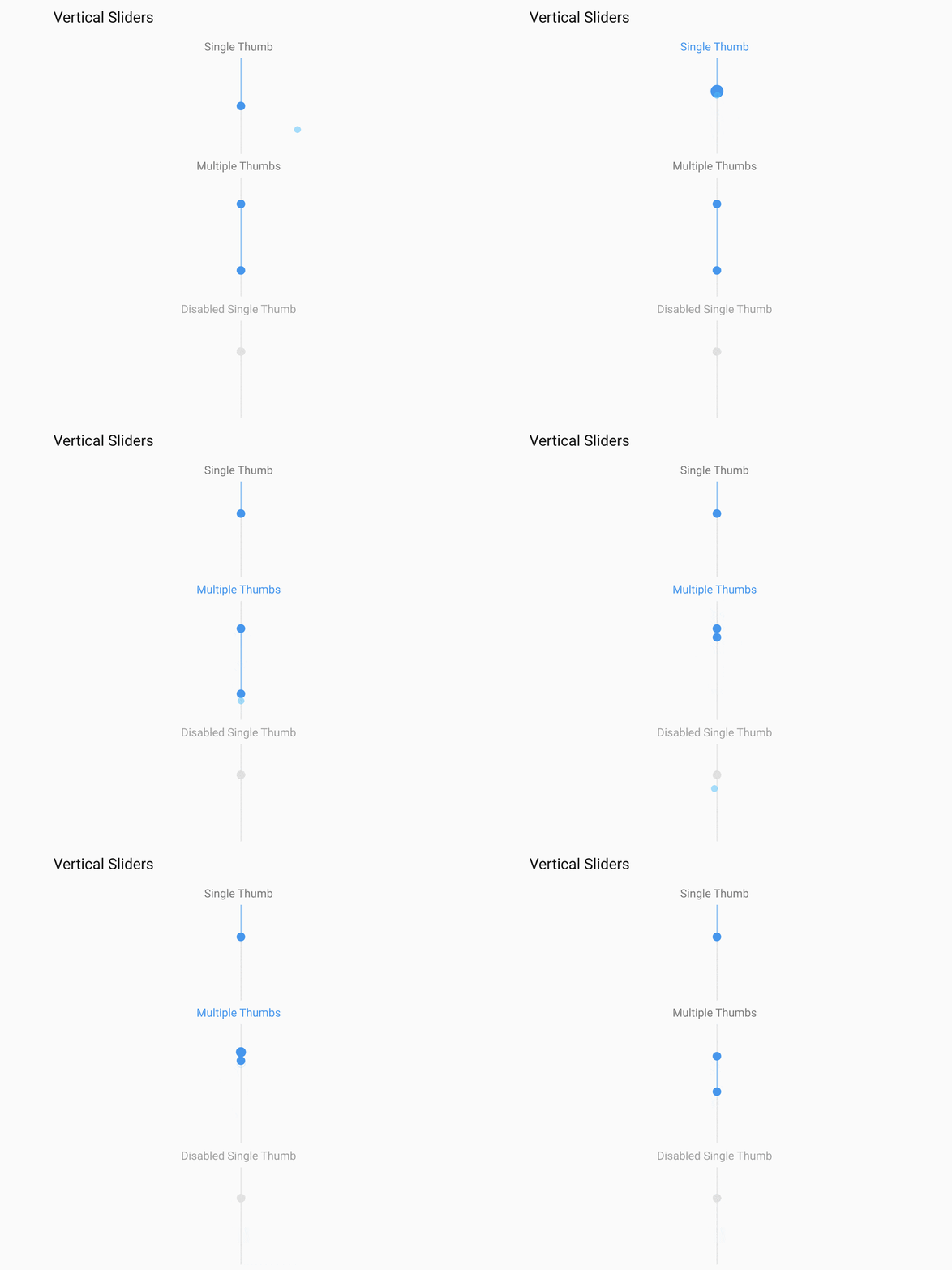
Added vertical option for the Modern Slider component. Until now, the modern toolkit only supported a horizontal slider. The vertical slider requires adding vertical: true config for the modern sliderfield. Please refer to an example in KitchenSink to help show how to configure and use the new vertical slider for a modern toolkit.

    xtype: 'sliderfield',
    label: 'Single Thumb',
    values: 30,
    height: 150,
    vertical: true
Shown: Code sample for vertical slider
For open tooling/npm Sencha CMD central repository, refer to the updated documentation on- how to include Ext JS shared packages using npm.
Quality Improvements
The latest 7.6 release includes a handful of updates from customer requests. This includes:
- Improved selection model for modern virtual stores
- Improved scroll performance for Ext.dataview.List on Windows touch devices
- Improved JAWS screen reader support for classic TreePanel and Grid components
- Ease of use improvements for drag and drop of tree node to HTML editor
- Better alignment of filter bar with browser zoom on 4k screens
- Upgraded Closure Compiler
- Fix for Sencha CMD MacOSX Monterey issue
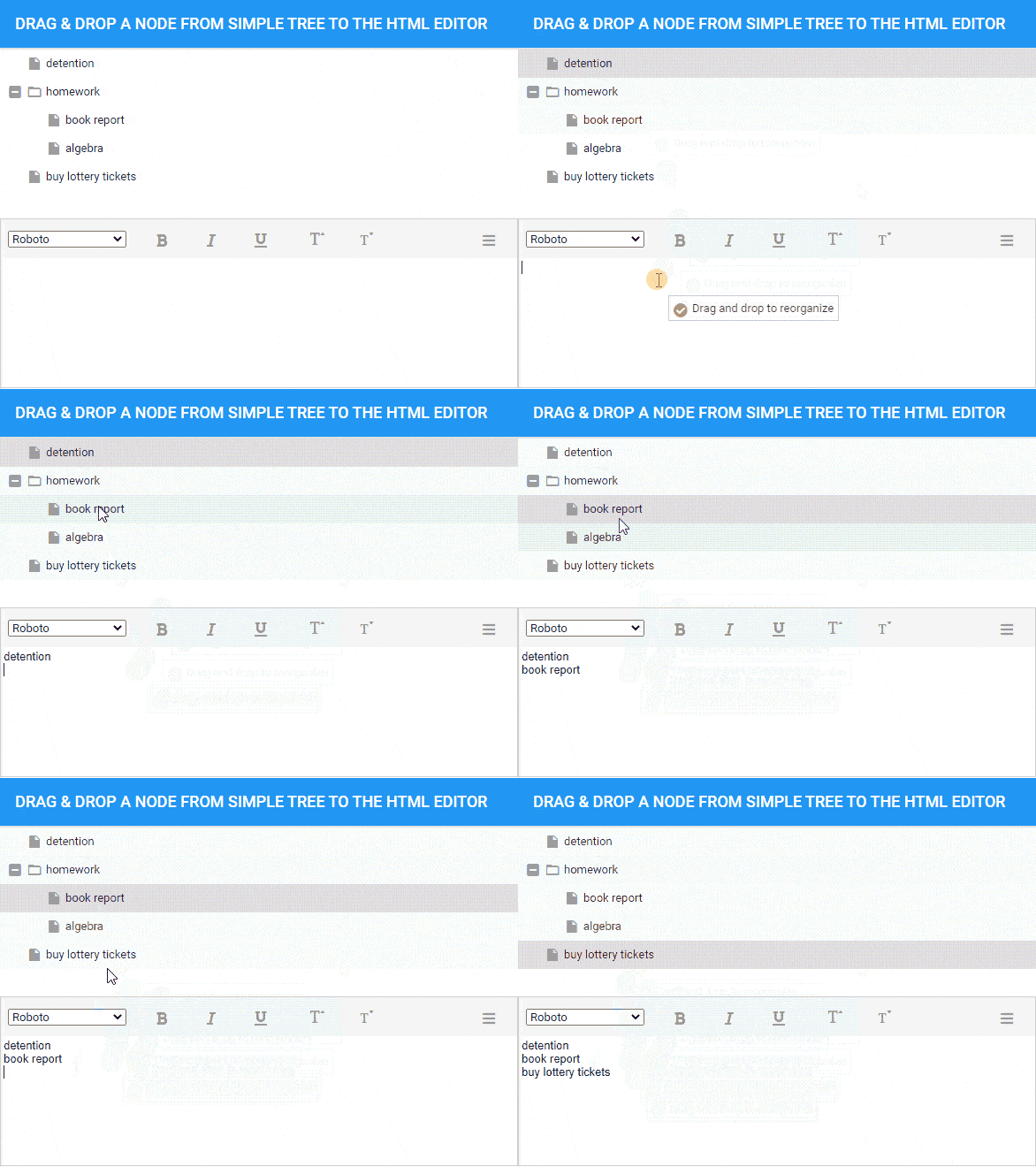
Classic Toolkit – Showcasing Drag & Drop element on the HTML Editor
Please refer to the Ext JS 7.6 release notes, for further details.

ExtGen and Sencha Cmd
Updated ExtGen and Sencha Cmd to support Ext JS 7.6.
Version Support
Provided support for Ext JS 7.6 in Sencha Upgrade Advisor, Sencha Architect and Sencha Themer. Please go to the Support Portal and download the latest versions.
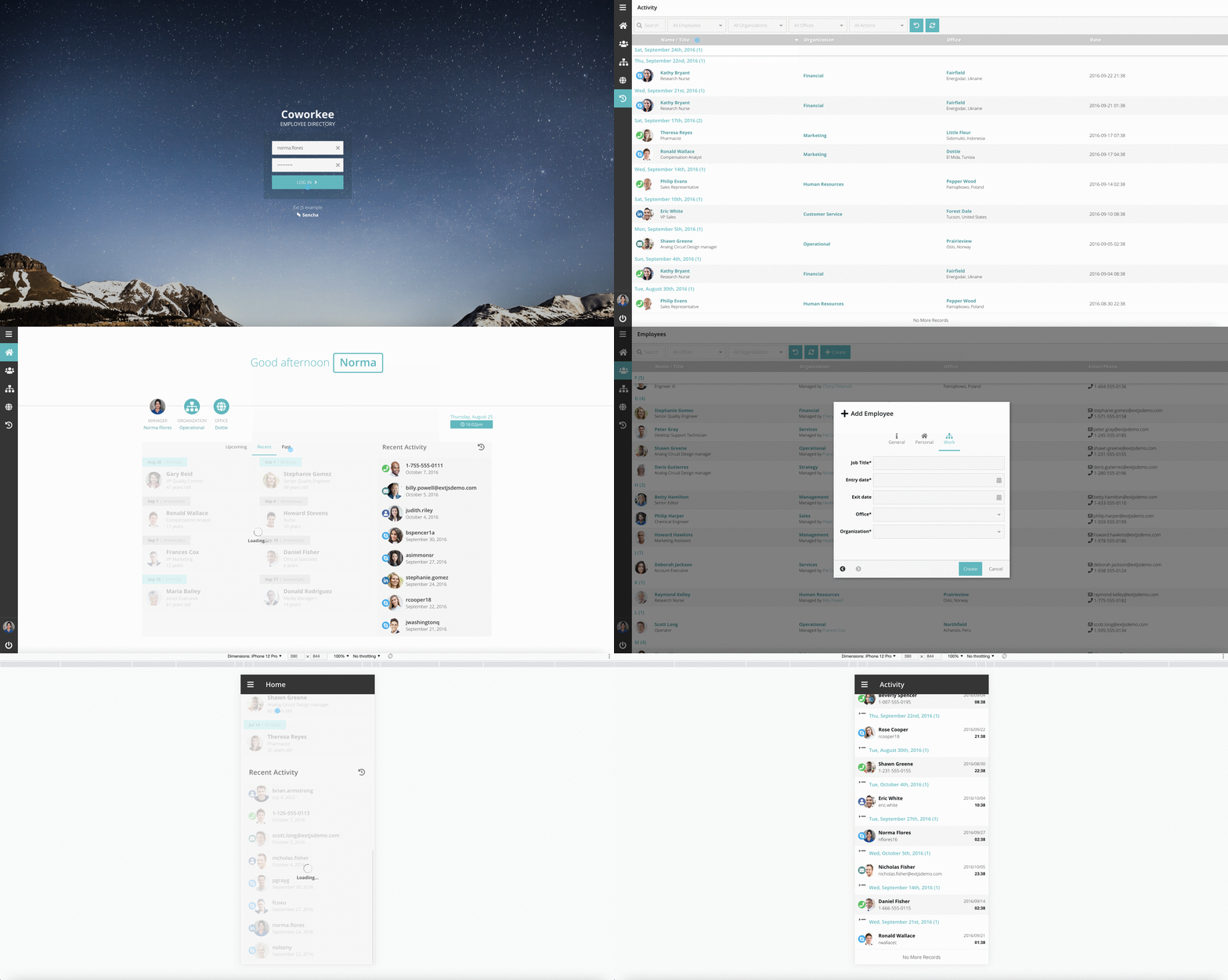
Shown: Coworkee an npm app and updated to the 7.6 version

What’s Next?
The work on Ext JS 7.7 is in full swing*! The Sencha team is pacing well on regular quarterly releases and we are committed to delivering new features, quality, performance and usability enhancements and improvements all along.
Sencha Architect is going to stay and will receive continued updates. As part of the 7.6 release, Sencha Architect 4.3.2 has support for a single version of Ext JS 7.6. Sencha team is gearing up to provide support for on-demand downloading and all the previous versions of Ext JS 7.6. We are also working towards providing support to MAC M1 & M2 versions.
Sencha is gearing up to introduce a new Visual Studio Code extension for Sencha Architect to aid in the rapid development of Ext JS apps by minimizing hand-coding efforts with a low-code editor.
Our goal is to provide you with continual support through quality and performance enhancements. If you have any feedback or questions, drop us a note here or get in touch.
*Features are not committed until completed and GA released.
Ready to check out the Ext JS 7.6 documentation?
We are working hard to serve our community better in all areas. Please do try out our new Ext JS 7.6:
- Download Ext JS 30-day free trial
- Getting Started Guides
- Check out the updated Resource Center
- KitchenSink examples
Be sure to follow us on Twitter and our YouTube Channel for updates. Until next time, let’s build great apps and happy coding.
Looking to Upgrade to 7.6?
The free-to-use Ext JS Upgrade Adviser tool helps identify code changes required to migrate to the latest Ext JS version. Give it a try!
Join to Sencha Discord Server
Are you looking for community engagement? Want to help, learn and share with many Ext JS experts? Join Sencha Discord Server now for free and be part of our community!
- Sencha MVP’s are there.
- Sencha developers are there.
- Expand awareness of Sencha products
- Community Engagement and Contributions
- And more…



Latest Content

Async/await with Ext JS
Probably one of the most appreciated features of the latest versions of JavaScript is Promises,…
September 3, 2026
Sencha IDE Plugins - JetBrains 6.0.18 Is Here
JetBrains 2026.2 just shipped. So did we. Sencha’s JetBrains plugin is an Integrated Development Environment…
September 2, 2026
MVP Developer Series 1.1 - Responsive layout in Ext JS
Ext JS provides several tools for building a responsive layout. A video was recently published…
August 24, 2026