



 Ask Sencha AI
How to Choose a React Grid Component: 12 Features Enterprise Apps Need
October 16, 2026
117 Views
Get a summary of this article:
Picking a React grid component looks easy in week one. Every option sorts columns and scrolls through a few hundred rows. The differences show up months later, when users ask for grouped subtotals, frozen columns, Excel export, and smooth scrolling through 200,000 records, and your grid either has those features or your team has to build them.
This guide gives you the 12 features that separate an enterprise-ready React grid component from a basic table, what to test for each one during evaluation, and a scorecard to compare candidates side by side. For each feature, you’ll also see how it works in ReExt, which brings the Ext JS data grid into React, so you can judge what “built-in” looks like in practice.
How to use this guide
Before comparing grids, mark each of the 12 features for your app:
- Must-have: users need it in the first release, or will within a year.
- Nice-to-have: useful, but you could ship without it.
- Not needed: genuinely irrelevant to your app.
Then, for every must-have, check two things for each candidate grid: whether the feature exists, and whether it’s included in the license tier you plan to buy. Many grids offer a free core and keep advanced features in paid tiers, so “supported” and “included” are not the same thing.
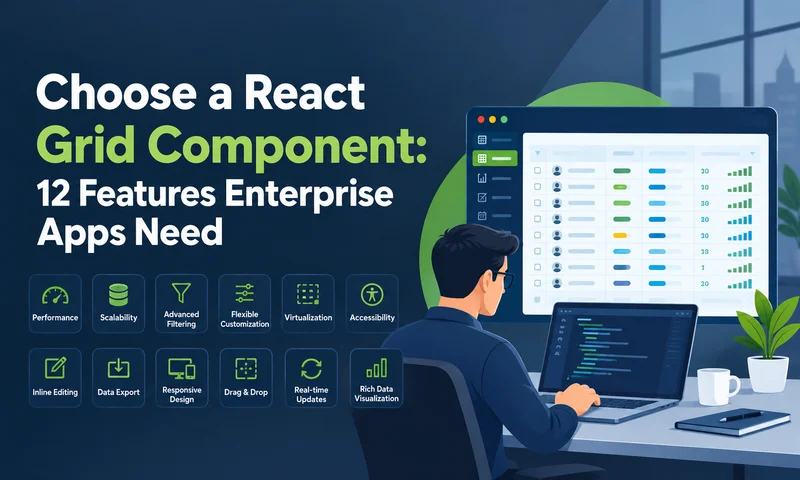
The 12 features fall into three groups: handling data, working with data, and analyzing and accessing data.
Handling data: features 1–4
1. Smooth performance with large datasets
Why it matters. A grid that renders every row as a DOM element slows down sharply as data grows. Enterprise grids render only the rows in view, plus a small buffer, and swap them as users scroll.
What to test. Load a production-sized dataset with your real column count. Measure time to first render, then scroll quickly from top to bottom and watch for blank rows or stutter.
In ReExt. The Ext JS grid uses buffered rendering, so only visible rows are in the DOM. For very large remote datasets, a buffered store loads pages of rows on demand as the user scrolls:
    <ReExt
      xtype="grid"
      style={{ height: 500 }}
      config={{
        store: {
          type: 'buffered',
          pageSize: 200,
          proxy: { type: 'ajax', url: '/api/orders',
            reader: { type: 'json', rootProperty: 'data', totalProperty: 'total' } },
          autoLoad: true,
        },
        columns,
      }}
    />
2. Server-side sorting, filtering and paging
Why it matters. Past a few hundred thousand rows, or when data is sensitive, the browser shouldn’t hold the whole dataset. The server should sort, filter, and page, and the grid should request only what users see.
What to test. Check that sort and filter changes are sent to your API as parameters, that totals and page counts stay correct, and how much code it takes to wire up.
In ReExt. Server-side data is configuration on the store, not custom code:
    store: {
      pageSize: 100,
      remoteSort: true,
      remoteFilter: true,
      proxy: { type: 'ajax', url: '/api/orders',
        reader: { type: 'json', rootProperty: 'data', totalProperty: 'total' } },
      autoLoad: true,
    },
    bbar: { xtype: 'pagingtoolbar', displayInfo: true },
3. Sorting and filtering users can control
Why it matters. Users expect to sort by several columns and filter each column by its data type: a list of statuses, a number range, a date range.
What to test. Multi-column sorting, type-aware filter menus, and whether filters work the same with local and server-side data.
In ReExt. The grid filters plugin adds a filter menu to each column, matched to its type:
    plugins: [{ ptype: 'gridfilters' }],
    columns: [
      { text: 'Customer', dataIndex: 'customer', flex: 1, filter: 'string' },
      { text: 'Amount', dataIndex: 'amount', xtype: 'numbercolumn', filter: 'number' },
      { text: 'Order date', dataIndex: 'orderDate', xtype: 'datecolumn', filter: 'date' },
      { text: 'Status', dataIndex: 'status',
        filter: { type: 'list', options: ['Open', 'Shipped', 'Closed'] } },
    ],
4. Grouping and summaries
Why it matters. Business users think in groups: orders by region, tickets by priority, spend by department. They want subtotals for each group and a grand total.
What to test. Grouping by any column, collapsing groups, per-group and grand-total summaries, and whether summaries update when a value is edited.
In ReExt. Set a group field on the store and add the grouping summary feature; summaries update live as users edit:
    store: { data: orders, groupField: 'region' },
    features: [
      { ftype: 'groupingsummary', groupHeaderTpl: '{name} ({rows.length} orders)' },
      { ftype: 'summary', dock: 'bottom' },
    ],
    columns: [
      { text: 'Customer', dataIndex: 'customer', flex: 1 },
      { text: 'Amount', dataIndex: 'amount', xtype: 'numbercolumn',
        format: '$0,000', summaryType: 'sum' },
    ],
Working with data: features 5–8
5. Inline editing with validation
Why it matters. In operational apps, users don’t just read the grid; they update it. Editing in place is far faster than opening a form for every change, but only if bad values are caught before they’re saved.
What to test. Cell and row editing modes, editors for each data type (text, number, date, dropdown), validation messages, and how a failed save is rolled back.
In ReExt. Add an editing plugin and an editor per column. Validation rules live on the editor, and the onEdit event hands each change to React:
    plugins: [{ ptype: 'cellediting', clicksToEdit: 1 }],
    columns: [
      { text: 'Amount', dataIndex: 'amount', xtype: 'numbercolumn',
        editor: { xtype: 'numberfield', minValue: 0, allowBlank: false } },
      { text: 'Status', dataIndex: 'status',
        editor: { xtype: 'combobox', store: ['Open', 'Shipped', 'Closed'], forceSelection: true } },
    ],
    // on the <ReExt> element:
    onEdit={(editor, ctx) => saveOrder(ctx.record.getData())}
Switch cellediting to rowediting to edit a whole record at once with Update and Cancel buttons.
6. Locked (frozen) columns
Why it matters. In wide grids, users lose track of which row they’re reading once the customer name or ID scrolls out of view. Locking key columns keeps them visible while the rest scroll horizontally.
What to test. Locking one or more columns on the left, how locking interacts with grouping and editing, and whether users can lock or unlock columns themselves.
In ReExt. Mark a column as locked:
    columns: [
      { text: 'Order ID', dataIndex: 'id', width: 90, locked: true },
      { text: 'Customer', dataIndex: 'customer', width: 180, locked: true },
      // ...many more columns that scroll horizontally
    ],
7. Column management and saved layouts
Why it matters. Different users care about different columns. They expect to resize, reorder and hide columns, and to find their layout unchanged tomorrow.
What to test. Resizing, drag-to-reorder, show and hide from a column menu, and whether the layout persists between sessions without custom code.
In ReExt. Resizing, reordering and a show/hide column menu are built in. Making the grid stateful saves each user’s layout:
    // Once, after Ext JS loads (for example in a ready callback):
    Ext.state.Manager.setProvider(Ext.create('Ext.state.LocalStorageProvider'));

    // In the grid config:
    stateful: true,
    stateId: 'orders-grid',
8. Range selection and clipboard
Why it matters. Many enterprise users live in spreadsheets. They expect to select a block of cells, copy it into Excel, and paste values back in.
What to test. Selecting cell ranges with mouse and keyboard, copying to the clipboard in a spreadsheet-friendly format, pasting into the grid, and which license tier includes it. Some grids reserve these features for their paid editions.
In ReExt. The spreadsheet selection model and clipboard plugin provide Excel-style selection and copy:
    selModel: { type: 'spreadsheet', cellSelect: true },
    plugins: [{ ptype: 'clipboard' }],
Analyzing and accessing data: features 9–12
9. Export to Excel and CSV
Why it matters. Data rarely stays in the app. Finance, operations and auditors all want the grid’s contents in a spreadsheet, ideally with formatting and grouping intact.
What to test. Export to XLSX and CSV, whether formats, grouping and summaries survive, whether only visible or filtered rows are exported, and which license tier includes it.
In ReExt. The grid exporter plugin adds a saveDocumentAs method you can call from a React button. The exporter is part of the Enterprise plan and its package must be enabled in ReExtData:
    plugins: [{ ptype: 'gridexporter' }],

    // React button, using the grid reference from the ready callback:
    <button onClick={() =>
      gridRef.current.saveDocumentAs({ type: 'excel07', title: 'Orders', fileName: 'orders.xlsx' })
    }>
      Export to Excel
    </button>
10. Pivoting and analytics
Why it matters. Analysts want to turn rows into a summary table, such as revenue by region and quarter, without exporting to Excel first.
What to test. Choosing row and column dimensions, aggregations (sum, average, count), drilling into the numbers, and performance with your data size.
In ReExt. The pivot grid is a separate component, configured with axes and aggregates. It’s included in the Enterprise plan:
    <ReExt
      xtype="pivotgrid"
      style={{ height: 400 }}
      config={{
        store: { data: sales },
        matrix: {
          leftAxis: [{ dataIndex: 'region', header: 'Region' }],
          topAxis: [{ dataIndex: 'quarter', header: 'Quarter' }],
          aggregate: [{ dataIndex: 'revenue', aggregator: 'sum', header: 'Revenue' }],
        },
      }}
    />
11. Tree data and master-detail
Why it matters. Not all business data is flat. Charts of accounts, org structures and bills of materials are hierarchies, and orders often need their line items shown without leaving the grid.
What to test. Expandable tree rows with typed columns, lazy loading of child nodes, and expandable detail rows under a parent record.
In ReExt. Use a tree panel for hierarchies, and the row expander plugin for detail rows:
    // Hierarchical data
    <ReExt xtype="treepanel" config={{
      rootVisible: false,
      store: { type: 'tree', root: { expanded: true, children: accounts } },
      columns: [
        { xtype: 'treecolumn', text: 'Account', dataIndex: 'text', flex: 1 },
        { text: 'Balance', dataIndex: 'balance', xtype: 'numbercolumn' },
      ],
    }} />

    // Detail rows under each order (in a grid config)
    plugins: [{ ptype: 'rowexpander', rowBodyTpl: '<p><b>Notes:</b> {notes}</p>' }],
12. Accessibility and keyboard navigation
Why it matters. Enterprise software is increasingly bought against accessibility requirements, and power users rarely touch the mouse. A grid without full keyboard access fails both groups.
What to test. Moving between cells, editing, sorting and opening menus with the keyboard only; screen reader announcements for headers and cells; and a high-contrast theme. Run your own audit against WCAG 2.2, rather than relying on any vendor’s claim.
In ReExt. Ext JS components include keyboard navigation and ARIA support, and Ext JS ships an ARIA theme designed for high contrast. Include it in your accessibility audit like any other candidate.
Beyond the feature list: four questions that decide the long run
Two grids can tick the same 12 boxes and still be very different choices. Before deciding, answer these four questions for each candidate.
How well does it fit into React?
Check how the grid receives data and config (props or imperative calls), how events reach your components, and whether it works with your setup: Vite or Next.js, JavaScript or TypeScript. In ReExt, every component is a <ReExt> element with an xtype, a config prop and event props such as onEdit and onSelect; the package ships with TypeScript declarations and has setup paths for Vite and Next.js.
Will the rest of the screen match?
A grid never lives alone. The same screen usually needs forms, charts, trees, tabs and resizable panels. With a grid-only product, those come from other libraries with other themes. With a component framework, they share one theme and one API. ReExt brings the rest of the Ext JS library, 140+ components including charts, trees, calendar, forms and layouts, alongside the grid.
What will it cost over three years?
Add up license fees for every developer who needs one, the engineering time to build any must-have features the grid lacks, and the cost of switching if it falls short later. A free grid that needs months of custom features isn’t the cheapest option. ReExt has no separate license: it’s included in the Ext JS Pro and Enterprise plans.
Who supports it, and for how long?
Enterprise apps live for years. Check release history, support response times, how upgrades are handled, and whether a company stands behind the product. Ext JS has been maintained by Sencha for over a decade, and ReExt plans include maintenance and support.
If you already have Ext JS
There’s a fifth question for teams with an existing Ext JS application: can you keep what you’ve built? With ReExt, existing Ext JS grids, stores and custom components can be reused in React, which turns a risky rewrite into a gradual migration.
Your React grid component scorecard
Copy this table into a spreadsheet and fill it in for each grid you evaluate. Score every feature 0 (missing), 1 (possible with custom work or a higher tier) or 2 (built in and included in the tier you’d buy). Weight must-haves double, and ignore features you marked “not needed.”
The ReExt column is filled in as a reference; add your other candidates alongside it.
| # | Feature | Your priority | ReExt |
|---|---|---|---|
| 1 | Large datasets | Built in: buffered rendering and buffered stores | |
| 2 | Server-side data | Built in: remote sort, filter and paging on the store | |
| 3 | Sorting and filtering | Built in: multi-sort, typed filter menus | |
| 4 | Grouping and summaries | Built in: group, subtotals, grand totals | |
| 5 | Inline editing | Built in: cell and row editing, validation | |
| 6 | Locked columns | Built in: locked: true | |
| 7 | Column management | Built in: resize, reorder, hide, saved state | |
| 8 | Range selection and clipboard | Built in: spreadsheet selection, clipboard plugin | |
| 9 | Export to Excel and CSV | Built in: exporter plugin (Enterprise plan) | |
| 10 | Pivoting | Built in: pivot grid (Enterprise plan) | |
| 11 | Tree and master-detail | Built in: tree panel, row expander | |
| 12 | Accessibility and keyboard | Keyboard navigation, ARIA support, ARIA theme; audit against WCAG 2.2 |
A grid that scores high but needs several features from a higher tier may cost more than one that includes them. Total the license cost for your team next to each score.
Frequently asked questions
What is a React grid component?
In this context, it’s a React data grid: a React component that displays records in rows and columns and lets users sort, filter, group, edit, and export them. The term is also used for layout grids that arrange page content, which solve a different problem.
What features should an enterprise React data grid have?
At minimum: smooth performance with large datasets, server-side data, sorting and filtering, grouping and summaries, inline editing with validation, locked columns, column management, range selection and clipboard, export, pivoting, tree and master-detail views, and accessibility with full keyboard navigation.
How do I compare React grid components fairly?
Mark each feature as must-have, nice-to-have, or not needed, then test every candidate with your real data and column count. Score whether each must-have is built in and included in the tier you’d buy, and add up the three-year cost, including the engineering time to build anything missing.
Is a free React grid component enough for enterprise apps?
Sometimes. Free grids and headless libraries handle display, sorting, and filtering well. Advanced features such as range selection, clipboard, pivoting, and export are often in paid tiers or need custom code. Count that work before deciding.
Can I use the Ext JS grid in React?
Yes. ReExt lets you use the Ext JS grid, and the rest of the Ext JS component library, as a React component library configured with props. It’s included in the Ext JS Pro and Enterprise plans.
Which ReExt plan includes pivoting and export?
The pivot grid and the data exporter are part of the Enterprise plan. Core grid features, including grouping, editing, filtering, and locked columns, are available in Pro.
Choose the grid you’ll still want in two years.
The right react ui component library isn’t the one that demos best in week one. It’s the one that still fits when users ask for grouped totals, frozen columns, Excel export, and smooth scrolling through hundreds of thousands of rows. Mark your must-haves, test with real data, check what each license tier includes, and count the cost of building what’s missing.
If most of the 12 features are on your must-have list, a grid that includes them, inside a component framework that also covers your forms, charts, and layouts, will save your team the most time. That’s what ReExt brings to React.
Try it on your own data: start a 30-day ReExt trial, follow the Ext JS grid in React tutorial, or read React Data Grid: The Complete 2026 Guide for Enterprise Apps.


Latest Content

How to Handle Millions of Rows in a React Data Grid: Buffered Rendering and Server-Side Data
A React data grid that feels instant with 1,000 rows can freeze with 100,000 and…
October 16, 2026
Enterprise React Data Grid: The Features Enterprise Teams Need, and What Each Grid Includes
Almost every enterprise React data grid advertises the same features: grouping, pivoting, Excel export, clipboard,…
October 16, 2026

Enterprise React Data Grid Checklist: Locking, Pivoting, Export and Server-Side Data
Four features decide most enterprise React data grid evaluations: column locking, pivoting, export and server-side…
October 16, 2026


