Ask Sencha AI
Rapidly Detect Image Similarity Using Javascript And The DeepAi API
Jun 15, 2021
8541 Views
Get a summary of this article:
Detecting image similarity can be difficult, especially if you have stockpiled a large collection of digital images. If you have ever tried to search for a certain image or one similar in a large volume of digital, images, you understand how hard it can be to keep track of them manually.
Well, thankfully, current and developing computer vision techniques now enable us to automatically process, analyze, and organize huge libraries of images in a matter of seconds. CV algorithms combined with AI techniques also help us find images similar to an input image without the tedious process of manually inspecting each one.
In this blog, I’ll show you how to detect similarities between two images by calling DeepAI’s image similarity API from a Javascript client using what we thing is the best javascript framework, Ext JS. Sencha’s Ext JS is a comprehensive framework for building cross-platform web applications for all modern devices. To learn more, read on and find out how you can integrate AI and computer vision algorithms in your app to accomplish some awesome tasks.
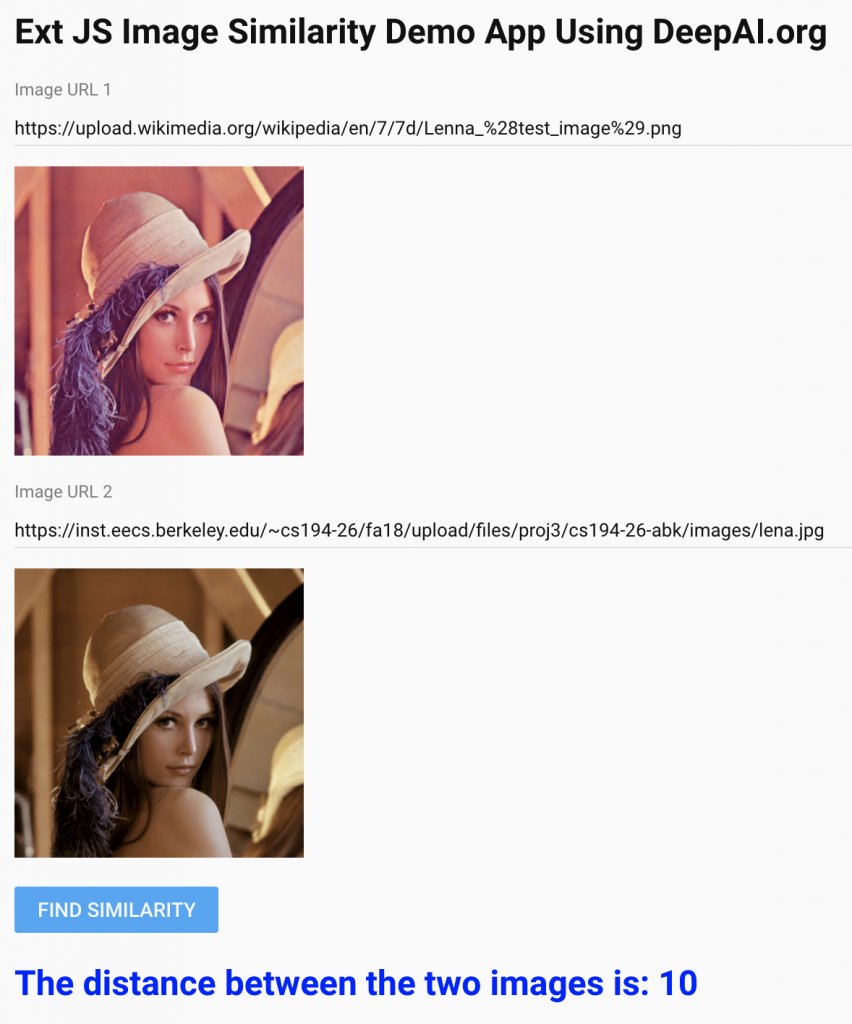
To get us started, the image similarity web app looks like this:
DeepAI’s Image Similarity API
DeepAI has developed an API that detects the similarity between two input images. The API is useful when searching for a picture in a directory of images or for quantifying changes in a series of images of the same scene taken at different times.
The Image Similarity API returns a distance score between the two images. For identical images, the score is zero. The higher the score the more dissimilar the images are. If you have never tried DeepAI’s APIs then you can use their quick start API key. It allows you to make a fixed number of queries, after which you’ll have to get your own API key.
At the console type the following:
curl -F 'image1=https://upload.wikimedia.org/wikipedia/en/7/7d/Lenna_%28test_image%29.png' -F 'image2=https://inst.eecs.berkeley.edu/~cs194-26/fa18/upload/files/proj3/cs194-26-abk/images/lena.jpg' -H 'api-key:quickstart-QUdJIGlzIGNvbWluZy4uLi4K' https://api.deepai.org/api/image-similarity
The above command specifies the input as the URLs of the well-known ‘Lenna’ images located on two different web pages. The response is a JSON object that contains the distance or amount of difference between the two input pictures:
{
"id": "a7f6e8c8-2a3d-4647-864a-f900f546c3fc",
"output": {
"distance": 10
}}
How can I build an Image Similarity App?
In order to build an Ext JS app that detects similarity between two input images, you will need to complete these 4 steps:
Step 1: Create a Minimal Desktop Application
First, using the command line, create a minimal desktop application.
If you are new to Ext JS, you can follow this tutorial to generate an empty project.
Here, I have created all the files in a folder called image-sim-demo and I have chosen the name ImageSimDemo for my App.
Step 2: Add the DeepAI package
Once you have created the project files, edit the index.html file in the main directory and add the following line anywhere in the header:
<script src="https://cdnjs.deepai.org/deepai.min.js"></script>
Step 3: Add Components to the Main View
Next, in the main view, add the following:
- Two text fields that allow user input for the URLs of the two images.
- Areas to display the two images
- A button labeled ‘Find Similarity’
- An area to display the distance between the two images
Note: The App starts with a default URL for the two images.
Once you are done with that, you need to Open the MainView.js file and overwrite its contents with the following code, making sure to replace ImageSimDemo with the name of your app:
Ext.define('ImageSimDemo.view.main.MainView', {
extend: 'Ext.Panel',
xtype: 'mainview',
controller: 'mainviewcontroller',
viewModel: {
type: 'mainviewmodel'
},
items: [
{
xtype: 'component',
html:'<h1> Ext JS Image Similarity Demo App Using DeepAI.org </h1> '
},
{
xtype: 'textfield',
label: 'Image URL 1',
value: 'https://upload.wikimedia.org/wikipedia/en/7/7d/Lenna_%28test_image%29.png',
reference: 'imgUrl1'
},
{
xtype: 'image',
title: 'Image 1',
reference: 'img1',
width: 200,
height: 200,
},
{
xtype: 'textfield',
label: 'Image URL 2',
value: 'https://inst.eecs.berkeley.edu/~cs194-26/fa18/upload/files/proj3/cs194-26-abk/images/lena.jpg',
reference: 'imgUrl2'
},
{
xtype: 'image',
title: 'Image 2',
reference: 'img2',
width: 200,
height: 200,
},
{
xtype: 'button',
text: 'Find Similarity',
handler: 'onFindSimilarity'
},
{
xtype: 'component',
html:'<p> Press the button to find similarity </p> ',
reference: 'output',
}
],
defaults: {
flex: 1,
margin: 10
}
})
Step 4: Add the controller
When you click the button labelled ‘Find Similarity’ the controller takes action by finding the distance between the two input images. To add the action, open the MainViewController.js file and overwrite it with the following code. Again, make sure to replace ImageSimDemo with your app’s name:
Ext.define('ImageSimDemo.view.main.MainViewController', {
extend: 'Ext.app.ViewController',
alias: 'controller.mainviewcontroller',
onFindSimilarity: function (button) {
url1 = this.lookupReference('imgUrl1').getValue();
url2 = this.lookupReference('imgUrl2').getValue();
//clear the output field
this.lookupReference('output').setHtml('');
//display the two images
this.lookupReference('img1').setSrc(url1);
this.lookupReference('img2').setSrc(url2);
//call the deepai API and find similarity between the two images
this.getSimilarity(url1,url2);
},
getSimilarity: async function (imgUrl1, imgUrl2){
try{
//replace with your API key
deepai.setApiKey('quickstart-QUdJIGlzIGNvbWluZy4uLi4K');
//call image similarity API
var resp = await deepai.callStandardApi("image-similarity", {
image1: imgUrl1,
image2: imgUrl2,
});
console.log(`Resposne:${JSON.stringify(resp)}`);
var distance = resp.output.distance;
this.lookupReference('output').setHtml('<h1 style="color:blue;">The distance between the two images is: '
+ distance + '</h1>')
}
catch(err) {alert(err);}
}
})
In the code above, I have added the quick start API key. You can replace it with your own key if you have run out of queries for the quick start API key. The getSimilarity() function does the main job of calling the image similarity API and displaying the distance between the two input images.
How can I get started building Javascript AI apps?
As you can see, you can quickly build an app that finds the similarity/distance between two images. It literally is a matter of minutes and it is possible because of the Sencha Ext JS framework. The Ext JS framework not only includes various user interface components, it also makes it easier to call the DeepAI REST APIs.
Try it for yourself. You can download the complete source code here. Happy coding!


Latest Content

Performance Tuning Large Grids and Stores in Ext JS
Grids are where enterprise Ext JS applications live, and they are also where performance problems…
November 4, 2026
From JavaScript Library to React: Bringing Ext JS into Modern Front Ends
Many of today’s most important business applications started life in the era of the JavaScript…
November 4, 2026
Best JavaScript Framework for Data-Intensive Applications
“What’s the best JavaScript framework?” has no single answer, because frameworks are built for different…
November 4, 2026