



 Ask Sencha AI
Sencha Theming Contest: Announcing Third Place Winner – Erin Knight
October 14, 2015
1491 Views
Get a summary of this article:
Thank you to everyone who participated in our Sencha Theming Contest! We received some very well-designed and creative submissions. Our goal was to highlight how easy it is to use the new features in Ext JS 6 such as Fashion and new tools such as Sencha Inspector to modify the theme of an existing application. For the contest, we used the feed viewer application. We’ll be highlighting each of our three contest winners in this blog series.
Third Place Winner
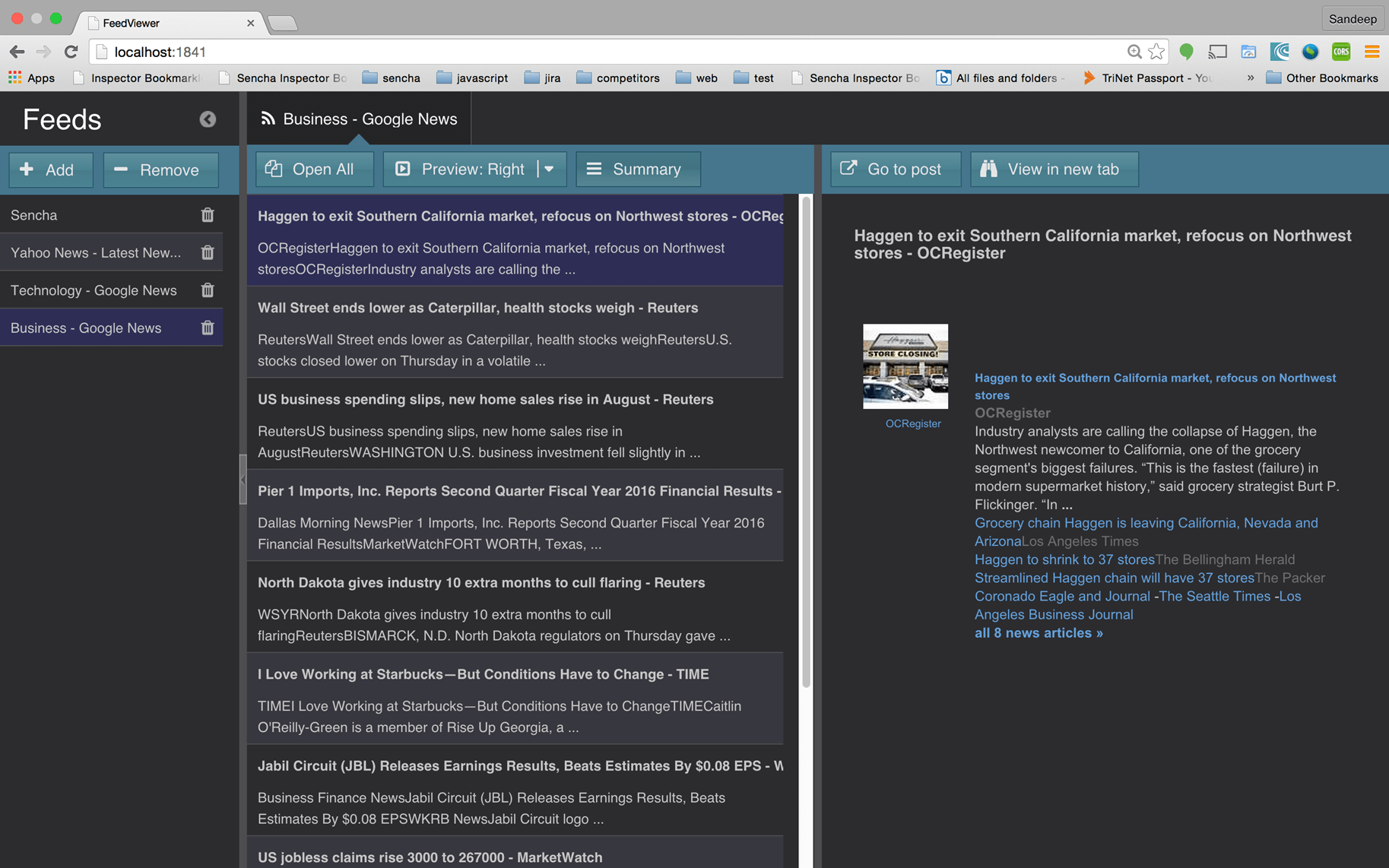
Today, we are very pleased to announce that Erin Knight is our Third Place Winner. The following are some screenshots of Erin’s submission.
Classic View:
Modern View:
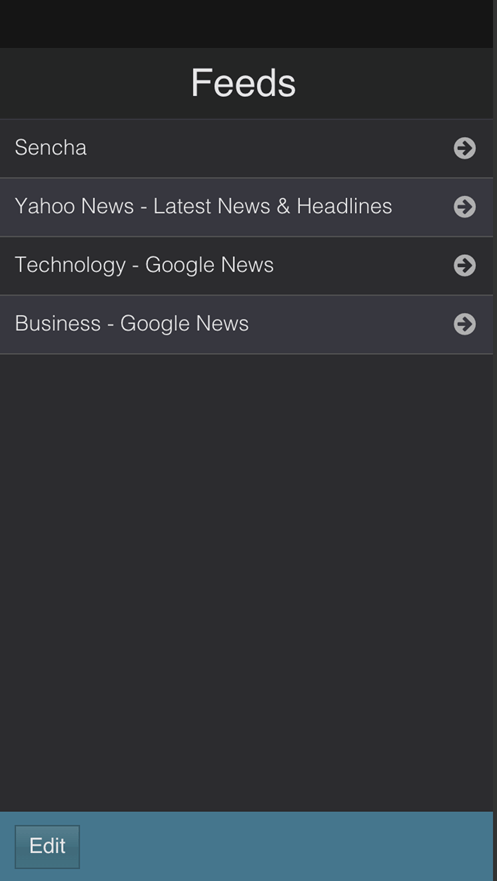
Our contest judges included product managers, engineers, and key members of our UX team. What they liked most about this design was:
- Creative design for tabs – especially the lip detail
- Good use of fonts
- Good styling of the template – margins and padding
If you would like to leverage Erin’s great design, you can access the package here.
How Erin Created Her Design
We asked Erin to answer a few questions about her experience with Ext JS and the process she went through to create her design.
How much experience do you have with Sass?
I first used Sass when styling Ext JS 4 apps and have used it since then.
Where did you get your inspiration for the design?
I knew I wanted to make a dark theme, because I hadn’t seen any default Sencha themes like that. Because it extends the Ext JS Neptune theme, I wanted to create a cool, outer space feel, and named mine “Vega”. I picked complementary shades of grey, blue, and teal to make a cohesive theme.
Describe the process of how you created this theme.
I started out by identifying what I didn’t like about the default app. In particular, where things looked too cluttered, or where functionality was unclear for a user. Next, I created mockups in Illustrator of what each screen would look like for both desktop and mobile. After I had visual designs to work from, I kept the Inspector open with Fashion to identify the variables I would need to change to match my visual designs.
Describe your overall experience in theming the app.
This was my first experience with Ext JS 6, so it was fun to play around with Sencha Inspector and Fashion. Every update of Inspector was more stable and easier to use. In my previous theming experiences, I had to live in the Sencha docs to find the right variable names. Using Inspector saves a ton of time because you don’t have to already know what you are looking for; you can search to find the right set of variables. This was also my first experience using any of the modern or touch components. It’s exciting to see how to develop a single app that can have both views.
About Erin:

Erin is currently a front-end developer at Headspring. At her previous job, she used Ext JS daily to develop enterprise apps. She has done full-time web application development for 2 years, focusing primarily on Ext JS.


Latest Content
How to Handle Millions of Rows in a React Data Grid: Buffered Rendering and Server-Side Data
A React data grid that feels instant with 1,000 rows can freeze with 100,000 and…
October 16, 2026
How to Choose a React Grid Component: 12 Features Enterprise Apps Need
Picking a React grid component looks easy in week one. Every option sorts columns and…
October 16, 2026
Enterprise React Data Grid: The Features Enterprise Teams Need, and What Each Grid Includes
Almost every enterprise React data grid advertises the same features: grouping, pivoting, Excel export, clipboard,…
October 16, 2026


