



 Ask Sencha AI
Upgrading Ext JS 5.x to 8.0: A Practical Enterprise Guide
May 15, 2026
1100 Views
Get a summary of this article:
For organizations still running Ext JS 5.x applications, upgrading to Ext JS 8.0 is best treated as a strategic modernization initiative rather than a routine framework update. The gap between Ext JS 5.x and 8.0 spans multiple generations of framework evolution, including major changes in toolkit direction, component maturity, performance, accessibility, responsive behavior, theming, data handling, and developer tooling.
Because of that distance, most teams should approach the move with a clear plan, realistic expectations, and a focus on risk reduction. In many cases, the work is less about simply changing a framework version and more about validating architectural assumptions, reviewing years of custom overrides, updating build and theme infrastructure, and ensuring that business-critical workflows remain reliable throughout the transition.
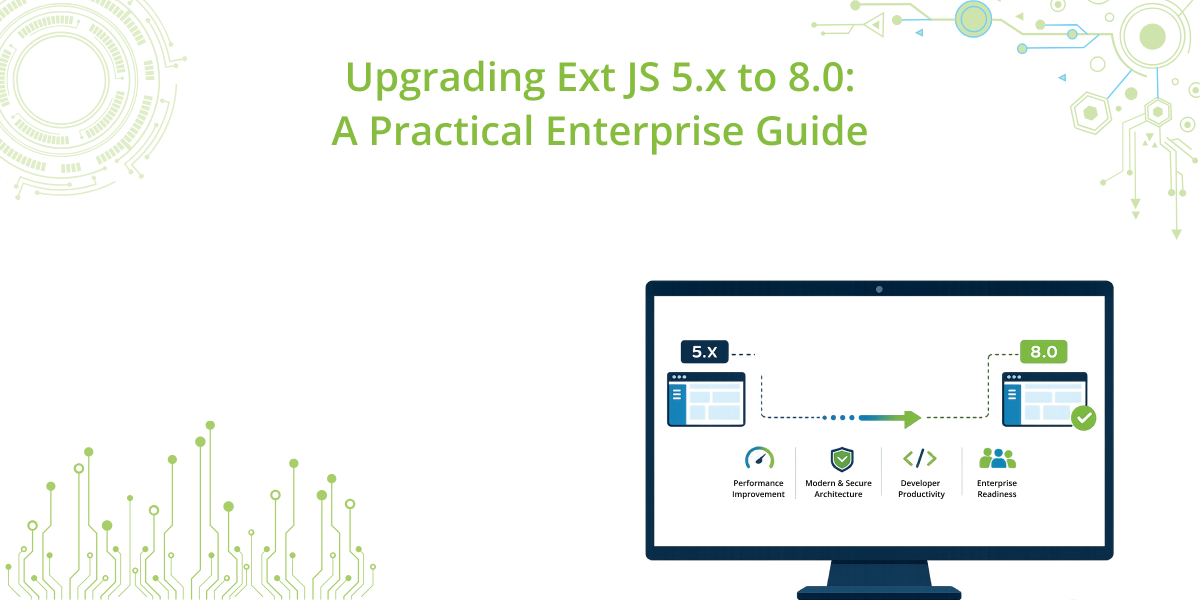
This guide outlines a practical approach for enterprise teams moving from Ext JS 5.x to 8.0. It covers what changed across the framework generations, what to assess before beginning, where the highest-risk areas typically appear, and how to execute the upgrade in a controlled, testable way.
Who This Guide Is For
This guide is intended for teams maintaining applications currently built on:
- Ext JS 5.0
- Ext JS 5.1
It is written for enterprise architects, engineering managers, technical leads, and delivery teams planning a structured migration to Ext JS 8.0.
What Changed Since Ext JS 5.x
Before planning the move, it is important to recognize how much the framework evolved after the 5.x generation.
Ext JS 5.x
Ext JS 5.x introduced significant advances for its time, including MVVM patterns, data binding improvements, ViewModel support, session handling, and enhanced grid and application architecture capabilities. Many enterprise applications built on 5.x still rely heavily on these foundations.
Ext JS 6.x
Ext JS 6.x was a major platform transition. It introduced the Classic and Modern toolkit model, expanded responsive and mobile-oriented development options, and created a new framework structure that changed how many teams planned long-term application architecture.
Ext JS 7.x
The 7.x line continued to mature the framework with improvements in:
- performance
- accessibility
- theming
- layout flexibility
- data visualization
- responsive behavior
- state management
- tooling integration
- developer productivity
- stability for data-heavy enterprise use cases
Ext JS 8.0
By the time a team reaches Ext JS 8.0, the framework reflects a far more mature platform than Ext JS 5.x. The upgrade therefore needs to account not only for API and behavior changes, but also for accumulated differences in toolkit assumptions, layout behavior, theme structure, build tooling, and custom extension compatibility.
The Recommended Upgrade Path
For most enterprise teams, the practical target is still:
Ext JS 5.x → Ext JS 8.0
However, the migration should be handled as a phased direct modernization effort, not as a casual in-place upgrade.
In most cases, teams should avoid trying to treat this as a single-step technical change completed in isolation. Even if the codebase ultimately moves directly to 8.0, the planning and execution should account for the fact that the application is crossing several generations of framework behavior.
A successful effort usually depends on:
- choosing the correct target toolkit strategy
- stabilizing the existing codebase first
- auditing custom overrides and extensions early
- validating themes and layouts carefully
- budgeting heavily for regression testing
The First Strategic Decision: Classic or Modern
One of the most important decisions in a 5.x to 8.0 migration is the toolkit path.
Option 1: Upgrade to Ext JS 8.0 on Classic
This is usually the preferred route for established enterprise applications with:
- complex desktop workflows
- grid-heavy modules
- extensive custom components
- large form-based business applications
- significant existing UI investment
For many Ext JS 5.x applications, Classic is the lowest-risk path because it is typically closer to the structure and interaction model of the legacy application.
Option 2: Use the migration as an opportunity to move to Modern
This may be worth considering if the organization also wants to pursue:
- a more mobile-oriented experience
- broader responsive redesign
- major UI simplification
- a wider front-end modernization program
However, this is generally a larger transformation and should not be combined casually with a framework upgrade unless there is clear business sponsorship and timeline support.
Practical recommendation
For most enterprise teams, the safest plan is:
Ext JS 5.x → Ext JS 8.0 Classic first
Then, if desired, evaluate any broader UI modernization separately.
Pre-Upgrade Assessment Checklist
Preparation matters more here than in a smaller version jump.
1. Confirm the current application baseline
Document:
- exact Ext JS 5.x version
- application architecture patterns
- package structure
- build tooling
- custom themes
- SASS or CSS overrides
- shared component libraries
- third-party dependencies
- browser support requirements
- localization and accessibility requirements
2. Identify technical debt accumulated around the framework
Legacy applications often contain years of compensating logic. Review:
- custom framework overrides
- direct DOM manipulation
- private API usage
- old browser compatibility fixes
- custom layout hacks
- deprecated UX patterns
- hand-written state restoration logic
- grid customizations
- theme selectors tied to generated markup
3. Confirm business-critical workflows
The upgrade should be driven by workflow protection, not just screen rendering. Identify:
- login and startup
- navigation
- core transaction paths
- approvals
- reporting
- exports
- administrative functions
- role-based behavior
- mobile or tablet scenarios if relevant
4. Build a regression baseline
Capture:
- screenshots of critical views
- behavior notes for complex modules
- performance benchmarks where possible
- accessibility checkpoints
- browser-specific observations
- state restore scenarios
- large dataset handling behavior
5. Evaluate whether some modules need refactoring, not just upgrading
Not every module is equally fit for direct migration. Some older areas may require limited refactoring where they rely too heavily on outdated internals.
Common High-Risk Areas
In a 5.x to 8.0 project, these areas usually drive the most effort.
Grids
This is often the single largest workstream, especially where the application uses:
- locked columns
- buffered rendering
- row editing
- cell editing
- grouping
- summaries
- filters
- custom selection logic
- widget columns
- exports
- very large remote datasets
Layouts
Nested container layouts, older sizing assumptions, and complex responsive workarounds should be reviewed closely.
Themes and styling
Theme migrations frequently uncover hidden dependencies on internal class names, DOM structure, icon handling, and older SASS assumptions.
Overrides and extensions
Applications that heavily customized framework classes often face the highest remediation cost.
Data binding and state management
While Ext JS 5.x introduced strong MVVM foundations, applications often implemented custom patterns that should be reviewed against newer framework behavior.
Browser-era compatibility code
Older codebases may still include compatibility logic for browsers or behaviors that are no longer relevant and may actively interfere with newer framework behavior.
A Practical Upgrade Approach
Step 1: Stabilize the existing 5.x application
Before changing framework versions, confirm that the current application:
- builds successfully
- can be deployed reliably
- supports critical workflows
- has a reproducible test environment
- has key defects understood and documented
An unstable legacy baseline will make migration diagnosis far harder.
Step 2: Choose the target architecture scope
Decide early whether the effort is:
- a framework upgrade only
- a framework upgrade plus theme refresh
- a framework upgrade plus partial module refactoring
- a broader UI modernization initiative
The clearer the scope, the more predictable the project.
Step 3: Align project structure and tooling
Update the project setup for the Ext JS 8.0 target environment, including:
- framework package versions
- workspace structure
- build tooling
- package metadata
- local package compatibility
- CI/CD assumptions
- IDE or plugin support where relevant
This step should focus first on achieving a buildable baseline.
Step 4: Restore application shell behavior
Stabilize the top-level application structure:
- bootstrap
- launch flow
- main viewport
- routing
- navigation tree or menu
- session initialization
- authentication flow
- top-level controllers and view models
Until the shell is stable, deeper testing is inefficient.
Step 5: Address component-heavy modules in priority order
The best order is usually:
- grids
- forms
- dashboards and charts
- layout-heavy modules
- workflow-specific custom components
Each module should be remediated and validated against real business scenarios, not just developer spot checks.
Step 6: Review themes and visual consistency
Once functional behavior is restored, review:
- theme compilation
- color and branding consistency
- spacing and typography
- icons
- panel and toolbar layout
- form spacing
- modal behavior
- focus styles
- responsive rendering
Visual regressions are common in long-lived Ext JS applications.
Step 7: Audit and reduce override debt
For each override, determine whether it should be:
- kept as-is
- updated
- replaced with supported framework behavior
- removed entirely
This is one of the most valuable long-term cleanup activities in the migration.
Step 8: Execute structured regression testing
Testing should cover:
Smoke testing
- startup
- authentication
- navigation
- module loading
- basic data operations
Workflow testing
- core business transactions
- grid editing and filtering
- exports and reporting
- state restoration
- permissions-based UI behavior
- localization-sensitive paths
Non-functional testing
- accessibility
- performance
- browser compatibility
- memory behavior
- long-session stability
How AI Can Support the Migration
AI can be useful in a large migration project, particularly for:
- identifying repeated legacy patterns
- locating probable private API usage
- reviewing override-heavy files
- drafting remediation notes
- organizing migration issues by category
- accelerating repetitive code cleanup
It can also help compare modules and suggest where similar fixes may be applied consistently.
However, AI should not replace direct engineering review for:
- toolkit strategy decisions
- accessibility validation
- theme verification
- production-readiness assessment
- high-risk override removal
Practical Governance for Enterprise Teams
The biggest risk in a 5.x to 8.0 migration is uncontrolled scope growth. A disciplined operating model helps.
Recommended practices include:
- keeping upgrade work separate from feature work
- maintaining a dedicated migration issue log
- categorizing issues by build, UI, workflow, accessibility, and performance
- validating one module at a time
- avoiding broad refactoring unless justified
- documenting every override decision
- using a pilot module or representative application first where possible
For organizations with multiple Ext JS applications, upgrading one representative application first often provides the strongest template for portfolio-wide planning.
Post-Upgrade Checklist
After the application is running on Ext JS 8.0, confirm:
Functional stability
- major workflows pass
- forms submit correctly
- data loads and saves correctly
- reports and exports behave as expected
Visual stability
- layout alignment is correct
- custom themes render properly
- icons and controls display consistently
- responsive layouts behave correctly
Accessibility
- keyboard navigation works
- focus indicators are visible
- custom controls remain usable
- critical workflows remain accessible
Performance
- startup time is acceptable
- large grids perform correctly
- remote filtering and sorting are stable
- memory usage is reasonable in long sessions
Documentation and cleanup
- obsolete compatibility code is removed
- framework versions are documented
- build instructions are updated
- rollback planning is defined
- known issues are recorded
Common Questions
Is a direct move from Ext JS 5.x to 8.0 realistic?
Yes, but it should be treated as a structured modernization effort rather than a light upgrade.
Should teams stop at an intermediate version first?
Usually not, unless there is a very specific organizational reason. Most teams benefit more from planning carefully for the final target than from investing in multiple intermediate upgrade projects.
Is Classic the safer destination?
For most enterprise Ext JS 5.x applications, yes.
What usually takes the most time?
Typically:
- grids
- custom overrides
- themes
- regression testing
- tooling alignment
Is this mainly a coding exercise?
No. In many cases, testing, validation, and issue triage consume as much effort as the code changes themselves.
Conclusion
Upgrading from Ext JS 5.x to 8.0 is a meaningful enterprise modernization effort, but it is entirely manageable when approached with the right level of structure. The most successful teams do not treat it as a simple version change. Instead, they treat it as an opportunity to stabilize the platform, reduce long-term override debt, modernize tooling, and verify that the application remains reliable for the workflows the business depends on most.
In practice, the safest and most effective path is usually to move to Ext JS 8.0 Classic, keep the scope tightly controlled, focus on high-risk areas such as grids and themes, and back every remediation step with disciplined regression testing.



Latest Content
How to Handle Millions of Rows in a React Data Grid: Buffered Rendering and Server-Side Data
A React data grid that feels instant with 1,000 rows can freeze with 100,000 and…
October 16, 2026
How to Choose a React Grid Component: 12 Features Enterprise Apps Need
Picking a React grid component looks easy in week one. Every option sorts columns and…
October 16, 2026
Enterprise React Data Grid: The Features Enterprise Teams Need, and What Each Grid Includes
Almost every enterprise React data grid advertises the same features: grouping, pivoting, Excel export, clipboard,…
October 16, 2026


