



 Ask Sencha AI
What’s New in Ext JS 8.0
April 6, 2026
14004 Views
Get a summary of this article:
Ext JS 8.0 is here.
We’re excited to announce the General Availability Launch of Sencha Ext JS 8.0 – a major release delivering modern enhancements, improved performance, and new capabilities across our industry-leading JavaScript framework with over 140 pre-integrated UI components.
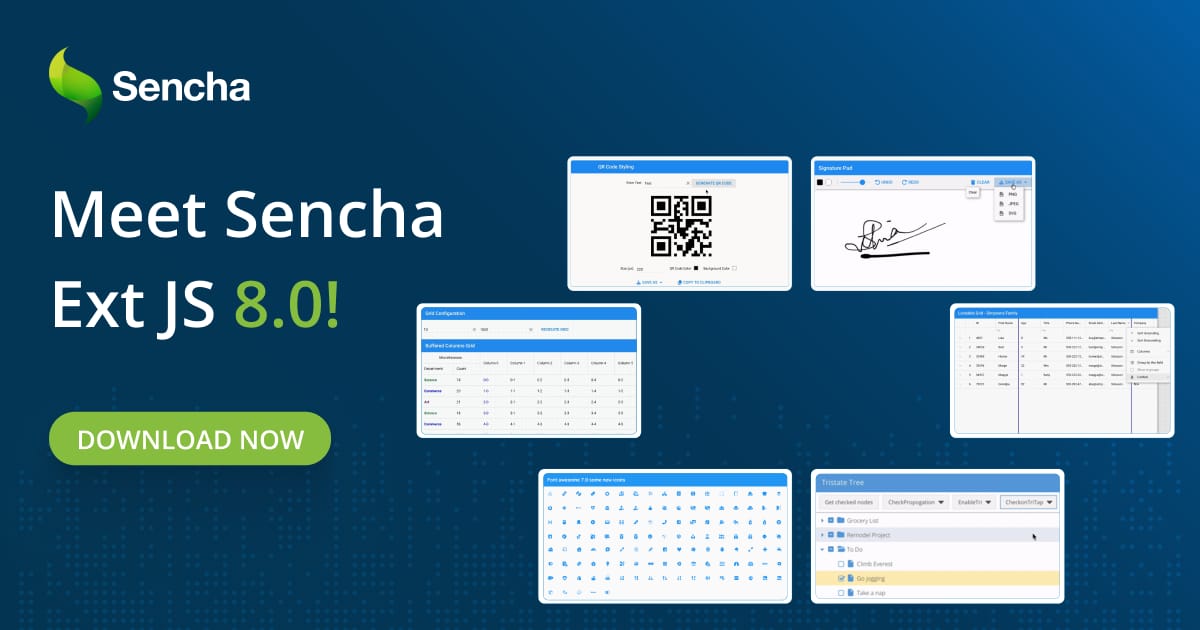
This release ships the features customers have been requesting — built-in signature capture, QR code workflows, faster grids for massive datasets, and modern icon support across every toolkit. All with full backward compatibility. No rewrites required.
A major version does not signal large-scale breaking changes or require application rewrites.
Here is everything that is new, and what it means for your applications.
Further enhancing the best-in-class Ext JS data grid remains a cornerstone of modern applications and in Ext JS 8.0, we have significantly enhanced grid performance and functionality.
Ext JS 8.0 Highlights
This release delivers top customer-requested features from the Sencha Upvote list — all while maintaining backward compatibility for seamless upgrade.
- Sign documents directly in your application with the new Responsive Digital Signature Pad (Classic & Modern Toolkit)
- Enable QR workflows across payments, retail, and logistics with the new QR Code Reader & Generator (Classic & Modern Toolkit)
- Access the latest icons via Font Awesome 7 — fully backward compatible with FA5
- Render large, wide datasets faster with Enhanced Grid Performance and Horizontal Buffering (Modern Toolkit)
- Pin columns for report-style views with the new Lockable Grid Plugin (Modern Toolkit)
- Write modern JavaScript with confidence using expanded ECMAScript support up to ES2025
- Build more inclusive applications with ARIA Accessibility Support (Modern Toolkit)
- Use ReExt with the latest Ext JS — ReExt 1.2 now fully supports Ext JS 8.0
Unlock broader ECMAScript support
Sencha Cmd and ExtGen 8.0.0 extend ECMAScript support through ES2025, enabling teams to adopt modern JavaScript features such as let, const, and arrow functions more broadly within Ext JS applications.
Compiler enhancements, including updated Closure Compiler parsing, improve alignment with current JavaScript standards and contribute to more reliable builds. These updates help teams modernize codebases more efficiently, reduce reliance on polyfills, minimize boilerplate, and support cleaner long-term application architecture.
    "language": {
        "js": {
            "input": "UNSTABLE", // New feature, accepts latest syntax for compiling
            "output": "ANY" // The following will accept syntax and disable the transpiler.
        }
    }
Please refer to the language transpiler documentation for further details
Responsive Digital Signature Pad
Sign documents directly in your app — no third-party library needed.
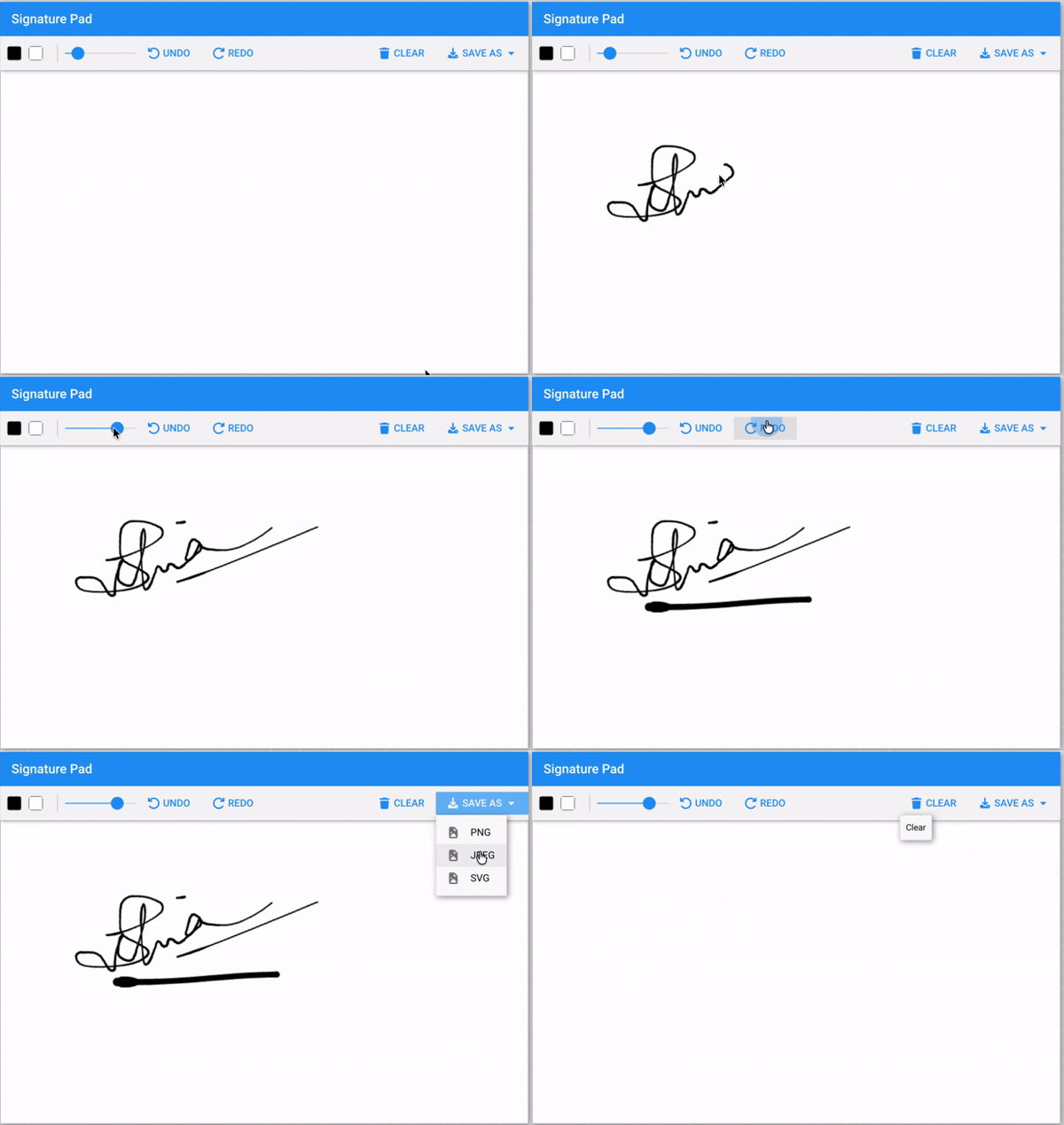
A brand-new addon component for smooth, responsive signature capture is now available for both toolkits. Built by extending native Ext JS components, the Signature Pad integrates seamlessly with Grid, Form, or Panel containers and fully supports Ext JS configs, events, methods, properties, and theming through variables and mixins.
The component includes a rich feature set: Undo/Redo functionality, Clear action, configurable Pen Width and Size, Background Color selection, Color Picker, and multiple export formats including JPG, PNG, and SVG. Preview, Title, and Signature placeholders round out the experience.
Teams building approval workflows, onboarding forms, compliance sign-offs, or field service applications can now capture and export signatures directly inside their Ext JS application — as JPG, PNG, or SVG — without integrating a third-party component.
    {
        xtype: 'signature',
        penColor: '#000',
        penStrokeWidth: 2,
        minStrokeRatio: 0.7,
        listeners: {
            beginStroke: function(cmp) {
                console.log('Signature beginStroke:', cmp);
            },
            endStroke: function(cmp) {
                console.log('Signature endStroke:', cmp);
            }
        }
    }
We’ve also outlined steps for self-upgrading the Signature Pad library to access the latest features and ensure smoother future upgrades.
QR Code Reader & Generator
Enable QR workflows across payments, logistics, and retail — built in.
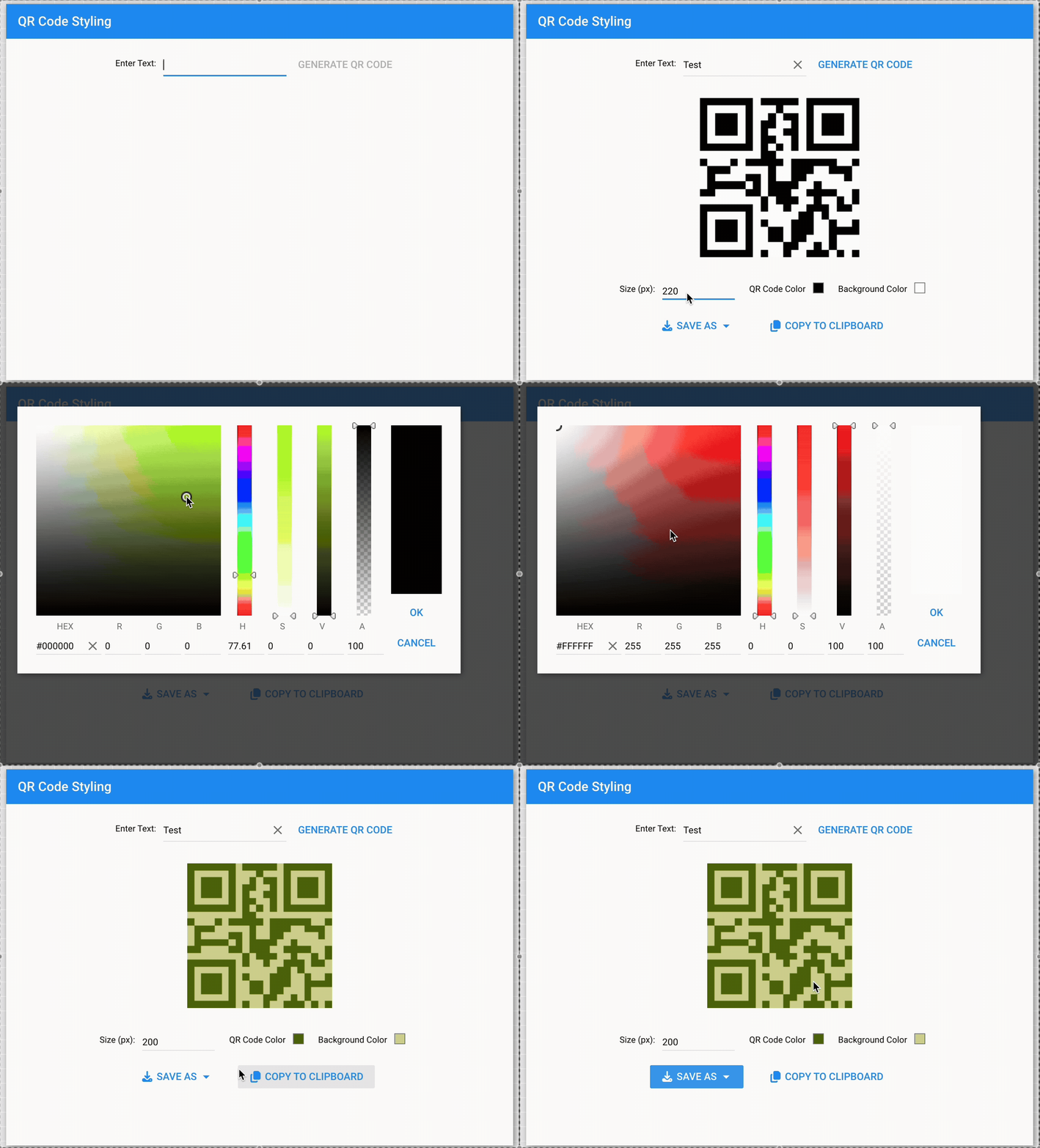
Ext JS introduces a powerful QR Code Reader and Generator component available for both Modern and Classic toolkits. This component enables developers to easily generate and read QR codes directly within their applications, supporting a variety of use cases such as payments, data sharing, contact exchange, and more.
Common use cases include payment confirmation in retail, asset tracking in logistics and transportation, contact sharing at events, Wi-Fi provisioning, and calendar invites — all handled natively inside your Ext JS application without external dependencies.
The component exposes a comprehensive API to generate and read QR codes with support for URLs, text, VCARD/MeCard, calendar events, geolocation, phone and SMS, email, Wi-Fi configurations, and payment data. Rendering options include SVG, Canvas, and PNG, with the ability to download as image, copy data to clipboard, and preview before saving.
Customization options allow for custom foreground and background colors, flexible size control, responsive UI for desktop and mobile, and input sanitization for security.
    {
        xtype: 'qrcode',
        padding: 20,
        type: 'email',
        data: {
            email: '[email protected]',
            subject: 'QR code generation example',
            body: 'QR code generated through Sencha'
        },
        listeners: {
            qrgenerated: function(QRCodeClassInstance, dataPassed) {
                console.log("QR Code Generated");
            }
        }
    }
Ready to see these features in action?
Download the Ext JS 8.0 free trial and explore every new component in the KitchenSink.
Start Free Trial
View KitchenSink Examples
Buffered Renderer with Horizontal Buffering
Render 1,000+ columns without a performance hit.
The Modern toolkit now includes improved grid rendering with column virtualization for large datasets. This enhancement renders only visible cells plus a configurable buffer zone, greatly boosting performance for grids with 1000+ columns.
The buffered column rendering works seamlessly with row and column locking, grouping, filtering, editing, accessibility features, RTL support, and all themes. An enhanced scroller handles very wide grids efficiently.
    Ext.create('Ext.grid.Grid', {
        title: 'Simpsons',
        store: store,
        bufferedColumns: true, // Enable virtual column rendering
        columns: [
            { text: 'Name', dataIndex: 'name', width: 200 },
            { text: 'Email', dataIndex: 'email', width: 250 },
            { text: 'Phone', dataIndex: 'phone', width: 120 }
        ],
        height: 200,
        layout: 'fit',
        fullscreen: true
    });
New Lockable Grid Plugin for Modern Toolkit
Lock columns for report-style views — now native in the Modern toolkit.
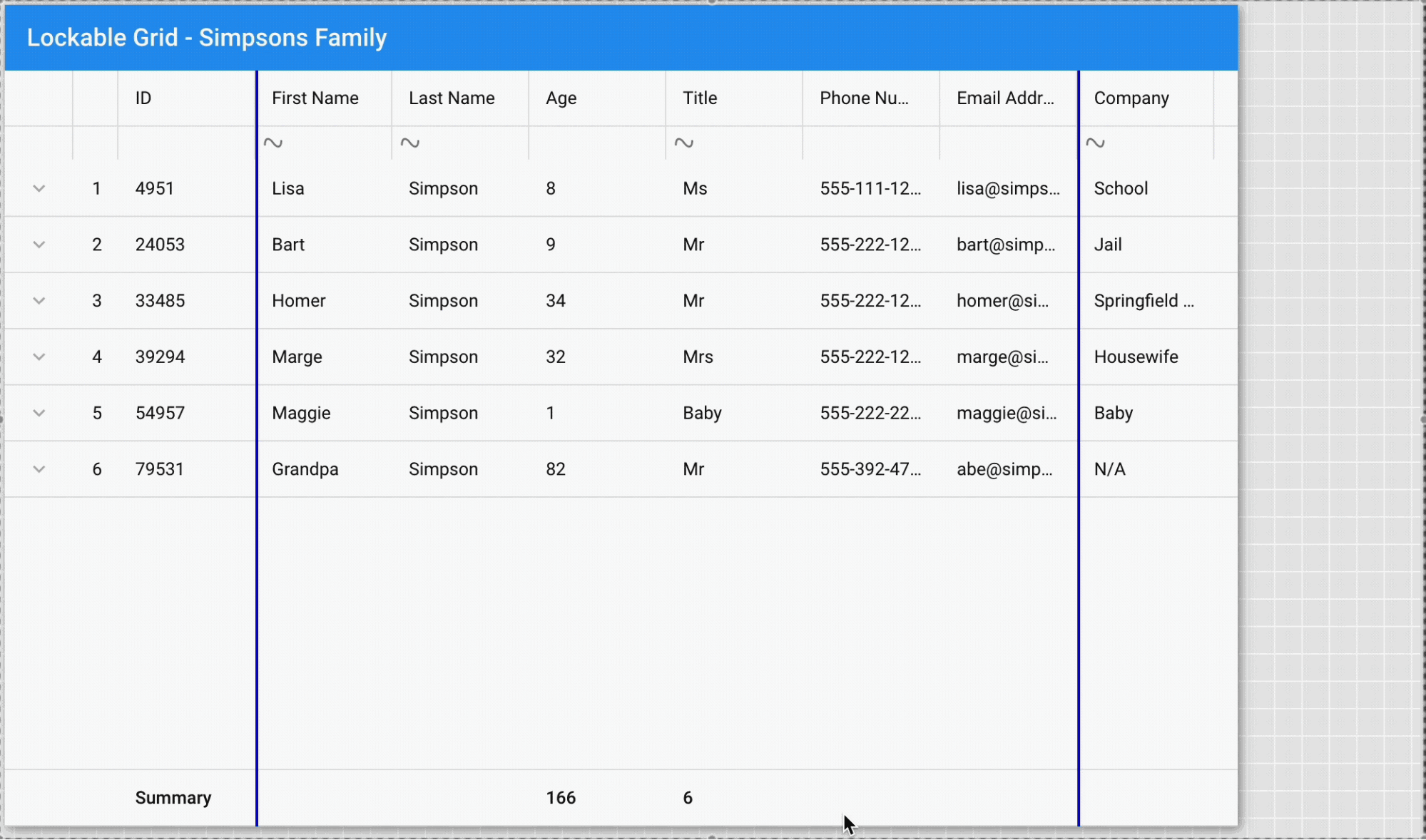
We’re introducing a new Lockable Grid plugin for the Modern toolkit that provides full lockable grid functionality. This plugin is designed to be simple to use, easy to configure, and supports flexible customizations.
The plugin implements column locking and unlocking behavior natively in the Modern Grid, with synchronized horizontal and vertical scrolling between locked and normal regions. It maintains full feature compatibility with selection models, cell editing, summaries, and other grid capabilities.
    {
        xtype: 'grid',
        plugins: [{
            type: 'lockable'
        }],
        store: myStore,
        columns: [{
            text: 'ID',
            dataIndex: 'id',
            locked: true
        }, {
            text: 'Name',
            dataIndex: 'name'
        }, {
            text: 'Email',
            dataIndex: 'email'
        }]
    }
Font Awesome 7 Support
The latest icons across every toolkit — zero breaking changes to FA5 configs.
Ext JS 8.0 now ships with Font Awesome 7.x as the default icon set for both Modern and Classic toolkits. The framework now aligns with the official FA7 website cheat sheet for consistent usage, and our documentation includes comprehensive guidance for developers on leveraging the new icon set effectively.

    // Using FA7 icons in your components
    {
        xtype: 'button',
        iconCls: 'fa-solid fa-rocket',
        text: 'Launch'
    }
Dialog Boundary Control
Dialogs that respect their container — no more viewport overflow.
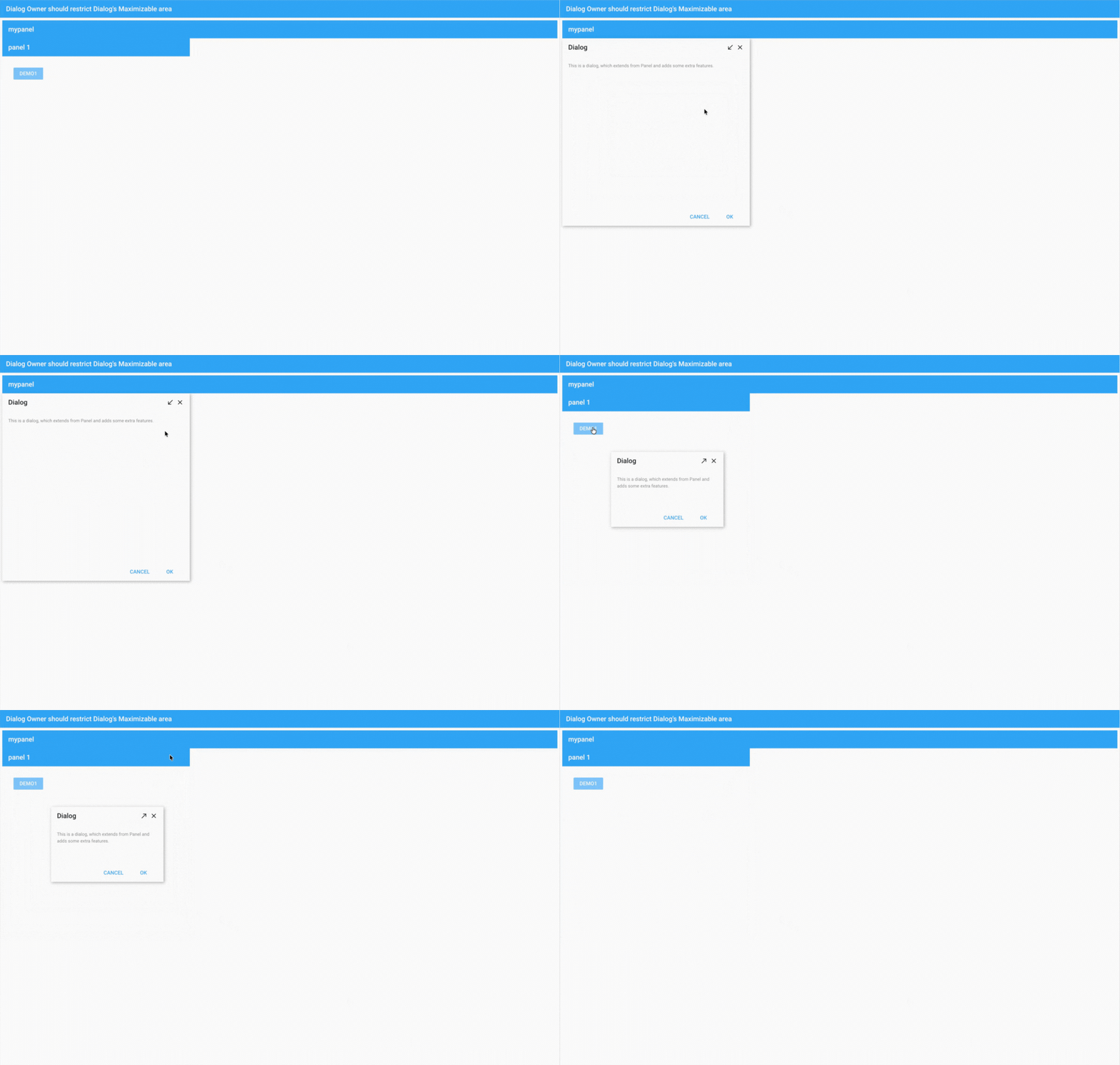
Ext.Dialog now supports boundary-aware maximize, minimize, and drag operations. Dialogs can now respect the boundaries of their parent container or panel rather than defaulting to the full viewport.
A new owner value has been added to both the constrainDrag and maximizable configurations, enabling developers to constrain dialog behavior to the bounds of its owner component. Even though dialogs are floated, they properly respect parent container boundaries when maximized, minimized, or dragged.
    Ext.create({
        xtype: 'panel',
        title: 'Parent Container',
        width: 600,
        height: 400,
        renderTo: Ext.getBody(),
        items: [{
            xtype: 'dialog',
            title: 'Dialog',
            closable: true,
            modal: false,
            constrainDrag: 'owner',
            maximizable: 'owner',
            bodyPadding: 30,
            maxWidth: 300,
            html: 'This dialog respects its parent container boundaries.'
        }]
    });
Accessibility: ARIA Support for Fields
Build accessible applications without extra configuration.
The Modern toolkit now includes full ARIA support for form fields and triggers. Proper ARIA properties and roles are applied during render, ensuring compatibility with screen readers including JAWS, Narrator, TalkBack, and VoiceOver.
This enhancement is part of our ongoing commitment to making Ext JS applications accessible to all users.
Tri-State Checkbox for TreePanel
Smarter tree selection matching Material Design — one config line to enable.
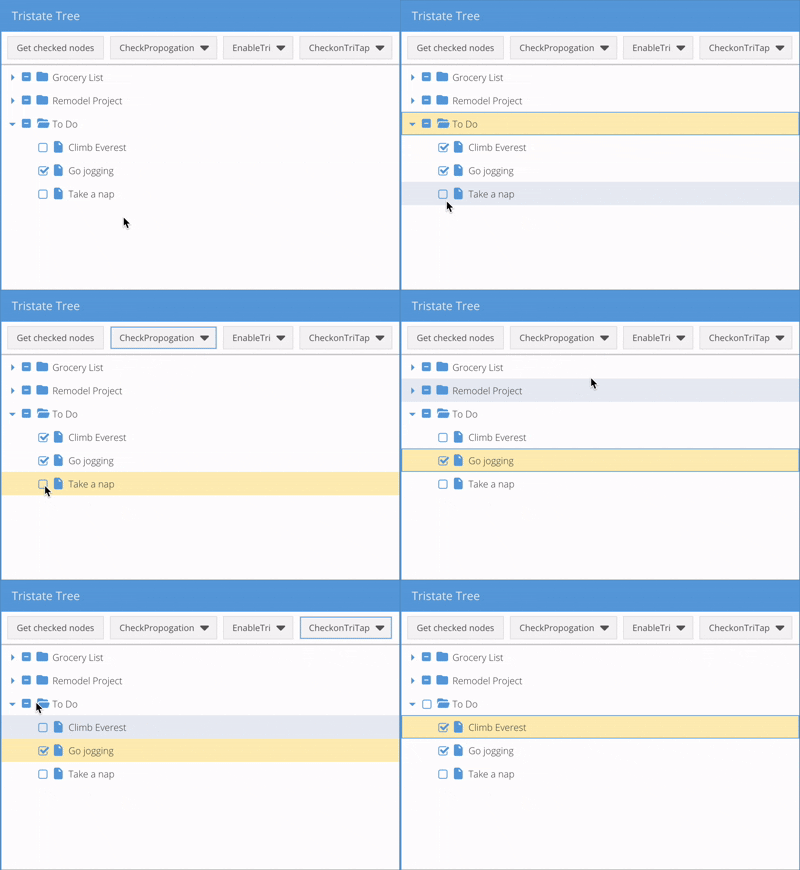
TreePanel checkboxes in the Classic toolkit now support tri-state behavior: checked, unchecked, and indeterminate. Parent nodes automatically reflect the collective state of their children, matching Material Design patterns and accessibility expectations.
Enabling this feature requires minimal developer effort – simply set enableTri: true in your configuration with no event changes necessary.
    Ext.create('Ext.tree.Panel', {
        title: 'Tri-State Tree Example',
        width: 400,
        height: 300,
        rootVisible: false,
        renderTo: Ext.getBody(),
        enableTri: true,
        checkable: true,
        checkOnTriTap: false,
        store: {
            root: {
                expanded: true,
                children: [{
                    text: 'Parent Node',
                    expanded: true,
                    children: [
                        { text: 'Child 1', leaf: true, checked: true },
                        { text: 'Child 2', leaf: true, checked: false }
                    ]
                }]
            }
        }
    });
ReExt 1.2
ReExt provides a bridge between React and the powerful Ext JS framework, allowing developers to leverage Ext JS’s extensive library of over 140 UI components to help users build robust, high-performance web applications. These include a powerful data grid, trees, charts, calendars, D3, and more. ReExt 1.2 now seamlessly supports the latest Ext JS version 8.0!
Version Support
Provided support for Ext JS 8.0 in Sencha Upgrade Advisor v8.0, Sencha Architect v4.3.8, and Sencha Themer v1.4.6, ReExt 1.2.0 and Rapid Ext JS 1.2.0. Please visit the Support Portal and download the latest versions.
Trusted by enterprise teams worldwide
Ext JS 8.0 is already in use by teams at Morgan Stanley, Hitachi Energy, Blue Yonder, Citigroup, Motorola Solutions, and BMW Group — among others. If your team is evaluating the upgrade, speak with your Sencha account manager about upgrade planning, licensing options, and timelines.
Summing Up
Ext JS 8.0 is available now. Download the free trial, explore the KitchenSink examples, or register for the webinar on April 15.. As always, we welcome your feedback or feature request – it plays a key role in helping us continuously improve our products.
View the change log documentation here:
Ready to check out the Ext JS 8.0 documentation?
For full details about this release, please see the change log and the What’s New guide:
Download Ext JS 30-day free trial
Getting Started Guides
Check out the updated Resource Center
KitchenSink examples
Be sure to follow us on Twitter and our YouTube Channel for updates. Until next time, let’s build great apps and happy coding.
Looking to Upgrade to 8.0?
The free-to-use Ext JS Upgrade Adviser tool helps identify code changes required to migrate to the latest Ext JS version. Give it a try!
Join the Sencha Discord Server
Are you looking for community engagement? Want to help, learn and share with many Ext JS experts? Join Sencha Discord Server now for free and be part of our community!
- Sencha MVPs are there
- Sencha developers are there
- Expand awareness of Sencha products
- Community Engagement and Contributions
And more…
 2
2
 1
1
Latest Content

Generating Live Ext JS Database Applications with Indi Engine AI: A Practical Architecture for Enterprise Modernization
Modernizing enterprise applications is rarely a matter of replacing an old interface with a new…
September 28, 2026

Building High-Performance Real-Time Operational Dashboards with Ext JS and React
Real-time operational dashboards are no longer simply reporting interfaces. In logistics, fleet management, supply chain…
September 28, 2026

What JS Days 2026 Keynote Revealed About the Next Era of Development
The JavaScript ecosystem has spent the last decade optimizing for speed. Frameworks have become more…
September 23, 2026


