



 Ask Sencha AI
The Complete Guide to Form Validation in JavaScript (Client & Server Side)
May 27, 2026
3817 Views
Get a summary of this article:
Form validation is one of the most important parts of building reliable web applications. Whether users are signing up, submitting payment details, updating account settings, or completing multi-step workflows, forms are often the main way data enters a system. If validation is weak, inconsistent, or difficult to manage, the result can be poor user experience, bad data quality, security issues, and costly backend problems.
That is why modern JavaScript applications need a clear validation strategy that covers both client-side and server-side validation. Client-side validation helps provide immediate feedback and improves usability. Server-side validation acts as the final gatekeeper, ensuring the data is trustworthy before it is stored or processed.
For enterprise applications, form validation can become especially complex. Validation rules may depend on user roles, business logic, conditional workflows, field dependencies, formatting standards, remote checks, and dynamic UI state. In these situations, developers benefit from frameworks and a robust UI component library that provides built-in structure for managing form behavior consistently.
This is where Ext JS offers a strong advantage. Ext JS includes an integrated form validation system that helps developers manage field validation, custom rules, error display, and complex validation logic within large application interfaces. For teams building data-heavy business applications, this can significantly streamline development and improve consistency.
In this guide, we will cover the fundamentals of form validation in JavaScript, explain the difference between client-side and server-side validation, review best practices, and explore how Ext JS simplifies complex validation scenarios.
Why Form Validation Matters
Form validation serves several critical purposes:
- ensures the required data is provided
- checks formatting and value constraints
- improves user experience with clear feedback
- reduces invalid submissions
- protects backend systems from bad or malformed input
- supports business rules and workflow requirements
Without proper validation, even simple forms can become a source of data integrity problems and user frustration.
Client-Side Validation
Client-side validation happens in the browser before data is sent to the server.
Benefits of Client-Side Validation
- immediate feedback for users
- fewer unnecessary server requests
- smoother form completion experience
- faster correction of common input mistakes
Common Client-Side Validation Checks
These often include:
- required fields
- minimum and maximum length
- pattern matching
- valid email format
- password strength
- numeric ranges
- date formatting
- cross-field dependencies
Basic Example in Vanilla JavaScript
    const form = document.querySelector('#signupForm');

    form.addEventListener('submit', (event) => {
      const email = document.querySelector('#email').value.trim();

      if (!email.includes('@')) {
        event.preventDefault();
        console.log('Please enter a valid email address');
      }
    });
This works for simple cases, but large forms quickly become harder to manage with purely manual logic.
Using HTML5 Validation Features
Browsers also provide built-in validation support through HTML attributes such as:
Example
<input type="email" required minlength="5" />
These native features are useful, but they may not be enough for complex business rules or consistent enterprise-grade UI behavior.
Server-Side Validation
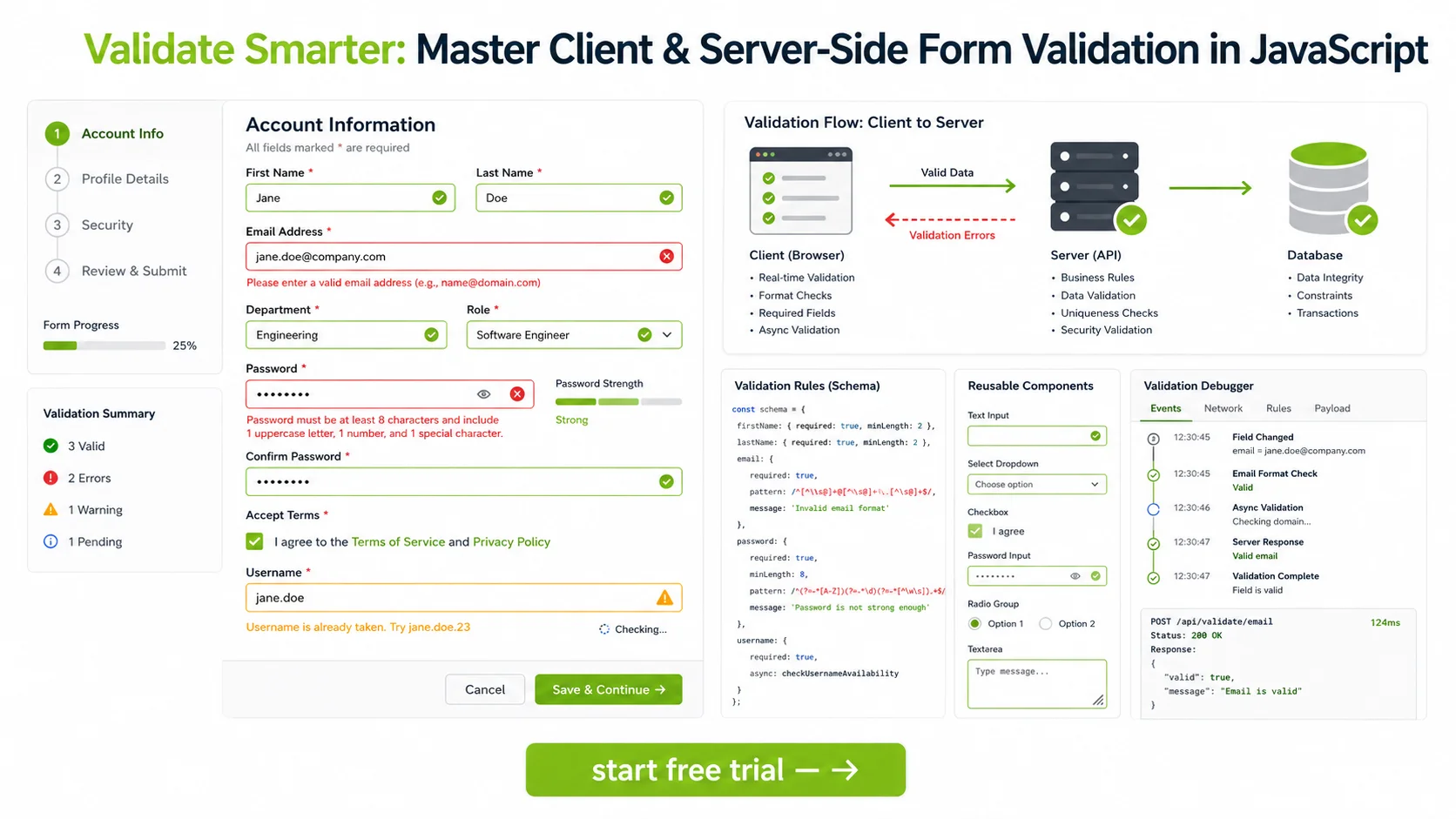
Server-side validation happens after the form is submitted and the backend receives the data.
Why Server-Side Validation Is Essential
Client-side validation improves usability, but it is never sufficient on its own. Users can disable JavaScript, manipulate requests, or bypass browser checks entirely.
Server-side validation is necessary because it:
- enforces data integrity
- protects against tampered requests
- applies authoritative business rules
- ensures trusted validation before persistence or processing
Important Principle
Client-side validation is for user experience. Server-side validation is for trust.
Every important rule should ultimately be enforced on the server.
Common Server-Side Validation Tasks
Server-side validation often checks:
- required fields
- sanitized input
- uniqueness constraints
- account permissions
- allowed value ranges
- relational consistency
- business workflow conditions
- security-sensitive rules
For example, a username may look valid in the browser but still be rejected on the server because it is already taken.
Also read: 10 Essential JavaScript Libraries Every Developer Should Know in 2026
Why Combining Client and Server Validation Works Best
The strongest approach combines both layers:
- client-side validation for responsiveness and usability
- server-side validation for authority and security
This gives users a better experience while preserving backend integrity.
Common Validation Types
1. Required Field Validation
Ensures users do not leave essential fields blank.
2. Format Validation
Checks whether a value matches the expected format, such as email, phone number, or postal code.
3. Length Validation
Verifies that text input meets minimum or maximum length requirements.
4. Range Validation
Ensures numbers, dates, or values fall within acceptable boundaries.
5. Cross-Field Validation
Compares multiple fields, such as confirming that password and confirm password match.
6. Conditional Validation
Applies rules only when certain conditions are met.
Example:
- if “Company Account” is selected, require company name
- if a checkbox is enabled, require an explanation field
7. Async or Remote Validation
Checks rules that require backend confirmation, such as:
- username availability
- coupon validity
- account status
- permission-based checks
Challenges of Form Validation in Larger Applications
Validation becomes harder as forms become more advanced.
Common challenges include:
- duplicated validation rules
- inconsistent error messaging
- difficult cross-field dependencies
- dynamic field visibility
- role-based validation logic
- asynchronous checks
- complex multi-step workflows
- keeping client and server rules aligned
This is where Web Application framework -level validation support becomes especially helpful.
Ext JS and Integrated Form Validation
Ext JS provides an integrated form validation system designed for structured, data-heavy user interfaces.
Instead of manually wiring validation logic across many separate DOM elements, Ext JS lets developers manage validation through form fields, component configs, validators, model rules, and consistent error handling patterns.
This can make a major difference in enterprise applications where forms are often large, dynamic, and tied to business logic.
How Ext JS Streamlines Validation
1. Built-In Field Validation
Ext JS form fields support validation rules directly through configuration. This allows developers to define requirements close to the field itself.
Typical validation options can include:
- required fields
- length constraints
- format rules
- custom validators
- type-aware validation
This keeps validation logic structured and easier to maintain.
2. Consistent Error Display
A major challenge in custom validation systems is presenting errors clearly and consistently. Ext JS helps by integrating validation feedback into the component system, making it easier to show messages, field states, and invalid input indicators in a standardized way.
This improves both user experience and development consistency.
3. Custom Validation Rules
Enterprise forms often need rules beyond simple required or format checks. Ext JS allows developers to create custom validators for application-specific logic.
Examples include:
- validating account codes
- checking workflow-specific requirements
- enforcing organization-specific formats
- handling dependent field logic
This flexibility is important for complex business applications.
4. Model-Level Validation Support
In many applications, validation should not live only at the field level. Data models often need their own rules as well.
Ext JS supports model-oriented validation patterns, which help ensure that validation can be tied to structured records and data definitions, not just UI widgets.
This improves reusability and consistency across forms and data workflows.
5. Easier Management of Complex Forms
Large enterprise forms may include:
- tabs
- field groups
- dependent inputs
- conditional sections
- dynamic field generation
- role-specific behavior
Ext JS is well suited for these scenarios because its component architecture and integrated validation system work together to support more organized form logic.
Example Validation Scenarios in Ext JS Context
While implementation details vary by application, Ext JS is especially helpful in scenarios such as:
- validating large account management forms
- enforcing business rules in approval workflows
- handling dynamic field requirements in admin panels
- validating grid editing input
- coordinating multi-step forms with shared data models
These are common enterprise needs where scattered manual JavaScript validation can quickly become difficult to maintain.
Best Practices for Form Validation
Whether you use vanilla JavaScript or Ext JS, these practices are important.
1. Validate on Both Client and Server
Never rely only on browser-side validation for important rules.
2. Give Clear, Specific Error Messages
Users should understand what went wrong and how to fix it.
Bad:
- Invalid input
Better:
- Password must be at least 12 characters long
3. Validate Early, But Do Not Overwhelm Users
Provide timely feedback without making the form feel hostile or distracting.
4. Keep Rules Consistent
Validation behavior should not vary unpredictably across similar forms.
5. Handle Cross-Field Logic Carefully
Dependencies between fields should be explicit and well tested.
6. Make Errors Easy to Recover From
Do not clear user input unnecessarily, and guide users toward successful correction.
7. Separate Validation Logic From Unrelated UI Logic
Validation should be structured clearly, not buried inside unrelated event handlers.
8. Design for Maintainability
As rules evolve, your validation approach should remain understandable and reusable.
Common Mistakes to Avoid
Some common validation mistakes include:
- relying only on client-side checks
- writing vague error messages
- duplicating the same rules in inconsistent ways
- making custom validation too tightly coupled to UI behavior
- failing to account for async validation cases
- not handling dynamic fields cleanly
- ignoring accessibility in error presentation
For enterprise applications, these problems can grow quickly if validation is not structured from the start.
Ext JS Advantage for Enterprise Validation Workflows
The value of Ext JS becomes especially clear when validation moves beyond simple signup forms.
Enterprise systems often require:
- multi-field dependencies
- conditional requirements
- reusable data rules
- standardized feedback patterns
- validation across large forms and editing workflows
- consistent handling across many screens
Ext JS helps streamline this through its integrated form components, validation capabilities, and model-oriented data handling.
Instead of building all validation mechanics from scratch, teams can work within a JavaScript framework that already supports structured, scalable form management.
Conclusion
Form validation is essential for building reliable, secure, and user-friendly JavaScript applications. Client-side validation improves usability by catching problems early, while server-side validation provides the trusted enforcement needed to protect application integrity.
The best validation strategies use both.
As forms become more complex, validation also becomes more difficult to manage. Cross-field dependencies, conditional rules, async checks, and large enterprise workflows require more than simple manual event handlers.
That is where Ext JS provides a clear advantage. Its integrated form validation system helps developers manage field rules, custom validators, consistent error handling, and complex business logic within structured component-based interfaces. For enterprise applications with demanding validation requirements, this can significantly improve maintainability and development speed.
A strong validation strategy does more than prevent errors. It creates better user experiences, protects data quality, and supports scalable application architecture.
Download the free Ext JS trial and accelerate enterprise app development.
FAQs
What is form validation in JavaScript?
Form validation is the process of checking user input to ensure it is complete, correctly formatted, and acceptable before the data is processed or stored.
What is the difference between client-side and server-side validation?
Client-side validation runs in the browser to improve user experience, while server-side validation runs on the backend to enforce trusted rules and protect data integrity.
Is client-side validation enough?
No. Client-side validation can be bypassed, so server-side validation is always necessary for important rules.
What are common types of form validation?
Common types include required field validation, format validation, length validation, range validation, cross-field validation, conditional validation, and async validation.
Why is form validation difficult in large applications?
Large applications often have dynamic forms, role-based rules, conditional fields, multi-step workflows, and reusable business logic, which make validation harder to organize and maintain.
How does Ext JS help with form validation?
Ext JS provides an integrated validation system with field-level rules, custom validators, consistent error handling, and support for structured form and model-based validation.
Why is Ext JS useful for enterprise form workflows?
It helps teams manage complex validation requirements across large, component-based interfaces without building everything manually from scratch.
Form Handling & Validation
Backend Development
JavaScript Development
Enterprise Application Development
Frontend Development
Web Application Development


Latest Content

Building Custom AI Coding Agents with ACP, MCP & React
From AI Code Completion to Autonomous Software Engineering Artificial intelligence is changing how software is…
October 1, 2026

Generating Live Ext JS Database Applications with Indi Engine AI: A Practical Architecture for Enterprise Modernization
Modernizing enterprise applications is rarely a matter of replacing an old interface with a new…
September 28, 2026

Building High-Performance Real-Time Operational Dashboards with Ext JS and React
Real-time operational dashboards are no longer simply reporting interfaces. In logistics, fleet management, supply chain…
September 28, 2026


