



 Ask Sencha AI
7 Best React Data Grids in 2026: Performance, Features, and Pricing Compared
July 16, 2026
1983 Views
Get a summary of this article:
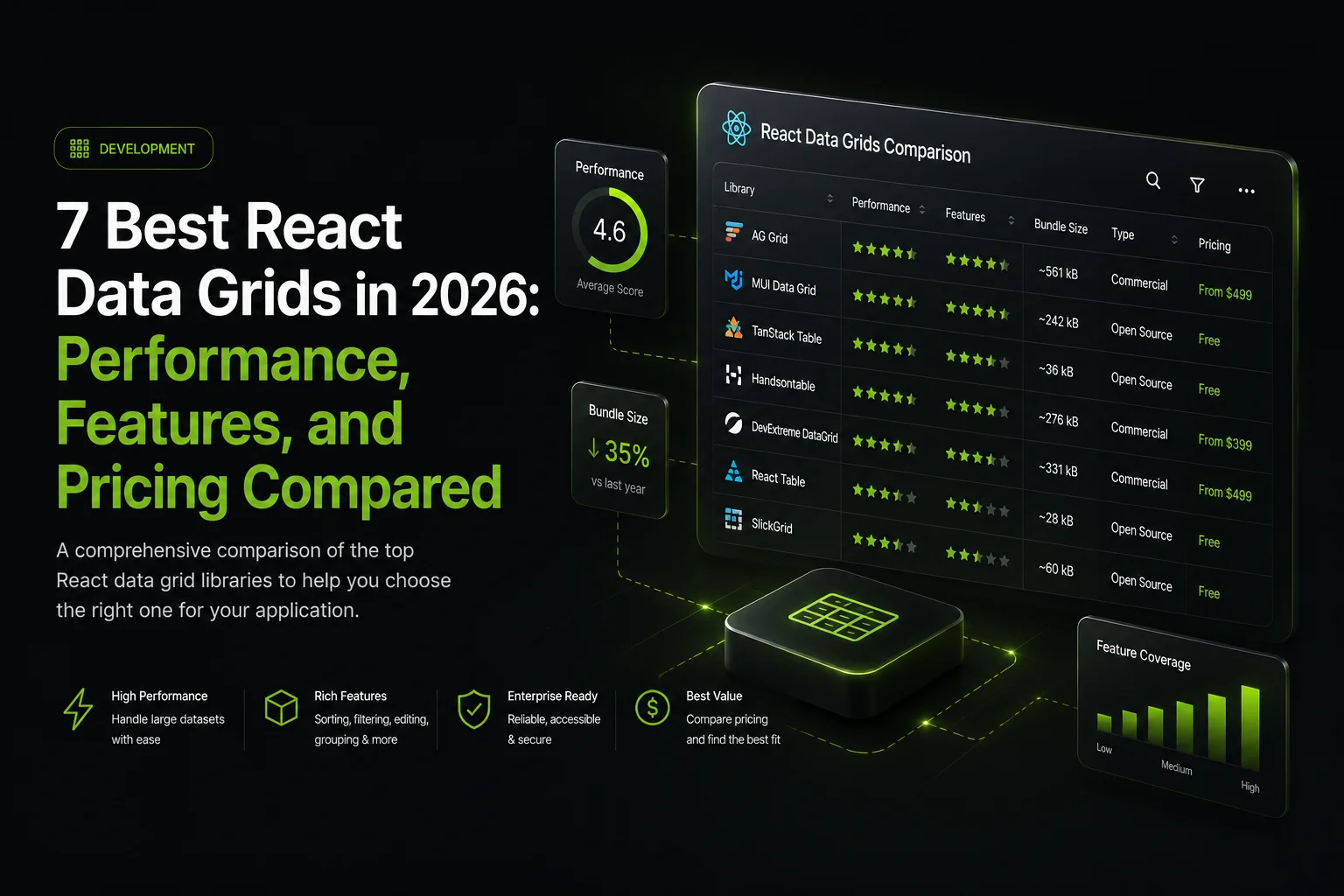
React data grid selection significantly affects enterprise application development outcomes because grids are often the most performance-critical component in data-intensive React applications. This guide compares seven mature React data grid options: ag-Grid React, MUI X Data Grid, TanStack Table, Handsontable, Sencha Ext JS grid via ReExt, PrimeReact DataTable, and KendoReact Grid. Each covers performance approach, feature depth, licensing structure, and best-fit scenarios. The right choice depends on data volume, feature depth, integration patterns, accessibility compliance, and total cost of ownership.
Key Takeaways
- Seven mature React data grid options serve different enterprise scenarios. The right choice depends on specific application requirements rather than general popularity.
- Grid performance for large datasets requires virtualization patterns. Virtual scrolling and column virtualization vary in approach and depth across grids.
- Feature depth varies substantially across React data grids. From basic sorting and filtering to advanced grouping, aggregation, pivoting, inline editing, and export.
- Licensing structures range from fully open-source to fully commercial. Several grids offer community and enterprise editions with different feature sets.
- Total cost of ownership often differs from the initial license cost. Developer time cost typically dominates total cost for enterprise applications.
- Accessibility through WCAG 2.2 is essentially mandatory for regulated industries. Grids with built-in accessibility significantly reduce per-application accessibility work.
Why React Data Grid Selection Matters
React data grids serve as the primary interface for displaying and interacting with data in most enterprise React applications. Business intelligence tools, operational dashboards, admin panels, financial applications, and customer management systems all depend heavily on data grid capabilities. For enterprise app development specifically, several considerations affect React data grid selection more heavily than general React library selection:
- Data volume. Grids that perform well with hundreds of rows sometimes fail at thousands of rows.
- Feature depth. Enterprise scenarios routinely need grouping, aggregation, pivoting, inline editing, and export beyond basic sorting.
- Accessibility compliance. WCAG 2.2 has become essentially mandatory for enterprise applications in regulated industries.
- Long-term vendor stability. Matters for applications expected to run for years across framework version changes.
1. ag-Grid React
ag-Grid is a widely adopted specialized data grid library with dedicated React bindings through ag-Grid React. The library focuses specifically on data grid capabilities across React, Angular, Vue, and vanilla JavaScript, which produces deep grid functionality that general-purpose UI libraries typically do not match.
- Performance and features. Virtual scrolling and column virtualization handle substantial data volumes. Features cover sorting, filtering, grouping, aggregation, inline editing, cell rendering with custom components, keyboard navigation, and accessibility support.
- Licensing and pricing. Dual-licensing model. ag-Grid Community is MIT-licensed and free. ag-Grid Enterprise requires a commercial license per developer and includes row grouping, pivoting, Excel export, master-detail rows, and integrated charting. Contact ag-Grid for current pricing.
- Best fit for React applications. Applications where data grid capability is central to user experience and other UI needs can be addressed through separate React libraries. Common in financial applications, business intelligence tools, and operational dashboards that display substantial data volumes.
2. MUI X Data Grid
MUI X Data Grid extends the Material UI component library with a dedicated data grid component. The grid follows Material Design principles and integrates naturally with Material UI applications through consistent theming, styling patterns, and API conventions.
- Performance and features. Virtualization for large datasets, sorting, filtering, column resizing, and cell rendering with React components. TypeScript-first since MUI X is TypeScript-first like Material UI itself.
- Licensing and pricing. Tiered licensing. MIT-licensed community version includes core grid functionality. MUI X Pro adds column pinning, row grouping, and tree data. MUI X Premium adds Excel export, aggregation, and cell selection. Pro and Premium require commercial licenses per developer. Contact MUI for current pricing.
- Best fit for React applications. React applications already using Material UI where consistent visual design and integration with existing MUI components matter. Less appropriate for applications with design directions incompatible with Material Design.
3. TanStack Table
TanStack Table (formerly React Table) is a headless table library that provides logic and behavior without prescribing visual design. Teams style TanStack Table using their own CSS, design system, or component library. The headless approach gives teams complete design control while providing sophisticated table behavior.
- Performance and features. Virtualization through integration with TanStack Virtual, sorting, filtering, grouping, aggregation, column resizing, and expansion. Hook-based API fits modern React patterns. TypeScript support is excellent with strong type inference from data models.
- Licensing and pricing. MIT-licensed without cost. No commercial edition or paid tiers. Total cost of ownership includes developer time for styling and integrating the headless components into the application’s design system.
- Best fit for React applications. Applications with distinctive design requirements where the headless approach lets teams build custom-branded tables on top of proven behavior. Pairs commonly with Tailwind CSS and shadcn/ui patterns. Less appropriate for teams without design resources for extensive styling work.
4. Handsontable
Handsontable provides a spreadsheet-like data grid that gives users an experience similar to Excel or Google Sheets. The library supports React through dedicated bindings and suits applications where users work with data in familiar spreadsheet patterns.
- Performance and features. Virtual scrolling for large datasets, cell editing with formula support, sorting, filtering, merged cells, custom renderers, conditional formatting, and validation. Handles formulas that reference other cells.
- Licensing and pricing. Dual licensing. A non-commercial license is available for personal, educational, and non-commercial use. Commercial applications require a commercial license priced based on the organization’s needs. Contact Handsontable directly for current commercial pricing.
- Best fit for React applications. Applications where users benefit from spreadsheet-like interactions. Financial applications with cell-based calculations, data entry applications where users move between cells frequently, and business tools where users expect Excel-like patterns.
Also Read: TypeScript vs JavaScript – Which to Choose in 2026
5. Sencha Ext JS Grid via ReExt
The Sencha Ext JS grid is a comprehensive enterprise data grid that ReExt makes accessible to React applications. React teams can use the Ext JS grid within React applications while continuing to write React code with hooks and functional components.
- Performance and features. Native virtualization, including horizontal buffering, handles substantial data volumes without additional library integration. Features cover sorting, filtering, grouping, aggregation, inline editing, custom cell renderers, locked columns, and column operations. WCAG 2.2 accessibility is built into the Modern toolkit rather than requiring per-component retrofitting.
- Licensing and pricing. Commercial licensing designed for enterprise deployment. Per-developer commercial licenses include commercial support, service level agreements, and version upgrade assistance. Contact Sencha directly for current pricing and licensing terms.
- Best fit for React applications. React applications where enterprise grid capability, commercial support, and comprehensive component depth matter. Suits React teams that have standardized on React for general development but need enterprise components for data-intensive application sections.
Teams can evaluate Ext JS and ReExt against their specific requirements to determine fit for their particular application context.
6. PrimeReact DataTable
PrimeReact DataTable is part of the broader PrimeReact component library from the PrimeFaces family. PrimeReact provides substantial React component coverage, including forms, panels, overlays, and specialized components. The DataTable component is one of the library’s flagship components.
- Performance and features. Virtualization for large datasets, sorting, filtering, grouping, editing, expandable rows, frozen columns, and many features relevant to enterprise applications. Strong TypeScript support. Multiple themes let applications choose visual direction independently.
- Licensing and pricing. MIT-licensed base library provides comprehensive functionality without cost. PrimeReact PRO offers additional templates, priority support, and other services for teams that want commercial arrangements. Contact PrimeReact for current PRO pricing.
- Best fit for React applications. React applications using PrimeReact for their component library. Suits applications that need broad React component coverage plus a capable data grid in a single library. Consider PrimeReact when neither Material UI nor Ant Design design directions fit.
7. KendoReact Grid
KendoReact Grid is part of Progress KendoReact, a commercial React component library from Progress Software. The grid provides enterprise-focused capabilities within a broader library covering forms, charts, editors, and various enterprise components.
- Performance and features. Virtualization, sorting, filtering, grouping, aggregation, inline editing, custom cell rendering, keyboard navigation, and Excel export. Comprehensive TypeScript support. Progress provides enterprise support with defined service level agreements.
- Licensing and pricing. Commercial licensing with per-developer pricing. No free open-source edition. Commercial support included with licensing. Contact Progress directly for current KendoReact pricing and licensing terms.
- Best fit for React applications. React applications with substantial enterprise requirements where commercial support, comprehensive component coverage, and integration with the KendoReact ecosystem matter. Evaluate whether commercial features justify licensing cost compared to MIT-licensed alternatives.
React Data Grid Comparison Table
| Grid | Licensing | Design approach | Support | Best fit |
|---|---|---|---|---|
| ag-Grid React | MIT Community + Enterprise | Framework-agnostic | Yes (Enterprise) | Grid-central apps |
| MUI X Data Grid | MIT + Pro + Premium | Material Design | Yes (Pro/Premium) | Material UI apps |
| TanStack Table | MIT | Headless | Community | Custom-designed |
| Handsontable | Non-commercial + Commercial | Spreadsheet-like | Yes (Commercial) | Spreadsheet workflows |
| Ext JS via ReExt | Commercial | Enterprise-focused | Yes | Enterprise React apps |
| PrimeReact DataTable | MIT + PRO tier | Flexible themes | Community + PRO | PrimeReact ecosystem |
| KendoReact Grid | Commercial | Enterprise-focused | Yes | Commercial priority |
How to Choose the Right React Data Grid
Selecting among seven mature React data grid options requires evaluating specific application requirements. For teams choosing application development software for enterprise scenarios, work through these five criteria:
- Assess data volume and performance. Test with realistic data volumes rather than sample data because performance characteristics emerge only under production-like conditions. The Ext JS grid, ag-Grid, and Handsontable all handle substantial data volumes through mature virtualization.
- Match design direction to grid aesthetics. Material Design applications fit MUI X. Custom-designed applications fit TanStack Table. Enterprise-focused applications fit Ext JS via ReExt or KendoReact. Spreadsheet workflows fit Handsontable.
- Evaluate feature depth for enterprise needs. Map application requirements against candidate grids. Some grids provide advanced features under community licensing; others reserve them for commercial tiers. Consider both feature availability and licensing tier requirements.
- Consider accessibility requirements. Grids with strong accessibility foundations, including Sencha Ext JS Modern toolkit, provide ARIA semantics, keyboard navigation, and screen reader compatibility built in. Test with actual assistive technology rather than relying only on marketing claims.
- Calculate the total cost of ownership. Include license fees, initial development, ongoing maintenance, framework upgrade cost, support cost, and opportunity cost. For enterprise applications where developer time dominates, grids with commercial licensing often produce lower total cost than free grids requiring substantial custom development.
Conclusion
Seven mature React data grid options serve different enterprise scenarios well in 2026. ag-Grid React provides specialized grid focus with dual licensing. MUI X Data Grid integrates deeply with Material UI. TanStack Table provides headless flexibility. Handsontable delivers spreadsheet-like experiences. Sencha Ext JS via ReExt brings comprehensive enterprise grid capability to React applications. PrimeReact DataTable serves the PrimeReact ecosystem. KendoReact Grid provides commercial React-focused enterprise capabilities.
The right choice depends on data volume, feature depth, design direction, accessibility needs, licensing preferences, and total cost of ownership. For enterprise application development with substantial data grid requirements, evaluate grids against your specific requirements rather than choosing based on general popularity. For enterprise software development teams needing comprehensive enterprise capability within React applications, the combination of a strong data grid with the broader component library the grid comes from often produces better outcomes than assembling a grid with separate components from different vendors.
Frequently Asked Questions
What is the best React data grid for enterprise applications?
It is one of the best software development tools, particularly for React ecosystems. ReExt also provides a powerful React JS grid component for building data-rich interfaces efficiently. Begin developing smarter with ReExt and enjoy the full benefits of rapid application development. You don’t need to start from scratch. With ReExt, much of the heavy lifting is already done. That’s what makes it different from many other tools out there.
Which React data grid handles the most rows?
Sencha Ext JS via ReExt, ag-Grid React, and Handsontable all handle large datasets through built-in virtualization. Specific performance depends on cell complexity and update frequency. Test with realistic data volumes rather than relying on marketing benchmarks.
Which React data grids are free?
Several offer free tiers under an MIT license:
- TanStack Table. Fully MIT-licensed.
- PrimeReact DataTable. MIT-licensed as part of PrimeReact.
- ag-Grid Community and MUI X Community. Core features are free; advanced features require commercial licenses.
- Handsontable. Free for non-commercial use only; business use requires a commercial license.
Can I use Sencha Ext JS grid in a React application?
Yes. ReExt lets React teams use the Ext JS grid inside React applications while writing standard React code with hooks. Common patterns use React for general UI and Ext JS through ReExt for data-intensive sections like dashboards and complex data management.
Do React data grids support accessibility?
Yes, to varying degrees. WCAG 2.2 requires ARIA semantics, keyboard navigation, focus management, and screen reader support. Grids with built-in accessibility, including Sencha Ext JS Modern toolkit, reduce per-application work. Test with actual assistive technology.
Which React data grid works best with TypeScript?
All seven grids in this guide provide native TypeScript definitions. Evaluate integration quality beyond mere presence, including type inference from data models, autocomplete for grid options, and compile-time error checking.
Should I choose a specialized grid or a comprehensive component library?
Specialized grids suit applications where the grid is central and other UI needs come from separate libraries. Comprehensive libraries like Sencha Ext JS suit applications with substantial UI beyond grids, reducing assembly work and integration overhead.
JavaScript UI Components
Enterprise Application Development
Web Development
React Development
Front-End Development
React


Latest Content
React Component Library for Data-Heavy Apps: Why 1 Vendor Beats 5
Data-heavy React apps rarely start with five UI vendors. They get there one reasonable decision…
October 21, 2026
How to Standardize on One UI Component Library Across Your React Apps
In most large organizations, every React app has its own UI stack. One team uses…
October 21, 2026
UI Component Library vs Component Framework: What Enterprise React Teams Need
Ask a React team what they use for UI, and you’ll usually hear the name…
October 21, 2026


