



 Ask Sencha AI
How to Design UI Faster in 2026: A Developer’s Guide to the Best UI Components
April 28, 2023
6689 Views
Get a summary of this article:
What this article covers: A practical 2026 developer’s guide to designing UI faster using the best javascript ui components — what they are, how prebuilt ui components cut development time, and why Sencha Ext JS is the leading ui component library for building enterprise-grade web applications.
- What UI components are: Reusable, self-contained interface building blocks — buttons, grids, forms, charts — that eliminate repetitive work, enforce design consistency, and let developers focus on business logic instead of rebuilding solved problems
- 2026 context: The ui component library landscape has split into styled (MUI, Ant Design), headless (Radix UI, shadcn/ui), and enterprise-depth (Sencha Ext JS) — choosing the wrong philosophy for your project costs weeks of rework
- Where Sencha Ext JS leads: 140+ production-ready prebuilt ui components, buffered rendering for millions of rows, a unified data layer across grids, charts, and forms — all without third-party assembly
- Key strengths: Real-time data binding, pivot tables, 50+ chart types, built-in ARIA accessibility, XSS/CSRF security at the component level, and long-term commercial support
- Bottom line: For developers building data-intensive enterprise applications, Sencha Ext JS delivers the design speed, component depth, and unified data architecture that no general-purpose library can replicate without significant integration overhead

Let’s Be Honest — UI Design Takes Too Long
Here is a situation every developer has been in. You sit down to build what looks like a straightforward dashboard. A grid here, a chart there, a few filters, maybe a form. Six hours later, you are still debugging a sorting edge case in a data table you built yourself, the chart does not update when the grid filters change, and the deadline is tomorrow.
Sound familiar?
The problem is not that you are a slow developer. The problem is that building UI from scratch in 2026 is genuinely hard — and most developers are still doing it the hard way. Hand-coding components that already exist. Wiring up multiple third-party libraries that were never designed to talk to each other. Spending hours on accessibility fixes that a good ui component library would have handled automatically.
There is a better way. And it starts with understanding what javascript ui components can actually do for your design process — and which ui component library is genuinely worth your time.
What Are UI Components and Why Do They Matter for Design Speed?
A UI component is a self-contained, reusable piece of interface functionality. It handles its own rendering, styling, and behavior — and can be dropped into any part of your application without rewriting it. Buttons, grids, date pickers, charts, modals, tree views, combo boxes — all UI components.
The keyword is reusable. Write it once, configure it anywhere, update it in one place and the change instantly propagates across the entire application. That principle is what makes prebuilt ui components such a powerful design accelerator — and why teams that use a well-chosen ui component library consistently outship teams that build everything from scratch.
Think about what goes into building a single data grid correctly from zero. Sorting logic. Filtering. Pagination. Keyboard navigation. ARIA roles and labels for screen readers. Responsive column behavior. Loading states. Empty states. Error states. Cross-browser consistency. That is easily a week of work for one component — and that is before you add real-time data updates or inline editing.
A good ui component library gives you all of that in one line of configuration. That is the design speed advantage that compounds across every component in your application.
The Three Types of UI Component Library in 2026
Not every ui component library solves the same problem. In 2026, the market has settled into three clear camps — and picking the wrong one for your project is a mistake that costs weeks.
Styled libraries like MUI, Ant Design, and Chakra UI ship with pre-built visual designs that work out of the box. Great for prototyping and general web projects. The trade-off is bundle size and design opinions baked in that take effort to customize away from.
Headless libraries like Radix UI and React Aria give you behavior and accessibility with zero visual styling — maximum design freedom, but you build every pixel yourself. shadcn/ui bridges the gap, putting Radix’s accessibility foundations into Tailwind-native styles you own directly in your codebase.
Enterprise-depth libraries like Sencha Ext JS are built for the applications where everything else hits its limits — millions of rows of live data, pivot analytics, synchronized charts and grids, long-running sessions, and regulated industry compliance. This is where the real design speed gains live for enterprise teams.
Why Sencha Ext JS Is the Fastest Way to Design Enterprise UI
Here is the honest truth about enterprise UI design in 2026: assembling a stack of general-purpose libraries and wiring them together is slow, fragile, and expensive to maintain. You spend more time making libraries talk to each other than you do actually designing the application.
Sencha Ext JS solves this problem at the root. It is not just a ui component library — it is a complete enterprise application design platform with 140+ production-ready javascript ui components that all share a single, unified data layer. JavaScript Grids, charts, pivot tables, forms, and tree views all consume the same Ext JS data store. When the data updates, every component on the dashboard updates automatically. No custom synchronization code. No wiring. No bugs from a mismatched state between a chart and a grid that were never designed to share data.
That single architectural decision — the unified data layer — is what separates Ext JS from every assembled stack of general-purpose libraries. And it is what makes the design process dramatically faster in practice.
Let’s break down exactly what that means for your UI design workflow.
Also Read: Top 10 Web Application Development Frameworks in 2026
How Sencha Ext JS Speeds Up Every Stage of UI Design
Starting Fast With 140+ Ready-to-Use Components
The first way Ext JS speeds up UI design is simply the sheer depth of what is available out of the box. Most ui component libraries offer 40–100 components optimized for general web use. Sencha Ext JS offers 140+ components built specifically for the complexity and data volumes of enterprise applications.
Grid panels, pivot grids, spreadsheet grids, tree grids, 50+ chart types, form panels, tab panels, tree panels, DataView components, combo boxes, toolbars, window components — every major enterprise UI pattern is covered as a prebuilt ui component, ready to configure rather than build.
Designing Data-Heavy Interfaces Without the Performance Headaches
One of the biggest design bottlenecks in enterprise UI development is data performance. You design a beautiful grid, populate it with real data in staging, and suddenly the interface crawls. Columns misalign, scrolling lags, filters take seconds to apply. The design that looked great with 50 rows falls apart at 50,000.
Sencha Ext JS eliminates this problem with buffered rendering — an architecture where only the rows currently visible in the viewport exist in the DOM at any time. An application displaying 500,000 records performs identically to one displaying 500. The design never degrades under data volume. That means you design once for the real production scale — not twice, once for the demo and once to fix the performance issues you discover later.
Keeping Dashboards Synchronized Without Extra Work
Here is a design challenge that trips up almost every team building analytics dashboards: how do you keep a chart and a grid synchronized when they are displaying the same data? In most library stacks, the answer involves custom event handling, shared state management, and a growing tangle of synchronization code that becomes harder to maintain every time a new component gets added to the dashboard.
In Sencha Ext JS, both the chart and the grid consume the same Store. When a user filters the grid, the chart updates automatically. When new data arrives from the API, both update together. There is no synchronization code to write because the synchronization is built into the architecture. Designing multi-component dashboards in Ext JS is genuinely faster than the same task in any assembled alternative stack — not marginally faster, but fundamentally faster because an entire category of engineering complexity does not exist.
Designing With Accessibility Already Done
Accessibility is one of the most time-consuming aspects of careful UI design — and one of the most frequently cut when deadlines tighten. According to the 2025 WebAIM Million report, approximately 95% of the top one million websites still have detectable WCAG accessibility failures. That statistic exists largely because accessibility is treated as a finishing step rather than a foundation.
Sencha Ext JS flips this entirely. ARIA support, keyboard navigation, focus management, and high-contrast mode are built into every component by default. Designers and developers working with Ext JS do not implement accessibility — they inherit it. For teams working in regulated industries like healthcare, government, and finance, where WCAG compliance is a hard requirement, this built-in foundation reduces the cost and timeline of accessibility audits significantly.
Building Analytical Interfaces With Native Pivot Grids
One of the most requested enterprise UI design patterns — and one of the hardest to implement well — is a pivot grid for analytical data summaries. Most general-purpose libraries do not offer pivot grids at all. Teams that need them either build custom implementations from scratch or bolt on specialized third-party tools with their own APIs, their own data formats, and their own integration surfaces to maintain.
Sencha Ext JS includes native pivot grid components with three layout modes — outline, compact, and tabular — that connect directly to the same data stores powering every other component in the application. Designing analytical interfaces in Ext JS means the pivot grid just works alongside the regular grid and the charts, without a separate integration project.
Security Designed In, Not Bolted On
Enterprise applications handle sensitive data — and the design decisions made at the component level have security implications that surface later in production. Sencha Ext JS builds XSS and CSRF protections directly into every component. Security is not a separate layer applied on top of the UI design — it is part of the component architecture from the start. For teams designing applications in healthcare, finance, and government, where data security is non-negotiable, this built-in protection is a significant design advantage over libraries that leave security implementation entirely to the developer.
How to Get Started With Sencha Ext JS?
If you want to start implementing Sencha Ext JS in your web development, here is how you can do it. First of all, you have to visit their website and look for the blue button “Start Free Trial”. You can see it in the image given below:
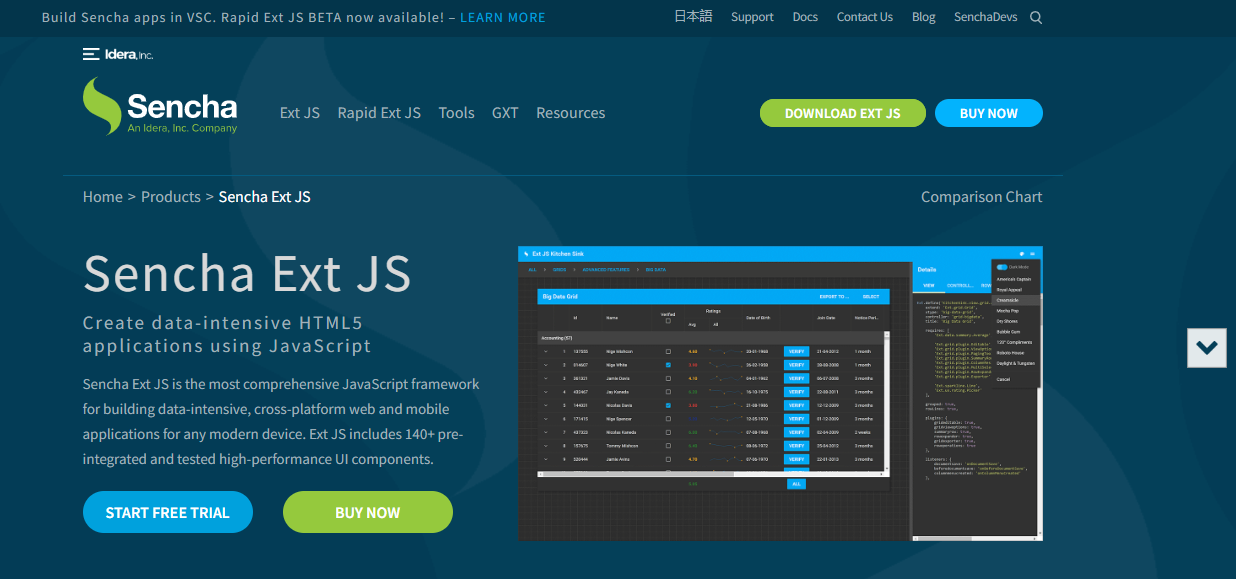
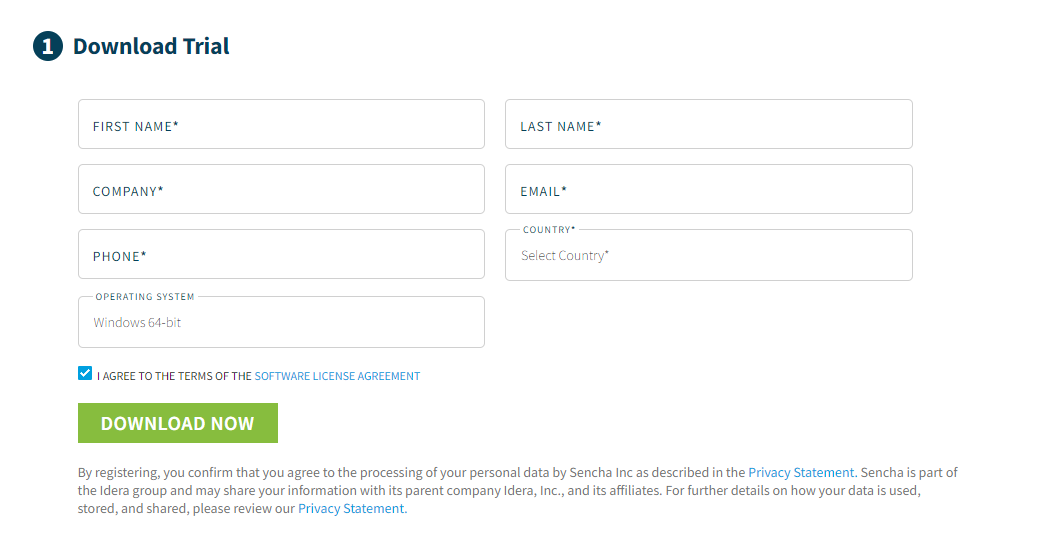
Note that you can get started with Sencha Ext JS within three simple and easy steps. When you click on ”START FREE TRIAL”, you will get the below screen. You must fulfil the required details and click on the Download Now button.
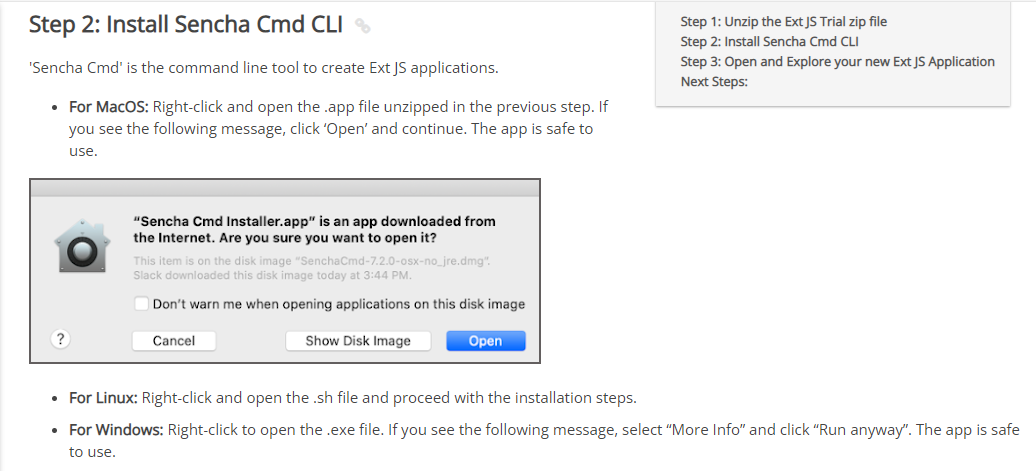
Then, you have to follow the below steps: Unzip the downloaded folder from the Ext JS website. Then, you must install the Sencha CMD CLI. Here are the details for installation in Linux, MacOS, and Windows.
Finally, you can enjoy and explore your new Ext JS application. Note that the installation process is well-explained on the Sencha Ext JS website. You must open the command window and create a directory where you will keep your new application.
cd <folder-to-create-the-app>
If you are a trial user, you can use the following command:
sencha generate app --ext MyApp ./MyApp
On the other hand, if you are using Ext JS as an active customer, you can use the following command:
sencha -sdk /path/to/downloaded/sdk generate app modern MyApp ./MyApp
You can navigate to the new application through the following command:
cd MyApp
Then, you can run the application through the following command:
sencha app watch
You can also run your application in a browser through the following URL: http://localhost:1841/
Next Steps:
Now, you can experience highly efficient UI components, debugging, and testing tools. You can also add more components and learn more about the application structure at the Sencha Ext JS website.
Quick Comparison: Design Speed Across the Top UI Component Libraries
| Library | Components | Design Speed | Enterprise Data | Best For |
|---|---|---|---|---|
| Sencha Ext JS | 140+ | Fastest for enterprise | Native — unified data layer | Enterprise data-intensive apps |
| Material UI | 100+ | Fast for general apps | Manual wiring required | General enterprise, consumer apps |
| shadcn/ui | ~50 | Fast for design-led teams | Manual wiring required | Tailwind-first, full design control |
| Ant Design | 60+ | Fast for admin tools | Manual wiring required | Admin panels, internal tools |
| Chakra UI | 50+ | Fast for accessible UIs | Manual wiring required | Accessibility-first projects |
Conclusion
Designing UI faster in 2026 is not about taking shortcuts — it is about building on the right foundation from the very first decision. The best javascript ui components eliminate repetitive work, enforce design consistency across the application, deliver accessibility as a default rather than an afterthought, and free development teams to focus on the business logic and user experience that actually creates value.
For general web development, the 2026 Best UI component library market offers excellent options at every level — from shadcn/ui’s design freedom to MUI’s comprehensive coverage to Ant Design’s business application depth. For enterprise applications where the design requirements go beyond what any general-purpose library can handle without significant assembly and integration work, Sencha Ext JS is the clear answer. Its 140+ production-ready prebuilt ui components, unified data layer, buffered rendering architecture, built-in accessibility, and long-term commercial support make it the standard against which every other enterprise design platform is measured.
Start with the right tools. Build on a tested foundation. Design faster — and deliver the quality your users expect from day one. Start your free trial now!
Frequently Asked Questions
What are the best UI components for enterprise web development?
For enterprise web development, Sencha Ext JS leads with 140+ production-ready prebuilt ui components, including advanced buffered grids, pivot tables, 50+ chart types, tree views, form systems, and layout containers — all sharing a unified data layer. For general web development, MUI, Ant Design, shadcn/ui, and Chakra UI each lead their respective niches.
What is a ui component library, and why does it matter for design speed?
A ui component library is a collection of prebuilt ui components that developers integrate directly into applications rather than building from scratch. It matters for design speed because it eliminates the time spent building, testing, and debugging interface elements that have already been solved — letting teams focus on application-specific features instead of reinventing solved design problems.
What makes Sencha Ext JS faster for UI design than other libraries?
Sencha Ext JS accelerates UI design through three key advantages: 140+ prebuilt ui components purpose-built for enterprise workflows, a unified data layer that keeps grids, charts, and forms synchronized without custom wiring, and buffered rendering that maintains consistent visual performance at any dataset size. Teams designing with Ext JS spend less time integrating and debugging third-party tools and more time designing the features their users actually need.
Which UI component library is best for data-intensive applications?
For data-intensive applications, Sencha Ext JS is the leading choice. Its unified data architecture, buffered rendering for millions of rows, native pivot grids, 50+ chart types, and long-term commercial support give enterprise design teams a foundation that general-purpose libraries require significant additional assembly to approximate.

 1
1
Latest Content

React Component Library for Data-Heavy Apps: Why 1 Vendor Beats 5
Data-heavy React apps rarely start with five UI vendors. They get there one reasonable decision…
October 21, 2026
How to Standardize on One UI Component Library Across Your React Apps
In most large organizations, every React app has its own UI stack. One team uses…
October 21, 2026
UI Component Library vs Component Framework: What Enterprise React Teams Need
Ask a React team what they use for UI, and you’ll usually hear the name…
October 21, 2026


