



 Ask Sencha AI
Stop Bloating Your Bundle: Dynamic Package Loading in Ext JS
April 20, 2026
1587 Views
Get a summary of this article:

Performance is not just a feature; it’s a requirement. For large-scale enterprise applications, the biggest enemy of a smooth User Experience (UX) is the Initial Load Time. If your app-all.js is several megabytes, you are making your users wait for code they might not even use in that session.
It’s time to stop ship-everything-at-once builds. Let’s look at how to use Dynamic Package Loading with Sencha Cmd to modularize your app and slash your bundle size.
The Strategy: Requires vs. Uses
By default, when you put a package in the requires array of your app.json, Sencha Cmd merges everything into the main bundle. To decouple them, we move secondary features to the uses array.
1. Configure app.json
First, ensure you have the package-loader in your requirements and move your heavy modules to the uses section.
JSON
    {
        "requires": [
            "package-loader"
        ],
        "uses": [
            "ReportsModule",
            "AdminDashboard"
        ]
    }
2. Implementation: Loading on Demand
Instead of the framework loading these packages at startup, you control the execution using Ext.Package.load(). This is particularly powerful when hooked into Routes.
JavaScript
    // Example: Loading a Reporting module only when the user navigates to the route
    routes: {
        'reports/:type': {
            before: 'ensurePackageLoaded',
            action: 'showReport'
        }
    },

    ensurePackageLoaded: function(type, action) {
        var pkg = 'ReportsModule';

        if (Ext.Package.isLoaded(pkg)) {
            action.resume();
        } else {
            Ext.getBody().mask('Loading Module...');

            Ext.Package.load(pkg).then(function() {
                Ext.getBody().unmask();
                action.resume();
            });
        }
    }
Tree Shaking & Build Optimization
Dynamic loading is half the battle. To ensure the packages themselves are lean, leverage Sencha Cmd’s compiler capabilities:
- Dead Code Elimination: Sencha Cmd’s compiler automatically performs tree shaking by analyzing class requirements. Avoid using Ext.create(‘ClassName’) with strings; use xtype or proper requires blocks so the compiler can safely include only what’s used.
- Build Switch: When building, use the –uses flag to tell Cmd to generate separate bundles for your dynamic packages.
Bash
sencha app build production --uses
Why this matters for the Developer
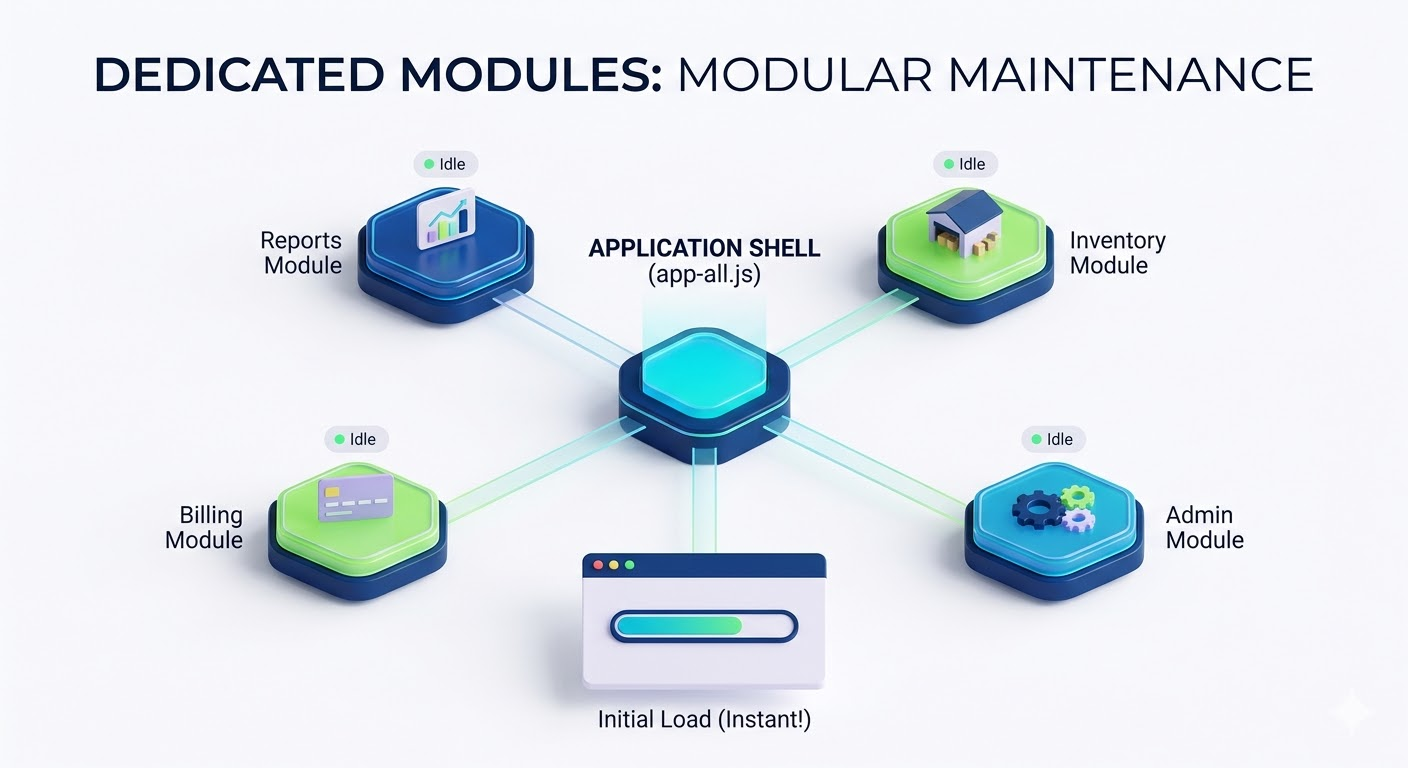
- Faster Upgrades: By modularizing features into packages, you can update or refactor specific modules without risking the stability of the entire core application.
- Modular Maintenance: Teams can work on separate packages (e.g., Inventory vs. Billing) with clear boundaries.
- Lightweight Initial Footprint: Your core app.js only contains the essential “Shell” and common logic, making the first “Time to Interactive” (TTI) lightning fast.
Documentation References
- Dynamic Package Loading Guide
- Manifest Class
- Sencha CMD Packages
- Creating Sencha CMD Packages
- Package Loader Source Code
Conclusion
Stop treating your enterprise app like a monolith. Use Dynamic Package Loading to deliver only what the user needs, exactly when they need it. Your bundle and your users will thank you.
Looking to Upgrade to 8.0?
The free-to-use Ext JS Upgrade Adviser tool helps identify code changes required to migrate to the latest Ext JS version. Give it a try!
Join the Sencha Discord Server
Are you looking for community engagement? Want to help, learn and share with many Ext JS experts? Join Sencha Discord Server now for free and be part of our community!
- Sencha MVPs are there
- Sencha developers are there
- Expand awareness of Sencha products
- Community Engagement and Contributions
- And more…
Software Engineering
Frontend Development
Web Development
Performance Optimization
JavaScript Frameworks
 1
1

Latest Content
React Component Library for Data-Heavy Apps: Why 1 Vendor Beats 5
Data-heavy React apps rarely start with five UI vendors. They get there one reasonable decision…
October 21, 2026
How to Standardize on One UI Component Library Across Your React Apps
In most large organizations, every React app has its own UI stack. One team uses…
October 21, 2026
UI Component Library vs Component Framework: What Enterprise React Teams Need
Ask a React team what they use for UI, and you’ll usually hear the name…
October 21, 2026


