








Turbocharge Your JavaScript Grids with Locked Columns, Infinite Scrolling, and Sparklines
June 29, 2021
3077 Views
Get a summary of this article:
As all developers know, the grid is one of the most powerful UI tools you have at your disposal. In particular, JavaScript Grids allow you to conveniently manipulate HTML tables with large datasets. One of the reasons for this is that grids are extremely versatile and offer extensive features, like locked columns, infinite scrolling, and sparklines, which all help you render large sets of data smoothly and efficiently.
The previous article, How to Quickly Customize Ext JS Data Grid, demonstrates various methods for quickly customizing an Ext JS Data Grid, which is related to this current article, which will look at how you can begin turbocharging your JavaScript Grid with Sencha Ext JS features such as Locked columns, infinite scrolling, and sparklines.
What is Sencha Ext JS?
Sencha Ext JS is a feature-rich JavaScript framework for building data-intensive web applications. It offers more than 140 high-performance UI components, including grids and pivot grids. Using Sencha Ext JS components, you can easily and quickly develop powerful cross-platform web applications.
How can I turbocharge my JavaScript Grids with Locked Columns?
With Sencha Ext JS, you can lock two columns side by side. This allows your users to scroll down both of them simultaneously. Here is an example:
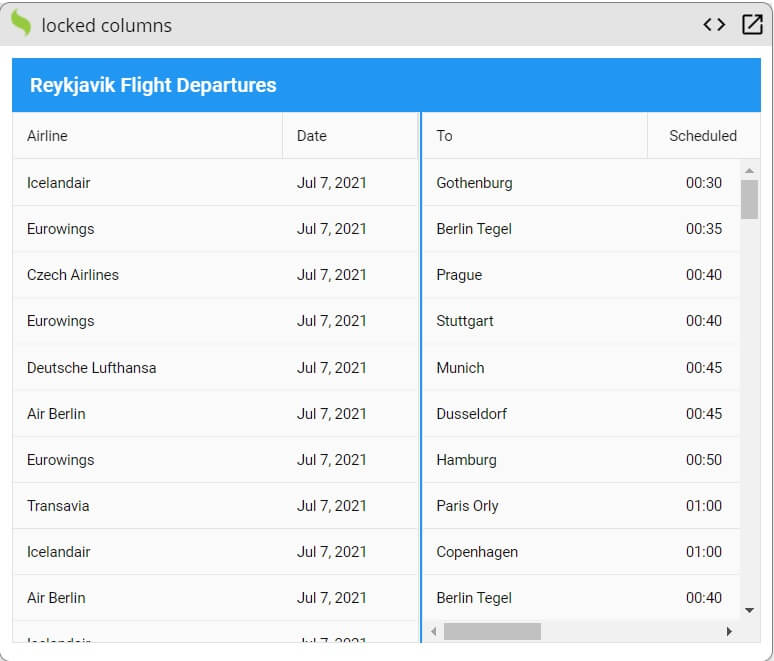

To create the locked columns shown above, you have to follow these steps:
1. First, you have to define the view of the app. Then extend Grid and specify the title.
Ext.define('MyApp.view.Main', {
extend: 'Ext.grid.locked.Grid',
title: 'Reykjavik Flight Departures',
2. Next, you have to specify the columns. You can find all the details in the source code.
3. Then you have to define store. You have to specify the type, fields, and proxy. Also, make sure to set autoLoad to true.
store: {
type: 'store',
autoLoad: true,
fields: [{name: 'date',type: 'date',dateFormat: 'j. M'}],
proxy: {
type: 'ajax',
url: 'departures.json',
reader: {rootProperty: 'results'}}
}
});
4. Finally, you have to call Ext.application() function:
Ext.application({
name: 'MyApp',
mainView: 'MyApp.view.Main'
});
Source Code:
You can play with the source code at Fiddle.
How can I turbocharge my JavaScript Grids with Infinite Scrolling?
Infinite Scrolling is great for mobile devices. The user can scroll down and keep getting new data without going to another web page. It results in a smoother user experience. Here is an example:
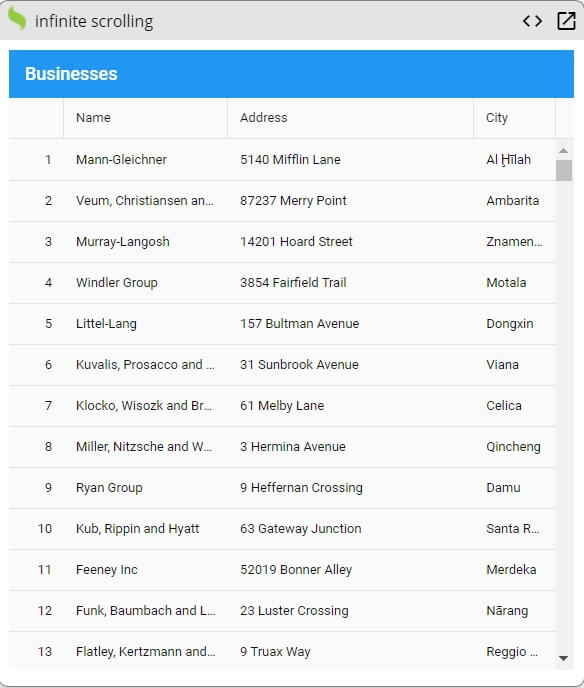

To implement infinite scrolling in your JavaScript web application, you have to use this code:
1. Define the view of the app and the title. Then extend Grid.
Ext.define('MyApp.view.Main', {
extend: 'Ext.grid.Grid',
title: 'Businesses',
2. Now, you have to specify the columns:
columns: [
{ xtype: 'rownumberer', width: 55},
{ text: 'Name', dataIndex: 'name', flex : 2},
{ text: 'Address', dataIndex: 'full_address', flex : 3 },
{ text: 'City', dataIndex: 'city', flex: 1 }
],
3. Next, you have to specify the store.
store: {
type: 'virtual',
pageSize: 200,
proxy : { type : 'ajax', url : '//nameless-tundra-27404.herokuapp.com/go/?fn=bigdata', reader : { type : 'json', rootProperty : 'data' } },
autoLoad: true
}
});
4. Now, add this code:
Ext.application({
name: 'MyApp',
mainView: 'MyApp.view.Main'
});
Source Code:
You can find the source codes right here.
How can I turbocharge my JavaScript Grids with Sparklines?
Sparkline is a small line chart. It helps you to visualize data effectively. By using Grids with sparklines, you can create beautiful visualizations. Here is an example:
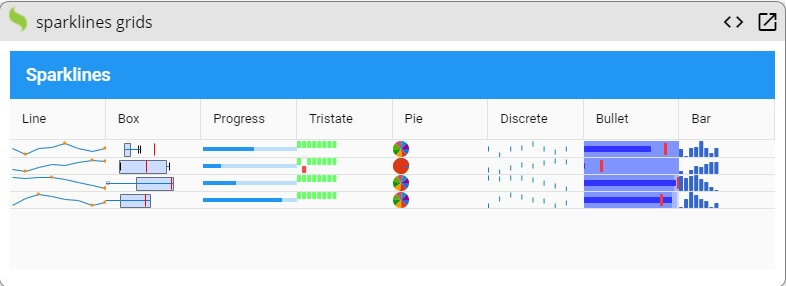

To create the visualization shown above, simply follow these steps:
1. Define the view of the app. Then extend Grid and specify the title.
Ext.define('MyApp.view.Main', {
extend: 'Ext.grid.Grid',
title: 'Sparklines',
2. Next, you have to define columns for various charts, including box chart and pie chart. You also have to define the column for sparklines. You will find all the details in the source code.
3. Then you have to define initialize. You have to create a function for pushing and shifting values.
initialize: function(){
var me = this;
this.callParent();
var store = this.getStore();
window.setInterval(function(){
store.each(function(record){
var values = Ext.clone(record.data.trend );
var last = values[values.length-1];
last += (Math.random() * 2) - 1;
values.push(last);
values.shift();
record.set('trend', values);
});
},300);
},
4. Now, you have to define store. You can find all the details in the source code.
5. Finally, add this code:
Ext.application({
name: 'MyApp',
mainView: 'MyApp.view.Main'
});
Source Code:
You can view the source code at Fiddle.
Are you ready to start turbocharging your JavaScript Grids?
JavaScript Grids enable you to simplify the way your users work with data and render large datasets smoothly. In addition, a well-designed grid significantly reduces the time your users spend managing their data. Overall, JavaScript Grids help you to effectively accelerate your business process by giving you control over how your data is manipulated and displayed.



Latest Content


How to Build a Reusable React Grid Component
In most enterprise React apps, the grid shows up on dozens of screens: orders, customers,…
October 9, 2026

React Grid Component: Layout and Data Grids in One Framework
Search for “React grid component,” and you will find two very different things. Half the…
October 9, 2026

How to Use the Ext JS Grid in React: Setup, Columns, Editing and Grouping
Set up the Ext JS grid in React with ReExt, then add typed columns, store-backed…
October 6, 2026


