



 Ask Sencha AI
Sencha Visual Studio and Eclipse Plugins Are Generally Available
December 2, 2015
4150 Views
Get a summary of this article:
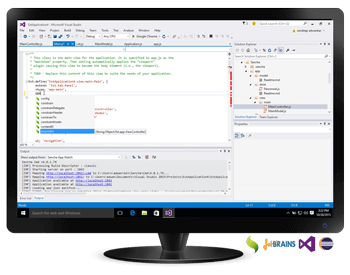
We’re excited to announce that Sencha Visual Studio Plugin and Eclipse Plugin are now generally available. With this release, we now have support for all of the major IDEs including JetBrains. Our goal for Sencha IDE Plugins is to streamline the development process for developers using Sencha Ext JS and popular IDEs. These new plugins are available to Ext JS Pro and Premium customers at no extra charge.
- Try it for free today*
- Ext JS Pro and Premium customers:
Download the plugin from the Support portal.
*Note: when you receive the Ext JS free trial confirmation email, you can choose to download Visual Studio or Eclipse plugin only, if you already have Ext JS.
Both Eclipse and Visual Studio Plugins have the following features to help developers build Ext JS web applications faster:
- Starter template: quickly create new web application projects for Sencha Ext JS frameworks
- Consistent code completion experience inside the IDE for:
- Config, method, and property names for all Ext JS and user classes
- Alias properties such as xtype, controller, viewModel, layout
- Event names and listeners objects
- Controller methods in listeners
- Properties from the ViewModel in bind configs
- Easily navigate code to:
- Framework, custom, and parent classes
- Context-sensitive help
- Use template creation capabilities to quickly create code snippets by adding new:
- Ext JS apps and workspaces
- Ext JS classes (view, model, controller, store)
- View packages
- Integrate with build and debugging tools by:
- Watching source code changes and rebuilding using Sencha Cmd
- Using inspect flags to allow inspection of Ext JS apps using Sencha Inspector
- Support for any Sencha application developed with Ext JS 4.2 and above or Touch 2.1 and above.
Visual Studio Plugin
Visual Studio Plugin is available for Microsoft Visual Studio 2015 and 2013 for Enterprise, Professional, Ultimate, Premium, or Community editions.
Installation Instructions:
After downloading the Visual Studio IDE Plugin (from the Support Portal or Ext JS trial):
- Run (double-click) the VSIX file and follow the steps in the install wizard.
- Restart Visual Studio for the changes to take effect.
- Use (or create) your Sencha ID to register your plugin and start a fully-functional 30 day trial.
- Ext JS Pro and Premium customers: use the activation code that you received with your purchase to activate the plugin.
- Follow the steps described in the Sencha docs to create a new Ext JS project or add the Ext JS framework to an existing project.
To learn more about Visual Studio Plugin, access our on-demand webinar Build Universal HTML5 Apps within Visual Studio. Please share your feedback in the Visual Studio Plugin forum.
Sencha Eclipse Plugin
The Eclipse Plugin is available for Luna and Mars editions.
Installation Instructions:
After downloading the Eclipse IDE Plugin (from the Support Portal or Ext JS trial):
- In Eclipse, go to Help -> Install New Software, click the “Add” button.
- Click the “Archive” button and point to the downloaded Eclipse IDE Plugin zip file.
- Select the resulting checkbox next to the “Sencha Ext JS Plugin” item.
- Click “Next >” twice.
- Accept the terms of the license agreement and click “Finish” (“OK” to bypass any warnings).
- Restart Eclipse for the changes to take effect.
- Use (or create) your Sencha ID to register your plugin and start a fully-functional 30 day trial.
- Ext JS Pro and Premium customers: use the activation code that you received with your purchase to activate plugin.
- Follow the steps described in the Sencha docs to create a new Ext JS project or add the Ext JS framework to an existing project.
To learn more about Eclipse Plugin, access the on-demand webinar Improving Developer Productivity: Sencha Eclipse Plugin. Please share your feedback in the Eclipse Plugin forum.
We wish to extend our heartfelt thanks to our community. Your feedback and bug reports during the Early Access programs have made it possible for us to achieve this milestone. We hope you enjoy building web apps with Ext JS using Visual Studio and Eclipse Plugins.


Latest Content
Generating Live Ext JS Database Applications with Indi Engine AI: A Practical Architecture for Enterprise Modernization
Modernizing enterprise applications is rarely a matter of replacing an old interface with a new…
September 28, 2026
Building High-Performance Real-Time Operational Dashboards with Ext JS and React
Real-time operational dashboards are no longer simply reporting interfaces. In logistics, fleet management, supply chain…
September 28, 2026
What JS Days 2026 Keynote Revealed About the Next Era of Development
The JavaScript ecosystem has spent the last decade optimizing for speed. Frameworks have become more…
September 23, 2026


