



 Ask Sencha AI
Introducing GridPlugins – Learn new ways to improve the Ext JS Grid
April 17, 2019
4137 Views
Get a summary of this article:
Guest Blog Post
Introduction
The Grid Panel is one of the most powerful Ext JS framework components. It includes a plethora of features and plugins that allow developers to display data in a variety of ways.
The Grid Panel’s Grouping feature is an intriguing feature. This feature allows you to group store data and display summaries for each group and store; however, it is limited to only one level of grouping.
The Filters plugin is another intriguing feature. You can add menu items to the grid headers so that your users can filter the grid data. This has the potential to be very beneficial. We’ve noticed that users sometimes want faster results with fewer clicks, which I’ll explain in this blog post about Gridplugins, multi grouping features, and summaries plugins, as well as how grouping and filtering can be improved using Javascript Grid Libraries.
What is GridPlugins?
mzSolutions, a Sencha partner, builds powerful Javascript components for the Ext JS framework to help power your web and mobile business applications, including GridPlugins.
The GridPlugins package contains plugins and features that will enhance the Ext JS Grid Panel (visit the mzSolutions website for how to purchase GridPlugins).
To use the package in your app, you need to include it in your app.json file like this:
{
    "name": "YourApp",

    "requires": [
        "gridPlugins"
    ],

    "id": "391a5ff6-2fd8-4e10-84d3-9114e1980e2d"
}
In the current version the package works only with the classic toolkit on all 6.x versions of Ext JS. A modern toolkit version will be available later this year.
MultiGrouping feature
The MultiGrouping grid feature allows the Grid Panel to display the Store data that is grouped by multiple groupers. Here is an example of what it looks like:
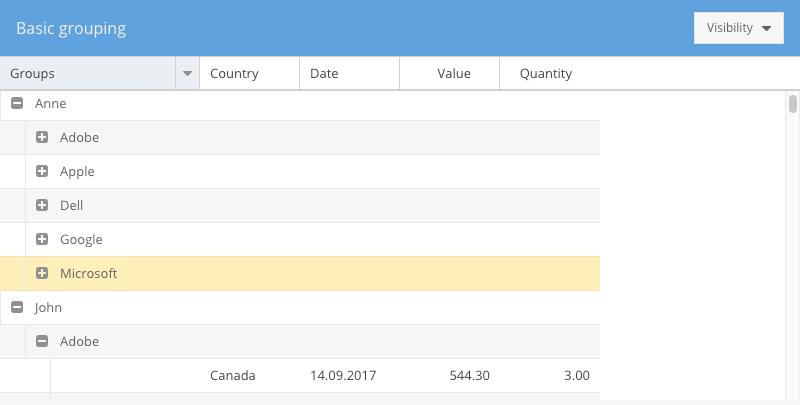
And this is the class definition:
Ext.define('KitchenSink.grid.Grouped', {
    extend: 'Ext.grid.Panel',
    xtype: 'k-grouped',

    requires: [
        'KitchenSink.grid.GroupedController',
        'Ext.grid.feature.MultiGrouping'
    ],

    title: 'Basic grouping',
    controller: 'grouped',

    store: {
        type: 'sales',

        groupers: ['person', 'company']
    },

    columns: [
        { text: 'Company',  dataIndex: 'company', editor: 'textfield', groupable: true },
        { text: 'Country', dataIndex: 'country', editor: 'textfield', groupable: true },
        { text: 'Person', dataIndex: 'person', editor: 'textfield', groupable: true },
        { text: 'Date', dataIndex: 'date', xtype: 'datecolumn', format: 'd.m.Y' },
        { text: 'Value', dataIndex: 'value', xtype: 'numbercolumn', editor: 'numberfield', align: 'right' },
        { text: 'Quantity', dataIndex: 'quantity', xtype: 'numbercolumn', editor: 'numberfield', align: 'right' }
    ],

    features: [{
        ftype: 'multigrouping'
    }],

    // more configs
});
In the above example you can see that the grid store was configured with two groupers and some grid columns are configured with `groupable` config set to `true`. For the groupable columns, the header menu is enhanced to allow users to change the grouping on the fly:
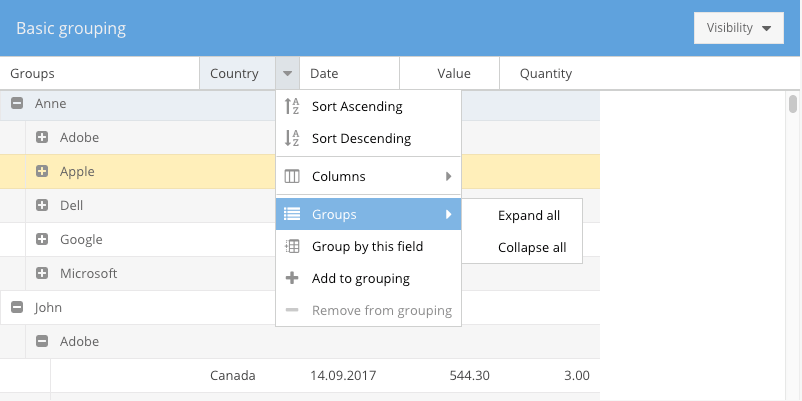
Users can either replace the grouping completely by choosing “Group by this field” or they can add that dimension to the existing grouping by choosing “Add to grouping”. There is also the possibility to expand or collapse all existing groups in the grid.
MultiGroupingSummary feature
Summaries should be defined on the Store model like this:
Ext.define('KitchenSink.model.Sale', {
    extend: 'KitchenSink.model.Base',

    requires: [
        'Ext.data.summary.*'
    ],

    fields: [
        {name: 'company',   type: 'string'},
        {name: 'country',   type: 'string', summary: 'count'},
        {name: 'person',    type: 'string'},
        {name: 'date',      type: 'date', dateFormat: 'c'},
        {name: 'value',     type: 'float', summary: 'sum'},
        {name: 'quantity',  type: 'float', summary: 'sum'},
        {
            name: 'year',
            calculate: function(data){
                return parseInt(Ext.Date.format(data.date, "Y"), 10);
            }
        },{
            name: 'month',
            calculate: function(data){
                return parseInt(Ext.Date.format(data.date, "m"), 10) - 1;
            }
        }
    ]
});

If you want to have summaries in the grid for all generated groups, then you can use this feature as follows:

Ext.define('KitchenSink.grid.Summary', {
    extend: 'Ext.grid.Panel',
    xtype: 'k-summary',

    requires: [
        'KitchenSink.grid.SummaryController',
        'Ext.grid.feature.MultiGroupingSummary'
    ],

    title: 'Grouping and summaries',
    controller: 'summary',

    store: {
        type: 'sales',

        groupers: ['person', 'company']
    },

    columns: [
        { text: 'Company',  dataIndex: 'company', editor: 'textfield', groupable: true },
        { text: 'Country', dataIndex: 'country', editor: 'textfield', groupable: true },
        { text: 'Person', dataIndex: 'person', editor: 'textfield', groupable: true },
        { text: 'Date', dataIndex: 'date', xtype: 'datecolumn', format: 'd.m.Y' },
        { text: 'Value', dataIndex: 'value', xtype: 'numbercolumn', editor: 'numberfield', align: 'right', summaryFormatter: 'number("0,000.00")' },
        { text: 'Quantity', dataIndex: 'quantity', xtype: 'numbercolumn', editor: 'numberfield', align: 'right', summaryFormatter: 'number("0,000")' }
    ],

    features: [{
        ftype: 'multigroupingsummary',
        groupSummaryPosition: 'bottom',
        summaryPosition: 'docked'
    }],

    // more configs
});
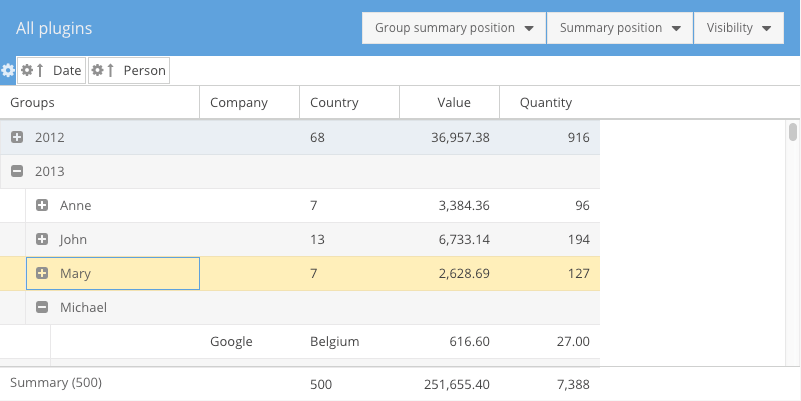
As you can see, you can set the position of both group summaries and grand summary and it will look like this:
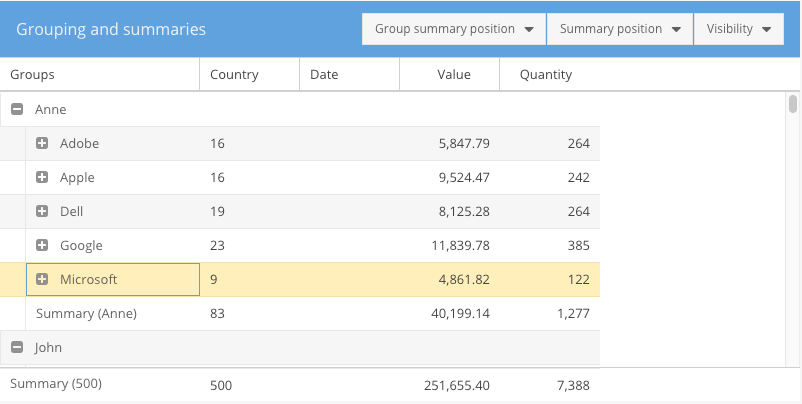
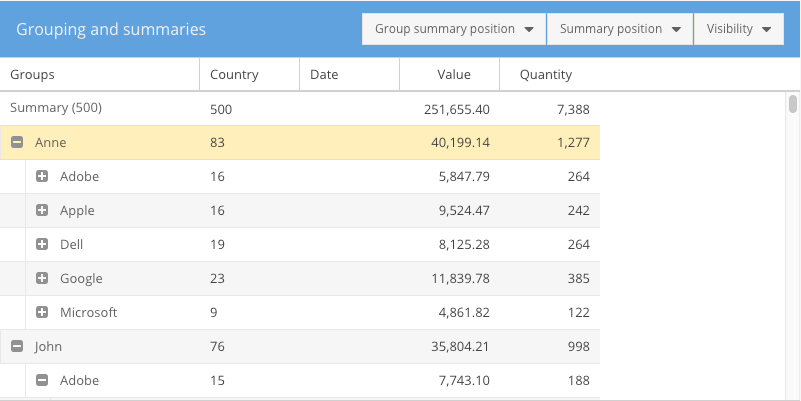
The group summaries can be displayed at the top or at the bottom of the group. The grand summary can either be the first in the grid, the last in the grid, or docked at the top or bottom of the grid.
GroupingPanel plugin
This plugin allows your end-users to drag and drop grid columns to the grouping panel section that is visible above the grid panel.
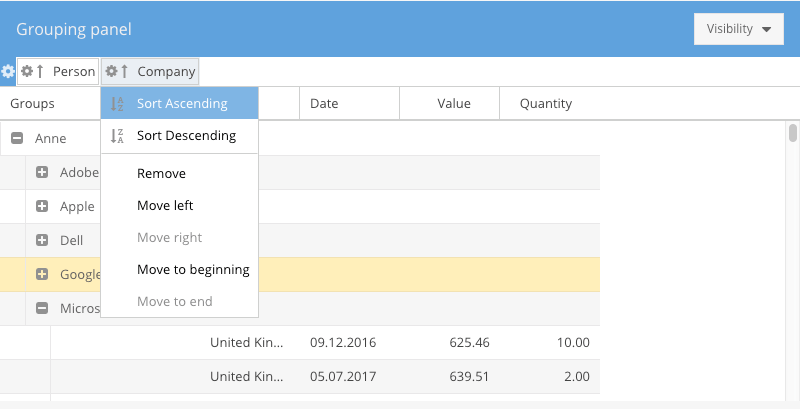
The user can move the dimensions in the grouping panel in which order he/she wants.
Ext.define('KitchenSink.plugin.GroupingPanel', {
    extend: 'Ext.grid.Panel',
    xtype: 'k-groupingpanel',

    requires: [
        'KitchenSink.plugin.GroupingPanelController',
        'Ext.grid.feature.MultiGrouping',
        'Ext.grid.plugin.GroupingPanel'
    ],

    features: [{
        ftype: 'multigrouping'
    }],

    plugins: {
        groupingpanel: true
    },

    // more configs
});
Summaries plugin
This plugin will enable your end-users to change the summary function on grid columns.
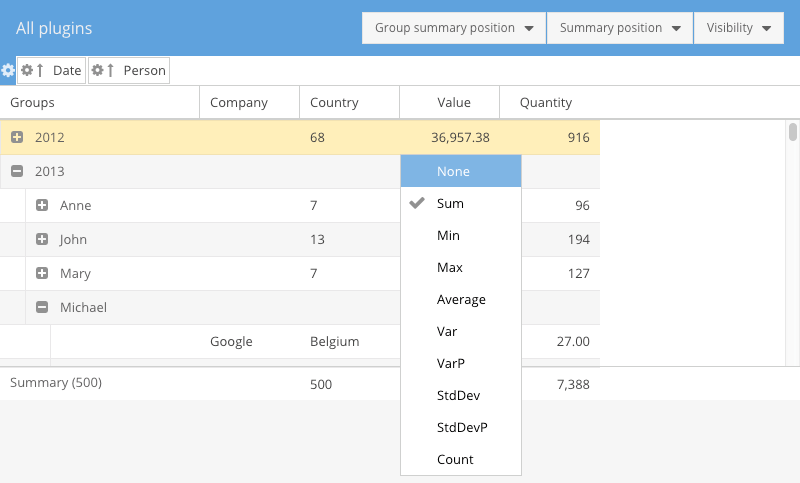
The summary functions that are available on a grid column are customizable. You need to provide a config to your grid column, as follows:
{
     xtype: 'column',
     summaries: {
         sum: true,
         average: true,
         count: false
     }
 }
If you want to have your own summary function used on that column then you need to configure it like this:
{
     xtype: 'column',
     summaries: {
         calculateSomething: true
     }
 }
And then implement a class for your own summary function, like this:
Ext.define('Ext.data.summary.CalculateSomething', {
     extend: 'Ext.data.summary.Base',
     alias: 'data.summary.calculateSomething',

     text: 'Calculate something',

     calculate: function (records, property, root, begin, end) {
         // do your own calculation here
     }
 });
FilterBar plugin
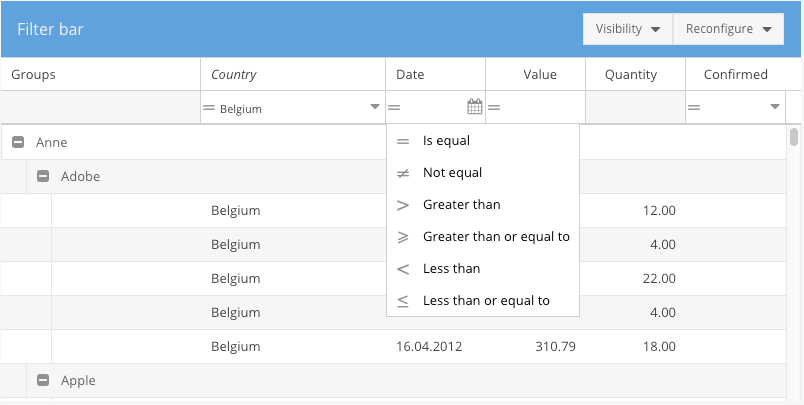
This plugin will add a docked bar under the grid headers and depending on the grid columns configuration,filter fields will be added.
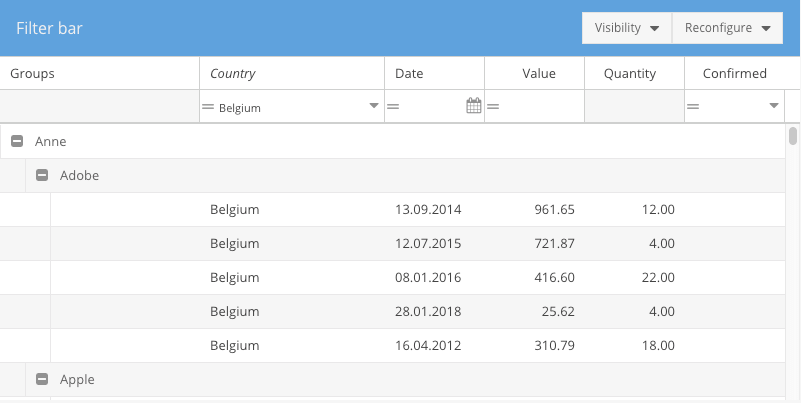
Each filter can be setup as you like and the available operators are also configurable.
Ext.define('KitchenSink.plugin.FilterBar', {
    extend: 'Ext.grid.Panel',
    xtype: 'k-filterbar',

    requires: [
        'KitchenSink.plugin.FilterBarController',
        'Ext.grid.plugin.FilterBar'
    ],

    title: 'Filter bar',
    controller: 'filterbar',

    store: {
        type: 'sales',

        groupers: ['person', 'company'],
        filters: [{
            property: 'country',
            operator: '==',
            value: 'Belgium'
        }]
    },

    columns: [
        { text: 'Company',  dataIndex: 'company', editor: 'textfield', groupable: true, flex: 1, filter: {type: 'string'} },
        { text: 'Country', dataIndex: 'country', editor: 'textfield', groupable: true, flex: 1, filter: {type: 'list'} },
        { text: 'Person', dataIndex: 'person', editor: 'textfield', groupable: true },
        { text: 'Date', dataIndex: 'date', xtype: 'datecolumn', format: 'd.m.Y', filter: {type: 'date'} },
        { text: 'Value', dataIndex: 'value', xtype: 'numbercolumn', editor: 'numberfield', align: 'right', filter: {type: 'number'} },
        { text: 'Quantity', dataIndex: 'quantity', xtype: 'numbercolumn', editor: 'numberfield', align: 'right' },
        { text: 'Confirmed', dataIndex: 'confirmed', xtype: 'booleancolumn', align: 'center', trueText: 'Yes', falseText: 'No', filter: {type: 'boolean'} }
    ],

    features: [{
        ftype: 'multigrouping'
    }],

    plugins: {
        gridfilterbar: true
    }

});
The following filter types are available: boolean, string, number, date, list and inlist. This list can be extended as you like by creating your own types that use your own fields.
Additional Resources
If you would like to learn more about mzSolutions and its commercial product GridPlugins, please follow these links:


Latest Content

How to Use Tailwind CSS v4 in Ext JS (Classic) Without Breaking the Theme
We know that Ext JS is a war tank. When it comes to handling absurd…
October 15, 2026

How to Build a Reusable React Grid Component
In most enterprise React apps, the grid shows up on dozens of screens: orders, customers,…
October 9, 2026

React Grid Component: Layout and Data Grids in One Framework
Search for “React grid component,” and you will find two very different things. Half the…
October 9, 2026


