



 Ask Sencha AI
Building Custom AI Coding Agents with ACP, MCP & React
October 1, 2026
256 Views
Get a summary of this article:
From AI Code Completion to Autonomous Software Engineering
Artificial intelligence is changing how software is written, maintained, tested, and modernised. Yet the most consequential shift is not simply that AI can generate code faster. It is that AI systems are evolving from passive assistants into agents capable of understanding context, invoking tools, executing multi-step workflows, and adapting when an operation fails.
Traditional code completion tools primarily respond to the developer’s immediate context. They suggest a line of code, complete a function, or generate a snippet based on the surrounding text. These capabilities are valuable, but they do not necessarily provide the application-wide understanding or execution capabilities required to resolve complex engineering problems.
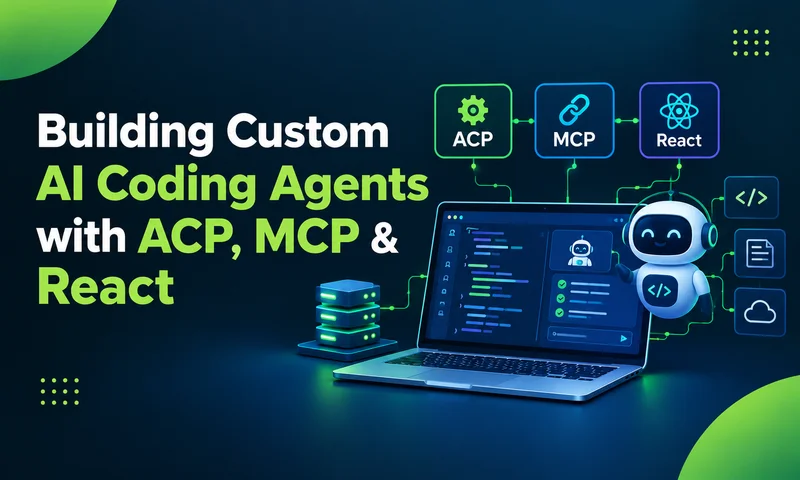
Consider a common enterprise challenge: modernising a legacy application. A developer must identify deprecated APIs, understand dependencies, apply framework-specific migration rules, update affected files, execute linters, and verify the resulting changes. A conventional autocomplete tool can assist with individual steps. An agent can coordinate several of them through a structured workflow.
This distinction becomes particularly important in enterprise environments, where engineering outcomes depend on more than code generation. Teams must account for architectural standards, established development practices, system permissions, data handling, and repeatable execution.
The opportunity, therefore, is not merely to adopt a general-purpose AI assistant. It is to build custom AI coding agents that understand an organisation’s engineering environment and operate within its technical and operational constraints.
The architectural approach explored in this guide combines four core capabilities:
- Agent Client Protocol (ACP): A communication layer for connecting an agent client with supported AI agent backends.
- Model Context Protocol (MCP): A standardised approach to exposing tools and contextual capabilities to AI applications.
- Local and cloud-based language models: Flexible execution options for balancing reasoning requirements, operational cost, latency, and data-handling constraints.
- React and Sencha ReExt: A foundation for building an interactive, inspectable developer experience inside Visual Studio Code.
The central question is straightforward: How can engineering organisations move from experimenting with AI assistants to building controlled, extensible, and operationally useful AI agent systems?
From Code Completion to Autonomous AI Coding Agents
The difference between traditional code completion and an autonomous AI coding agent is best understood through the scope of work each can handle.
Code completion generally operates around the developer’s immediate editing context. An agent can work across a broader application context, use external tools, and coordinate multiple actions toward a defined outcome.
| Traditional Code Completion | Autonomous AI Coding Agents |
|---|---|
| Suggests code within a limited context. | Can reason across broader codebase context. |
| Relies heavily on developer-directed execution. | Can coordinate multi-step engineering workflows. |
| Typically does not orchestrate external tools. | Can invoke configured tools and services. |
| Supports individual coding actions. | Can retry failed operations and validate results. |
Application-wide context awareness
An agent needs more than the contents of the currently open file. Depending on the task, it may need to inspect project structure, file dependencies, framework versions, configuration, coding conventions, and previous execution results.
Context management becomes increasingly important during long-running tasks. The agent must prioritise relevant information, maintain useful state, and avoid losing critical details as the conversation or execution history grows.
Programmatic tool access
Enterprise engineering workflows frequently depend on operations outside the language model itself.
- Running shell commands and build scripts.
- Executing linters and automated tests.
- Inspecting files and dependency structures.
- Querying databases or internal development services.
- Invoking custom tools for framework migration and code analysis.
Tool access allows an agent to move beyond proposing an action and attempt to perform it through configured execution mechanisms.
Reusable skills and domain expertise
General-purpose models do not automatically know every organisation’s engineering conventions or legacy framework rules.
Skills can provide focused instructions, reusable procedures, and domain-specific knowledge. For example, a Markdown-based skill can instruct an agent how to audit an ExtJS application for deprecated APIs or when to invoke a custom linting tool.
This makes specialised engineering knowledge reusable rather than dependent on developers repeatedly writing long prompts.
Multi-step execution and recovery
A complex engineering task rarely succeeds in one step. A file path may be incorrect, a command may fail, or a test may expose an unexpected dependency.
An agent can inspect the failure, revise its approach, invoke a tool again, and evaluate the result. This is a form of iterative execution, sometimes described as self-healing behaviour.
However, retries should not be confused with guaranteed correctness. Reliable implementations still need bounded execution, clear stop conditions, appropriate permissions, and verifiable acceptance criteria
Why Enterprises Need Custom AI Coding Agents
General-purpose coding agents provide a useful starting point. However, enterprise engineering environments often have requirements that extend beyond a standard development assistant.
Legacy applications may depend on organisation-specific frameworks, proprietary libraries, internal APIs, established release processes, and coding standards that are not captured by a generic model or default prompt.
A custom AI coding agent makes it possible to embed these requirements into the development experience itself.
Four strategic advantages of a custom AI agent
1. A developer experience designed for the workflow
A custom interface can expose execution status, session metrics, tool activity, diagnostic output, and relevant controls directly inside the IDE.
2. Domain expertise embedded as reusable skills
Framework-specific rules, migration guidance, and coding conventions can be packaged as focused Markdown instructions.
3. Business-specific tools and execution logic
Custom MCP servers can expose targeted capabilities, such as an ExtJS linting process, internal code analysis, or automated migration checks.
4. Greater control over the operational lifecycle
Engineering teams can manage extension releases, skill updates, tool permissions, model configurations, and distribution processes.
Example: Modernising a legacy ExtJS application
Suppose a development team needs to identify deprecated ExtJS patterns across an existing codebase.
Rather than relying on an open-ended instruction such as modernise this file, the team can create a dedicated command:
/extlint current fileThe workflow can then combine several components:
- A Markdown skill defines the audit objective and relevant migration rules.
- The agent inspects the target file and determines which checks are required.
- An MCP tool executes the specialised linting operation.
- The agent examines the returned diagnostics.
- If execution fails because of an incorrect path, the agent can inspect the workspace structure and retry within configured limits.
- The final response summarises the findings and identifies any remaining work.
The broader lesson is that custom agents can combine domain-specific instructions with executable tools to support repeatable engineering workflows.
Agent Client Protocol (ACP): Building a Flexible AI Model Layer
One of the architectural challenges in custom AI agent development is model-provider fragmentation.
Different providers may expose different SDKs, session-management approaches, event streams, authentication mechanisms, and tool-execution conventions.
The Agent Client Protocol (ACP) offers an approach to reducing this `complexity by defining a common communication interface between `compatible agent clients and agent backends.
How ACP fits into the architecture
Custom AI Agent
VS Code Extension · React Interface · Session Management
VS Code Extension · React Interface · Session Management
↓
ACP Communication Layer
Standardised interaction with compatible agent implementations
Standardised interaction with compatible agent implementations
↓
Cloud Agent · CLI Agent · Local Agent
What a protocol abstraction means for engineering teams
- Reduced provider-specific coupling: The application can depend on a common interaction contract.
- More manageable backend experimentation: Teams can evaluate compatible agent implementations without rebuilding the entire user interface.
- Cleaner separation of responsibilities: The client can focus on the developer experience while the backend handles its supported execution model.
- A more maintainable integration layer: Protocol boundaries can make testing and troubleshooting easier.
A simplified ACP client pattern
import { spawn } from "node:child_process";
    // Start a compatible agent adapter.
    // The executable and arguments depend on the implementation.
    const adapterProcess = spawn(
        "your-acp-adapter",
        ["--your-configured-arguments"],
        {
            stdio: ["pipe", "pipe", "inherit"]
        }
    );
    // Connect an ACP client to the adapter's supported
    // transport and initialise the agent session.
    //
    // Implementation-specific steps:
    // 1. Create the ACP transport.
    // 2. Initialise the client connection.
    // 3. Negotiate supported capabilities.
    // 4. Subscribe to session updates.
    // 5. Handle process exit and transport errors.
In a production extension, the surrounding implementation must also handle process lifecycle management, cancellation, error reporting, authentication where required, and cleanup when the VS Code session closes.
ACP and MCP solve different problems
- ACP addresses communication between an agent client and a compatible agent implementation.
- MCP addresses how AI applications discover and invoke tools and access contextual capabilities exposed by MCP servers.
A useful enterprise architecture can therefore use ACP at the agent integration boundary and MCP at the tool-integration boundary, where the selected implementations support that arrangement.
Model Context Protocol (MCP): Giving AI Agents Access to Tools
Reasoning alone does not enable an AI coding agent to inspect a filesystem, run a linter, execute a test suite, or retrieve information from an internal service.
Those actions require an execution layer.
The Model Context Protocol (MCP) provides a standardised way for AI applications to connect to external tools and contextual resources through MCP servers.
Skills versus MCP tools
| Dimension | Skills | MCP Tools |
|---|---|---|
| Primary purpose | Guide the agent’s approach | Expose executable capabilities |
| Typical format | Markdown instructions or skill files | Programmatic server operations |
| Content | Rules, procedures, domain knowledge | Tool definitions, inputs, execution and results |
| Example | Instructions for an ExtJS migration audit | A tool that runs an ExtJS linter |
| Role | Helps determine how and when to act | Performs a requested operation |
Inside an MCP tool call
1 Request interpretation
The agent identifies the task and determines whether an available tool can fulfil it.
2 Tool selection and argument construction
The agent selects the tool and prepares structured input.
3 MCP request and execution
The client sends the tool call to the MCP server, which executes the operation within its configured environment.
4 Result processing
The server returns a result or error. The agent uses that informationto produce a response or determine the next permitted step.
Designing enterprise-ready tool integrations
- Permissions: Which operations can read files, modify code, or execute commands?
- Input validation: Are tool arguments checked before execution?
- Execution boundaries: Can the tool access only the resources it requires?
- Failure handling: How are timeouts and execution errors reported?
- Observability: Are relevant tool invocations and outcomes recorded?
- Human approval: Which actions require explicit confirmation?
Local LLMs, Cloud Models, and Data Sovereignty
Choosing a model for an enterprise AI coding agent is not simply a question of which model produces the best answer. It is an infrastructure decision involving performance, hardware, operational cost, privacy requirements, and the complexity of the engineering task.
Cloud-hosted models can provide access to capable reasoning systems without requiring an organisation to provision equivalent inference hardware. Local models, by contrast, can support workloads that benefit from local execution and reduced dependence on external model APIs.
Local model execution with LM Studio and Ollama
Tools such as LM Studio and Ollama make it possible to run supported language models on local hardware.
Local inference can be useful for iterative development, basic tool-calling experiments, interface testing, and tasks involving code that should remain within a controlled environment.
Local versus cloud-based AI coding agents
| Consideration | Local Model Execution | Cloud-Hosted Models |
|---|---|---|
| Inference costs | No provider token fee; hardware and operating costs remain. | Typically usage-based or subscription-based. |
| Data handling | Can keep inference local when configured accordingly. | May require data transmission to the provider. |
| Hardware | Requires suitable local compute and memory. | Usually requires less local inference hardware. |
| Network dependency | Can operate without external inference connectivity. | Typically depends on network connectivity. |
| Complex reasoning | Depends on model, hardware, and task. | Depends on the selected service and model. |
| Operational control | Greater control over local runtime and model deployment. | Provider manages much of the inference infrastructure. |
Data sovereignty requires end-to-end design
Local inference can help reduce external data transmission, but it does not independently guarantee data sovereignty.
An AI coding agent may also communicate with external services through telemetry, package managers, MCP tools, logging systems, source-control integrations, or other connected components.
An organisation must therefore assess the complete data flow rather than the model runtime alone.
A hybrid model strategy
Local inference can be evaluated for routine development tasks, basic tool-calling workflows, UI testing, and workloads that benefit from local data processing.
Cloud inference can be evaluated for demanding multi-file reasoning, complex refactoring, and workloads where an approved hosted model offers relevant capabilities.
Building an Enterprise AI Agent Interface with React and Sencha ReExt
A capable AI backend is only one part of an effective coding agent. Developers also need an interface that makes execution understandable, exposes relevant controls, and presents diagnostic information without disrupting their workflow.
In a VS Code extension, a React-based Webview can provide this interface. Sencha ReExt can extend the UI with enterprise-oriented components, including data grids suited to displaying structured diagnostic information.
The VS Code extension architecture
A typical implementation can be organised into five stages:
- Extension activation and command registration.
- Webview provider initialisation.
- React UI mounting.
- Agent and protocol communication.
- Real-time execution and diagnostic inspection.
Why operational visibility matters
Agentic workflows can generate a large volume of events: status changes, tool invocations, structured payloads, errors, streaming messages, and session metrics.
A structured grid can make the information easier to inspect by supporting:
- Expandable and collapsible payloads.
- Filtering by event type or execution status.
- Separation of user-facing responses from diagnostic events.
- Searchable tool-call histories.
- Session-level metrics and error inspection.
Balancing observability with usability and privacy
An enterprise agent interface should expose the information developers need without overwhelming them.
- User-facing output: The task result, findings, and next steps.
- Operational diagnostics: Tool calls, status transitions, errors, and timing.
- Restricted technical data: Sensitive payloads, credentials, or information that should not be broadly displayed or logged.
The interface should distinguish what the agent attempted from what the system actually executed and verified.
Designing Self-Healing AI Agent Workflows
One of the more useful capabilities of an AI coding agent is its ability to respond to execution failures without immediately abandoning the task.
Traditional scripts often follow predefined paths. When an unexpected condition occurs, they may stop and return an error. An agent can potentially interpret the failure, reconsider its approach, and attempt a recovery.
A practical recovery workflow
The important architectural feature is the feedback loop. Tool output informs the next action, allowing the agent to adjust its execution strategy based on evidence rather than continuing with an invalid assumption.
What makes an agent recovery loop reliable?
- Bounded retries: The agent should not repeat the same failing operation indefinitely.
- Evidence-based recovery: The next attempt should respond to the actual error.
- Controlled permissions: Recovery should not grant broader access simply because an operation failed.
- Verification: The agent should inspect the result and determine whether the original task has been satisfied.
- Clear escalation: If available evidence is insufficient, the agent should stop and request intervention.
These controls help distinguish a useful recovery mechanism from an uncontrolled automation loop.
The Enterprise Architecture Behind a Production-Ready AI Coding Agent
A production-oriented AI coding agent is not a single model connected to a chat window. It is a system of components with distinct responsibilities.
Developer
Task Request · Review · Approval
Task Request · Review · Approval
↓
React + Sencha ReExt
Developer Experience · Diagnostics · Results
Developer Experience · Diagnostics · Results
↓
Agent Orchestration Layer
Task Management · Context · Skills · Recovery · Validation
Task Management · Context · Skills · Recovery · Validation
↓
ACP Integration
Compatible Agent Backend Communication
Compatible Agent Backend Communication
↓
MCP Integration
External Tools and Contextual Capabilities
External Tools and Contextual Capabilities
↓
Local Execution · Cloud Execution
Cross-cutting controls should include authentication, permissions, input validation, audit logging, data protection, execution limits, testing, and human approval where required.
The model layer
The model provides the reasoning and generation capabilities used by the agent. Depending on deployment, inference may run locally or through an approved cloud service.
The protocol layer
ACP can provide a standardised interface to compatible agent backends, while MCP can expose tools and contextual capabilities.
The execution layer
This layer manages task progression, tool selection, context updates, error handling, and validation.
The user experience layer
React and Sencha ReExt can provide an interface for initiating tasks, monitoring execution, reviewing diagnostics, and examining results.
The governance layer
Permissions, audit logging, data-handling rules, execution limits, and human approvals apply across the architecture.
An Enterprise Implementation Roadmap
For engineering leadership, the practical question is how to introduce these capabilities without turning an initial prototype into an expensive, difficult-to-govern platform.
Phase 1 – Identify the right engineering workflow
Start with a repetitive, well-defined problem such as deprecated API detection, framework migration analysis, or test generation.
Deliverable: A defined use case with measurable acceptance criteria.
Phase 2 – Define the architecture and model strategy
Determine whether ACP is appropriate for the selected agent backends, which MCP tools are required, and whether local, cloud, or hybrid inference best fits the workload.
Deliverable: An architecture decision record covering interfaces, dependencies, deployment, and data flows.
Phase 3 – Build the first specialised skills and tools
Encode relevant engineering rules in focused skill files and implement the necessary MCP tools.
Deliverable: A working, bounded workflow that can be tested against representative tasks.
Phase 4 – Implement the developer interface and observability
Build the VS Code extension, connect the React Webview, and expose meaningful status information, diagnostic events, and review controls.
Deliverable: An inspectable agent experience with defined operational boundaries.
Phase 5 – Evaluate, package, and scale
Compare the agent’s results with the baseline, measure failure and intervention rates, and assess operational costs.
Deliverable: A deployment decision supported by measured results and a maintenance plan.
What should leadership measure?
| Metric | What It Helps Establish |
|---|---|
| Task completion rate | How often the agent meets defined acceptance criteria. |
| Human intervention rate | How frequently developers must correct or complete the workflow. |
| Verification pass rate | How often generated changes pass relevant tests and checks. |
| Recovery success rate | How often the agent resolves recoverable execution failures. |
| Cost per successful task | The combined model and infrastructure cost associated with a verified outcome. |
| Time to completion | Whether the workflow reduces end-to-end engineering effort. |
| Defect and regression rate | Whether automation affects software quality. |
| Policy compliance | Whether the workflow remains within defined permissions and data-handling requirements. |
The Future of Enterprise Software Engineering Is Agentic
The evolution from code completion to autonomous AI coding agents represents a change in how engineering work can be organised.
The opportunity extends beyond generating functions or accelerating isolated coding tasks. Custom agents can coordinate specialised knowledge, application context, external tools, model capabilities, and verification workflows around the engineering practices of a particular organisation.
Realising that opportunity requires more than choosing a capable model.
ACP can help structure communication with compatible agent backends. MCP can standardise access to tools and contextual capabilities. Local and cloud models provide different deployment options. React and Sencha ReExt can support an interface that makes agent activity visible to developers.
The most practical starting point is a narrow, high-value workflow with clear acceptance criteria, specialised tools, observable execution, and measurable outcomes.
From there, organisations can expand capability based on demonstrated performance rather than assumptions about autonomy.
Further Reading and Technical Resources
- Model Context Protocol (MCP): Official MCP project and documentation
- Visual Studio Code Extensions: VS Code Extension API documentation
- Sencha ReExt: Sencha official website
- LM Studio: Official LM Studio website
- Ollama: Official Ollama website
- llama.cpp: Official llama.cpp repository
- Hardware and Model Profiling: llmfit
Frequently Asked Questions
What is a custom AI coding agent?
A custom AI coding agent is an AI-powered software development system configured for particular engineering workflows, tools, frameworks, and organisational requirements. Unlike a basic code completion tool, it can coordinate multiple steps, invoke available tools, process results, and attempt to recover from certain failures.
What is the difference between ACP and MCP?
ACP provides a protocol for communication between compatible agent clients and agent implementations. MCP provides a standardised interface for connecting AI applications to external tools and contextual capabilities.
Why build a custom AI agent instead of using a general-purpose coding assistant?
A custom agent can package organisation-specific instructions, tools, workflow logic, interface components, and deployment configurations. This can reduce repeated setup and make specialised engineering procedures more consistent.
Can AI coding agents run local language models?
Yes. Depending on model and runtime compatibility, tools such as LM Studio and Ollama can support local inference. Whether local execution is appropriate depends on available hardware, workload complexity, performance expectations, and data-handling requirements.
How do React and Sencha ReExt fit into a VS Code AI agent?
React can power the extension’s Webview interface, while Sencha ReExt can provide enterprise-oriented UI components such as data grids. These components can help developers inspect agent status, tool activity, structured diagnostics, and execution results within a single interface.
Are AI coding agents ready to operate without human oversight?
The appropriate level of autonomy depends on the workflow, the impact of potential errors, and the strength of the verification and control mechanisms. Read-only analysis, code generation, and changes to production systems carry different levels of risk.



Latest Content
React Component Library for Data-Heavy Apps: Why 1 Vendor Beats 5
Data-heavy React apps rarely start with five UI vendors. They get there one reasonable decision…
October 21, 2026
How to Standardize on One UI Component Library Across Your React Apps
In most large organizations, every React app has its own UI stack. One team uses…
October 21, 2026
UI Component Library vs Component Framework: What Enterprise React Teams Need
Ask a React team what they use for UI, and you’ll usually hear the name…
October 21, 2026


