Understanding Frontend Framework Performance Benchmarks: What Really Matters?
May 26, 2026
1813 Views
Get a summary of this article:
Front-end framework performance is one of the most discussed—and most misunderstood—topics in web development. Teams often compare frameworks using benchmark charts, demo apps, synthetic tests, or bundle size claims, then assume those results directly predict real-world application speed. In practice, performance is more nuanced than that.
A framework can look fast in a small benchmark and still struggle in a large enterprise application. Another framework may appear heavier at first glance, but it performs exceptionally well when handling data-dense interfaces, complex component trees, virtualization, grids, forms, and interactive workflows at scale. That is why understanding what performance benchmarks actually measure is far more important than simply scanning rankings.
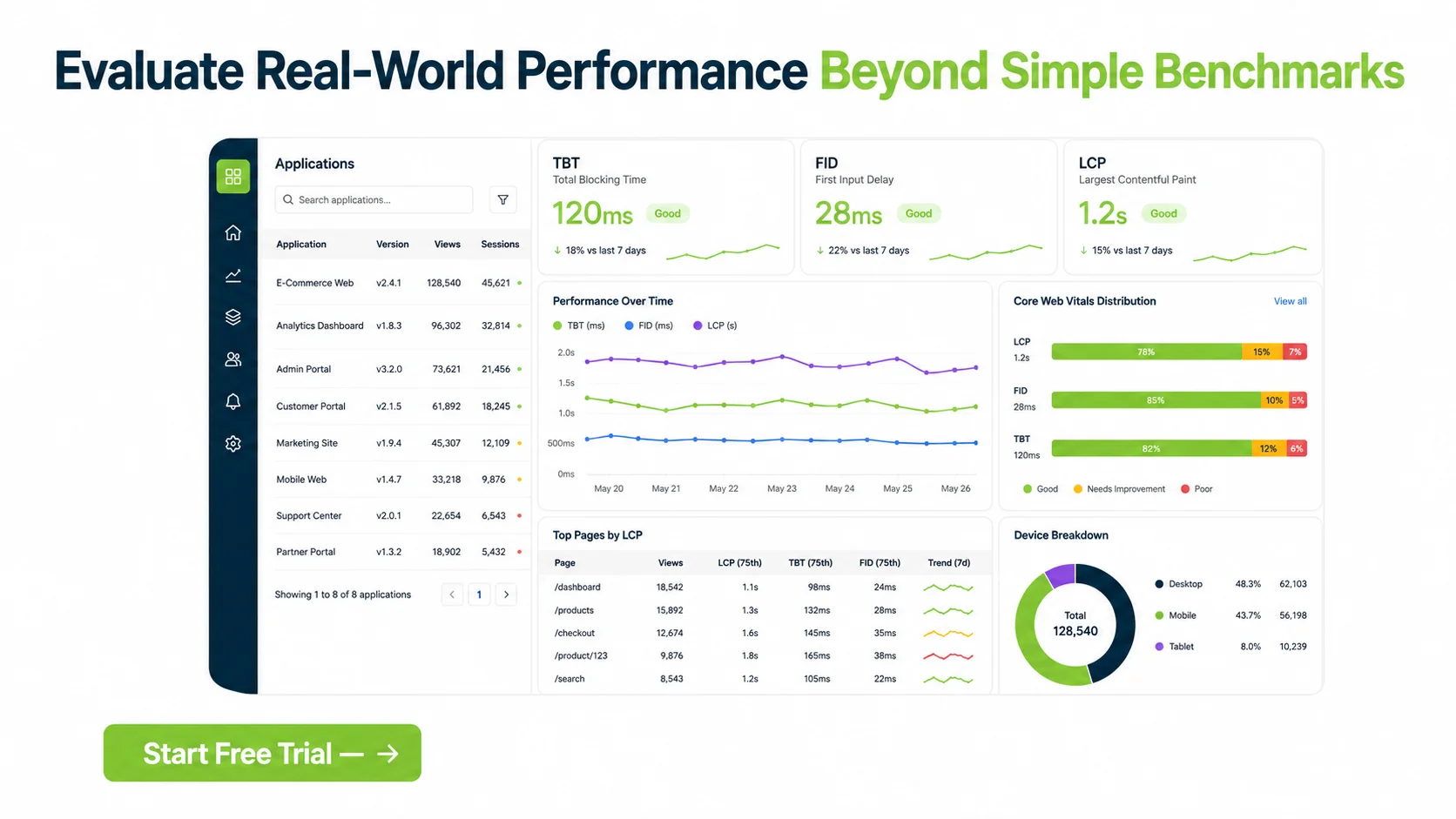
To evaluate frontend performance properly, developers need to distinguish between metrics that reflect page load experience, metrics that reflect interactivity, and metrics that reflect sustained application behavior under stress. Measures such as load time, Total Blocking Time (TBT), First Input Delay (FID), and Largest Contentful Paint (LCP) are commonly used, but each captures a different aspect of performance. Looking at only one can create a misleading picture.
This distinction matters even more for enterprise applications and modern Software Development Platforms. In business software, performance is not just about a landing page appearing quickly. It is also about how the UI behaves when rendering thousands of records, updating large grids, managing complex forms, switching views, responding to user input, and maintaining smooth interaction across long sessions.
That is where framework architecture becomes critical. Ext JS is designed for complex, data-intensive enterprise interfaces, and its strengths often show up not in minimal “hello world” benchmarks but in demanding real-world workloads. Features such as optimized rendering, virtual scrolling, and robust data handling help Ext JS maintain strong performance in scenarios where lighter frameworks can slow down under load.
In this article, we will examine the frontend performance metrics that actually matter, explain how to interpret benchmark claims more critically, and explore why frameworks like Ext JS can perform exceptionally well in enterprise-scale conditions.


Why Benchmark Results Can Be Misleading
Benchmark charts are useful, but only if you understand their limits.
Many published framework benchmarks focus on narrow tasks such as:
- initial render speed
- simple DOM updates
- small list rendering
- bundle size comparisons
- trivial component interactions
These tests can be informative, but they do not always reflect the workloads of real applications.
A business application may need to handle:
- large datasets
- dynamic grids
- filtering and sorting
- nested component hierarchies
- repeated state updates
- background requests
- complex forms and validation
- long-lived sessions
- responsive resizing across many UI regions
A framework that looks lightweight in isolation may not remain efficient when these demands increase.
The Main Performance Metrics That Matter
To evaluate frontend framework performance more meaningfully, it helps to understand the major metrics and what each one actually represents.
1. Load Time
Load time is a broad term that usually refers to how long it takes an application or page to become available to the user.
It can include:
- downloading assets
- parsing JavaScript
- executing application code
- rendering the initial UI
- fetching initial data
The problem with “load time” is that it is often discussed loosely. Two tools may define it differently, and teams may compare numbers without knowing exactly what is included.
Why It Matters
Load time affects first impressions. If users wait too long before seeing useful content, the application feels slow.
Why It Is Not Enough Alone
A page can load quickly but still feel sluggish afterward if heavy JavaScript blocks interaction or if later UI updates perform poorly.
2. Total Blocking Time (TBT)
Total Blocking Time measures how much time the main thread is blocked by long tasks between the page becoming visible and becoming reliably interactive.
In simpler terms, TBT reflects how much JavaScript work prevents the browser from responding smoothly.
Why TBT Matters
A high TBT often means:
- slow script execution
- too much work happening at once
- delayed responsiveness
- poor interactivity during load
This metric is especially useful because many JavaScript-heavy applications look visually ready before they are truly responsive.
Framework Relevance
Frameworks that require large amounts of upfront JavaScript processing may show higher TBT, especially during initial hydration, rendering, or component setup.
3. First Input Delay (FID)
First Input Delay measures the delay between a user’s first interaction and the browser’s ability to respond to it.
Examples of interactions include:
- clicking a button
- tapping a menu
- opening a modal
- focusing an input
Why FID Matters
FID captures whether the application feels responsive to real users.
If users click something and nothing happens immediately, the application feels broken or laggy.
Important Context
FID is about the first interaction, not overall responsiveness. A low FID is good, but it does not guarantee sustained performance during complex use.
4. Largest Contentful Paint (LCP)
Largest Contentful Paint measures how long it takes for the largest visible content element in the viewport to render.
This could be:
- a large heading
- a hero image
- a prominent content block
- a major application panel
Why LCP Matters
LCP is a strong indicator of perceived load speed. It helps answer the question:
“When does the main content appear?”
Why It Has Limits
A strong LCP does not guarantee that the rest of the application is interactive, data-ready, or performant during ongoing use.
Other Important Performance Considerations
Although load time, TBT, FID, and LCP are important, they are not the whole story.
Real framework evaluation should also consider:
- memory usage
- CPU cost during updates
- large-list rendering efficiency
- scrolling smoothness
- responsiveness under repeated interactions
- data update performance
- component mount and unmount cost
- bundle splitting and caching behavior
For enterprise software, these factors are often just as important as initial page metrics.
Why Enterprise Apps Need a Different Performance Lens
Consumer-facing sites and enterprise applications often have different performance priorities.
A marketing page may care most about:
- fast first paint
- SEO-friendly metrics
- lightweight initial delivery
An enterprise application may care more about:
- handling thousands of records
- stable interactive performance over time
- rapid filtering and sorting
- low-latency UI updates
- efficient rendering of dense components
- smooth navigation between complex views
This is why simplistic framework comparisons can be misleading. The fastest framework for a small homepage is not automatically the best framework for large-scale Enterprise Application Development or complex internal operations platforms.
Benchmark Questions Teams Should Ask
When reviewing benchmark claims, ask:
- What exactly is being measured?
- Is the test synthetic or realistic?
- How large is the dataset?
- How complex is the component tree?
- Does the benchmark include user interaction?
- Does it measure sustained usage or only initial render?
- Does it account for scrolling, filtering, or updates?
- Is it relevant to our application type?
These questions are often more valuable than the benchmark ranking itself.
Ext JS and Real-World Performance Under Heavy Load
This is where the Ext JS angle becomes especially important.
Ext JS is not designed only for minimal bundle demos. It is built for complex enterprise applications, where performance must hold up under significant UI and data pressure.
Its architecture is especially strong in scenarios involving:
- large data grids
- dense dashboards
- high-record-count interfaces
- complex forms
- nested layouts
- repeated component updates
- long-lived application sessions
In these environments, performance is about more than lightweight startup. It is about maintaining usability and responsiveness as application complexity grows.
Optimized Rendering in Ext JS
Ext JS is designed to manage rendering efficiently across large, component-rich interfaces.
This matters because enterprise UIs often contain:
- many panels
- toolbars
- forms
- tabs
- data views
- interactive controls
- nested containers
Efficient rendering helps reduce unnecessary UI work and keeps updates more predictable.
In practical terms, optimized rendering contributes to:
- smoother UI updates
- reduced overhead in complex component trees
- better responsiveness when switching views
- more stable behavior in large screens with many active elements
Also Read: Choosing the Right UI Framework for Enterprise Development in 2026
Virtual Scrolling and Large Data Sets
One of the strongest performance features in enterprise UI frameworks is virtual scrolling.
Instead of rendering every row in a very large dataset at once, virtualized interfaces render only the visible portion and update dynamically as the user scrolls.
This dramatically improves:
- rendering speed
- memory efficiency
- scroll smoothness
- perceived responsiveness
For applications with large tables or data-heavy grids, this is a major performance advantage.
Ext JS is particularly well suited for these scenarios, making it highly effective in applications where data scale would overwhelm simpler rendering approaches.
Robust Data Handling as a Performance Advantage
Performance is not only about DOM speed. It is also about how efficiently a framework handles application data.
Enterprise applications often need:
- store-based data management
- pagination
- sorting
- filtering
- buffering
- remote loading
- model synchronization
- repeated updates to large datasets
Ext JS provides strong support for data-driven application patterns, which helps reduce friction when managing large amounts of structured information.
This kind of architecture can outperform lighter frameworks in practice when application complexity rises, because the framework is built to handle those workflows directly instead of requiring many ad hoc optimizations.

Why Leaner Frameworks Do Not Always Win
Smaller frameworks or lighter libraries may win certain synthetic tests because they have:
- less abstraction
- smaller initial payloads
- faster simple renders
- lower overhead in minimal examples
But under heavy enterprise workloads, the picture changes.
When applications need:
- virtualization
- advanced grids
- coordinated components
- high-frequency updates
- deep data interaction
- rich stateful UI behavior
frameworks designed for enterprise complexity can outperform “leaner” options in overall user experience.
This does not mean lean frameworks are bad. It means context matters.
What “Fast” Actually Means for Users
Users do not care which benchmark chart a framework won.
They care whether the application:
- opens quickly enough
- responds immediately to clicks
- scrolls smoothly
- updates without freezing
- handles large data volumes well
- remains stable during real work
That is why framework performance should be evaluated based on user workflows, not just headline metrics.
A Better Way to Evaluate Framework Performance
If your team is comparing frontend frameworks, measure performance in scenarios that match your real application.
For example:
- load a realistic dashboard
- render a large data grid
- test filtering and sorting
- simulate repeated user interactions
- measure responsiveness during data refreshes
- observe memory use in long sessions
- compare scroll behavior with large lists
- monitor blocking time during startup and updates
This approach gives much more useful information than a synthetic benchmark alone.
Conclusion
Frontend framework performance benchmarks are valuable only when interpreted in context. Metrics such as load time, TBT, FID, and LCP each describe different parts of the user experience, and none of them alone is enough to determine whether a framework is truly “fast.”
For real-world applications—especially enterprise software—performance must be evaluated more broadly. Large datasets, complex UI trees, repeated updates, scrolling behavior, interactivity, and sustained responsiveness all matter. That is why teams should look beyond simple benchmark rankings and test frameworks against realistic workloads.
This is also why Ext JS deserves attention in serious performance discussions. Its optimized rendering, virtual scrolling, robust data handling, and advanced features highlighted in the Ext JS data grid documentation make it particularly effective for complex enterprise applications. In demanding, data-heavy environments, those strengths can allow Ext JS to deliver excellent performance and, in many cases, outperform leaner frameworks that are optimized more for minimal demos than real operational scale.
The real question is not which JavaScript framework wins the smallest benchmark. The real question is which framework performs best for the application you actually need to build.
Start your free trial of Sencha Ext JS 8.0 today.
FAQs
What is the most important frontend framework performance metric?
There is no single most important metric. Load time, TBT, FID, and LCP each measure different aspects of performance, so they should be evaluated together.
Why can framework benchmarks be misleading?
Many benchmarks test narrow or synthetic scenarios that do not reflect the complexity of real applications, especially enterprise software.
What does TBT tell you?
TBT shows how much the browser’s main thread is blocked by long tasks, which affects responsiveness during page load.
What does FID measure?
FID measures the delay between a user’s first interaction and the browser’s ability to respond.
Why is LCP important?
LCP helps show how quickly the main visible content appears, making it a useful measure of perceived loading speed.
Why do enterprise applications need a different performance evaluation approach?
Enterprise applications often involve large datasets, complex components, and sustained interactive workloads that are not captured by simple initial-render benchmarks.
How does Ext JS support strong performance?
Ext JS supports strong enterprise performance through optimized rendering, virtual scrolling, and robust data handling for complex, data-intensive interfaces.
UI Frameworks
Enterprise Applications
Software Architecture
Web Performance
Frontend Development
Web Development
Performance Optimization
JavaScript



Latest Content


Async/await with Ext JS
Probably one of the most appreciated features of the latest versions of JavaScript is Promises,…
September 3, 2026

Sencha IDE Plugins - JetBrains 6.0.18 Is Here
JetBrains 2026.2 just shipped. So did we. Sencha’s JetBrains plugin is an Integrated Development Environment…
September 2, 2026
MVP Developer Series 1.1 - Responsive layout in Ext JS
Ext JS provides several tools for building a responsive layout. A video was recently published…
August 24, 2026