



 Ask Sencha AI
Supercharge Your JavaScript Mobile Apps With Touch
September 1, 2021
5538 Views
Get a summary of this article:
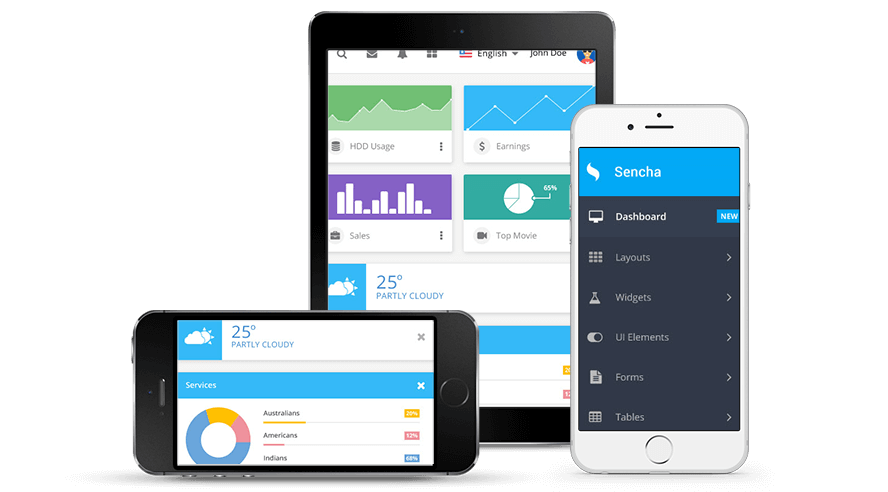
Touchscreens are available on a variety of devices, ranging from smartphones to tablets. They have transformed the way we interact with and design applications. People love using their phones, tablets, and other touch-enabled devices, which has made building high-quality applications for touchscreens a top priority in responsive UX design.
A large part of touch UX design is ensuring that the apps you create respond intuitively to your users’ actions and needs. Using Ext JS with Sencha Touch techniques can help developers optimize performance and improve mobile app speed, javaScript for smoother, more responsive experiences.
One of the best ways to supercharge your Ext JS cross-platform web applications is by leveraging Sencha Touch effectively. In this post, we’ll show you exactly how to do that.
What is Sencha Touch?
Sencha Touch is a JavaScript framework designed for developing applications for mobile devices. It can be used to develop data-intensive web apps for a wide spectrum of platforms including touchscreen laptops, smartphones, and tablets. More importantly, It helps you to develop mobile applications for both Android and iOS easily while maintaining a native look and feel.
Once a stand-alone product, Sencha Touch is no longer supported on its own. Instead, its core functionality has merged with Ext JS, which provides you with an even more powerful suite of tools to conveniently develop all of your cross-platform mobile and web applications.
How to implement touchscreen support on Ext JS?
Implementing Touch is even easier now that it is a part of the Ext JS JavaScript framework for smartphones, tablets, and touchscreen laptops. More than ever, the applications you build with ExtJS run seamlessly a variety of devices — all with little or no modification. Here are three ways to implement touchscreen support:
Event Normalization
The first way to implement Touch on a device using Ext JS is Event Normalization. Event Normalization refers to the process of translating simple mouse events to their equivalent touch and pointer events. Simply put, it enables your Ext JS application to run flawlessly on touchscreen devices.
Here is how it works: If your code requests a listener for a mouse event, Ext JS attaches an equivalent touch or pointer event to the request. For example, here is a scenario where the application attempts to attach a mousedown listener with the following code:
myElement.on('mousedown', someFunction);
If the device supports touchscreen events, the event system translates mousedown to touchstart:
myElement.on('touchstart', someFunction);
In cases where your devices support pointer-events, the event system translates mousedown to pointerdown:
myElement.on('pointerdown', someFunction);
As you can see, you can implement touchscreen support in the form of Event Normalization for your Ext JS web applications is very easy. There is no complexity and very little code you need to write to make it work.
Gesture System
Gesture systems are another way to implement touchscreen support in ExtJS. From a browser’s perspective, there are three types of events: touch, pointer, and mouse. Upon interpreting their sequence and timing, Ext JS can synthesize more complex events, like drag, swipe, and tap.
To enable your Ext JS application to listen for specific gesture events like longpress, you just need to use this single line:
Ext.get('myElement').on('longpress', handlerFunction);
Origionally, Sencha Touch was specifically designed for touch events. Now, however, Ext JS offers full support for pointer and mouse events using the Gesture System. Gestures respond to any type of input –they can be triggered using both touch input and single-point gestures, like tap and swipe. The end result is a versatile gesture system that works seamlessly across all modern devices.
Touch Scroller
Finally, there is the touch scroller. Some mobile Webkit browsers lack momentum scrolling and scroll position indicators. This can be cumbersome and it can result in a tedious and unintuitive user experience. To solve this issue, Sencha Touch utilizes the “touch scroller,” which implements momentum scrolling with scroll indicators using JavaScript. You don’t have to write any code to turn the touch scroller on. It is enabled by default in web browsers where native scrolling is less than optimal.
Should I use Ext JS for developing applications for touchscreen devices?
In short, if you want to develop your apps quickly, easily and efficiently, yes you should Ext JS to develop applications for touchscreen devices. Ext JS will save you time and effort. It enables normalized events and gesture recognition by default. This means that, in most cases, you don’t have to take any special action to activate touchscreen support for your application. So, yes, you should definitely consider using Ext JS.


Latest Content
How to Handle Millions of Rows in a React Data Grid: Buffered Rendering and Server-Side Data
A React data grid that feels instant with 1,000 rows can freeze with 100,000 and…
October 16, 2026
How to Choose a React Grid Component: 12 Features Enterprise Apps Need
Picking a React grid component looks easy in week one. Every option sorts columns and…
October 16, 2026
Enterprise React Data Grid: The Features Enterprise Teams Need, and What Each Grid Includes
Almost every enterprise React data grid advertises the same features: grouping, pivoting, Excel export, clipboard,…
October 16, 2026


