



 Ask Sencha AI
Upgrading Your Ext JS 7.x Application to Ext JS 8.0
April 23, 2026
3074 Views
Get a summary of this article:
This guide covers the technical steps for upgrading Ext JS 7.x applications to 8.0. Upgrading across multiple major versions requires planning and testing, as API changes, deprecations, and behavioral modifications have accumulated across the 7.x → 8.0 progression.
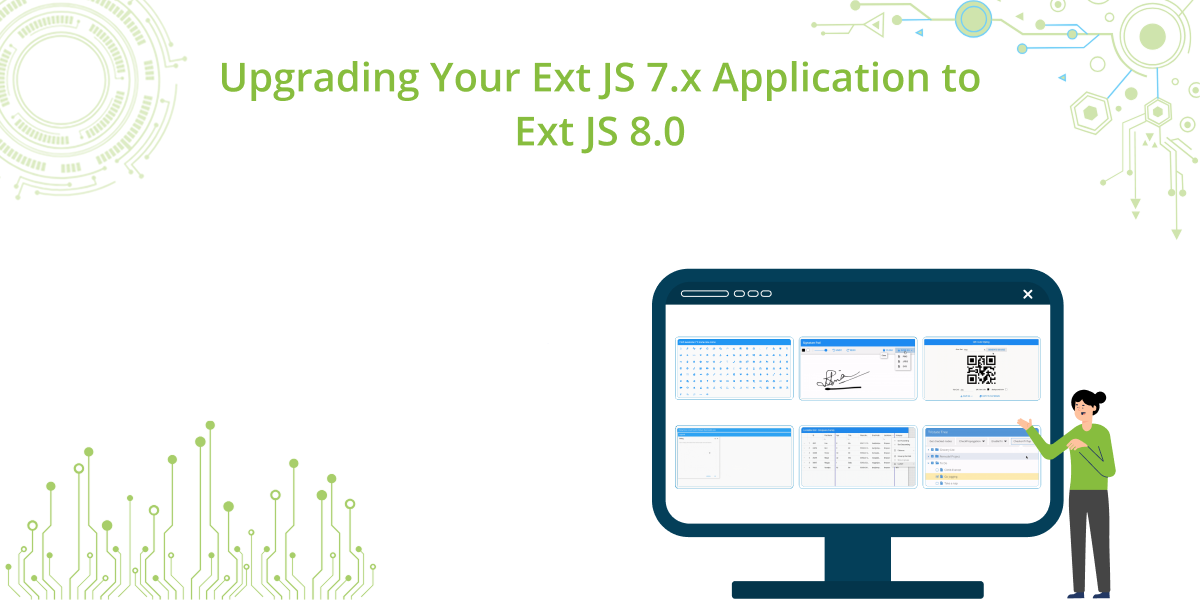
Whether you’re managing a single application or a multi-app workspace, this guide outlines a recommended upgrade path, key considerations, and validation checkpoints to help ensure a smooth transition.
Start with Ext JS Upgrade Adviser
Before changing framework files, updating packages, or rebuilding your application, the first step should be to run the Ext JS Upgrade Adviser.
The Upgrade Adviser is a free tool built for Ext JS customers to help expedite the upgrade process. It scans your Ext JS application code to identify upgrade blockers before they become build-time or runtime issues.
According to Sencha’s Upgrade Adviser resources, it helps detect:
- removed methods
- private APIs
- deprecated methods
- changed configs
- changed properties
It uses a custom ESLint plugin tailored for Ext JS and can be used through:
- the command line
- direct IDE integration
When used with supported IDEs, it can also provide:
- auto-fix suggestions
- upgrade recommendations
Using Upgrade Adviser early helps development teams:
- save time and resources
- estimate upgrade effort more accurately
- reduce migration risk
- identify code changes required before moving to Ext JS 8.0
If your application includes years of accumulated framework usage, customizations, or legacy patterns, this step can significantly reduce uncertainty.
Why Upgrade to Ext JS 8.0?
Upgrading to the latest version of Ext JS is not only about staying current – it also helps improve application quality, maintainability, and long-term compatibility.
Benefits include:
- better performance
- new framework capabilities
- improved security
- modern development support
- continued compatibility with modern JavaScript standards such as ES6
Ext JS 8.0 also introduces important enhancements that can help teams reduce custom code and deliver richer enterprise applications.
What’s New in Ext JS 8.0
Before beginning your upgrade, it’s valuable to understand the enhancements available in Ext JS 8.0.
Enterprise Components
- Built-in Digital Signature Pad component
- Built-in QR Code Reader and Generator
- Font Awesome 7 as the default icon library
Modern Toolkit Enhancements
- Lockable Grid plugin for column locking
- Horizontal buffered rendering via bufferedColumns
- Enhanced dialog boundary controls such as:
- constrainDrag: ‘owner’
- maximizable: ‘owner’
- Improved ARIA support for form fields and triggers
Classic Toolkit Enhancements
- Tri-state checkboxes for TreePanel
These additions help reduce dependency on custom implementations while improving accessibility and feature coverage.
Before You Begin
A successful upgrade starts with preparation
Backup and Rollback Strategy
Before upgrading:
- create a tagged release or repository snapshot
- create a dedicated upgrade branch
- document your current working setup
- confirm you can roll back deployments if needed
Review Release Documentation
It is also a good idea to review the release notes and What’s New materials for the versions between your current 7.x release and Ext JS 8.0.
This helps you:
- understand framework changes incrementally
- identify likely retest areas
- build a better validation plan
Download the Required Tools
From the Sencha Support Portal, obtain:
- the Ext JS 8.0 framework distribution
- the Sencha Cmd version compatible with Ext JS 8.0
You should also download the Ext JS Upgrade Adviser and review its documentation before starting the upgrade.
Review Overrides Before You Upgrade
One of the most important checks before upgrading is reviewing your application’s overrides.
Many Ext JS applications contain custom overrides created to:
- patch framework behavior
- work around historical issues
- customize UI behavior
- support older application requirements
Before upgrading to Ext JS 8.0, review these carefully to determine:
- whether the override is still needed
- whether the framework now provides native support for that behavior
- whether the override depends on internal or private APIs
- whether the override could conflict with framework changes in 8.0
This is an area where Upgrade Adviser can be especially useful, since it helps identify use of private APIs, deprecated methods, and changed configs or properties. Overrides that rely on internal framework behavior should be treated as high-priority review items during upgrade planning.
In many cases, removing or refactoring outdated overrides can make the upgrade cleaner and reduce future maintenance.
Recommended Upgrade Approach
For enterprise applications, a phased upgrade strategy is recommended.
Phase 1: Run Upgrade Adviser and Assess Findings
Start by scanning your codebase with Upgrade Adviser.
Review findings related to:
- deprecated or removed methods
- private APIs
- outdated configs
- changed properties
- areas where IDE auto-fix suggestions may help
This gives you an early view of what needs to be changed before the framework upgrade.
Phase 2: Pilot a Representative Module
Select a representative subset of your application that includes:
- at least one grid-intensive view
- at least one form-based workflow
- dialog or window interactions
- custom components or overrides
Upgrade and validate this pilot area first. This helps:
- reduce risk
- identify issues earlier
- produce a reusable checklist for the rest of the application
Phase 3: Upgrade the Full Application
After validating the pilot area, extend the process across the full application or workspace.
Upgrade Procedure
The upgrade process typically includes updating tooling, updating the framework version, and rebuilding your application.
Step 1: Upgrade Sencha Cmd Metadata
From your workspace root, or application root if not using a workspace, run:
sencha upgrade
This updates project metadata to align with your installed Sencha Cmd version.
Step 2: Upgrade the Ext JS Framework
sencha framework upgrade ext /path/to/ext-8.0.x
Or:
sencha framework upgrade --key ext --source /path/to/ext-8.0.x
This updates the framework version used by the application or workspace.
Step 3: Upgrade Each Application
For each application in your workspace, navigate to the app directory and run:
sencha app upgrade
Repeat this for each application if you manage multiple apps in one workspace.
npm-Based Upgrade Workflow
If your project uses an npm-based workflow, you can also upgrade by updating your package references.
Review your package.json and update the Ext JS-related package versions to the latest target version compatible with your upgrade plan. Then run:
npm install
This fetches the latest versions defined in package.json and updates your local dependencies.
After that, proceed with your normal application build and validation steps.
When using this approach, it is still recommended to:
- run Upgrade Adviser first
- review custom overrides and internal framework dependencies
- verify that all package versions are aligned with the target Ext JS 8.0 setup
Build and Validation
After upgrading, build your application to verify the upgrade succeeded.
Development Build
sencha app build development
Production Build
sencha app build production
If build errors appear, compare them with unresolved Upgrade Adviser findings and any custom overrides that may still depend on changed framework behavior.
Post-Upgrade Verification
The following areas commonly require attention after a major version upgrade.
Icon and Font Awesome Compatibility
Ext JS 8.0 uses Font Awesome 7 as the default icon set. Verify that:
- toolbar icons render correctly
- menu icons display properly
- grid action column icons appear as expected
- TreePanel node icons remain visible
If issues appear, review glyph mappings and icon configuration.
Grid Component Validation
For applications with extensive grid usage:
- test grouping, filtering, editing, and locking behavior
- verify scrolling performance with large datasets
- validate custom renderers and formatters
For Modern toolkit applications with wide grids, consider enabling bufferedColumns after confirming baseline functionality.
Form and Accessibility Validation
If you use the Modern toolkit:
- test keyboard navigation through forms
- verify field validation states
- validate triggers such as combo boxes and date pickers
- perform accessibility checks on key workflows where required
Dialog Validation
For Modern toolkit dialogs:
- verify drag behavior
- test maximize behavior
- validate modal interactions
- confirm boundary handling in owner-constrained layouts
TreePanel Validation
For Classic toolkit applications using TreePanel:
- verify existing checkbox behavior
- optionally evaluate the tri-state checkbox feature
Override Validation
After the framework upgrade, revisit any overrides you retained and verify that they:
- still behave as expected
- do not conflict with framework defaults
- do not duplicate newly available 8.0 behavior
- do not rely on private or removed APIs
This is especially important for enterprise applications with long-lived codebases.
Optional: Modernize with New Built-In Components
After your application is stable on Ext JS 8.0, consider replacing older custom solutions with new built-in capabilities.
Digital Signature Pad
This can help replace custom or third-party signature capture implementations.
QR Code Components
Built-in QR generation and reading can reduce external dependencies and standardize implementation.
Once your upgrade is stable, these kinds of follow-on improvements can help lower long-term maintenance costs.
Frequently Asked Questions
Q: Can we upgrade directly from Ext JS 7.x to 8.0?
A: Yes. The upgrade procedure supports upgrading from any Ext JS 7.x version to 8.0.
Q: Do we need to upgrade Sencha Cmd first?
A: Yes. Upgrading Cmd before upgrading the framework reduces tooling incompatibilities and prevents build errors.
Q: Can this process be used in a workspace with multiple applications?
A: Yes. The procedure works for both single-application projects and multi-application workspaces. Upgrade Cmd and the framework once at the workspace level, then upgrade each application individually.
Q: How long does an upgrade typically take?
A: Upgrade duration varies based on application complexity and customization. The framework upgrade itself is quick. Application stabilization and validation typically require days to weeks depending on your application’s size and the extent of custom components.
Q: What if we encounter build errors?
A: Please contact Sencha Support with your build output, current Ext JS version, target version, and workspace structure. Our team can provide targeted guidance.
Need Assistance?
If you have questions specific to your environment or encounter issues during your upgrade, please contact us through the Sencha Support Portal.
To help us respond efficiently, please include:
- Current Ext JS version and Sencha Cmd version
- Target Ext JS 8.0 version
- Toolkit in use (Classic, Modern)
- Workspace structure (single app or multi-app)
- Build output and error messages (if applicable)
For additional resources, visit:
- Sencha Support Portal: Access documentation, downloads, and support tickets
- Ext JS Upgrade Adviser: Free tool to identify code changes required for migration
- Sencha Discord Server: Connect with community experts and Sencha developers
Professional Services
For complex upgrades, Sencha offers advisory services, including:
- Code review and migration planning
- Hands-on upgrade assistance
- Training and knowledge transfer
- Post-upgrade optimization
Contact your Sencha account representative for details.
Conclusion
Upgrading to Ext JS 8.0 positions your application to take advantage of modern enterprise features, improved accessibility, and reduced maintenance through built-in components. By following this structured approach – establishing a rollback plan, upgrading in phases, and validating systematically – you can minimize risk and ensure a successful transition.
By following this structured approach, your team can reduce risk, improve planning accuracy, and move to Ext JS 8.0 with greater confidence.



Latest Content
How to Use the Ext JS Grid in React: Setup, Columns, Editing and Grouping
Set up the Ext JS grid in React with ReExt, then add typed columns, store-backed…
October 6, 2026

React Data Grid: The Complete 2026 Guide for Enterprise Apps
Almost every business application eventually becomes a grid. Orders, invoices, trades, tickets, inventory, patients, shipments:…
October 6, 2026
Understanding Ext JS Layouts and Containers: An Introduction (Classic vs. Modern)
Building complex, responsive, and data-intensive Web applications requires a solid layout engine. In Ext JS,…
October 6, 2026


