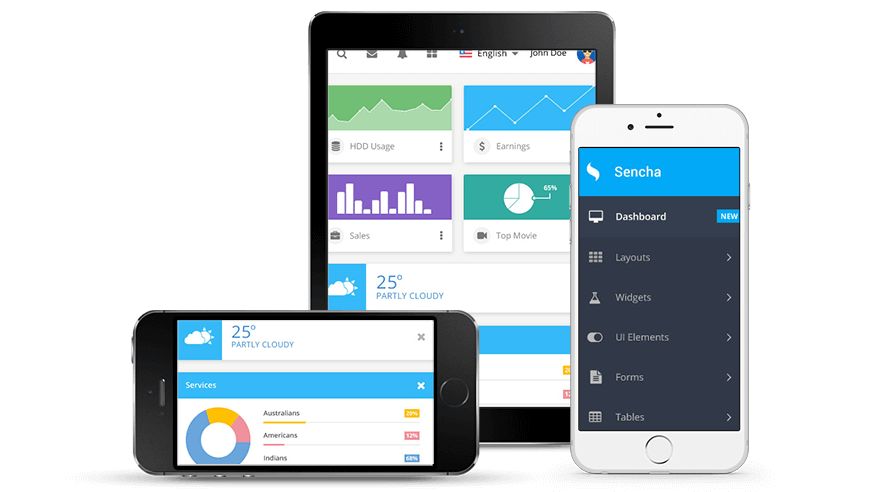
Built on HTML5 Technology
Sencha Touch, a high-performance HTML5 mobile application framework, is the cornerstone of the Sencha HTML5 platform. Built for enabling world-class user experiences, Sencha Touch 2 is the only framework that enables developers to build fast and impressive apps that work on iOS, Android, BlackBerry, Windows Phone, and more.
Smoother Scrolling and Animations
Sencha Touch 2 provides a user experience unparalleled in HTML5. Fluid animations and smooth scrolling make Sencha Touch 2 apps come alive, rivaling native technology. Lists, carousels, and other components scroll smoothly and naturally, with a high frame rate across a wide range of devices. The framework automatically uses the best scrolling mechanism for each device, resulting in a great experience everywhere.
Adaptive Layouts
Sencha Touch’s novel layout engine leverages HTML5 in powerful ways to let developers build complex applications that respond, load, and layout in a snap. Switching from landscape to portrait happens nearly instantaneously, and applications load in fractions of a second as Sencha Touch 2’s advanced layout engine ensures pixel perfection.
Native Packaging
Web applications work everywhere. But there are still a few features uniquely available to native apps — like camera access and app store distribution — that are essential to app developers. Sencha SDK Tools give you the best of both worlds, providing a way to seamlessly “wrap” your web app in a native shell. Whether you’re on Mac or Windows, you’re one command away from deploying to the Apple App Store or Android Market.
Click play above to view a brief walkthrough of our Sencha Touch Kitchen Sink demo application.
New Components
Navigation View
The new Navigation View component makes it easy to make applications that feature beautiful animated transitions between screens as well as providing automatic back button management.
Learn More about Navigation View
View short demo video on Vimeo
Architectural Improvements
Class System
Sencha Touch 2 builds on the class system from Ext JS 4. Developers can take advantage of powerful features like dynamic loading and mixins, all making it easy to create minified custom builds for your application.
How to Use Classes in Sencha Touch 2
Watch Class System Screencast
Component DataView
The new Component DataView enables you to build beautiful interfaces based on a Model and a Store. It’s easy to create a template that has full featured components instead of simple HTML templates so you can bind, listen, and control components inside of a DataView.
History, Back Button and Deep Linking
While Sencha Touch 1 provided basic history support, with 2.0 it’s easier than ever to make your applications history-aware, meaning the back button works and you can provide a deep link to any part of your application.
Advanced List Plugins
Lists are one of the most popular components in Sencha Touch, and with 2.0 we’ve updated two of the most powerful plugins: Pull to Refresh and Load More. These plugins, activated with a single line of code, deliver a fantastic List experience out of the box.
Infinite Carousel
Carousels are a great way of showing multiple screens of information in a constrained space. In Sencha Touch 2 they get even more powerful, with a data-bound Carousel supporting an infinite number of items. No need to worry about performance, or memory — Sencha Touch manages it for you, so scrolling is consistently smooth.
Config System
Sencha Touch 2 has a great API thanks largely to its config system. Almost any configuration of any component can be changed at run time, with a consistent and predictable API.
Config System Code Sample:
var button = Ext.create('Ext.Button', { text: 'My button' }); button.setText('Change me whenever you like');
Sencha Touch 2 Device Support
Apple
-
Apple iPad
iOS 4+
-
Apple iPhone 4S, 4 & 3GS
iOS 4+
-
Apple iPod touch
iOS 4+
BlackBerry
-
BlackBerry Q10
BB OS 10
-
BlackBerry Z10
BB OS 10
-
BlackBerry PlayBook
BB Tablet OS 1
-
BlackBerry 9800
BB OS 6+
Windows
-
Nokia Lumia 920
Windows Phone 8
-
Nokia Lumia 900
Windows Phone 8
Android 2.3+
-
Amazon Kindle Fire
Kindle OS 6.2.2
-
Asus Transformer Prime
Android 4 w/ Chrome
-
Motorola Xoom 1, 2
Android 4.0.3+
-
Motorola Droid Bionic
Android 2.3+
-
Motorola Droid X
Android 2.3+
-
Motorola Droid 2, 3, 4, & 5
Android 2.2+
-
Motorola Atrix
Android 2.3+
-
Samsung Galaxy S1, & S2
Android 2.3+
-
Samsung Galaxy Nexus
Android 4 w/ Chrome
-
HTC Desire
Android 2.2+
-
HTC Desire S
Android 2.3+
-
HTC Evo 4G
Android 2.3+
Tons more features
- AJAX - Sencha Touch provides full AJAX support, including CORS and JSON-P
- DOM manipulation - Full DOM manipulation support available
- Feature Detection - Automatically detects the presence of features like geolocation, canvas and orientation support
- Geolocation - Provides a simple wrapper around geolocation on devices that support it
- Icons - 300 icons included
- Example apps - 8 full example apps included
- Touch events - Provides a full range of touch events and gestures like tap, swipe and pinch
