



 Ask Sencha AI
Announcing Ext JS Upgrade Adviser GA
June 10, 2019
1923 Views
Get a summary of this article:
Ext JS Upgrade Adviser 1.0 Release
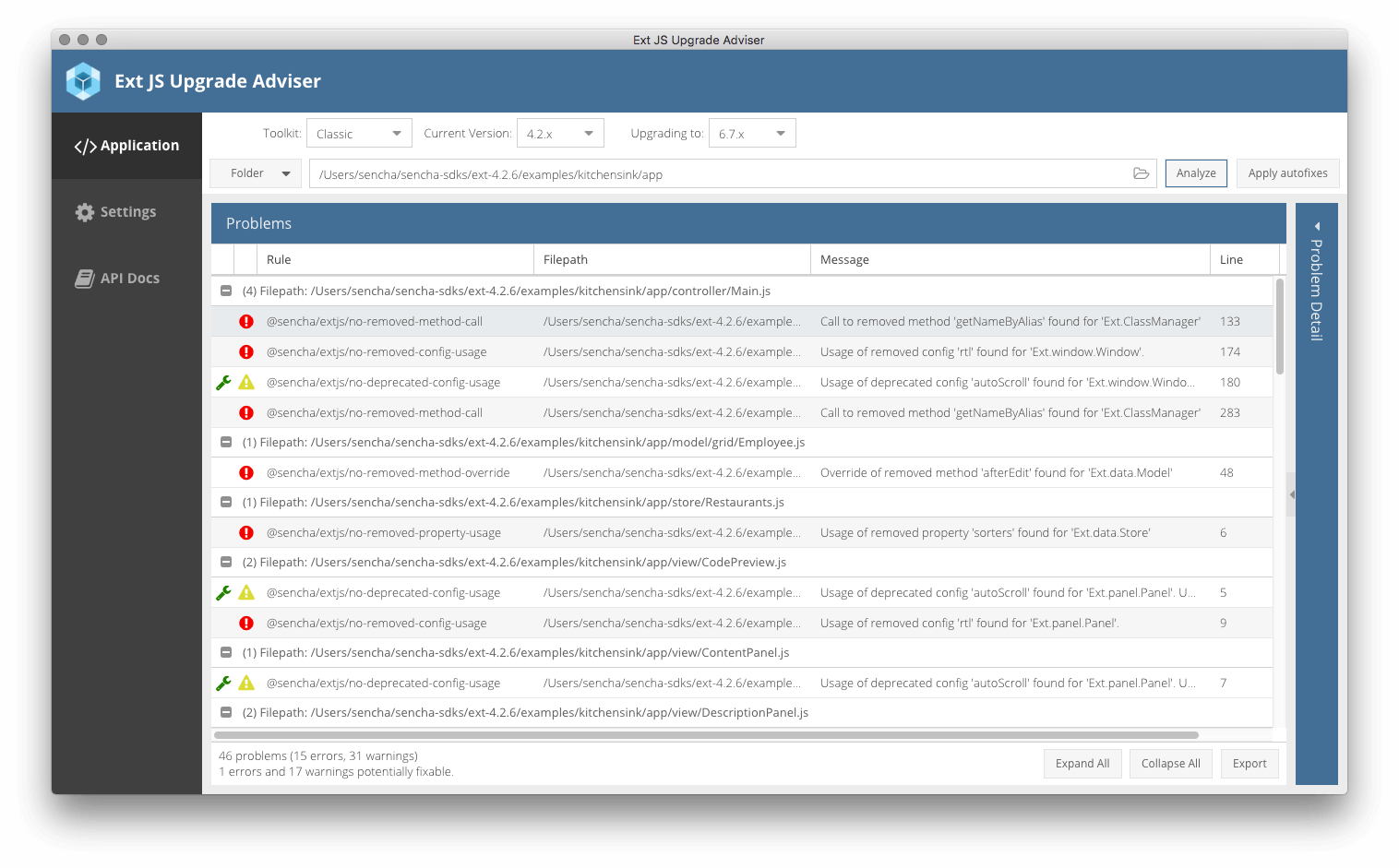
We are excited to announce the release of Ext JS Upgrade Adviser 1.0. Ext JS Upgrade Adviser scans your Ext JS 4.x and 5.x applications and reports problems in the source code that need to be addressed before upgrading to a later Ext JS version (6.x). Ext JS Upgrade Adviser includes:
- Ext JS ESLint Plugin that can be run on an Ext JS application from the command line or integrated with an IDE such as Visual Studio Code
- Ext JS ESLint Plugin provides ESlint rules that will help you identify the use of removed, private and deprecated classes, methods, configs and properties and the overriding of existing aliases, classes and methods
- Ext JS ESLint Plugin provides the options to auto fix certain identified problems
- A desktop application is provided to visually see the results of the scan as well as the affected source code
- Support for both Classic and Modern
Benefits of Upgrading to Ext JS 6.x
Ext JS 6.x supports universal applications targeting desktops, tablets, and smartphones, using a single codebase. We introduced a number of new components in Ext JS 6.x – Pivot Grid, Calendar, D3, enhanced exporter. In addition to these new components, we have made grid enhancements including row body widgets, accessibility improvements with ARIA functionality in the core and new Graphite accessible theme. Ext JS npm packages, ExtGen and ExtBuild are available with Ext JS 6.x/
Try Ext JS Upgrade Adviser
- Complete the form and begin downloading
- Read the Getting Started Guide for Ext JS Upgrade Adviser
- Register and Attend Ext JS Upgrade Adviser webinar (June 12, 2019)


Latest Content

How to Handle Millions of Rows in a React Data Grid: Buffered Rendering and Server-Side Data
A React data grid that feels instant with 1,000 rows can freeze with 100,000 and…
October 16, 2026
How to Choose a React Grid Component: 12 Features Enterprise Apps Need
Picking a React grid component looks easy in week one. Every option sorts columns and…
October 16, 2026
Enterprise React Data Grid: The Features Enterprise Teams Need, and What Each Grid Includes
Almost every enterprise React data grid advertises the same features: grouping, pivoting, Excel export, clipboard,…
October 16, 2026


