Ask Sencha AI
How to Choose a JavaScript Library: 5 Steps (2026 Checklist)
Mar 1, 2022
✎Oct 27, 2026
3514 Views
Get a summary of this article:
Picking a JavaScript library feels like a five-minute job. Search npm, pick the one with the most stars, run npm install, move on. The problems show up later: two years in, the library is abandoned, too slow for your real data, or its licence quietly changed.
Every library you add becomes part of your product. It deserves the same scrutiny as code your own team writes. Here’s the five-step process, criteria and red flags we use when evaluating npm packages for enterprise apps.
TL;DR — how to choose a JavaScript library
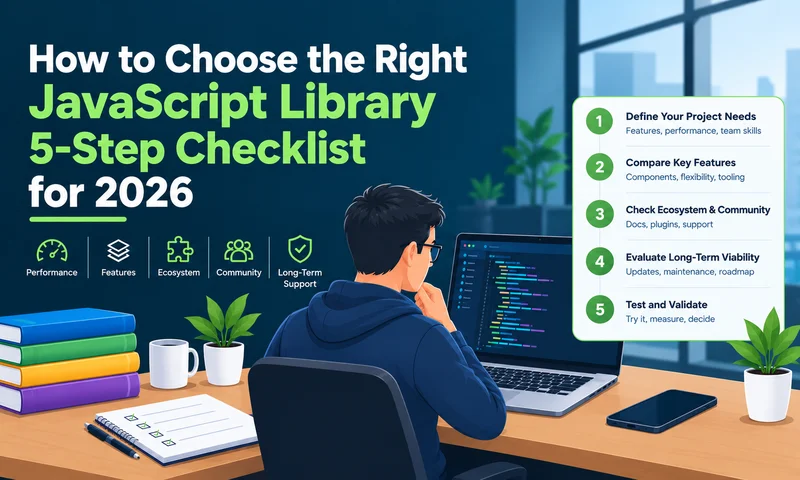
- Define the job. Write down what you need, and check whether a native browser API already does it.
- Check it’s actively maintained. Recent releases and responsive maintainers matter more than stars or downloads.
- Test performance and bundle size. Measure what it adds to your build, and test with real data volumes.
- Review licence, security and support. Confirm the licence, run npm audit, and count its dependencies.
- Prove it with a prototype. Build one real feature in your own stack, TypeScript included.
Want recommendations rather than a process? See our list of the best JavaScript libraries in 2026, grouped by category.
JavaScript library selection criteria: quick checklist
Keep this table open while you evaluate. If a library shows two or more red flags, keep looking.
| Criterion | Where to check | Good sign | Red flag |
|---|---|---|---|
| Need | Native browser APIs, your existing stack | Solves a real gap | Duplicates something you already have |
| Maintenance | GitHub releases, issues, commits | A release in the last few months | No release in a year; issues ignored |
| Bundle size | Bundlephobia, your own build | Small and tree-shakeable | A large bundle for one feature |
| Performance | A test with your real data | Smooth at production volumes | Only fast in the demo |
| Licence | LICENSE file, pricing page | MIT, Apache 2.0 or a clear commercial licence | Unclear or recently changed terms |
| Security | npm audit, advisories | Few dependencies, fast fixes | Open, unpatched vulnerabilities |
| Accessibility | Docs, a screen-reader test | WCAG 2.2 support, keyboard navigation | No accessibility notes at all |
| Compatibility | package.json, docs | TypeScript types, ESM, works with SSR | Breaks your build tool or framework |
| Fit | A small prototype | Good docs, your team picks it up fast | Conflicts with existing libraries |
Step 1: Define what you actually need
Start from the problem, not from whatever is trending. Write the job down in one sentence with numbers in it. “An editable grid for 50,000 rows that works offline” and “a sortable table for 100 rows” sound similar, but they lead to completely different libraries.
- Split must-haves from nice-to-haves.
- Note the scale: rows, users, update frequency, devices.
- Check native APIs first. fetch, structuredClone, Intl.DateTimeFormat and modern DOM APIs now replace several libraries outright.
- Decide whether you want a single library or a framework that already includes the feature (see framework vs library).
Step 2: Check the library is actively maintained
Popularity isn’t maintenance. Stars and downloads lag reality by years: Moment.js is still downloaded millions of times a week but is in maintenance mode, and styled-components entered maintenance mode in March 2025 with tens of thousands of stars.
Look for:
- Release rhythm — the date of the last release and how often it ships
- Issue health — open vs closed issues, and how fast maintainers reply
- Bus factor — how many people maintain it; one maintainer is a real risk
- Change discipline — semantic versioning, a changelog and upgrade guides for breaking changes
- Long-term support — supported major versions, if your app will live for years
Step 3: Test performance and bundle size
A library that’s smooth with 100 records can crawl at 100,000. Test it with realistic data, on the devices and browsers your users actually have, not just your development laptop.
- Check the size it adds to your bundle (Bundlephobia is a quick first look) and whether it tree-shakes.
- Measure rendering speed and memory with production-sized data.
- Read published benchmarks, then confirm them yourself. Vendor numbers, ours included, are a starting point.
Step 4: Review licence, security and support
Confirm the licence allows your use. MIT and Apache 2.0 are permissive. Be wary of “free” libraries that charge for the features you’ll need later, and remember licences change; GSAP, for example, became free for commercial use in April 2025.
Security is the other half of this step. In 2025, attackers hijacked maintainer accounts and self-spreading malware compromised popular packages on npm. Every dependency is part of your software supply chain.
- Run npm audit and read the library’s security advisories.
- Prefer libraries with few dependencies of their own.
- Check accessibility support if the library renders UI; fixing it later is expensive and, increasingly, a legal issue.
- For business-critical apps, look for commercial support or a service-level agreement.
Step 5: Prove it with a prototype
Build one real feature with the library, inside your actual stack, before you commit. Give it a day or two. A short prototype shows what demos and docs hide.
- Does it work with your framework, build tool, TypeScript setup and server rendering?
- Can you solve a real problem from the docs alone, without digging through forums?
- Can the rest of your team pick it up quickly?
- Do AI coding assistants handle it well? Popular, well-documented libraries get noticeably better suggestions.
Red flags when evaluating a JavaScript library
Any one of these is a reason to slow down. Two or more, and we’d usually walk away.
- No release in over a year, or a “looking for maintainers” notice
- Known security vulnerabilities with no fix
- A large bundle for a small feature
- An unclear licence, or a recent licence change nobody has reviewed
- Documentation that only covers the demo
- A long chain of its own dependencies
- No TypeScript types, and no plan to add them
Free tools for evaluating npm packages
You can answer most of the checklist in about 15 minutes with these free tools.
| Tool | What it tells you |
|---|---|
| npm trends | Download trends over time, side by side with alternatives |
| GitHub Insights (Pulse, Contributors) | Recent activity, how many people actually maintain the project |
| Bundlephobia | Minified and gzipped size, and whether it tree-shakes |
| deps.dev | The full dependency tree, licences and known vulnerabilities |
| OpenSSF Scorecard | A security-practices score: code review, branch protection, signed releases |
| Socket | Supply-chain risk signals, such as install scripts or sudden ownership changes |
| npm audit | Known vulnerabilities in your installed dependency tree |
A simple scoring template
When two or three libraries are close, score them instead of arguing about them. Give each criterion a weight that reflects your project, score each library from 1 to 5, then multiply and add up.
Here’s a worked example for picking a date library in a long-lived enterprise app. The scores are our judgement for illustration; your weights will differ.
| Criterion | Weight | Moment.js | Day.js | date-fns |
|---|---|---|---|---|
| Fits the need | 20 | 5 | 5 | 5 |
| Active maintenance | 20 | 1 | 4 | 4 |
| Bundle size and performance | 15 | 1 | 5 | 5 |
| Licence | 10 | 5 | 5 | 5 |
| Security and dependencies | 15 | 3 | 4 | 4 |
| TypeScript and compatibility | 10 | 2 | 4 | 5 |
| Docs and team fit | 10 | 5 | 4 | 4 |
| Weighted score (out of 500) | 100 | 300 (60%) | 445 (89%) | 455 (91%) |
Moment.js still fits the job perfectly, and it loses anyway, because maintenance and size count. That’s the point of the exercise: it makes the hidden costs visible. Between Day.js and date-fns the gap is small, so the prototype in Step 5 should decide.
Build vs buy: a library stack or a complete framework?
Sometimes the best way to choose a library is to need fewer of them. Every library you add is another dependency to audit, update and eventually replace. A typical enterprise app collects ten to fifteen of them across UI components, grids, charts, forms, dates, state and testing, each with its own release schedule.
A complete JavaScript framework swaps most of that list for one tested, supported package. Sencha Ext JS takes that approach: a JavaScript framework with 140+ components for data-heavy interfaces, plus tools that cover the rest of the lifecycle. Here’s how it lines up with the checklist above.
| Ext JS tool | What it does | Checklist item it covers |
|---|---|---|
| Ext JS framework | 140+ components, including grids, charts, forms and trees, built to work together | Need, performance, accessibility |
| Sencha Cmd | Scaffolding, minification, production builds, shared code across apps | Compatibility and long-term maintenance |
| Sencha Architect | Drag-and-drop, WYSIWYG UI building with less hand-written code | Team fit and speed |
| Sencha Themer | Build custom themes visually, with a smart colour palette for component states | Fit, without extra styling libraries |
| Sencha Test | Component-aware unit and end-to-end testing for Ext JS apps | Replaces separate testing tools |
| Sencha Fiddle | Create, run and share code examples from a URL | Prototyping (Step 5) |
It’s a commercial licence, so the honest comparison is licence cost vs the developer time to assemble, integrate and maintain the equivalent stack yourself. Run the scoring template on both options.
Working in React? ReExt brings the same 140+ Ext JS Ui components into an existing React app.
Frequently asked questions
How do I choose a JavaScript library?
Define the exact problem, check the library is actively maintained, test its performance and bundle size with real data, review its licence and security, and build a small prototype in your stack before committing.
What are the criteria for selecting a JavaScript library?
Need, maintenance activity, performance and bundle size, licence, security, accessibility, documentation, TypeScript support and fit with your existing stack. For apps that will run for years, long-term support matters most.
How do I evaluate an npm package?
Check its last release date, open issues and maintainer activity on GitHub; compare download trends on npm trends; check its size on Bundlephobia and its dependency tree on deps.dev; run npm audit; then test it in a small prototype.
How do I know if a JavaScript library is still maintained?
Look at the date of the last release, how quickly issues and pull requests get answered, and whether the project lists active maintainers. No release in a year is a warning sign.
Are GitHub stars a good way to judge a library?
Not on their own. Stars measure past popularity, not current health. styled-components had tens of thousands of stars when it entered maintenance mode. Use release activity and issue response instead.
How big is too big for a JavaScript library?
It depends on what it does. A few kilobytes for a utility is fine; 100 KB or more for one small feature is a red flag. Always weigh size against what you’d otherwise have to build and maintain.
Should I use a library or write the code myself?
Use a library for complex, well-solved problems like data grids, charts and dates. Write it yourself when the need is small or a native browser API already covers it.
Are commercial JavaScript libraries worth paying for?
Often, for business-critical apps. You get guaranteed maintenance, support and long-term compatibility. Compare the licence cost with the developer time needed to build and maintain the same features.
How do I keep my JavaScript dependencies secure?
Commit your lockfile, run npm audit or a scanner on every pull request, avoid installing brand-new releases the day they ship, enable two-factor authentication on publishing accounts, and remove packages you no longer use.
Conclusion
Choosing a JavaScript library comes down to five checks: a real need, active maintenance, solid performance with your data, a licence and security record you can live with, and a prototype that works in your stack. When the choice is close, score it. When the list of libraries keeps growing, ask whether one framework could replace several.
For recommendations by category, see the best JavaScript libraries in 2026. To replace a stack of libraries with one supported framework, start a free Ext JS trial and test it against your own data.



Latest Content

Mastering the Sencha Layout System with AI
In an enterprise Ext JS application, the layout system decides how fast screens render, how…
October 30, 2026

Testing Ext JS Applications: What Is Actually Worth Automating
Ask a team with a ten-year-old Ext JS application how much of it is covered…
October 29, 2026

Building a Reusable React UI Component Around the Ext JS Data Grid
The Ext JS data grid can do almost anything an enterprise screen needs: grouping, summaries,…
October 29, 2026