



 Ask Sencha AI
How to Add Elements to an Array in JavaScript: push, unshift, splice and More (2026)
Mar 14, 2024
✎Nov 3, 2026
82365 Views
Get a summary of this article:
Adding an item to an array is something you’ll do hundreds of times a week in JavaScript. The method you pick depends on two questions: where should the new item go, and should the original array change or should you get a new one?
TL;DR
- Add to the end: push(), the fastest and most common way.
- Add to the beginning: unshift(), or the spread operator to keep the original unchanged.
- Add at a specific position: splice(), or toSpliced() for a new array.
- Add several items or another array: push(…other), concat(), or spread.
- In React: always create a new array with spread. Never change state directly.
Which method should you use?
| Where to add | Method | Changes the original? | Speed |
|---|---|---|---|
| End | push(item) | Yes | Fast, O(1) |
| End (new array) | […arr, item] or concat() | No | O(n) |
| Beginning | unshift(item) | Yes | O(n) |
| Beginning (new array) | [item, …arr] or concat() | No | O(n) |
| Specific index | splice(index, 0, item) | Yes | O(n) |
| Specific index (new array) | toSpliced(index, 0, item) | No | O(n) |
“Changes the original” matters more than it sounds. Mutating methods are simple and fast; non-mutating ones keep other code that holds a reference to the array from being surprised, and they’re required in React state.
Also Read: How to Choose a JavaScript Library: 5 Steps (2026 Checklist)
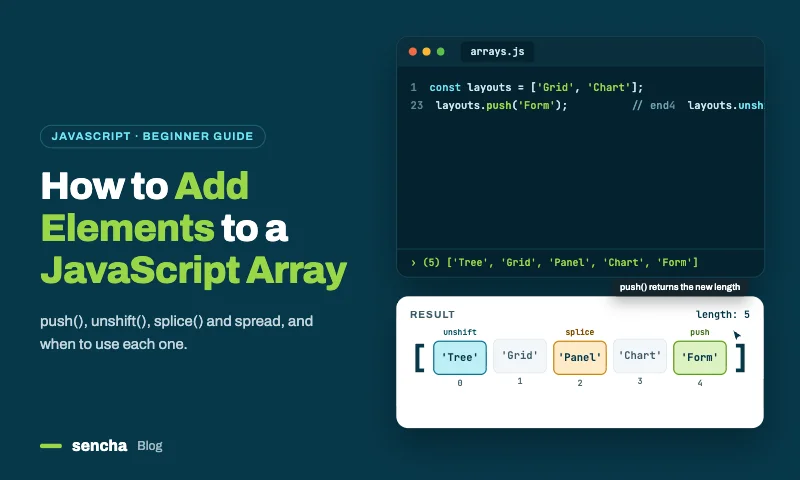
Add elements to the end of an array: push()
push() adds one or more items to the end of an array and returns the new length. It changes the original array, and it’s the fastest option because nothing else has to move.
    const fruits = ['apple', 'banana'];

    fruits.push('cherry');
    console.log(fruits); // ['apple', 'banana', 'cherry']

    fruits.push('date', 'elderberry');
    console.log(fruits); // ['apple', 'banana', 'cherry', 'date', 'elderberry']
Technically, push() is O(1) amortised: now and then the engine has to grow the array’s memory, but averaged over many pushes the cost stays constant.
Other ways to add to the end
    // Index assignment: same result as push for a single item
    fruits[fruits.length] = 'fig';

    // New array, original unchanged (use this in React)
    const updated = [...fruits, 'grape'];

    // Also a new array
    const alsoUpdated = fruits.concat('grape');
In everyday code, stick with push() when mutating and spread when you need a new array. Index assignment works, but it’s less readable.
Add elements to the beginning of an array
Adding to the front (prepending) is slower than adding to the end, and it’s worth understanding why before picking a method.
How prepending works under the hood
Arrays store items in order, by index. To put something at index 0, everything already there has to move along by one:
    Before:   [1, 2, 3]
    Shift:    [_, 1, 2, 3]   every element moves one place right
    Insert:   [0, 1, 2, 3]   new element goes into index 0
That shift is why prepending is O(n): the work grows with the size of the array. With 10 items you’ll never notice. With 1,000,000 items, that’s a million moves every time. Appending with push() skips all of that; it just writes into the next free slot.
Method 1: unshift()
unshift() is the most direct way to add to the beginning. It changes the original array and returns the new length.
    const fruits = ['banana', 'cherry', 'date'];
    const newLength = fruits.unshift('apple');

    console.log(fruits);    // ['apple', 'banana', 'cherry', 'date']
    console.log(newLength); // 4
You can pass several items, and they keep the order you give them. Spread lets you prepend a whole array:
    const fruits = ['cherry', 'date'];
    fruits.unshift('apple', 'banana');
    // ['apple', 'banana', 'cherry', 'date']

    const existing = ['cherry', 'date'];
    existing.unshift(...['apple', 'banana']);
    // ['apple', 'banana', 'cherry', 'date']
- Use it when mutation is fine, the array is small to medium (up to tens of thousands of items), or you want the new length back.
- Avoid it in React state, functional code, very large arrays you prepend to often, or anywhere the original must stay intact.
Method 2: the spread operator
Spread is the modern way to prepend without touching the original. It builds a new array.
    const original = ['banana', 'cherry', 'date'];
    const updated = ['apple', ...original];

    console.log(updated);  // ['apple', 'banana', 'cherry', 'date']
    console.log(original); // ['banana', 'cherry', 'date'] (unchanged)

    // Several items, or merging arrays with a new first item
    const combined = ['apple', ...['banana', 'cherry'], ...['date', 'elderberry']];
    // ['apple', 'banana', 'cherry', 'date', 'elderberry']
Why it’s the favourite: [‘newItem’, …existing] reads exactly like what it does. Anyone reviewing the code sees a new array with the item at the front. It’s also what React needs, since React only notices changes when it gets a new array.
Method 3: concat()
concat() joins arrays or values into a new array. It’s the classic immutable approach, from before spread existed.
    const original = ['banana', 'cherry', 'date'];
    const updated = ['apple'].concat(original);
    // ['apple', 'banana', 'cherry', 'date']
concat() vs spread. For prepending they give the same result, so it’s mostly style. Two differences are worth knowing:
- Spreading a non-iterable throws: […null] is a TypeError. concat(null) doesn’t throw, but it adds null as an element, which may not be what you want either.
- concat() flattens array arguments one level. [1].concat([2, 3]) gives [1, 2, 3]; to add an array as a single item, wrap it: [1].concat([[2, 3]]).
Method 4: splice()
splice() can insert anywhere, including position 0. It changes the original array.
    const fruits = ['banana', 'cherry', 'date'];
    fruits.splice(0, 0, 'apple');
    // splice(startIndex, deleteCount, ...itemsToInsert)
    // ['apple', 'banana', 'cherry', 'date']
It works, but for the front of an array unshift() or spread is clearer. splice() earns its keep when inserting in the middle (see below).
Method 5: toSpliced() and with() (ES2023)
ES2023 added non-mutating versions of familiar methods: toSpliced(), toSorted(), toReversed() and with(). toSpliced() is the one that helps here: it works like splice() but returns a new array.
    const original = ['banana', 'cherry', 'date'];
    const updated = original.toSpliced(0, 0, 'apple');

    console.log(updated);  // ['apple', 'banana', 'cherry', 'date']
    console.log(original); // ['banana', 'cherry', 'date'] (unchanged)
with() doesn’t add items; it returns a new array with one element replaced, which is handy alongside the others:
    const replaced = original.with(1, 'coconut');
    // ['banana', 'coconut', 'date']
Both are supported in every modern browser and in Node.js 20+.
Also read: Framework vs Library: Key Differences Explained.
Add an element at a specific index
Use splice(index, 0, item). Read the arguments as: where to start, how many to remove (0, so nothing), then what to insert. Use toSpliced() with the same arguments when you want a new array instead.
    const fruits = ['apple', 'date', 'elderberry'];

    fruits.splice(1, 0, 'banana', 'cherry'); // insert at index 1
    console.log(fruits); // ['apple', 'banana', 'cherry', 'date', 'elderberry']

    // Immutable version
    const letters = ['a', 'c'];
    const withB = letters.toSpliced(1, 0, 'b'); // ['a', 'b', 'c']
Negative indexes count from the end, so splice(-1, 0, item) inserts just before the last element.
Also Read: How to Choose a JavaScript Library: 5 Steps (2026 Checklist)
Add multiple elements or another array
To add several items, or every item from another array:
    const a = [1, 2];
    const b = [3, 4];

    a.push(...b);               // changes a: [1, 2, 3, 4]
    const c = [1, 2].concat(b); // new array: [1, 2, 3, 4]
    const d = [...[1, 2], ...b]; // new array: [1, 2, 3, 4]
One limit to know: push(…b) passes every item as a separate argument, and engines cap how many arguments a call can take. With hundreds of thousands of items it can throw a RangeError, so use concat() or a loop for very large arrays.
Add an object to an array
Objects go in exactly like any other value:
    const users = [{ id: 1, name: 'Ana' }];
    users.push({ id: 2, name: 'Ben' });
    console.log(users.length); // 2
Remember that the array stores a reference to the object. Change the object later and the array sees the change too.
Add an element only if it doesn’t exist
Check first: includes() for simple values, some() for objects.
    const tags = ['js', 'react'];
    if (!tags.includes('vue')) tags.push('vue');

    const users = [{ id: 1 }];
    if (!users.some((u) => u.id === 2)) users.push({ id: 2 });
If you’re doing this a lot, a Set is simpler and faster, because it ignores duplicates automatically:
    const unique = new Set(['js', 'react']);
    unique.add('react'); // ignored, already there
    unique.add('vue');
    console.log([...unique]); // ['js', 'react', 'vue']
Common mistakes when adding to arrays
Expecting push() to return the array. It returns the new length:
    const list = ['a'];
    const result = list.push('b');
    console.log(result); // 2, not ['a', 'b']
If you need the array back, use […list, ‘b’] or call push and then use list.
Thinking const stops changes. const stops you reassigning the variable, not changing its contents. const arr = []; arr.push(1) is perfectly valid. To truly lock an array, use Object.freeze(arr) or a readonly type in TypeScript.
Creating holes by assigning past the end. arr[10] = ‘x’ on a three-item array leaves indexes 3 to 9 empty. Those holes behave strangely with map() and forEach(), and can slow the array down. Use push() instead.
Mutating inside a loop over the same array. Pushing to an array while iterating over it with for…of can create an endless loop. Build a separate array, or iterate over a copy.
Performance: which method is fastest?
For arrays under a few thousand items, the differences are too small to matter. Choose whatever reads best. At scale, they start to add up.
| Method | Changes original? | Time complexity | Best for |
|---|---|---|---|
| push() | Yes | O(1) amortised | Adding to the end |
| unshift() | Yes | O(n) | Simple scripts, small arrays |
| No | O(n) | React state, immutable code | |
| concat() | No | O(n) | Classic immutable code |
| splice(i, 0, x) | Yes | O(n) | Inserting anywhere |
| toSpliced(i, 0, x) | No | O(n) | Modern immutable inserts |
Only push() avoids touching existing elements. Every other method either shifts elements or copies the whole array.
To get a feel for the numbers, here’s a rough single prepend at different sizes. Exact timings vary a lot by device and engine, so treat these as orders of magnitude:
    const small = new Array(100).fill(0);
    small.unshift(-1);   // ~microseconds

    const large = new Array(1_000_000).fill(0);
    large.unshift(-1);   // ~a few milliseconds

    const huge = new Array(10_000_000).fill(0);
    huge.unshift(-1);    // ~tens of milliseconds or more
One prepend of a few milliseconds is fine. A thousand of them in a loop is a frozen tab. That’s when the strategies below help. JavaScript engines (V8, SpiderMonkey, JavaScriptCore) all optimise arrays in different ways, but none can make prepending cheaper than O(n), so measure in your target browsers rather than relying on general claims.
Strategies for large arrays
When an app prepends to arrays with tens of thousands of items, often, standard methods become the bottleneck. Three patterns fix it.
Strategy 1: batch prepends in a buffer
Push new items to a small buffer (fast), then merge them into the main array in one go:
    class PrependBuffer {
      constructor(limit = 100) {
        this.main = [];
        this.buffer = [];
        this.limit = limit;
      }

      addToFront(item) {
        this.buffer.push(item); // O(1)
        if (this.buffer.length >= this.limit) this.flush();
      }

      flush() {
        // One O(n) merge instead of `limit` separate O(n) prepends
        this.main = [...this.buffer.toReversed(), ...this.main];
        this.buffer = [];
      }

      getAll() {
        // toReversed() returns a copy, so calling getAll() twice is safe
        return [...this.buffer.toReversed(), ...this.main];
      }
    }

    const list = new PrependBuffer();
    list.addToFront('item1');
    list.addToFront('item2');
    console.log(list.getAll()); // ['item2', 'item1']
A hundred prepends now cost 99 cheap pushes plus one merge, instead of a hundred full shifts.
Strategy 2: use a linked list
If you prepend constantly and rarely need items by index, a linked list adds to the front in O(1):
    class Node {
      constructor(value, next = null) {
        this.value = value;
        this.next = next;
      }
    }

    class LinkedList {
      constructor() {
        this.head = null;
        this.size = 0;
      }

      prepend(value) {
        this.head = new Node(value, this.head); // O(1), whatever the size
        this.size++;
      }

      toArray() {
        const result = [];
        let current = this.head;
        while (current) {
          result.push(current.value);
          current = current.next;
        }
        return result;
      }
    }

    const list = new LinkedList();
    list.prepend('third');
    list.prepend('second');
    list.prepend('first');
    console.log(list.toArray()); // ['first', 'second', 'third']
The trade-off: reading item 5,000 means walking 5,000 nodes. For a newest-first feed or an undo stack, that’s usually fine.
Strategy 3: cap the list size
For UI lists like activity feeds, you rarely need every item ever created. Keep a fixed window and let old items fall off:
    class WindowedList {
      constructor(maxSize = 1000) {
        this.items = [];
        this.maxSize = maxSize;
      }

      addToFront(item) {
        this.items = [item, ...this.items.slice(0, this.maxSize - 1)];
        // The array never grows past maxSize, so cost stays flat
      }
    }

    const recentActivity = new WindowedList(500);
    recentActivity.addToFront({ action: 'login', time: Date.now() });
For enterprise apps that show large datasets in grids, a data framework can take this off your hands entirely. In Ext JS, for example, the grid’s store handles inserts, sorting and virtual scrolling internally, so you call the store API rather than managing raw arrays.
Adding to arrays in React, Vue and TypeScript
React: always create a new array
React decides whether to re-render by comparing the old and new state with ===. If you mutate the existing array and pass it back, the reference is the same, so React assumes nothing changed and skips the update.
    import { useState } from 'react';

    function TodoList() {
      const [todos, setTodos] = useState([
        { id: 1, text: 'Buy groceries' },
        { id: 2, text: 'Walk the dog' },
      ]);

      const addToTop = (text) => {
        // CORRECT: new array; the functional update always uses the latest state
        setTodos((prev) => [{ id: crypto.randomUUID(), text }, ...prev]);
      };

      const addToTopWrong = (text) => {
        // WRONG: mutates the existing array, then passes the same reference back
        todos.unshift({ id: crypto.randomUUID(), text });
        setTodos(todos); // React sees no change and doesn't re-render
      };

      return (
        <div>
          <button onClick={() => addToTop('New task')}>Add to top</button>
          <ul>
            {todos.map((todo) => (
              <li key={todo.id}>{todo.text}</li>
            ))}
          </ul>
        </div>
      );
    }
Three details make this version reliable:
- New array every time. [newItem, …prev] to prepend, […prev, newItem] to append, prev.toSpliced(i, 0, newItem) to insert.
- Functional updates. setTodos((prev) => …) avoids bugs when several updates happen quickly, because each one builds on the latest state.
- Stable keys. Using the array index as a key breaks when you add to the front: every item’s index changes, so React mixes up inputs and component state. Give each item a real ID.
Vue 3: mutation works, replacement is clearer
Vue’s reactivity system tracks array mutations, so unshift() and push() both trigger updates. Replacing the array is also fine, and many teams prefer it for consistency with React code:
    import { ref } from 'vue';

    const todos = ref(['Buy groceries', 'Walk the dog']);

    // Option A: mutate (Vue detects this)
    todos.value.unshift('New task');

    // Option B: replace with a new array
    todos.value = ['New task', ...todos.value];
TypeScript: type-safe helpers
A small generic helper keeps types intact and refuses to mutate a readonly array:
    function prepend<T>(array: readonly T[], ...items: T[]): T[] {
      return [...items, ...array];
    }

    const numbers: readonly number[] = [2, 3, 4];
    const updated = prepend(numbers, 0, 1); // number[]: [0, 1, 2, 3, 4]

    // numbers.push(5); // Error: 'push' does not exist on type 'readonly number[]'
TypeScript also catches the wrong type going in: prepend(numbers, ‘zero’) fails to compile.
Browser compatibility
Everything here works in every current browser. The only methods to watch are the ES2023 ones, if you still support older Safari or Node.js versions.
| Method | Chrome | Firefox | Safari | Edge | Node.js |
|---|---|---|---|---|---|
| push(), unshift(), splice(), concat() | All | All | All | All | All |
| Spread | 46+ | 16+ | 8+ | 12+ | 6+ |
| toSpliced() | 110+ | 115+ | 16+ | 110+ | 20+ |
| with() | 110+ | 115+ | 16+ | 110+ | 20+ |
Frequently asked questions
How do I add an element to an array in JavaScript?
Use push() to add to the end, unshift() to add to the beginning, or splice(index, 0, item) to insert at a specific position. To keep the original unchanged, use spread, concat() or toSpliced().
How do I add an element to the end of an array?
Use arr.push(item). It adds the item and returns the new length. For a new array instead, use […arr, item].
How do I add an element to the beginning of an array?
Use arr.unshift(item) to change the array, or [item, …arr] to get a new one. Both are O(n), because existing elements have to shift.
How do I insert an element at a specific index?
Use splice(index, 0, item). For example, arr.splice(2, 0, ‘x’) inserts ‘x’ at position 2 without removing anything. Use toSpliced() for a new array.
What’s the difference between push() and unshift()?
push() adds to the end in O(1) time with no shifting. unshift() adds to the beginning in O(n) time because every element moves right. On large arrays, push() is much faster.
Why does push() return a number?
Because it returns the array’s new length, not the array. If you need the updated array, use […arr, item], or call push() and then use the original variable.
Does unshift() change the original array?
Yes. It mutates the array in place and returns the new length. Use spread or concat() if you need the original left alone.
Can I push to a const array?
Yes. const only stops you reassigning the variable; it doesn’t freeze the contents. Use Object.freeze() or a TypeScript readonly type to prevent changes.
How do I add an object to an array?
Just like any value: users.push({ id: 2, name: ‘Ben’ }). In React state, use setUsers((prev) => […prev, newUser]).
How do I add an element only if it isn’t already there?
Check with includes() for simple values or some() for objects before pushing. For lots of unique values, use a Set.
Can I add multiple elements at once?
Yes. push(‘a’, ‘b’) adds both to the end, unshift(‘a’, ‘b’) adds both to the start, and […newItems, …existing] does it without mutation. Items keep the order you pass them.
How do I add to the beginning of an array in React?
Use setItems((prev) => [newItem, …prev]). Never use unshift() on state; it mutates the array and React won’t detect the change. Give each item a stable key, not its index.
What is toSpliced()?
An ES2023 method that works like splice() but returns a new array instead of changing the original. Use it when you want splice’s flexibility with immutability.
Why is prepending slower than appending?
Prepending shifts every existing element one place right, which is O(n). Appending just writes to the next free slot, which is O(1). With a million items, prepending moves a million elements; appending moves none.
What’s the best way to prepend to very large arrays?
For arrays over roughly 100,000 items that you prepend to often, batch prepends in a buffer, use a linked list for O(1) prepends, or cap the list size with a window.
How does Ext JS handle large array operations in data grids?
Ext JS data stores manage large datasets with virtual scrolling and buffered rendering. You work with the store API instead of raw arrays, and the store optimises inserts and updates internally, handling hundreds of thousands of rows.
Conclusion
Adding to a JavaScript array comes down to where the item goes: push() for the end, unshift() or spread for the beginning, and splice() or toSpliced() for anywhere in between. Use the mutating methods for simple scripts, and the immutable ones (spread and the ES2023 to* methods) whenever other code, or React, depends on the original array staying put.
For very large arrays, remember that only push() is O(1); everything else scales with size, so batch, cap or change data structure when it starts to hurt. And if your large arrays live inside data grids, Ext JS 8.0‘s stores handle those performance details for you, so you can focus on application logic.

 0

Latest Content

Performance Tuning Large Grids and Stores in Ext JS
Grids are where enterprise Ext JS applications live, and they are also where performance problems…
November 4, 2026
From JavaScript Library to React: Bringing Ext JS into Modern Front Ends
Many of today’s most important business applications started life in the era of the JavaScript…
November 4, 2026

Best JavaScript Framework for Data-Intensive Applications
“What’s the best JavaScript framework?” has no single answer, because frameworks are built for different…
November 4, 2026