



 Ask Sencha AI
How to Standardize on One UI Component Library Across Your React Apps
October 21, 2026
104 Views
Get a summary of this article:
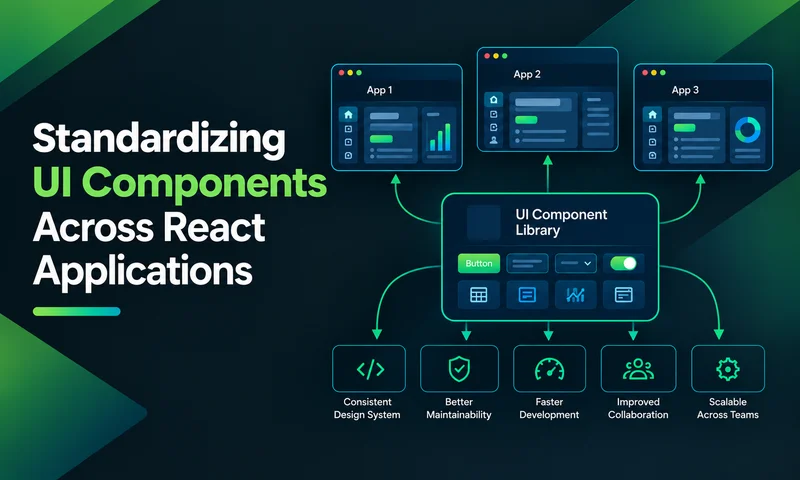
In most large organizations, every React app has its own UI stack. One team uses MUI with AG Grid, another uses Ant Design with Recharts, a third has a homegrown table, and the legacy app still runs on Ext JS. Each choice made sense at the time. Together they mean inconsistent screens, duplicated work, several license contracts, and an upgrade problem that multiplies with every app.
Standardizing on one UI component library across your React apps fixes that, but only if it’s done as a program, not a memo. This guide walks through seven steps: auditing what you use today, defining requirements, choosing the standard, wrapping it in an internal package, governing it, migrating apps to it, and measuring the result. The examples use ReExt, which brings the 140+ components of Ext JS into React, as the standard.
Why standardize?
The benefits compound as the number of apps grows:
- Consistency for users. People who use several internal apps see the same grids, forms, and navigation everywhere, and learn them once.
- Speed for developers. Engineers can move between teams without learning a new UI stack, and new screens start from proven components.
- One upgrade path. A React release means updating one library and one internal package, not ten different stacks.
- Fewer contracts and less risk. One license, one vendor relationship, one set of dependencies to audit for security.
- Shared investment. A fix or improvement made for one app benefits every app.
The cost is real too: migration effort, some loss of team autonomy, and the work of maintaining a shared package. The rest of this guide is about keeping that cost low.
Step 1: Audit what you use today
You can’t standardize what you haven’t counted. Start with an inventory of every UI library in every React repo. This Node.js script scans a folder of repositories, reads each package.json (skipping node_modules), and groups the UI libraries it finds by category:
    // ui-inventory.mjs: list the UI libraries used across your React repos.
    // Usage: node ui-inventory.mjs ~/code
    import { readdirSync, readFileSync, statSync } from 'node:fs';
    import { join, relative } from 'node:path';

    const CATEGORIES = {
      'Component libraries': [/^@mui\/material$/, /^antd$/, /^@chakra-ui\/react$/, /^@mantine\/core$/,
        /^react-bootstrap$/, /^@progress\/kendo-react/, /^@syncfusion\/ej2-react/, /^devextreme-react$/,
        /^@sencha\/reext$/],
      'Data grids': [/^ag-grid-/, /^@mui\/x-data-grid/, /^@tanstack\/react-table$/, /^react-data-grid$/,
        /^react-table$/],
      'Charts': [/^recharts$/, /^chart\.js$/, /^react-chartjs-2$/, /^echarts/, /^highcharts/, /^@nivo\//,
        /^victory/],
      'Forms': [/^react-hook-form$/, /^formik$/, /^react-final-form$/],
      'Date pickers': [/^react-datepicker$/, /^@mui\/x-date-pickers/, /^react-day-picker$/],
      'Layout': [/^react-grid-layout$/, /^react-resizable-panels$/, /^react-split-pane$/],
    };

    function findPackageJsons(dir, out = []) {
      for (const name of readdirSync(dir)) {
        if (name === 'node_modules' || name.startsWith('.')) continue;
        const path = join(dir, name);
        let stat;
        try { stat = statSync(path); } catch { continue; }
        if (stat.isDirectory()) findPackageJsons(path, out);
        else if (name === 'package.json') out.push(path);
      }
      return out;
    }

    const root = process.argv[2] || '.';
    const usage = {}; // category -> package -> set of apps

    for (const file of findPackageJsons(root)) {
      let pkg;
      try { pkg = JSON.parse(readFileSync(file, 'utf8')); } catch { continue; }
      const deps = { ...pkg.dependencies, ...pkg.devDependencies };
      const app = pkg.name || relative(root, file);
      for (const dep of Object.keys(deps)) {
        for (const [category, patterns] of Object.entries(CATEGORIES)) {
          if (patterns.some((p) => p.test(dep))) {
            ((usage[category] ??= {})[dep] ??= new Set()).add(app);
          }
        }
      }
    }

    for (const [category, pkgs] of Object.entries(usage)) {
      console.log(`\n${category}`);
      const rows = Object.entries(pkgs).sort((a, b) => b[1].size - a[1].size);
      for (const [dep, apps] of rows) {
        console.log(`  ${dep.padEnd(30)} ${apps.size} app(s): ${[...apps].join(', ')}`);
      }
    }
A typical result looks like this:
    Component libraries
      @mui/material                  1 app(s): billing
      antd                           1 app(s): ops

    Data grids
      @mui/x-data-grid-pro           1 app(s): billing
      ag-grid-react                  1 app(s): ops
      ag-grid-enterprise             1 app(s): ops

    Charts
      recharts                       1 app(s): billing
      chart.js                       1 app(s): ops

    Forms
      react-hook-form                1 app(s): billing
      formik                         1 app(s): ops
Add anything the script can’t see: Ext JS apps built with Sencha Cmd, homegrown component folders, and the license contracts behind each commercial library. Record, for each app, how many screens it has and how many users rely on it.
Step 2: Define what the standard must cover
List the kinds of screens your apps actually have, then the components each one needs. Most enterprise portfolios come down to a handful of screen types:
| Screen type | Components it needs |
|---|---|
| Data browsing and editing | Data grid with sorting, filtering, grouping, editing and export |
| Dashboards | Charts, KPI panels, grids, resizable layouts |
| Data entry | Forms with validation, date and number fields, dropdowns |
| Hierarchies | Tree views and tree grids |
| Navigation and app shell | Layouts, tabs, menus, toolbars, dialogs |
Then add the cross-cutting requirements: accessibility, localization, TypeScript, supported React versions, long-term support and licensing. Our UI component library checklist for enterprise apps covers each area in detail.
Step 3: Choose the standard
The best standard isn’t the library one team likes most. It’s the one that covers the most screen types with the fewest add-ons, so you don’t end up standardizing on one library plus four exceptions.
Score each candidate on the criteria that matter specifically for standardization:
| Criterion | Question to answer |
|---|---|
| Coverage | How many of your screen types does it cover without another library? |
| Depth where it counts | Does its grid handle your hardest screen, not just your simplest? |
| One API and one theme | Can every team learn one way of configuring and styling components? |
| Licensing at scale | How does cost grow as more developers and apps adopt it? |
| Long-term support | Is there a vendor accountable for fixes, security and React compatibility for years? |
| Migration path | How hard is it to move each existing app onto it, including legacy apps? |
Then run a short pilot: rebuild one demanding screen from two different apps with each finalist. A pilot tells you more in two weeks than months of comparison spreadsheets.
Why ReExt is a strong candidate for data-heavy portfolios
If your apps are dominated by grids, dashboards and forms, ReExt covers all five screen types above from one library: the Ext JS grid, charts, forms, trees and application layouts, with one configuration model and one theme. Two further reasons stand out for standardization:
- Licensing is simple. ReExt is included in the Ext JS Pro and Enterprise plans, which cover the whole component library, so there’s no separate grid, chart, or form license per team.
- Legacy apps aren’t a dead end. If part of your portfolio already runs on Ext JS, ReExt lets those teams bring existing components into React, so the oldest apps can join the standard without a rewrite.
Step 4: Wrap the library in an internal UI package
Apps shouldn’t import the chosen library directly. Instead, publish a small internal package, for example @acme/ui, that wraps it with your organization’s defaults. The package becomes the one place where setup, formatting, theming, and conventions live.
A typical structure:
    packages/ui/
      src/
        UIProvider.tsx        # one shared ReExt setup for every app
        grid/DataGrid.tsx      # team-standard grid (typed columns, editing, saving)
        grid/gridColumns.ts
        form/FormPanel.tsx     # standard form with validation and save handling
        chart/Chart.tsx        # standard chart defaults (colors, legend, tooltips)
        layout/AppShell.tsx    # header, navigation and content regions
        index.ts
      package.json
      CHANGELOG.md
One shared setup for every app
With ReExt, the provider is where the Ext JS version, toolkit, theme, locale, and right-to-left settings are configured. Centralizing it means every app loads the same, tested setup:
    // packages/ui/src/UIProvider.tsx
    import type { ReactNode } from 'react';
    import { ReExtProvider } from '@sencha/reext';

    const baseConfig = {
      sdkversion: '7.9.0',
      toolkit: 'classic',
      theme: 'classic',
      debug: false,
      urlbase: './',
      location: 'local',   // licensed Ext JS copy served by each app
    };

    interface UIProviderProps {
      children: ReactNode;
      licenseKey: string;
      locale?: string;
      rtl?: boolean;
    }

    export function UIProvider({ children, licenseKey, locale = 'en', rtl = false }: UIProviderProps) {
      return (
        <ReExtProvider splash={true} ReExtData={{ ...baseConfig, locale, rtl }} reextkey={licenseKey}>
          {children}
        </ReExtProvider>
      );
    }
    // packages/ui/src/index.ts
    export { UIProvider } from './UIProvider';
    export { default as DataGrid } from './grid/DataGrid';
    export type { GridColumn } from './grid/gridColumns';
    export { default as FormPanel } from './form/FormPanel';
    export { default as Chart } from './chart/Chart';
    export { default as AppShell } from './layout/AppShell';
The DataGrid component can follow the pattern in our guide to building a reusable React grid component: a small, typed API for columns, data, and edits, with formats and save-or-roll-back behavior decided once.
Keep apps on the standard
A lint rule stops apps from importing replaced libraries, or the underlying library directly, by accident. Add it to the apps’ ESLint config (not the UI package’s own):
    // eslint config for apps
    rules: {
      'no-restricted-imports': ['error', {
        paths: [
          { name: 'recharts', message: 'Use Chart from @acme/ui.' },
          { name: 'react-hook-form', message: 'Use FormPanel from @acme/ui.' },
        ],
        patterns: [
          { group: ['ag-grid-*', '@mui/x-data-grid*'], message: 'Use DataGrid from @acme/ui.' },
          { group: ['@sencha/reext'], message: 'Import components through @acme/ui.' },
        ],
      }],
    },
Run it as a warning in apps still migrating, and as an error in apps that have finished.
Step 5: Govern the standard
A shared package without an owner decays within a year. Put a light but clear governance model in place from day one:
- A small owning team. Two or three engineers, part-time is fine, who review changes, cut releases, and answer questions.
- A contribution path. Any team can propose a new component or option through a short written proposal and a pull request. The owners decide whether it belongs in the shared package or stays app-specific.
- Semantic versioning and a changelog. Breaking changes only in major versions, announced ahead of time, with a migration note.
- A deprecation policy. Old APIs keep working for at least one major version, with lint warnings pointing to the replacement.
- Living documentation. A docs site or Storybook with every component, its props and copy-ready examples. Wrap stories in UIProvider so they render exactly as in apps.
- Regular upgrades. Owners upgrade the underlying library (for ReExt, both ReExt and Ext JS) on a schedule, test once, and release one new version of @acme/ui for every app.
Step 6: Migrate apps in waves
Trying to move every app at once stalls every team at once. Migrate in waves, starting where the payoff is highest, and the risk is lowest:
| Wave | What moves | Why |
|---|---|---|
| 1. New work | Every new screen in every app uses @acme/ui | Stops the problem growing, at almost no extra cost |
| 2. Pilot apps | One or two apps migrate fully | Proves the package and finds its gaps |
| 3. High-traffic screens | The grids and dashboards most users touch daily | Delivers visible consistency fast |
| 4. Remaining screens | Lower-traffic screens, as teams touch them | Spreads the effort across normal work |
| 5. Retire old libraries | Remove replaced dependencies and their licenses | Captures the savings |
Two practices keep migrations safe:
- Screen by screen, not app by app. Old and new components can live side by side in the same React app while a migration is in progress.
- Ext JS apps move by reuse. For apps already built on Ext JS, ReExt lets you load existing components and stores in React and render them by xtype. Teams can move the app shell to React first and keep proven grids running while they modernize.
Step 7: Measure the result
Track a few numbers from the start so you can show the program is working, and spot where it isn’t:
| Metric | How to measure | What good looks like |
|---|---|---|
| UI libraries per app | Rerun the inventory script each quarter | Falling toward one |
| Screens on the standard | Count screens built with @acme/ui vs total | Rising every quarter |
| Time to build a new data screen | Track from ticket start to release | Shorter than before the standard |
| UI defects per release | Tag UI bugs in your tracker | Falling as shared components mature |
| Time to upgrade React | Days from React release to all apps updated | One coordinated upgrade instead of many |
| UI license spend | Sum all UI-related contracts | Fewer, consolidated contracts |
Common pitfalls
- A standard with too many exceptions. If the chosen library can’t cover your hardest grid, teams will keep adding their own. Test the hardest screen during selection, not after.
- A wrapper that hides everything. If @acme/ui exposes too little, teams work around it. Offer a documented escape hatch, such as passing extra config through, for rare cases.
- No owner. Without named maintainers, the shared package falls behind the library it wraps, and teams drift back to direct imports.
- Big-bang migrations. Forcing every app to migrate in one quarter stalls feature work and turns teams against the standard.
- Ignoring the legacy apps. Leaving older apps off the plan keeps their libraries, licenses, and inconsistencies alive. Give them a path, such as reusing Ext JS components through ReExt.
Frequently asked questions
Why should an organization standardize on one UI component library?
It gives users a consistent experience across apps, lets developers move between teams without relearning the UI stack, reduces license contracts and security reviews, and turns many separate upgrades into one.
How do I choose which UI component library to standardize on?
Inventory what your apps use, list the screen types they need, and pick the library that covers the most of them with the fewest add-ons. Confirm the choice with a short pilot that rebuilds your hardest screens.
Should apps import the component library directly?
It’s better to wrap it in an internal package that sets your defaults, formatting, and conventions. Apps import from that package, and a lint rule keeps them from importing replaced libraries.
How long does standardization take?
It depends on the number of apps and screens. Using the standard for all new work can start immediately; migrating existing screens usually happens in waves over several quarters, alongside normal feature work.
Can Ext JS apps be part of a React standardization effort?
Yes. ReExt lets teams use existing Ext JS components and stores inside React, so Ext JS apps can adopt the same React standard gradually instead of being rewritten first.
One library, one package, every app
Standardizing on one UI component library works when it’s treated as a program: count what you have, choose the library that covers the most screens, wrap it in an internal package, give it owners, migrate in waves, and measure the results.
For portfolios dominated by grids, dashboards, and forms, ReExt makes a strong standard: 140+ Ext JS components with one API and one theme, included in the Ext JS license, and a migration path for apps already built on Ext JS.
Next steps: start a 30-day ReExt trial, read UI Component Library vs Framework, or work through the UI component library checklist for enterprise apps.


Latest Content

React Component Library for Data-Heavy Apps: Why 1 Vendor Beats 5
Data-heavy React apps rarely start with five UI vendors. They get there one reasonable decision…
October 21, 2026

UI Component Library vs Component Framework: What Enterprise React Teams Need
Ask a React team what they use for UI, and you’ll usually hear the name…
October 21, 2026

UI Component Library Checklist for Enterprise Apps: Grids, Charts, Forms and Long-Term Support
A UI component library is one of the longest-lived decisions in an enterprise front end.…
October 21, 2026


