



 Ask Sencha AI
How to Utilize Upgrade Adviser to Upgrade Your Ext JS Apps
February 7, 2025
5113 Views
Get a summary of this article:
Upgrading Ext JS from versions 3.x, 4.x, 5.x, or 6.x to latest 7.8 is a significant task. It requires reviewing legacy code, handling deprecated features, and resolving compatibility issues across multiple versions—challenges that can take considerable time and effort for development teams.
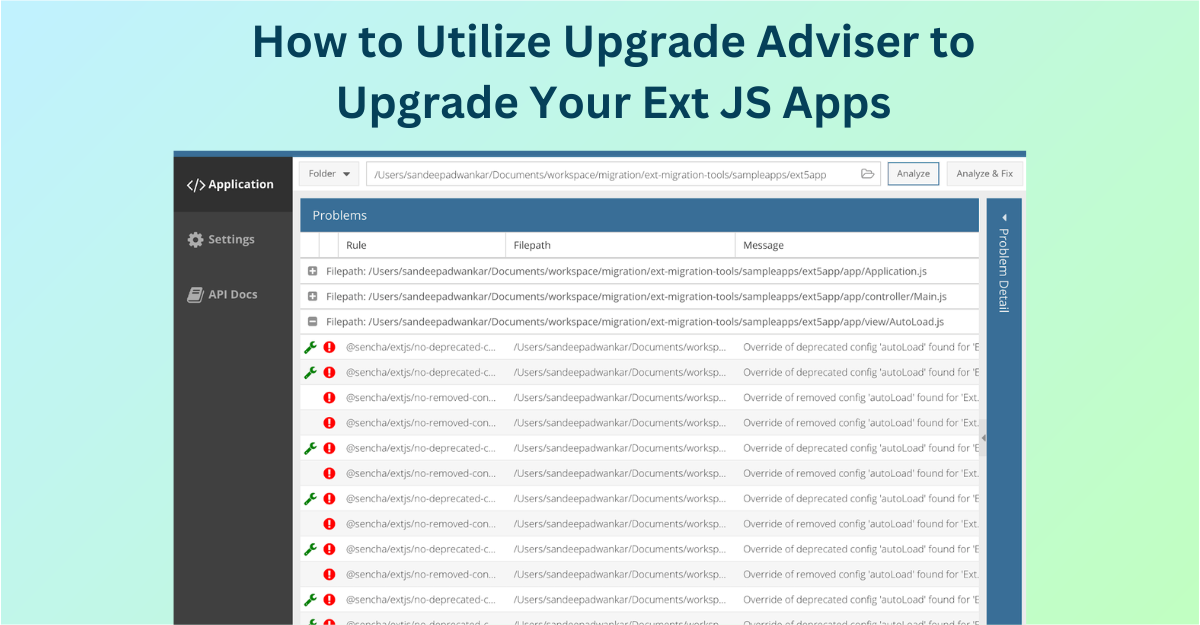
To simplify the upgrade process, Sencha provides the Upgrade Adviser—a tool that scans your Ext JS application code to identify issues that need fixing before upgrading. Whether you’re making a major jump from versions 3.x or 4.x to 7.8 or keeping up with incremental updates, the Upgrade Adviser helps reduce risks, save time, and ensure a smoother transition.
What is the Ext JS Upgrade Adviser?
The Ext JS Upgrade Adviser is a powerful tool designed to help developers prepare their applications for upgrading to newer versions of Ext JS. It scans your application’s code to identify potential issues that need attention before upgrading. These issues include:
- Removed Methods: Flags methods that are no longer supported in newer Ext JS versions.
- Private APIs: Identifies the use of private APIs, which should be replaced with public alternatives.
- Deprecated Configs and Properties: Flags outdated configurations and properties that require updating for compatibility.
The Upgrade Adviser uses a custom ESLint plugin built specifically for Ext JS, enabling automated checks. It can be run from the command line or integrated into an IDE, offering developers the ability to fix issues automatically or receive detailed recommendations for resolving upgrade-related problems.
This tool ensures a smoother, more efficient upgrade process by addressing potential compatibility issues before they affect your application.
Why Upgrading to the Latest Version Matters
Upgrading your Ext JS version isn’t just about keeping up with changes—it’s about improving the quality and longevity of your applications.
Reasons to Upgrade:
- Better Performance: New versions of Ext JS include changes that make your applications run faster and more efficiently.
- New Features: Access improved UI components, better theming, and updated tools for building your app.
- Security Updates: Ensure your app is safe from known security risks by using the most recent version.
- Improved Developer Tools: New versions include tools and features that make development easier and faster.
- Long-Term Compatibility: Keep your app in sync with modern web technologies like ECMAScript 6 (ES6) and beyond.
Though the advantages of upgrading are clear, the process can be tricky. The Ext JS Upgrade Adviser can help make the upgrade smoother and save time and effort.
How Ext JS Upgrade Adviser Works
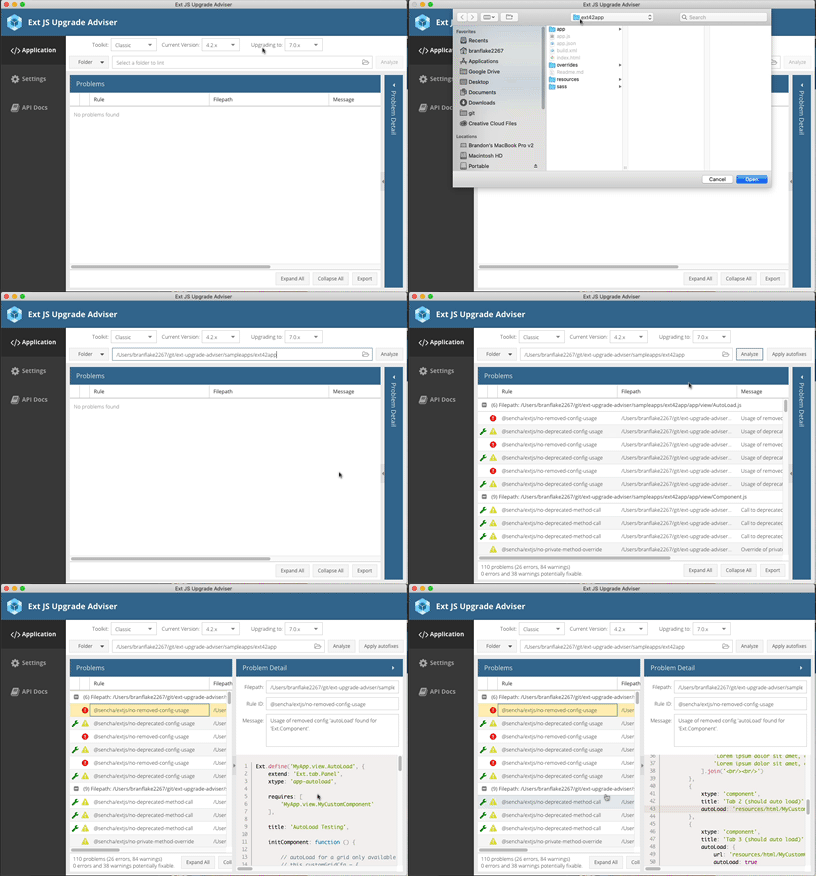
The Ext JS Upgrade Adviser operates by analyzing your application’s source code and generating a comprehensive report of issues that need addressing before an upgrade. Here’s how it works:
- 1.Code Scanning: The tool scans your application code for deprecated methods, removed APIs, and outdated configurations.
- 2.Detailed Reporting: It generates a report that highlights the problem areas and provides recommendations on how to address them.
- 3.Integration with IDEs: Developers can integrate the Upgrade Adviser into their favorite IDEs, enabling automatic linting and quick fixes.
- 4.Custom ESLint Plugin: The custom Ext JS ESLint plugin allows for detailed linting specific to Ext JS, ensuring that your code complies with the latest standards.
To learn more about the upgrade process and detailed steps, please visit the documentation.
Key Benefits of Using Ext JS Upgrade Adviser
1. Time and Resource Efficiency
Quickly identify deprecated methods and outdated configurations, saving time and reducing errors.
2. Accurate Upgrade Estimation
Understand potential issues early, allowing for better time and resource planning for upgrades.
3. Faster Upgrades
Receive recommendations for fixes, speeding up the resolution of issues.
4. Reduced Errors
Automated identification of deprecated methods and private APIs lowers the risk of introducing errors during the upgrade.
5. Modern Standards Compatibility
Supports ECMAScript 6 (ES6) and works with both Modern and Classic Ext JS toolkits.
6. Customizable Linting
Use the custom Ext JS ESLint plugin to ensure code complies with the latest Ext JS standards.
7. Strategic Planning Support
Gain insights into areas needing attention, helping prioritize development and allocate resources effectively.
8. Seamless Integration
Integrates smoothly into existing workflows with full support and documentation available.
Who Should Use Ext JS Upgrade Adviser?
The Ext JS Upgrade Adviser is essential for any developer or organization using Ext JS, whether on 3.x, 4.x, 5.x, 6.x, or newer versions.
Ideal Users:
- Ext JS Customers (4.x and newer): Free to download and use.
- Teams Upgrading to the Latest Version: Simplifies the transition process.
- Developers Using ES6: Ensures compatibility with modern JavaScript standards.
- Organizations Using Modern & Classic Toolkits: Supports both for seamless upgrades.
How to Get Started with Ext JS Upgrade Adviser
Getting started with the Ext JS Upgrade Adviser is simple:
- Download the Tool: Visit the Ext JS Upgrade Adviser page to download the tool.
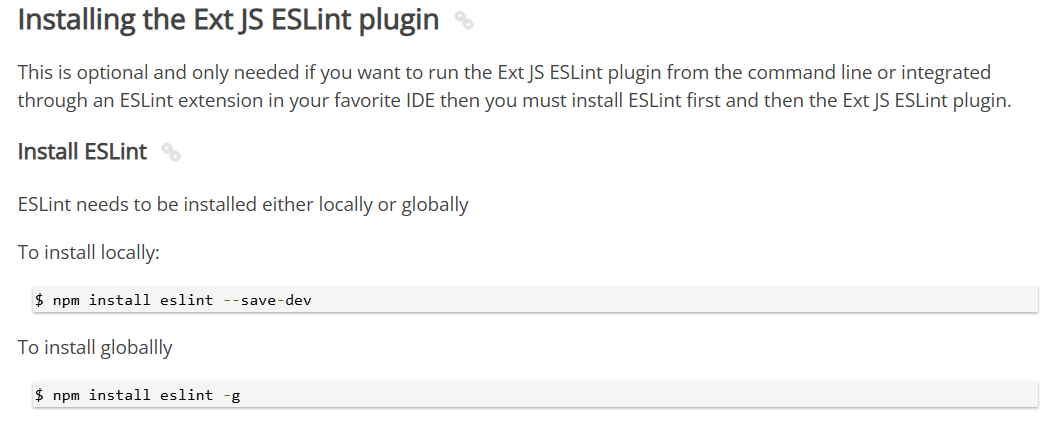
- Install and Run: Install the tool and run it on your application code to generate a detailed report.
- Analyze the Report: Use the report to identify problem areas and implement the recommended fixes.
- Integrate with Your IDE: Take advantage of the custom ESLint plugin for automatic linting and quick fixes.
Conclusion
Upgrading your Ext JS applications can be a seamless process with the right tools. The Ext JS Upgrade Adviser helps you identify and resolve compatibility issues, ensuring a smooth transition to the latest version.
By upgrading, you gain access to better performance, new features, and improved security, keeping your application up to date with modern web technologies.
Start optimizing your code today— download the Ext JS Upgrade Adviser and simplify your upgrade process.
Additionally, Sencha provides access to Senior Architects who can review your applications for best practices, performance optimization, and UI design. Contact them at [email protected] for personalized assistance.



Latest Content
React Component Library for Data-Heavy Apps: Why 1 Vendor Beats 5
Data-heavy React apps rarely start with five UI vendors. They get there one reasonable decision…
October 21, 2026
How to Standardize on One UI Component Library Across Your React Apps
In most large organizations, every React app has its own UI stack. One team uses…
October 21, 2026
UI Component Library vs Component Framework: What Enterprise React Teams Need
Ask a React team what they use for UI, and you’ll usually hear the name…
October 21, 2026


