



 Ask Sencha AI
Sencha Inspector Is Now Generally Available
October 1, 2015
2878 Views
Get a summary of this article:
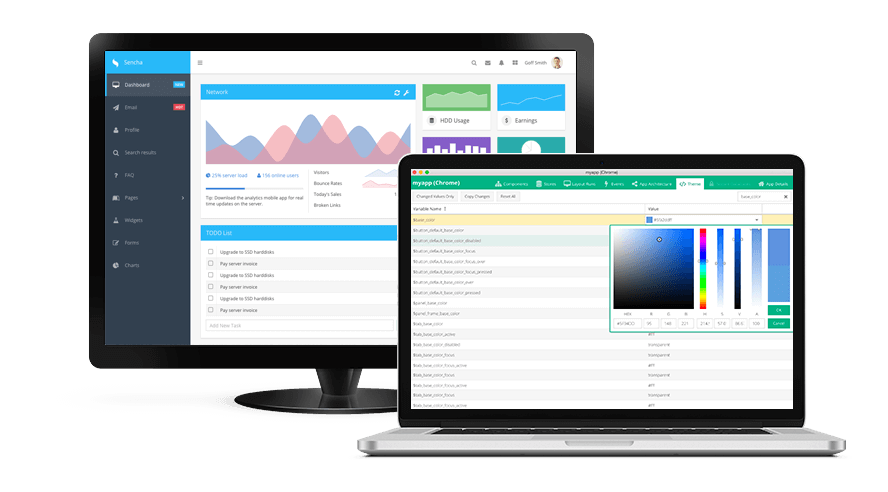
We’re excited to announce that Sencha Inspector is now generally available as part of Ext JS Premium. Inspector is designed to provide application insights and intelligent debugging capabilities for any Sencha application developed with Ext JS 4.2.0, 5.x, 6.x or Touch 2.1.0 and above – regardless of the browser you’re using.
- Download it for free today* and give us your feedback in the forum.
*Note: when you receive the Ext JS free trial confirmation email, you can choose to download Inspector only. - Ext JS Premium customers: Download Inspector from the Support portal.
- To learn more about Inspector, join us for our upcoming webinar.
Webinar: Sencha Inspector – Accelerating Web Application Debugging and Theming
Tuesday, October 6, 2015
10am EDT | 1pm EDT | 6pm BST
Register Now
Using Sencha Inspector
Developer tools native to today’s browsers (Chrome, Firefox, Safari, and Internet Explorer) expose DOM elements, CSS rules, JavaScript code and more in order to assist developers with debugging their applications. None of these tools understands (let alone displays) the component tree, application architecture, inheritance, events, etc. for applications built using Sencha frameworks (Ext JS & Touch). Inspector provides direct access to components, classes, objects, etc. for Ext JS and Touch apps, and helps to improve developer productivity around common debugging tasks.
Inspecting Ext JS Apps
Inspector is a desktop application with a multi-tabbed view, and each tab provides comprehensive insights into your Ext JS application structure. The Component tab view shows a component tree that you can use to look at the component hierarchy. It shows Id, xtype, layout configuration, and whether a component uses data binding, viewmodels, or viewcontrollers. After selecting a component, you can inspect the component’s properties, methods, layout, data binding, viewmodel, and viewcontroller.
- Store tab view – inspect store config, store model, store proxy, records, and details of each store record.
- Layout Runs tab view – watch application layout runs that will help you with optimizing your application.
- Events tab view – record interactions with the Ext JS application and inspect those UI events.
- App Details tab – a snapshot view of application information including Ext JS toolkit, version, Cmd version, and theme which you can use when creating support tickets.
Debugging an App Running on Multiple Browsers and Mobile Devices
Inspector is a desktop tool that allows multiple simultaneous debugging sessions. You can debug an application running on multiple browsers simultaneously including Chrome, Firefox, Safari, and IE. You can also debug applications running on mobile devices including iOS and Android mobile devices, and also in Sencha Web Application Manager. Inspector is a great tool for debugging Ext JS application code and performance.
- Layout Runs tab – information about layout rendering order.
- Components tab – information about component nesting that will help you uncover over-nesting issues; also any data binding errors within your application.
Theming an Application
Inspector is a comprehensive tool for viewing and debugging all your Ext JS Sass variables. You have access to view and modify thousands of Sass variables from the Inspector theming tab. Using Ext JS 6 and Fashion, you can theme your application by modifying the Sass in near real-time. Check out our new Live Theming guide for instructions on how to debug your Sass, create new themes, and give your application a great new look.
Get Started Quickly
With the General Availability release, we’re providing you with a hosted Ext JS application – Feed Viewer – that is preconfigured to connect to your instance of Inspector. Just access the feed viewer application from your browser, and immediately start inspecting the app. Check out the Inspector guide for detailed instructions.
To learn more and get all of your questions answered, register now for our upcoming webinar.


Latest Content
React Component Library for Data-Heavy Apps: Why 1 Vendor Beats 5
Data-heavy React apps rarely start with five UI vendors. They get there one reasonable decision…
October 21, 2026
How to Standardize on One UI Component Library Across Your React Apps
In most large organizations, every React app has its own UI stack. One team uses…
October 21, 2026
UI Component Library vs Component Framework: What Enterprise React Teams Need
Ask a React team what they use for UI, and you’ll usually hear the name…
October 21, 2026


