



 Ask Sencha AI
Async/await with Ext JS
September 3, 2026
1085 Views
Get a summary of this article:
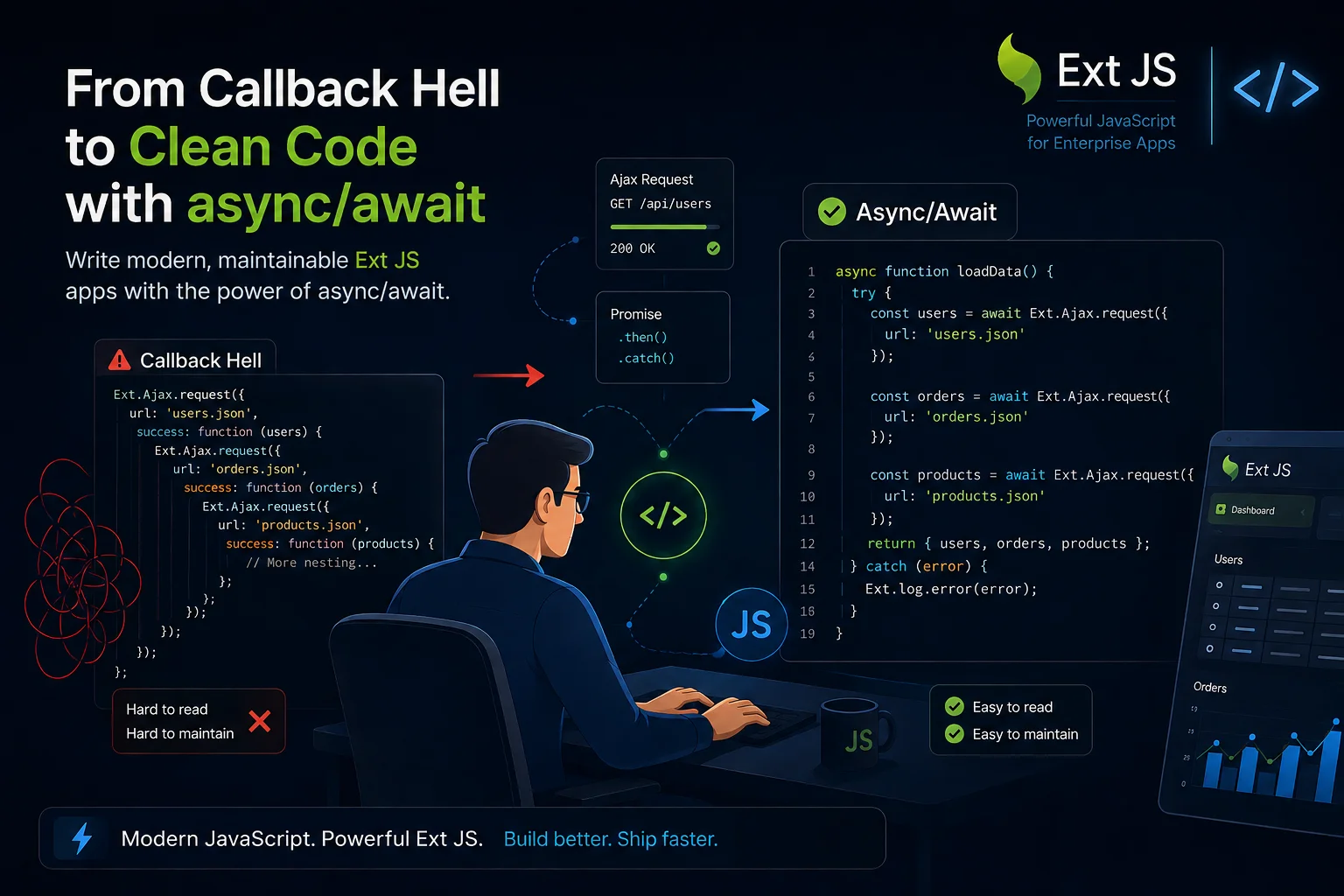
Probably one of the most appreciated features of the latest versions of JavaScript is Promises, and in particular their use through the new language keywords async/await introduced with ECMAScript 2017.
Promises
To simplify it a lot, Promises are a standardized way to call asynchronous functions. In JavaScript, the use of asynchronous functions has always been very common, from Ajax calls to events and more. Ext JS itself makes very extensive use of them. Before Promises, the most classic approach involved using callbacks:
Ext.Ajax.request({
     url: 'ajax_demo/sample.json',

     success: function(response, opts) {
         var obj = Ext.decode(response.responseText);
         console.dir(obj);
     },

     failure: function(response, opts) {
         console.log('server-side failure with status code ' + response.status);
     }
 });
In this case, success and failure are the two callbacks. As anyone who has used Ext JS or JavaScript for some time will know, in the long run this way of working becomes extremely complex, especially when we have callbacks that call other callbacks, and so on, producing what is commonly referred to as callback hell:
a(function (resultFromA) {
    b(resultFromA, function (resultFromB) {
        c(resultFromB, function (resultFromC) {
            d(resultFromC, function (resultFromD) {
                e(resultFromD, function (resultFromE) {
                    f(resultFromE, function (resultFromF) {
                        console.log(resultFromF);
                    });
                });
            });
        });
    });
});
Starting from Ext JS 6.0, the Ext.Ajax.request method returns a Promise, so it is also possible to use it like this:
Ext.Ajax.request({
    url: 'ajax_demo/sample.json'
 }).then(function(response, opts) {
    var obj = Ext.decode(response.responseText);
    console.dir(obj);
 });
In this case, the request function returns a Promise that has a then method, to which you pass a callback for a successful result, and a catch method, which is used in case of failure. At first glance, this may not seem like much of a change, but things become more interesting when we call multiple asynchronous methods one after another:
Ext.Ajax.request({
    url: 'ajax_demo/sample1.json'
 }).then(function(response, opts) {
    return Ext.Ajax.request({
        url: 'ajax_demo/sample2.json'
    });
 }).then(function(response, opts) {
    return Ext.Ajax.request({
        url: 'ajax_demo/sample3.json'
    });
 }).then(function(response, opts) {
    return Ext.Ajax.request({
        url: 'ajax_demo/sample4.json'
    });
 }).then(function(response, opts) {
    // ...
 });
In this way, we avoid callback hell and make the code more readable. Using Promises also makes it easier to manage multiple simultaneous calls and other complex use cases.
Async/await
Now comes the most interesting part: combining Promises with the new async/await keywords. In fact, if a function returns a Promise, it can be used like this:
async function dataReader() {
    var response = await Ext.Ajax.request({
        url: 'ajax_demo/sample.json'
    });

    var obj = Ext.decode(response.responseText);
    console.dir(obj);
}
By using the await keyword before the function, instead of getting a Promise, the application virtually pauses and waits until a value becomes available and is returned. In reality, the application does not truly stop running — the interface remains responsive and other portions of code continue to work normally — but that specific function waits to receive a value before continuing.
To learn more, you can also find one of my videos on the Wintech Italia YouTube channel titled “Async/await per uscire dall’inferno delle callback”


Latest Content

React Component Library for Data-Heavy Apps: Why 1 Vendor Beats 5
Data-heavy React apps rarely start with five UI vendors. They get there one reasonable decision…
October 21, 2026
How to Standardize on One UI Component Library Across Your React Apps
In most large organizations, every React app has its own UI stack. One team uses…
October 21, 2026

UI Component Library vs Component Framework: What Enterprise React Teams Need
Ask a React team what they use for UI, and you’ll usually hear the name…
October 21, 2026


