



 Ask Sencha AI
JavaScript Library vs Framework: Which Do Enterprise Apps Need?
Nov 12, 2026
102 Views
Get a summary of this article:
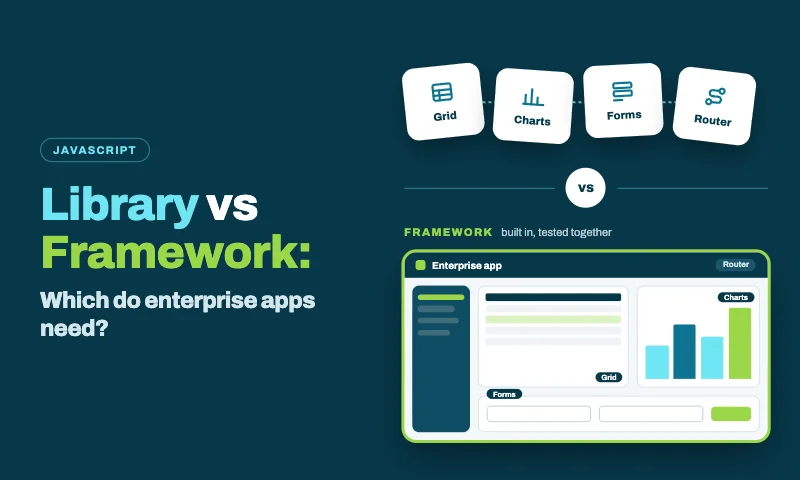
“Should we use a JavaScript library or a framework?” sounds like a terminology question. For enterprise apps, it’s a strategy question. The answer decides who designs your application’s structure, how many separate tools your teams have to choose and keep compatible, and who is accountable when something breaks five years from now.
This guide explains the real difference between a JavaScript library and a framework, where today’s popular tools sit, what enterprise application development actually need, and how to choose, including the hybrid many organizations end up with: React as the library, with Ext JS components brought in through ReExt.
The real difference: who’s in control
The classic definition comes down to inversion of control:
- With a library, your code is in charge. You decide the structure, and you call the library when you need it.
- With a framework, the framework is in charge. It defines the structure, and it calls your code at the right moments.
Here’s a library at work. Your code decides what happens and when:
    // A library: your code calls it when needed
    import { groupBy, sumBy } from 'lodash';

    const byRegion = groupBy(orders, 'region');
    const totals = Object.entries(byRegion).map(([region, rows]) => ({
      region,
      total: sumBy(rows, 'amount'),
    }));
And here’s a framework. You define the pieces; Ext JS creates them, wires them together and calls your code when events happen:
    // A framework: you fill in the pieces, and the framework calls them
    Ext.define('App.view.orders.OrdersController', {
      extend: 'Ext.app.ViewController',
      alias: 'controller.orders',

      // Ext JS calls this when the user selects a row
      onSelect: function (selModel, record) {
        this.getViewModel().set('selectedOrder', record);
      },
    });

    Ext.define('App.view.orders.Orders', {
      extend: 'Ext.grid.Panel',
      xtype: 'orders',
      controller: 'orders',
      viewModel: { data: { selectedOrder: null } },
      store: { type: 'orders' },        // an Orders store defined elsewhere in the app
      features: [{ ftype: 'groupingsummary' }],
      listeners: { select: 'onSelect' },
      columns: [
        { text: 'Customer', dataIndex: 'customer', flex: 1 },
        { text: 'Amount', dataIndex: 'amount', xtype: 'numbercolumn', summaryType: 'sum' },
      ],
    });
In the framework example, you never write code to create the grid, load the store, calculate group totals or route the selection event. The framework does that, following conventions every Ext JS developer knows.
In practice, the line is a spectrum. React, for example, calls your components to render them, which is a framework-like trait. But it leaves routing, data, structure and most UI components to you, which is why the React team describes it as a library.
Where popular JavaScript tools sit
Most of the tools enterprise teams evaluate fall into one of three groups. The labels are approximate, but they tell you how much each tool decides for you.
| Tool | Category | What it gives you | What you still choose |
|---|---|---|---|
| React | Library | Components and rendering | Routing, data handling, structure, most UI components |
| jQuery, Lodash, D3, Chart.js | Libraries | One focused job each: DOM, utilities, visualization, charts | Everything else |
| Vue | Progressive framework | A core library, with official router and state packages to grow into a framework | UI components, data grid, layouts |
| Angular | Framework | Structure, dependency injection, routing, forms, an HTTP client and a CLI | Advanced UI components, such as an enterprise grid |
| Ext JS | Framework | MVVM structure, a data package, 140+ UI components, application layouts and tooling | Very little for data-heavy apps |
| Next.js, React Router v7, TanStack Start | Meta-frameworks | Routing, rendering and data loading around React | UI components, screen data handling, layouts |
Two things stand out. First, “framework” covers a wide range: Angular decides your structure but not your data grid, while Ext JS decides both. Second, meta-frameworks make React more framework-like for routing and rendering, but leave the component layer, where data-heavy apps spend most of their effort, open.
What enterprise apps need, and how each approach delivers it
Enterprise applications are built by many people, used all day, and maintained for years. That changes which qualities matter:
| Need | With libraries | With a framework |
|---|---|---|
| Consistent structure across teams | Conventions you design, document and enforce yourself | Built-in patterns, such as MVVM in Ext JS or dependency injection in Angular |
| Data handling | A state library, a server-state library and a validation library, wired together | Built in; Ext JS includes models, stores, proxies, validation and change tracking |
| UI components | Several libraries chosen and integrated per need | Ext JS ships 140+; Angular provides a basic set |
| Upgrades | Each library on its own release schedule | One coordinated release |
| Support and accountability | Many maintainers, mostly community | One team or vendor responsible |
| Flexibility | Very high: swap any piece | Lower: work within the framework’s model |
| Learning | Many small APIs | One larger system, learned once |
The hidden cost of assembling libraries
A library-based enterprise front end isn’t one decision. It’s a dozen: a router, a state library, a server-state library, a form library, a validation library, a react data grid, a chart library, date pickers, a layout solution, localization, a testing setup and a design system to tie them together.
Each choice is reasonable. Together, they carry an ongoing cost that rarely shows up in the original decision:
- Integration code to pass data between libraries that don’t know about each other.
- Visual alignment to make components from different vendors look like one product.
- Upgrade coordination whenever React, or any one library, releases a breaking change.
- Security reviews across many packages and maintainers.
- Onboarding, because every new developer has to learn your particular combination.
None of this makes libraries the wrong choice. It means the comparison should be “framework vs libraries plus the cost of assembling them,” not “framework vs free libraries.”
When a library is the better choice
- The app is small or short-lived, and a framework’s structure would cost more than it saves.
- Design freedom matters most, as in consumer products, marketing sites and content-led apps.
- You need only one capability, such as charts on an existing page, or DOM utilities.
- Your team already has a mature, well-maintained internal platform that provides the structure a framework would.
- A free, open-source license is a hard requirement.
When a framework is the better choice
- Many teams build on one codebase, and you need them to work the same way.
- The app will be maintained for five years or more, so one upgrade path and an accountable maintainer matter.
- Most screens are data screens: grids, forms, dashboards, trees and reports, where a framework’s components and data layer save the most work.
- Consistency is a requirement, across hundreds of screens and several applications.
- You’d rather build features than choose and integrate tools.
For data-intensive enterprise applications, the second list usually wins, and the framework that covers the most of it is Ext JS. It’s the only option in this comparison that includes the structure, the data layer, the enterprise data grid and the rest of the UI components in one framework, maintained by one vendor and now on version 8.
The hybrid: a library for the app, a framework for the data screens
Many enterprises have already standardized on React frameworks, the library, and won’t switch. They still need framework qualities for their data screens. The hybrid gives them both: React stays in charge of the application, and ReExt brings Ext JS components, including the grid, pivot grid, charts, trees, forms and layouts, into React as ordinary React elements.
    import ReExt from '@sencha/reext';

    // React owns the screen; Ext JS provides the grid, its data handling and its features.
    export function OrdersScreen({ orders, onOpen }) {
      return (
        <ReExt
          xtype="grid"
          style={{ height: 420 }}
          config={{
            store: { data: orders, groupField: 'region' },
            features: [{ ftype: 'groupingsummary' }],
            columns: [
              { text: 'Customer', dataIndex: 'customer', flex: 1 },
              { text: 'Amount', dataIndex: 'amount', xtype: 'numbercolumn',
                format: '$0,000', summaryType: 'sum' },
            ],
          }}
          onSelectionchange={(selModel, records) => records[0] && onOpen(records[0].getData())}
        />
      );
    }
What each side contributes:
| React (the library) | Ext JS through ReExt (the framework layer) |
|---|---|
| Rendering, routing and application state | Grids, pivot grids, charts, trees, forms and layouts |
| The React ecosystem and talent pool | Models, stores, validation and change tracking for data screens |
| Meta-frameworks such as Next.js or React Router | One theme and one configuration style across data components |
| Your existing React codebase | A path for existing Ext JS code to move into React |
ReExt 1.2.0 supports Ext JS 8.0 and is included in the Ext JS Pro and Enterprise plans.
Decision guide: library, framework or hybrid?
Answer each question for your application. The answers usually point clearly to one option.
| Question | If yes, lean toward |
|---|---|
| Is the app small, short-lived or built by one small team? | Libraries |
| Are design freedom and public SEO the top priorities? | Libraries, with a meta-framework such as Next.js |
| Is a free, open-source license a hard requirement? | Libraries, or an open-source framework such as Angular or Vue |
| Will several teams build on it for five years or more? | A framework, or the hybrid |
| Are most screens grids, forms, dashboards and reports? | Ext JS, or the hybrid |
| Is the new app free to use the best tool for data-heavy work? | Ext JS 8 |
| Has your organization already standardized on React? | The hybrid: React with ReExt |
| Do you have existing Ext JS applications? | Ext JS 8 to stay current, or React with ReExt to join a React platform |
Three rules of thumb
- Count the assembly cost. When comparing a framework with libraries, include the integration, alignment, upgrade and onboarding work the libraries will need.
- Match the tool to the screens. Content screens and data screens have different needs; the best answer may differ between them.
- Plan for year five, not week one. Libraries feel faster at the start. Frameworks usually pay off as teams, screens and years add up.
Also Read: 25 Best JavaScript Libraries in 2026 – By Category
Frequently asked questions
What is the difference between a JavaScript library and a framework?
It comes down to control. With a library, your code is in charge and calls the library when it needs to. With a framework, the framework defines the structure and calls your code at the right moments. Frameworks also tend to bundle more: architecture, data handling, components, and tooling.
Is React a library or a framework?
React is a library. It renders components and manages their state, and leaves routing, data handling, structure, and most UI components to other tools. Meta-frameworks such as Next.js add some framework features around it.
Is Ext JS a library or a framework?
Ext JS is a framework. It began as a JavaScript library extension in the mid-2000s and grew into a complete application framework with MVVM architecture, a data package, 140+ UI components, application layouts and tooling. The current version is Ext JS 8.
Do enterprise apps need a framework?
Most enterprise apps need framework qualities: consistent structure, a data layer, a complete component set, one upgrade path and accountable support. You can get them from a framework such as Ext JS, by assembling and governing libraries yourself, or through a hybrid such as React with ReExt.
Can I use a library and a framework together?
Yes. A common pattern is React for the application, with Ext JS components brought in through ReExt for the data-heavy screens.
Choose for the life of the application
The library-or-framework question is really about who designs your application’s structure, how many tools your teams must integrate, and who is accountable over time. Libraries give maximum freedom and suit small, design-led or short-lived apps. Frameworks give structure and completeness, and suit large, long-lived, data-heavy ones.
For data-intensive enterprise applications, Ext JS provides the most complete framework, and ReExt brings its components into React for organizations that have standardized on the library.

JavaScript Libraries
Enterprise JavaScript Frameworks
Enterprise Application Development
JavaScript Frameworks
JavaScript


Latest Content
Best JavaScript Libraries for Data Grids, Charts and Dashboards
Data grids, charts and dashboards are where most business applications earn their keep, and where…
November 12, 2026

Taming a Large Ext JS Codebase: Structure, Naming, and Boundaries That Last
Every Ext JS application starts tidy. Five years and forty screens later, you have a…
November 11, 2026

Performance Tuning Large Grids and Stores in Ext JS
Grids are where enterprise Ext JS applications live, and they are also where performance problems…
November 4, 2026