



 Ask Sencha AI
Sencha Inspector Beta is Now Available
August 21, 2015
1347 Views
Get a summary of this article:
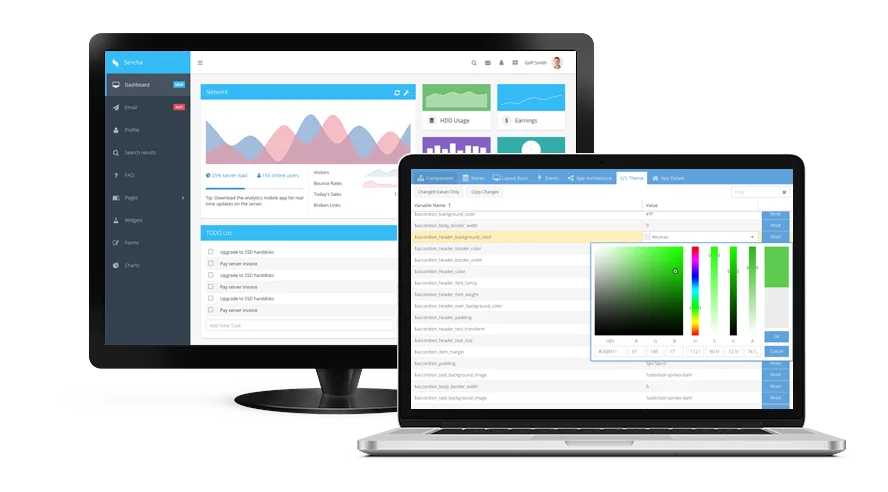
We’re excited to announce that the beta version of Sencha Inspector is now available. This beta release enables you to evaluate our work in progress. With Inspector beta, you can debug Ext JS classic and modern applications simultaneously on multiple desktop browsers as well as mobile devices.
In Inspector beta, we’ve added several new features including:
- Improved app architecture
- Enhanced inspection of data stores
- Drag and drop the Inspector bookmarklet
- Valid SSL connections
- Links to documentation directly from Component Tree
- Inspection of the secure database in Sencha Web Application Manager
- A hosted demo Ext JS demo application
- A guide that walks you through the basics of inspecting a Sencha application
Try out Inspector beta and tell us what you think by completing a short survey. Submit the survey by September 15th, and you’ll be entered into a drawing to win a $100 Amazon gift card. You can also share your feedback in the Sencha Inspector forum.
Using Sencha Inspector
As a web and mobile developer, there are lots of situations when you need a good debugging tool. Inspector helps you with:
Inspecting a Sencha web application
You may have to inspect and debug complex pre-written applications. With Inspector, you can inspect the application structure (MVC, MVVM), data stores, layout, as well as events in your Sencha applications. Inspector allows you to customize the bookmarklet, and drag and drop it on to your choice of browser. Now you can inspect the application using the bookmarklet without any need to modify the application code. It also allows you to analyze the application for performance and layout issues such as overnesting components. With this beta release, we’re providing you with a hosted Ext JS application – DemoClient – that is preconfigured to connect to your instance of Inspector. Just access the DemoClient from your browser, and immediately start inspecting the DemoClient app in Inspector.
Debugging an application running on multiple browsers and mobile devices
You may want to debug an application in multiple browsers simultaneously such as Chrome, Firefox, Safari, and IE, or debug applications running on mobile devices. Inspector is a desktop tool and allows multiple simultaneous debugging sessions. You can debug an application running on multiple browsers, iOS and Android mobile devices, and even in Sencha Web Application Manager.
Theming an application
You may also want to see and debug effects of your changes to CSS and Sass variables. Inspector allows you to inspect and debug all your Ext JS Sass variables. Using Ext JS 6 and Fashion, you can theme your application by modifying the Sass in near real-time. Inspector works with Fashion, so you can debug your Sass, create new themes, and give your application a great new look.
Don’t forget to enter our Theming Contest for a chance to win great prizes. First place winner gets $2,500. You can use Inspector beta to inspect your CSS and Sass variables.


Latest Content

React Component Library for Data-Heavy Apps: Why 1 Vendor Beats 5
Data-heavy React apps rarely start with five UI vendors. They get there one reasonable decision…
October 21, 2026
How to Standardize on One UI Component Library Across Your React Apps
In most large organizations, every React app has its own UI stack. One team uses…
October 21, 2026
UI Component Library vs Component Framework: What Enterprise React Teams Need
Ask a React team what they use for UI, and you’ll usually hear the name…
October 21, 2026


