



 Ask Sencha AI
UI Component Library vs Component Framework: What Enterprise React Teams Need
October 21, 2026
104 Views
Get a summary of this article:
Ask a React team what they use for UI, and you’ll usually hear the name of a react ui component library: a set of buttons, inputs, dialogs, and tables they assemble into screens. For many apps, that’s exactly right. But enterprise teams building data-heavy applications often find that a library of separate components leaves the hardest work undone: connecting a grid, a chart, and a form to the same data, laying out complex screens, and keeping dozens of components consistent for years.
That’s the gap a component framework fills. This guide explains the difference, shows what a framework adds in practice, and helps you decide which one your React app needs.
UI component library vs component framework
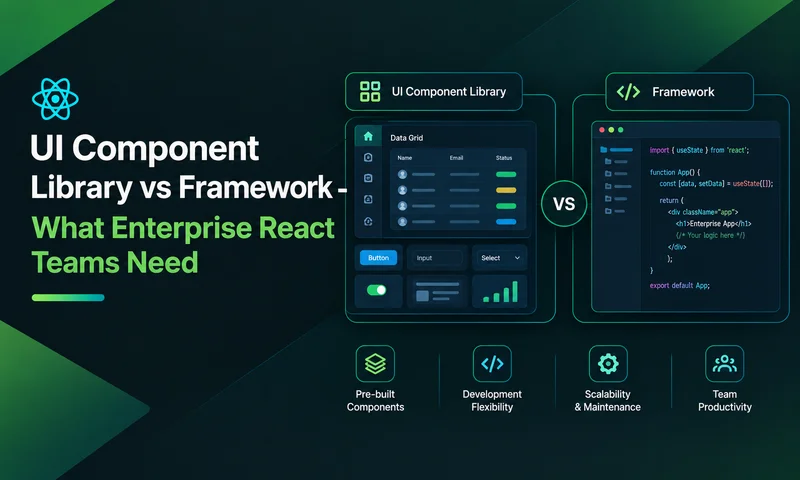
A UI component library is a collection of reusable interface components. Each component works on its own; you decide how to connect them, manage their data, and arrange them on screen.
A component framework provides components that are designed to work as a system. Alongside the components, it brings a shared data layer, a layout system, one configuration and event model, and one theme, so a grid, a chart, and a form can share data and behavior without glue code.
React itself is a library for building interfaces, not a framework in this sense. Teams add structure around it, and the component layer is where the choice between a library and a framework matters most.
| UI component library | Component framework | |
|---|---|---|
| Scope | Individual components | Components plus data, layout, and behavior systems |
| Data | You manage it in React state or a separate library | Shared stores and models feed every component |
| Layout | CSS, a grid system, or your own components | Built-in application layouts with regions, splitters, and panels |
| Consistency | Good within the library; gaps filled from other libraries | One theme and one API across everything |
| Flexibility | High: swap or restyle any piece | Lower: you work within the framework’s model |
| Learning curve | Shallow for each component | Steeper at first, then faster for complex screens |
| Best for | Content apps, marketing sites, design-led products | Data-heavy business apps: dashboards, back-office, trading, ERP |
The spectrum of React UI options
In practice, React UI tools sit on a spectrum, from maximum control to maximum built-in capability. Moving right, you write less code for complex screens but accept more of the tool’s structure.
| Category | Examples | What you get | What you build yourself |
|---|---|---|---|
| Headless primitives | Radix UI, React Aria, TanStack Table | Behavior and accessibility, no styling | All visuals, and every complex component |
| Copy-paste components | shadcn/ui | Source code you own and edit | Grids, charts, data handling, upkeep of the copied code |
| Styled UI component libraries | MUI, Ant Design, Chakra UI, Mantine | Polished, themeable general-purpose components | Advanced grids and charts (often added from other libraries), data wiring |
| Commercial component suites | KendoReact, Syncfusion, DevExtreme | Broad sets of components, including grids and charts | Data wiring between components, application layout |
| Component frameworks | Ext JS, in React via ReExt | Components plus shared data stores, layouts and one config and event model | Your business logic and screens |
None of these is better in general. Each fits a different kind of app. The question is where your app’s complexity lives: in its visual design, or in its data.
What a component framework adds
The difference is clearest on a typical enterprise screen: a grid of orders, a chart summarizing them, and a form for editing the selected order. With separate libraries, you write the code that keeps all three in sync. With a component framework, they share the same data from the start.
Four things a framework provides
- A shared data layer. One store holds the records. Grids, charts, trees, and forms all read from it, and a change made anywhere shows up everywhere.
- A layout system for applications. Border layouts with resizable, collapsible regions, plus tabs, accordions, and windows, designed for screens users work in all day.
- One configuration and event model. Every component is configured the same way and raises events the same way, so learning one teaches you the rest.
- One theme. Grids, charts, forms, and panels match without custom CSS, and stay matched through upgrades.
Also Read: 15 Best Web Application Frameworks in 2026 – Compared
Example: grid, chart, and form sharing one store in ReExt
ReExt brings the Ext JS component framework into React. In this screen, the grid and chart share a single store. Selecting a row loads it into the form; applying the form updates the record, and the grid and chart refresh automatically, with no state-syncing code:
    import { useMemo, useRef } from 'react';
    import ReExt from '@sencha/reext';
    import { orders } from './data';

    export default function OrdersWorkspace() {
      const formRef = useRef(null);
      const selected = useRef(null);

      // One store, shared by the grid and the chart.
      const store = useMemo(() => Ext.create('Ext.data.Store', {
        fields: [{ name: 'amount', type: 'float' }],
        data: orders,
      }), []);

      const gridConfig = useMemo(() => ({
        title: 'Orders',
        store,
        columns: [
          { text: 'Customer', dataIndex: 'customer', flex: 1 },
          { text: 'Region', dataIndex: 'region', width: 100 },
          { text: 'Amount', dataIndex: 'amount', width: 120,
            xtype: 'numbercolumn', format: '$0,000' },
        ],
      }), [store]);

      const chartConfig = useMemo(() => ({
        store,
        axes: [
          { type: 'numeric', position: 'left' },
          { type: 'category', position: 'bottom' },
        ],
        series: [{ type: 'bar', xField: 'customer', yField: 'amount' }],
      }), [store]);

      const formConfig = useMemo(() => ({
        title: 'Edit order',
        bodyPadding: 12,
        defaults: { anchor: '100%' },
        items: [
          { xtype: 'textfield', name: 'customer', fieldLabel: 'Customer' },
          { xtype: 'numberfield', name: 'amount', fieldLabel: 'Amount', minValue: 0 },
        ],
        buttons: [{
          text: 'Apply',
          handler: () => {
            if (selected.current) formRef.current.getForm().updateRecord(selected.current);
          },
        }],
      }), []);

      return (
        <ReExt xtype="panel" style={{ height: 640 }} config={{ layout: 'border' }}>
          <ReExt xtype="grid" childRegion="center" config={gridConfig}
            onSelectionchange={(selModel, records) => {
              selected.current = records[0] || null;
              if (selected.current) formRef.current.getForm().loadRecord(selected.current);
            }}
          />
          <ReExt xtype="form" childRegion="east" childWidth={300} childSplit={true}
            config={formConfig}
            ready={(cmp) => { formRef.current = cmp; }}
          />
          <ReExt xtype="cartesian" childRegion="south" childHeight={240} childSplit={true}
            config={chartConfig}
          />
        </ReExt>
      );
    }
Change an amount in the form and click Apply: the grid row and the chart bar update together. With a library-based stack, the same screen typically needs a shared state store, update handlers for each component, and layout code for the resizable regions.
When a UI component library is the better choice
- Your app is content- or design-led. Marketing sites, e-commerce storefronts, and consumer apps live on visual polish and custom layouts.
- Data screens are simple. A few short tables and basic forms don’t need a shared data layer.
- You have a strong design system. If your brand requires full control over every pixel, headless or styled libraries give you that.
- Mobile-first, responsive layouts come first. Library grids and CSS layouts excel at reflowing content across breakpoints.
- Your team wants to swap pieces freely. Independent components can be replaced one at a time.
When a component framework is the better choice
- Your app is data-heavy. Grids, charts, trees, and forms sit on the same screens and work on the same records.
- Screens are complex and long-lived. Back-office systems, dashboards, trading, and ERP apps are used all day and maintained for years.
- You’re stitching libraries together today. If your package.json has a grid library, a chart library, a form library, and a layout library, a framework can replace that patchwork.
- Consistency matters across many teams. One API and one theme keep dozens of screens, built by different people, behaving alike.
- You already have Ext JS. ReExt lets you keep your Ext JS components, stores, and custom classes and use them in React, instead of rebuilding them on a new library.
Can you use both?
Yes, and many teams should. A common pattern is to keep your existing UI component library or design system for public pages, settings, and simple screens, and use a component framework for the data-heavy screens where users spend their working day.
To make the combination work:
- Draw clear boundaries. Use the framework for whole screens or regions, not for individual buttons mixed into library layouts.
- Align the basics. Match colors, fonts, and spacing so the switch between the two feels deliberate.
- Keep state at the edges. Let each side manage its own data, and pass only what’s needed, such as a selected ID, between them.
With ReExt, this works naturally: ReExt components are React components, so a ReExt grid screen can live in the same app, router, and build as the rest of your UI.
Decision guide: library or framework?
Answer these questions about your app. The more answers land in the right-hand column, the more a component framework will pay off.
| Question | Points to a UI component library | Points to a component framework |
|---|---|---|
| Where does most of the complexity live? | Visual design and content | Data and workflows |
| How many grids, charts and forms share screens? | Few | Many |
| Do components need to share the same records? | Rarely | Constantly |
| How long will the app be maintained? | A few years | Five years or more |
| How many separate UI libraries do you use today? | One or two | Three or more |
| How important is pixel-level design control? | Critical | Secondary to productivity |
| Do you have existing Ext JS code? | No | Yes |
If most answers point left, choose a UI component library that fits your design system, and add a dedicated grid if you need one.
If most answers point right, evaluate a component framework. ReExt brings Ext JS, with 140+ components, shared data stores, and application layouts, into React.
If answers are mixed, use both: a library for simple and design-led screens, and a framework for the data-heavy ones.
To compare specific options in each area, use our UI component library checklist for enterprise apps.
Frequently asked questions
What is the difference between a UI component library and a component framework?
A UI component library provides individual components that you connect and arrange yourself. A component framework provides components designed to work as a system, with a shared data layer, a layout system, one configuration and event model, and one theme.
Is React a framework or a library?
React is a library for building user interfaces. Teams add routing, state management, and a component layer around it. That component layer can be a UI component library or a component framework.
Do enterprise React apps need a component framework?
Not always. Content-led apps with simple data screens do well with a UI component library. Data-heavy apps, where grids, charts, and forms share records across many screens, gain the most from a component framework.
Can I use a component framework with my existing React component library?
Yes. Many teams keep their existing library or design system for simple screens and use a framework for data-heavy screens. With ReExt, React JS framework components are components, so both live in the same app.
What is ReExt?
ReExt brings the Ext JS component framework into React. It gives React apps more than 140 Ext JS components, including grids, pivot grids, charts, trees, forms, and layouts, along with Ext JS data stores, configured through React props and events.
Library or framework: let your data decide
The right choice depends on where your app’s complexity lives. If it’s in visual design and content, a UI component library gives you control and flexibility. If it’s in data, with grids, charts, and forms working on the same records across dozens of long-lived screens, a component framework saves the integration work that libraries leave to you.
ReExt brings that framework to React: Ext JS components, shared data stores, and application layouts, inside the React app you already have.
Next steps: start a 30-day ReExt trial, work through the UI component library checklist for enterprise apps, or see React Grid Component: Layout and Data Grids in One Framework.
Enterprise React Development
React Component Frameworks
Frontend Architecture
UI Component Libraries


Latest Content

React Component Library for Data-Heavy Apps: Why 1 Vendor Beats 5
Data-heavy React apps rarely start with five UI vendors. They get there one reasonable decision…
October 21, 2026
How to Standardize on One UI Component Library Across Your React Apps
In most large organizations, every React app has its own UI stack. One team uses…
October 21, 2026

UI Component Library Checklist for Enterprise Apps: Grids, Charts, Forms and Long-Term Support
A UI component library is one of the longest-lived decisions in an enterprise front end.…
October 21, 2026


