


 Rapid Ext JS (beta)
 ReExt
ReExt




Learn How to Use JavaScript
August 4, 2022
102 Views
JavaScript is a very important programming language. If you want to build awesome web-based apps for the mobile or desktop, learning this language is the key. You can think of it as the fuel that powers the web. Hence, learning how to use JavaScript is the first step toward building impressive enterprise-grade software. Continue reading to discover the basics of JavaScript, its applications, how to use it in different ways, and some of its basic ingredients, including JavaScript build tools.
What is JavaScript?
If you have worked with HTML, you already know that it is a markup language. The HTML simply tells the browser how to render and display text by using tags or markups within the text. However, it does not let users interact with the webpage. For example, HTML lets you display a button on a browser but it does not have the power to create a response when the user clicks the button. For this functionality, you need a programming language.
JavaScript is a programming language initially developed for the Netscape 2 browser and later became an ECMA-262 standard. Almost every browser now supports this programming language to allow the user to interact with all the elements of a webpage. It is a just-in-time compiled language with dynamic typing and event-driven programming capabilities. Everyone now accepts it as the programming language of the web.
What are its applications?
Today JavaScript is an extremely popular language. Its usage goes beyond interactivity in web pages. Developers create web and mobile apps with this programming language. Besides this, you can build server-side applications with JavaScript and other software. Here, we describe a few of its applications.
Can it add interactivity to my web page?
Indeed, yes! One of the most popular applications of JavaScript is in designing interactive web pages. It allows your users to interact with all the elements of a webpage. Almost every browser has a JavaScript engine, which executes the code as soon as a browser loads a webpage. A developer can also define different responses to different actions of a user on a web browser using this programming language. For example, a developer can choose to display a different webpage when a user clicks a button, submits a form, clicks on a link, or more. This programming language is the main ingredient for making your page interactive, dynamic, and responsive.
Can I use it for developing server-side applications?
Again, yes! You can use JavaScript to develop web servers and server-side applications. The commonly used term server-side JavaScript is used for JavaScript language for developing servers. When you develop a web application, there is a client-side and a server-side. The client side normally refers to the web browser, such as Safari on Mac, Firefox on Ubuntu, IE on Windows, or more. The server is a software program that runs on another remote computer that resides within a company’s designated location.
All the requests made by the client are sent to the server, which in turn interprets and processes them. The server application normally runs 24/7 and sends the required contents or pages to the client. For example, the client can make a request to search a database. The server, as a response, will find the relevant records and send the corresponding data to the client application, which would render the webpage to the user. There are many server-side environments, such as Node.js, ChakraCore, JSSP, and more.
Can I use JavaScript for creating web and mobile apps?
JavaScript can indeed be used to create all types of web and mobile apps using a JavaScript framework. A JavaScript framework is a set of pre-built libraries that you can use to build an application. Take, for example, ExtJS, which is a complete JavaScript framework with lots of tools and thoroughly tested code that you can integrate into your app. You can build all types of web or mobile apps with this framework. Additionally, with ExtJS, you can build anything, ranging from toy apps to enterprise-grade web and mobile applications. What’s more, even if you are a novice programmer, the pre-built libraries help you build an awesome app in a very short time period.
Is game development possible?
Again, yes! Other than web-based applications, JavaScript is also used in game development. Nowadays, the trend is to build games that run in the web browser or on a mobile phone. JavaScript is one of the best programming languages to develop such games. Numerous platforms and tools support game development with JavaScript. Examples include Phaser, BabylonJS, Three.js, PixiJS, and more.
Can you show me how to use JavaScript?
It is easy to start using JavaScript. If you want to start JavaScript coding, here are a few options for you.
How to use JavaScript in a web browser?
You can easily run JavaScript on a web browser. As we mentioned earlier, almost all web browsers have a built-in JavaScript engine. This engine is responsible for executing the code. As an example, in Chrome click on the vertical ellipses. As a result, you’ll see a menu similar to the one shown in the image below:
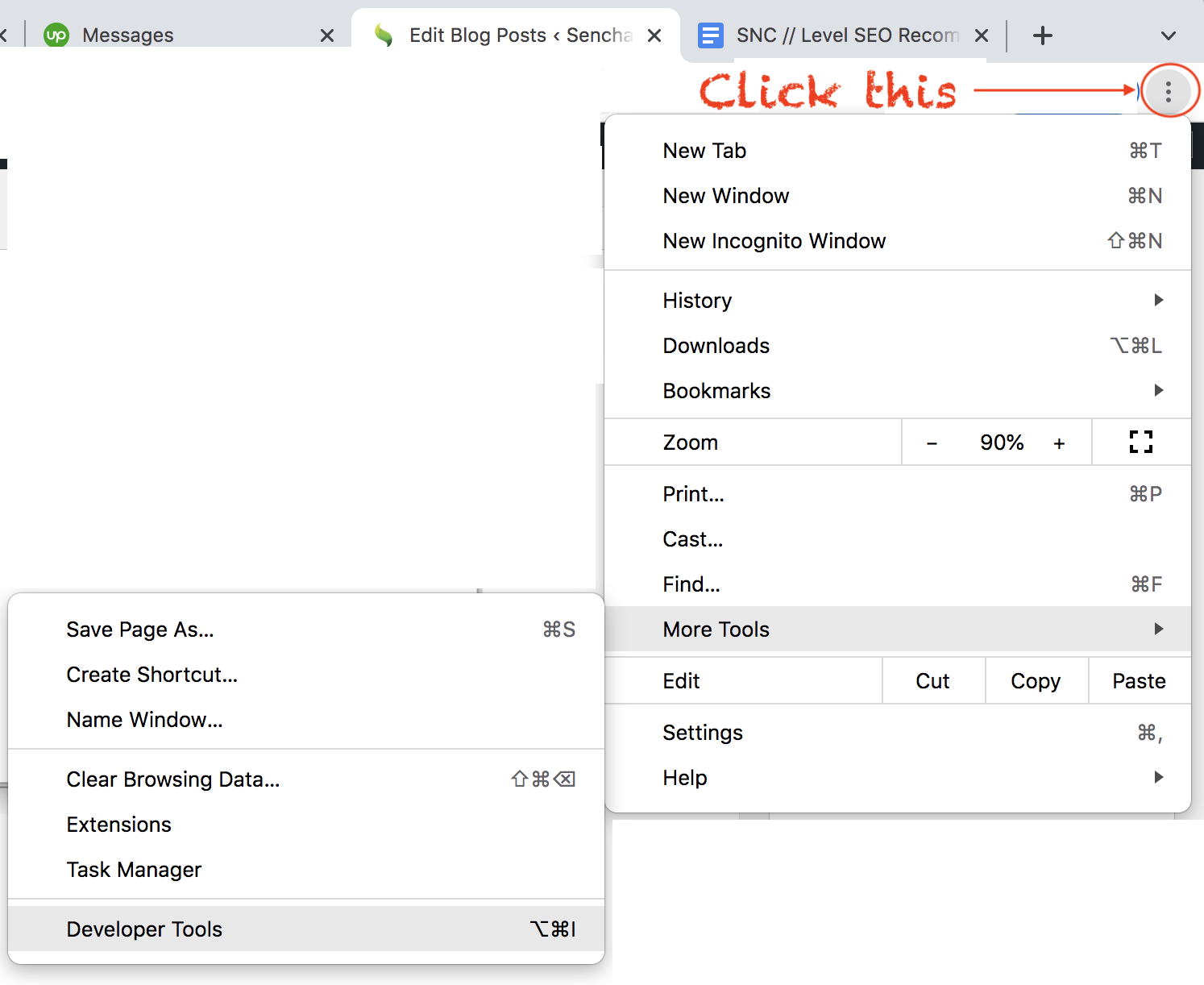
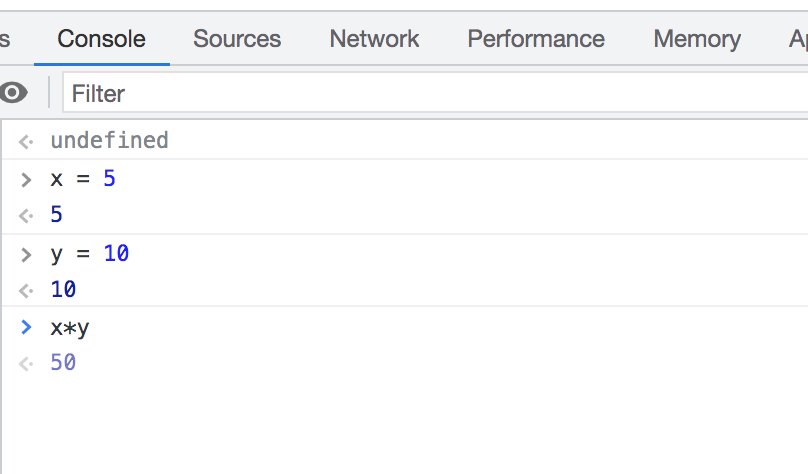
Clicking on More Tools shows you another menu with the Developer Tools options. You can click this option and the developer’s windows appear at the bottom of the webpage. Find the Console tab and click it. This option opens a window, where you can type the JavaScript. An example is shown below:
How to use JavaScript on a web page?
One of the easiest ways to use JavaScript is by creating an HTML file and embedding it in the HTML page. Create a file and name it firstJS.html. Copy the following contents to this file:
<!DOCTYPE html>
<html>
<body>
<h1>How To Use Javascript</h1>
<button id="myButton" onclick="myJSFunction()">Click Me to be Red</h3>
<script>
 function myJSFunction() {
    document.getElementById("myButton").style.color = "red";
 }
</script>
</body>
</html>
The above HTML has a script tag. You can write your code within this opening and closing tag, In the example above, myJSFunction() is code attached to the HTML button. Every time a user clicks this button, its text color changes to red. Loading this HTML file in the browser will show you the following screen:
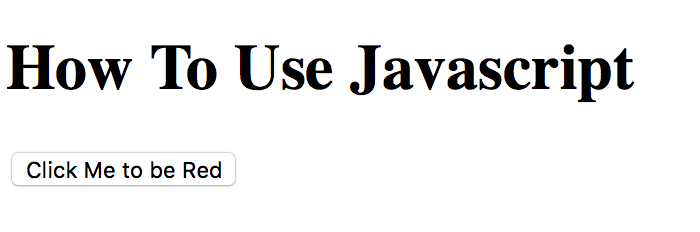
Now if you click the button, its text color will change to red.
How to use JavaScript in Node.js?
Here are the steps for Node.js:
- Install the latest Node.js environment.
- Write the code in your favorite code editor and save it with .js extension. For example, you can save it as
myFirstJS.js. - Open the command prompt and navigate to the file location and type:
node myFirstJS.js
If you follow the above steps, the console window will show you the corresponding output.
How to use JavaScript: What are the language basics?
Here are some language basics that you need to know.
What are variables?
Variables store values. In JavaScript, you can declare a variable using let. After that, you can assign it any value you like. An example is shown below:
let x;
x = 5;
What are the possible operators?
There are many possible operators that can be arithmetic or logical. For example, you can add numbers or link two strings using +. You can use mathematical operators like *, /, or - for multiplication, division, and subtraction respectively. You can also use logical operators like <, >, == for comparing two quantities.
How do I add comments?
Using the C-style for comments, you can either put an entire block in comments by starting the block with /* and ending the block with */. Alternatively, you can comment a single line by starting it with //.
How do I write a conditional statement?
The most popular method of writing conditional statements in JavaScript is to use the if block followed by an else block if applicable. For example:
if (x < 5) {

    alert('1, 2, 3, 4');

}

else {

    alert('5 or more');

}
What about functions?
All functions are preceded by the keyword function. An example is:
function concatenateStrings(str1, str2) {
    return str1 + str2;
}
How do I handle events?
If you want to make your website interactive and responsive to user actions, you need to write event handlers. For example, you can add code corresponding to the following HTML events (this is not an exhaustive list):
-
onclick(): A user clicks a button or other HTML elementonload(): An HTML page loads in a web browseronkeydown(): A user presses a key on the keyboardonmouseover(): The user hovers the mouse over an HTML element
How do I start with app development?
As you can see from our discussion, Javascript is an easy-to-learn and easy-to-use programming language. One of the best ways to get started is to develop an app with ExtJS. It is the most comprehensive framework for building web and mobile apps.
Join the Sencha family today. Follow this link to start your 30-day free trial!
What's your reaction?
 1
1

 0
0


Latest Content
How to Work with Ext JS Models and Stores: Tutorial on Managing Data and State
Ext JS is a popular JavaScript framework for creating robust enterprise-grade web and mobile applications.…
April 28, 2024

Ext JS Performance Optimization for Large-scale Applications
Are you facing issues with Ext JS applications’ performance as they scale up? Don’t worry!…
April 23, 2024

Ext JS Dynamic Forms: Hands-On Guide to Create Data Forms
Dynamic forms are changing the online world these days. ExtJS can help you integrate such…
April 23, 2024


