



 Ask Sencha AI
Too Many JavaScript Libraries? How to Consolidate Your Front-End Stack
Nov 12, 2026
104 Views
Get a summary of this article:
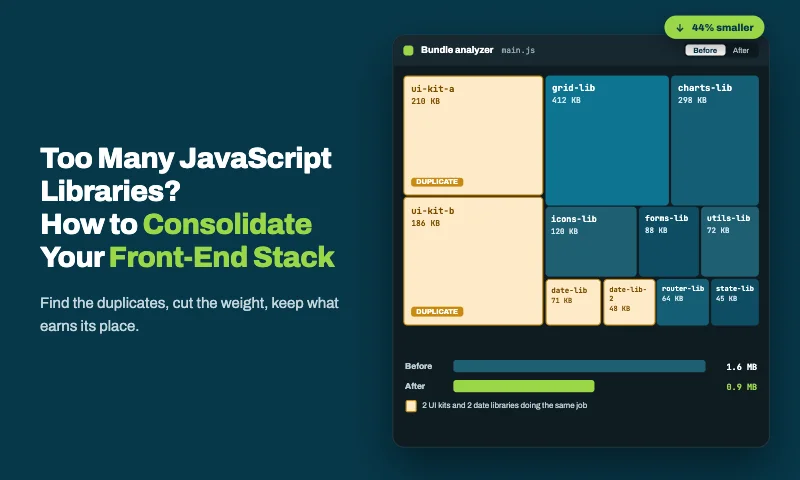
Every front end accumulates JavaScript libraries. A date library for one feature, a second one added by another team, a grid library, two chart libraries, an HTTP client the platform no longer needs, utility packages for things browsers now do natively. Each one was a sensible choice when it was added. Together, they make every upgrade slower, every security review longer and every new developer’s first month harder.
This guide is a practical plan for consolidating a front-end stack: how to inventory what you have, decide what to keep, replace utilities with the platform, fold the UI layer into one framework, migrate safely, and keep the sprawl from coming back.
Signs you have too many JavaScript libraries
You probably need to consolidate if several of these sound familiar:
- Your apps contain two or more libraries that do the same job, such as two date libraries or two HTTP clients.
- Grids, charts, forms and date pickers come from different vendors and look slightly different from each other.
- A React upgrade is blocked by one or two libraries that haven’t caught up.
- Dependency audits regularly flag packages nobody remembers adding.
- Some dependencies haven’t had a release in years.
- Your production bundle includes large libraries used for one or two functions.
- New developers spend their first weeks learning which library to use for what.
- Different apps in your portfolio solve the same problem with different libraries.
Three or more ticks is common in established codebases, and it’s fixable without stopping feature work.
Step 1: Take an inventory
Start with facts. A handful of standard tools tell you what’s installed, what’s actually used, what’s outdated, what’s vulnerable and what’s heavy:
    # Everything installed, including transitive dependencies
    npm ls --all > dependency-tree.txt

    # Dependencies declared but never imported (and imports never declared)
    npx depcheck

    # Unused files, exports and dependencies across the project
    npx knip

    # Packages behind their latest version
    npm outdated

    # Known vulnerabilities
    npm audit
For bundle weight, add a visualizer to your build, such as rollup-plugin-visualizer for Vite or source-map-explorer for any build with source maps, and look for large libraries used for small jobs.
Record the results in one spreadsheet, one row per library: what it’s for, which apps use it, how many files import it, its last release date, its bundle size, open advisories and its license.
Step 2: Find the overlaps
Group the libraries by job. Overlaps jump out quickly, and they’re the easiest wins. These are the duplicates that turn up most often:
| Job | Common duplicates | Typical outcome |
|---|---|---|
| Dates and times | Moment, date-fns, Day.js, Luxon | One library, or the platform’s Intl APIs |
| HTTP | Axios, a fetch wrapper, a framework’s built-in client | One shared API client on native fetch |
| Utilities | Lodash, Underscore, Ramda, one-function packages | Native JavaScript for most uses |
| State | Redux, Zustand, MobX, Context-based stores | One approach for app state; a server-state library for API data |
| Forms and validation | Several form libraries plus several validators | One form approach, one validation approach |
| Data grids | Two or more grid libraries across apps | One grid |
| Charts | Two or more chart libraries | One chart library |
| UI kits | Several component libraries and design systems | One component layer |
The last four rows are where data-heavy applications usually carry the most weight, and where consolidation pays off most.
Step 3: Score every library
For each library, answer six questions. The answers decide what happens to it.
| Question | Points toward removal or replacement |
|---|---|
| Usage: how many files and apps import it? | Imported in only a few places, or for one function |
| Overlap: does another library or the platform do the same job? | Yes |
| Maintenance: when was the last release, and how active is the project? | No release in a year or more, or a single maintainer |
| Weight: what does it add to the bundle? | Large relative to what it’s used for |
| Risk: does it have open advisories or a restrictive license? | Yes |
| Fit: does it match the direction of your stack? | Conflicts with your chosen framework or standards |
Step 4: Decide: keep, remove, replace or consolidate
Every library ends up in one of four groups:
- Keep. Well used, well maintained, no overlap. Document it as part of the standard stack.
- Remove. Unused or barely used. Delete it, plus the few call sites that use it. This is usually the quickest win, and depcheck and knip find most candidates.
- Replace with the platform. Utilities whose job modern JavaScript and browsers now do natively, such as dates, HTTP, IDs and deep cloning.
- Consolidate onto one choice. Several libraries doing the same job, such as grids, charts, forms and UI kits. Pick one and migrate the rest to it.
Groups 2 and 3 are small, steady clean-ups. Group 4 is where the biggest gains, and the biggest decisions, live, especially for the ui components.
Replace utility libraries with the platform
Many utility libraries were added when browsers couldn’t do the job. Modern JavaScript and the browser platform now cover most of the common cases:
| Library job | Platform replacement |
|---|---|
| Formatting dates | Intl.DateTimeFormat |
| Formatting numbers and currency | Intl.NumberFormat |
| Relative times (“3 days ago”) | Intl.RelativeTimeFormat |
| HTTP requests | fetch, wrapped in one shared API client |
| Unique IDs | crypto.randomUUID() |
| Deep cloning | structuredClone() |
| Grouping arrays | Object.groupBy() and Map.groupBy() |
| Non-mutating sorts | Array.prototype.toSorted() |
| Query strings | URLSearchParams |
Here’s what that looks like in practice:
    // Before: three libraries for four small jobs
    import moment from 'moment';
    import { groupBy, cloneDeep } from 'lodash';
    import { v4 as uuid } from 'uuid';

    const label = moment(order.date).format('MMM D, YYYY');
    const byRegion = groupBy(orders, 'region');
    const draft = cloneDeep(order);
    const id = uuid();
    // After: the platform
    const dateFormat = new Intl.DateTimeFormat('en-US', { dateStyle: 'medium', timeZone: 'UTC' });

    const label = dateFormat.format(new Date(order.date));
    const byRegion = Object.groupBy(orders, (o) => o.region);
    const draft = structuredClone(order);
    const id = crypto.randomUUID();
Two cautions. Check that the APIs you rely on are supported by every browser your users have, since some, like Object.groupBy, are relatively recent. And watch for subtle differences: date-only strings such as 2026-09-14 are parsed as UTC, which is why the example formats them with timeZone: ‘UTC’.
If your app is built on Ext JS, or uses Ext JS components through ReExt, you already have formatting helpers such as Ext.Date.format and Ext.util.Format.number, so there’s no need for a separate date or number formatting library either.
Consolidate the UI layer onto one framework
Utilities are small. The UI layer is where data-heavy apps carry most of their library weight: a grid, a chart library, a form library, a validation library, date pickers, a layout or panels library, and often a general component kit on top. Each brings its own API, theme, release schedule and maintainers.
Consolidating those onto one component framework removes more dependencies, more integration code and more upgrade risk than any other single step. For data-intensive applications, Ext JS covers all of them:
| Library you may have today | Replaced by |
|---|---|
| Data grid library (plus paid add-ons for grouping, export or pivot) | Ext JS grid, tree grid and pivot grid |
| Chart library | Ext JS charts |
| Form library and validation library | Ext JS forms, fields and model validators |
| Date picker and time picker | Ext JS date and time fields |
| Layout, panels or splitter library | Ext JS layouts: border, card, accordion and more |
| Client-side state for screen data | Ext JS stores and models, with change tracking |
| Formatting utilities | Ext.util.Format and Ext.Date |
There are two ways to make that move:
- Ext JS apps use the framework directly. If you’re on an older version, upgrading to Ext JS 8 is the place to start.
- React apps keep React frameworks for routing, application state and the wider ecosystem, and use Ext JS components through ReExt. ReExt renders Ext JS grids, charts, forms and layouts as React elements, and ReExt 1.2.0 supports Ext JS 8.0.
In a React app, the result is a much shorter dependency list for the UI layer:
     "dependencies": {
    -  "grid-library": "...",
    -  "grid-library-enterprise": "...",
    -  "chart-library": "...",
    -  "form-library": "...",
    -  "validation-library": "...",
    -  "date-picker-library": "...",
    -  "panel-layout-library": "...",
    +  "@sencha/reext": "^1.2.0",
       "react": "^19.0.0",
       "react-router": "..."
     }
Keep the libraries that do a job the framework doesn’t: your router, your server-state library and any specialist tools. Consolidation is about removing overlap, not removing choice.
Step 5: Migrate safely
Consolidation fails when it’s treated as one big project. It succeeds as a steady stream of small, reversible changes:
- Remove unused libraries first. They have no call sites, so the risk is minimal and the gains are immediate.
- Replace utilities file by file. Swap a date or HTTP library one module at a time, with tests around each change.
- Wrap before you replace. For the UI layer, put shared wrappers such as DataGrid and Chart in an internal package, so screens depend on your API, not a vendor’s. Then the library behind the wrapper can change without touching every screen.
- Migrate screens as they’re touched. New screens use the standard from day one; existing screens move when they’re next changed for a feature.
- Delete the old library when its last import goes. Then remove its license and its entry in your security tooling.
Step 6: Keep sprawl from coming back
Without guardrails, a consolidated stack slowly fills up again. Three lightweight controls prevent that.
A written dependency policy. List the approved library for each job, and require a short note, covering what it’s for, why the standard doesn’t cover it, and who maintains it, before anyone adds a new one.
An automated check in CI. This small script fails the build when someone adds a library the policy disallows, and tells them what to use instead:
    // scripts/check-deps.mjs: fail CI when a disallowed library is added.
    // Usage: node scripts/check-deps.mjs
    import { readFileSync } from 'node:fs';

    const pkg = JSON.parse(readFileSync('package.json', 'utf8'));
    const policy = JSON.parse(readFileSync('dependency-policy.json', 'utf8'));

    const deps = { ...pkg.dependencies, ...pkg.devDependencies };
    const problems = [];

    for (const name of Object.keys(deps)) {
      const rule = policy.disallowed.find((r) =>
        r.name.endsWith('*') ? name.startsWith(r.name.slice(0, -1)) : name === r.name);
      if (rule) problems.push(`${name}: ${rule.reason} Use ${rule.useInstead}.`);
    }

    if (problems.length) {
      console.error('Dependency policy violations:\n  ' + problems.join('\n  '));
      process.exit(1);
    }
    console.log(`Dependency policy OK (${Object.keys(deps).length} packages checked).`);
    {
      "disallowed": [
        { "name": "moment", "reason": "Large and in maintenance mode.", "useInstead": "Intl.DateTimeFormat or Ext.Date" },
        { "name": "axios", "reason": "Duplicates the shared API client.", "useInstead": "the fetch-based client in @acme/services" },
        { "name": "uuid", "reason": "The platform provides this.", "useInstead": "crypto.randomUUID()" },
        { "name": "ag-grid-*", "reason": "Data grids are standardized.", "useInstead": "DataGrid from @acme/ui (Ext JS grid via ReExt)" },
        { "name": "recharts", "reason": "Charts are standardized.", "useInstead": "Chart from @acme/ui (Ext JS charts via ReExt)" }
      ]
    }
When it finds a problem, the output tells developers exactly what to do:
    Dependency policy violations:
      moment: Large and in maintenance mode. Use Intl.DateTimeFormat or Ext.Date.
      ag-grid-react: Data grids are standardized. Use DataGrid from @acme/ui (Ext JS grid via ReExt).
Automated updates and reviews. Use a dependency update tool such as Renovate or Dependabot, and review the dependency inventory each quarter, so new overlaps are caught while they’re still small.
Measure the results
Track a few numbers before and after, so the value of consolidation is visible:
| Metric | How to measure |
|---|---|
| Direct dependencies per app | Count entries in package.json |
| Total installed packages | npm ls –all line count |
| Open security advisories | npm audit summary |
| Production bundle size | Your bundle visualizer |
| Time to upgrade React | Days from a React release to all apps updated |
| UI libraries per app | Grid, chart, form and component libraries in use |
Frequently asked questions
How many JavaScript libraries is too many?
There’s no fixed number. The warning signs are overlap (several libraries doing the same job), unused or unmaintained packages, upgrades blocked by dependencies, and different apps solving the same problem in different ways.
How do I find unused JavaScript libraries?
Tools such as depcheck and knip scan your code for imports and report dependencies that are declared but never used. Combine them with npm ls, npm outdated and npm audit for a full picture.
Can modern JavaScript replace utility libraries such as Moment and Lodash?
For many common uses, yes. Intl.DateTimeFormat, Intl.NumberFormat, structuredClone, Object.groupBy, crypto.randomUUID and fetch cover much of what those libraries were added for. Check browser support for the APIs you rely on.
What’s the biggest win when consolidating a front-end stack?
For data-heavy applications, it’s usually the UI layer. Replacing separate grid, chart, form, date picker and layout libraries with one component framework such as Ext JS, or with Ext JS components in React frameworks through ReExt, removes the most dependencies and integration code at once.
How do I stop new libraries creeping back in?
Publish a dependency policy with the approved library for each job, add an automated check in CI that blocks disallowed packages, and review the dependency inventory regularly.
Fewer libraries, faster teams
Too many JavaScript libraries is a slow, quiet cost: longer upgrades, larger audits, inconsistent screens and harder onboarding. Consolidating is mostly steady housekeeping, removing what’s unused and replacing what the platform now provides, plus one bigger decision about the UI layer.
For data-heavy applications, that decision has the largest payoff. Ext JS replaces separate grid, chart, form, date, and layout libraries with one framework, and ReExt brings the same components to React apps.
Next steps: start a 30-day ReExt trial, read React Component Library for Data-Heavy Apps: Why One Vendor Beats Five, or see How to Standardize on One UI Component Library Across Your React Apps.

JavaScript
Frontend Architecture
Enterprise Application Development
Frontend Development
JavaScript Libraries


Latest Content

JavaScript Libraries for Enterprise UI: Grid, Chart and Form Options Compared
Most comparisons of JavaScript libraries look at one category at a time: the best grid,…
November 12, 2026
Best JavaScript Libraries for Data Grids, Charts and Dashboards
Data grids, charts and dashboards are where most business applications earn their keep, and where…
November 12, 2026

JavaScript Library vs Framework: Which Do Enterprise Apps Need?
“Should we use a JavaScript library or a framework?” sounds like a terminology question. For…
November 12, 2026